

The Problem: Secrets Leaking into Public Code
Modern software development heavily relies on external services such as cloud providers, APIs, databases, and third-party integrations. To authenticate with these services, developers frequently use secrets like API keys, access tokens, private keys, and credentials. Examples include AWS access keys, GitHub tokens, database passwords, and OAuth tokens.
Ideally, these secrets should never be hardcoded into source code. Instead, they should be stored securely in secret management systems such as environment variables, vaults, or dedicated secret managers. However, in real world development workflows, mistakes happen.
Developers often work under tight deadlines, switch between multiple environments, or temporarily insert credentials during testing. In some cases, these secrets accidentally get committed to a repository and pushed to platforms like GitHub. If the repository is public or becomes public later, those secrets can instantly become exposed to the entire internet.
This type of exposure is not a rare occurrence. In fact, automated bots constantly scan public repositories looking for leaked credentials that can be abused within minutes.
A well known example is the Uber breach in 2016, where attackers discovered exposed credentials in a GitHub repository. Those credentials allowed them to access Uber's cloud infrastructure and ultimately exposed personal data of 57 million users and drivers.
Incidents like this highlight a critical reality, once a secret is leaked publicly, attackers can exploit it extremely quickly.
Because of this, organizations need a way to continuously monitor public code platforms for accidental exposures of their secrets. Ideally, this solution should scan public repositories to detect potential leaks and alert security teams as soon as they appear.
This is where GitGuardian's HasMySecretLeaked (hmsl) comes into play.
Introducing GitGuardian's HasMySecretLeaked (HMSL)
To address the risk of exposed credentials in public code, GitGuardian provides a service called HasMySecretLeaked (HMSL). The tool helps organizations identify whether any of their sensitive credentials have been accidentally exposed on public GitHub repositories.
HMSL continuously monitors public GitHub activity, including commits, gists, and issues, to detect potential leaks of secrets. It actively scans GitHub every day to detect newly leaked secrets and leverages GitGuardian's extensive dataset of previously discovered exposed credentials, which includes millions of identified secret leaks along with their corresponding locations on GitHub.
By querying this dataset, organizations can quickly determine whether any of their secrets have already been exposed publicly and take immediate remediation steps to secure them. The best part is, you don't need to share your secrets with GitGuardian to detect if they have been leaked or not!
Detecting Leaks Without Sharing Your Secrets
Users can check whether a secret has leaked without ever sharing the actual secret with the service. This ensures that GitGuardian cannot view or reconstruct the credential, allowing organizations to safely investigate potential leaks while keeping their sensitive data fully protected.
This approach creates a trustless security model, ensuring that secrets remain protected even while being investigated for public exposure.
Using ggshield hmsl
To use GitGuardian's HasMySecretLeaked (HMSL) service locally, you first need to have ggshield installed and configured on your system.
To better understand how this works, let's consider a simple example. Suppose we have a file named secrets.txt that contains four secrets, and we want to verify whether any of these secrets have been publicly exposed.
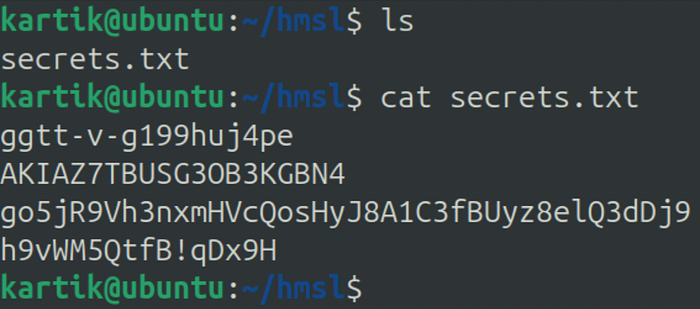
Once ggshield is set up, there are two ways to check whether a secret has been leaked:
1. Quick Check
The simplest method is to use a single command that performs the entire leak detection process automatically. This option is ideal when you simply want to verify whether a secret has appeared in public repositories without worrying about the internal mechanics of the protocol.
ggshield hmsl check --json secrets.txtwhere:
--json: Format to use for the output
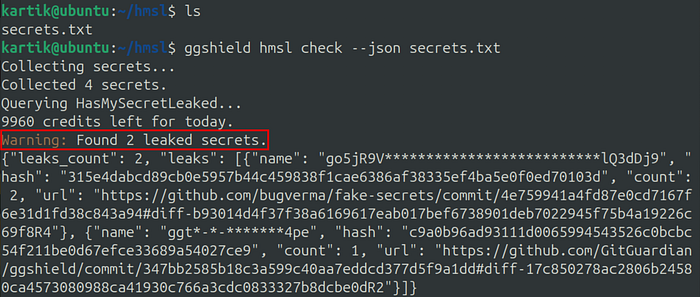
Output
{
  "leaks_count": 2,
  "leaks": [
    {
      "name": "go5jR9V**************************lQ3dDj9",
      "hash": "315e4dabcd89cb0e5957b44c459838f1cae6386af38335ef4ba5e0f0ed70103d",
      "count": 2,
      "url": "https://github.com/bugverma/fake-secrets/commit/4e759941a4fd87e0cd7167f6e31d1fd38c843a94#diff-b93014d4f37f38a6169617eab017bef6738901deb7022945f75b4a19226c69f8R4"
    },
    {
      "name": "ggt*-*-*******4pe",
      "hash": "c9a0b96ad93111d0065994543526c0bcbc54f211be0d67efce33689a54027ce9",
      "count": 1,
      "url": "https://github.com/GitGuardian/ggshield/commit/347bb2585b18c3a599c40aa7eddcd377d5f9a1dd#diff-17c850278ac2806b24580ca4573080988ca41930c766a3cdc0833327b8dcbe0dR2"
    }
  ]
}
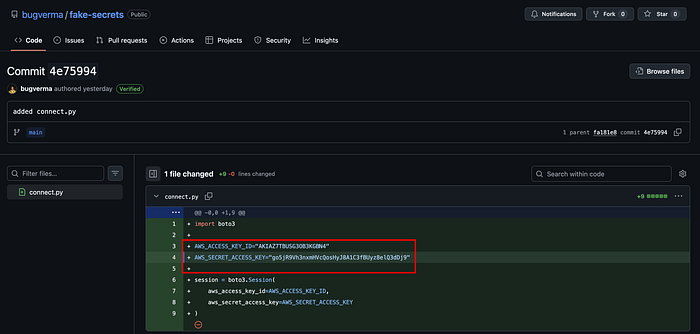
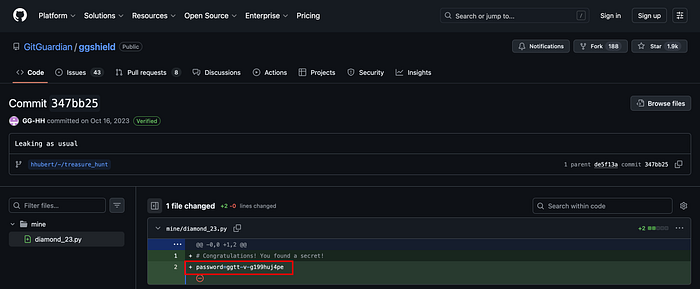
We can confirm that secrets have been leaked on GitHub:
2. Step-by-Step Check
Alternatively, ggshield allows you to run 3 separate commands that break down the process step by step. This approach helps illustrate what happens behind the scenes when HMSL checks whether a secret exists in the leak database.
Before using this method, it is helpful to understand the underlying protocol that powers HMSL, which ensures that secrets can be checked without ever being shared with the server.
How the HMSL Protocol Works
A key challenge in building a secret-leak detection service is ensuring that the secret being checked is never exposed to the service itself. HMSL solves this problem using a privacy-preserving protocol that combines hashing, prefix-based search, and client-side verification.
Let's walk through the process with a simple example.
1. Creating a Secret Fingerprint
Suppose an organization wants to check whether the following secret has leaked:
ggtt-v-g199huj4peInstead of sending this secret directly to the server, the client first converts it into a cryptographic hash using a strong hashing function (such as Scrypt).
This produces a fixed-length fingerprint:
c9a0b96ad93111d0065994543526c0bcbc54f211be0d67efce33689a54027ce9This step ensures that the original secret never leaves the client's system.
2. Sending Only a Partial Hash
To preserve anonymity, the client does not send the full hash to the server. Instead, it extracts only a small prefix of the hash (GitGuardian confirms that a five-character size currently delivers optimal results).
Example:
prefix = c9a0bThis prefix is then sent to the HMSL API.
Because many hashes can share the same prefix, the server cannot determine which exact secret the user is searching for. This technique is known as k-anonymity, and it ensures that a single query corresponds to many possible secrets.
3. Searching the Leak Database
GitGuardian maintains a large database of secrets that have been discovered in public GitHub commits, issues, and gists. These secrets are stored as hashed fingerprints, not in plaintext.
When the server receives the prefix, it searches its database for all hashes that start with that prefix.
For example:
c9a0b111223344...
c9a0b9ff22aa33...
c9a0b1f72c8d0b...
c9a0b8dd99112d...
Each of these represents a potential leaked secret.
4. Preparing Secure Leak Records
For every matching candidate, the server prepares a record containing two elements — Hint and Encrypted payload.
- The
hintallows the client to later identify which record corresponds to its secret without revealing the secret itself. - The
payloadcontains information about the leak, such as:
- Redacted version of the secret
- How many times it was found
- When it was first detected
- The GitHub locations where it appeared
Importantly, this payload is encrypted using the secret's hash as the key. This means that only someone who already knows the secret can decrypt the information.
5. Returning Multiple Candidate Records
The server then returns all records associated with the prefix. Because multiple possible matches are returned, the server cannot determine which secret the user is actually checking.
6. Client Identifies the Correct Record
On the client side, the system already knows the secret and its hash. Using this information, it calculates the expected hint and compares it with the hints returned by the server.
When a matching hint is found, the client identifies the corresponding encrypted payload.
The server never learns which record matched.
7. Decrypting the Leak Information
Finally, the client decrypts the payload using the secret-derived key. If the secret has appeared in public repositories, the client can now see details such as:
- The number of leaks
- When it was first detected
- The GitHub commit or location where it appeared
Because the decryption key is derived from the secret itself, only the user who already knows the secret can access this information.
Through this design, HMSL allows organizations to safely check whether their credentials have leaked on GitHub while ensuring that the secret itself is never shared, stored, or exposed during the process.
Step-by-Step Usage
ggshield performs the leak check in three stages. By executing each step individually, you can better understand how HMSL verifies whether a secret has been exposed while ensuring that the actual secret is never revealed to the service.
ggshieldfingerprints your secretsggshieldqueries HMSL service using prefixes or full hashesggshielddecrypts the returned payload
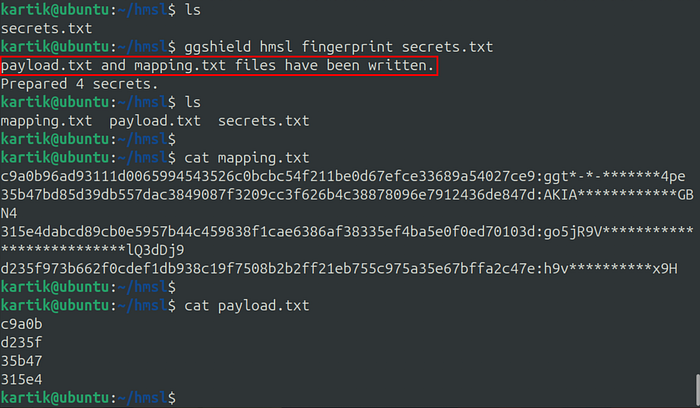
1. ggshield hmsl fingerprint
Collect secrets and compute fingerprints.
ggshield hmsl fingerprint secrets.txtIt creates 2 files:
payload.txt— Contains the prefixes that will be queried to HMSLmapping.txt— An association between the hashes of your secrets and their "names", a censored version of their values that is more human readable.
2. ggshield hmsl query
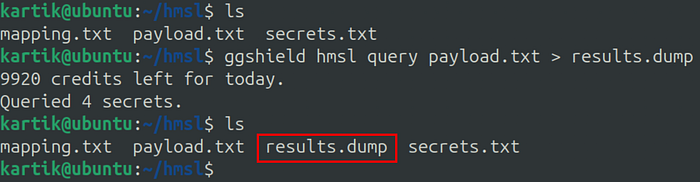
Query HasMySecretLeaked using outputs from the fingerprint command.
ggshield hmsl query payload.txt > results.dumpUsing a payload.txt file created with ggshield hmsl fingerprint. Remember to pipe the results in a file as they will need to be post-processed.
3. ggshield hmsl decrypt
Decrypt query's output and show secrets information.
ggshield hmsl decrypt --json results.dumpwhere:
--json: Format to use for the output
It expects to find a mapping.txt file in the current directory. If you used a prefix, or moved the file, use the -m option to specify the location of the mapping file.

Output
{
  "leaks_count": 2,
  "leaks": [
    {
      "name": "go5jR9V**************************lQ3dDj9",
      "hash": "315e4dabcd89cb0e5957b44c459838f1cae6386af38335ef4ba5e0f0ed70103d",
      "count": 2,
      "url": "https://github.com/bugverma/fake-secrets/commit/4e759941a4fd87e0cd7167f6e31d1fd38c843a94#diff-b93014d4f37f38a6169617eab017bef6738901deb7022945f75b4a19226c69f8R4"
    },
    {
      "name": "ggt*-*-*******4pe",
      "hash": "c9a0b96ad93111d0065994543526c0bcbc54f211be0d67efce33689a54027ce9",
      "count": 1,
      "url": "https://github.com/GitGuardian/ggshield/commit/347bb2585b18c3a599c40aa7eddcd377d5f9a1dd#diff-17c850278ac2806b24580ca4573080988ca41930c766a3cdc0833327b8dcbe0dR2"
    }
  ]
}
We can confirm that secrets have been leaked on GitHub:
What to Do If a Secret Is Leaked
If you discover that a secret has been publicly exposed, it is important to act quickly. The compromised secret should be revoked or rotated immediately, removed from the codebase, and replaced with a new credential stored securely using a secret management solution. You should also review any associated logs or activity to determine whether the leaked credential was misused.
For a more detailed guide on how to properly respond to an exposed secret, refer to GitGuardian's article.
Conclusion
Accidentally exposing secrets in public repositories is a common but serious security risk that can quickly lead to unauthorized access and potential breaches. In this article, we explored how GitGuardian's HasMySecretLeaked (HMSL) service helps organizations detect whether their credentials have been exposed on public GitHub repositories. We also looked at how ggshield can be used to perform these checks either through a quick command or by running the underlying steps individually to better understand the process.
A key strength of HMSL is its privacy-preserving protocol, which allows users to verify whether a secret has leaked without ever revealing the secret itself. By combining hashing, prefix-based search, and client-side decryption, the system ensures that sensitive credentials remain protected throughout the entire process.
By integrating tools like ggshield into their security workflows, organizations can quickly identify exposed secrets, respond to incidents faster, and reduce the risk of credential misuse.
I'm always learning and exploring new things in security. If you'd like to connect, the best place to reach me is LinkedIn! 😇