
The Problem
You've untagged vulnerable images in Azure Container Registry (ACR), but they still appear in Microsoft Defender for Cloud vulnerability reports under "Azure registry container images should have vulnerabilities resolved". The images don't show up when you list repository tags, yet Defender continues to flag them as security risks.
Why does this happen?
When you untag an image in ACR, you're only removing the tag reference — the underlying image manifest and layers remain in the registry. Microsoft Defender for Cloud scans all manifests in your registry, not just tagged ones. This means untagged manifests continue to generate vulnerability alerts even though they're no longer accessible by tag.
Understanding the Issue
What Are Untagged Images?
In container registries, an image consists of:
- Manifest: A JSON document describing the image layers
- Layers: The actual filesystem content
- Tags: Human-readable references pointing to manifests (e.g.,
nginx:1.14.0)
When you run:
az acr repository untag --name myregistry --image myapp/nginx:1.14.0You remove the tag, but the manifest and layers remain. These "orphaned" manifests are what we call untagged images.
Why Defender Still Reports Them
Microsoft Defender for Cloud performs vulnerability scanning at the manifest level, not the tag level. According to Microsoft's documentation on image vulnerability assessment, Defender scans all manifests regardless of tag status.
This creates a situation where:
- You untag a vulnerable image
- The image doesn't appear in repository listings
- Defender continues scanning the manifest
- Vulnerability alerts persist
Identifying Untagged Images
For a Single Repository
To find untagged manifests in a specific repository:
# Replace with your values
ACR_NAME="acrsecuritydemo1771231840"
REPO_NAME="vulnerable-apps/alpine"
# List all untagged manifests
az acr manifest list-metadata \
  --registry $ACR_NAME \
  --name $REPO_NAME \
  --query "[?tags==null].digest" \
  -o tsv
This command queries all manifests where the tags property is null, indicating they have no tag references.
For All Repositories (Script)
Here's a comprehensive script to scan all repositories and identify untagged images:
#!/bin/bash
#
# Script: find-all-untagged-images.sh
# Purpose: Find all untagged manifests across all repositories in an ACR
#
set -e
# Configuration
ACR_NAME="${1}"
if [ -z "$ACR_NAME" ]; then
    echo "Usage: $0 <acr-name>"
    echo "Example: $0 myregistryname"
    exit 1
fi
echo "================================================"
echo "Scanning for Untagged Images in ACR"
echo "================================================"
echo "Registry: $ACR_NAME"
echo "Scan Time: $(date)"
echo ""
# Get all repositories
echo "Fetching repository list..."
REPOS=$(az acr repository list --name $ACR_NAME --output tsv)
if [ -z "$REPOS" ]; then
    echo "No repositories found in $ACR_NAME"
    exit 0
fi
REPO_COUNT=$(echo "$REPOS" | wc -l)
echo "Found $REPO_COUNT repositories"
echo ""
# Counters
TOTAL_UNTAGGED=0
REPOS_WITH_UNTAGGED=0
# Process each repository
for REPO in $REPOS; do
    echo "----------------------------------------"
    echo "Repository: $REPO"
    echo "----------------------------------------"

    # Get all manifests for this repository
    MANIFESTS=$(az acr manifest list-metadata \
        --registry $ACR_NAME \
        --name $REPO \
        --output json 2>/dev/null)

    if [ -z "$MANIFESTS" ] || [ "$MANIFESTS" = "[]" ]; then
        echo "  No manifests found"
        echo ""
        continue
    fi

    # Count total manifests
    TOTAL_MANIFESTS=$(echo "$MANIFESTS" | jq 'length')

    # Find untagged manifests
    UNTAGGED_DIGESTS=$(echo "$MANIFESTS" | jq -r '.[] | select(.tags == null) | .digest')
    UNTAGGED_COUNT=$(echo "$UNTAGGED_DIGESTS" | grep -c "sha256:" || true)

    if [ $UNTAGGED_COUNT -gt 0 ]; then
        echo "  Total Manifests: $TOTAL_MANIFESTS"
        echo "  Untagged Manifests: $UNTAGGED_COUNT"
        echo ""
        echo "  Untagged Digests:"
        while IFS= read -r DIGEST; do
            if [ -n "$DIGEST" ]; then
                # Get additional details
                SIZE=$(echo "$MANIFESTS" | jq -r ".[] | select(.digest == \"$DIGEST\") | .imageSize")
                CREATED=$(echo "$MANIFESTS" | jq -r ".[] | select(.digest == \"$DIGEST\") | .createdTime")

                echo "    - Digest: $DIGEST"
                echo "      Size: $(numfmt --to=iec-i --suffix=B $SIZE 2>/dev/null || echo $SIZE bytes)"
                echo "      Created: $CREATED"
                echo ""
            fi
        done <<< "$UNTAGGED_DIGESTS"

        TOTAL_UNTAGGED=$((TOTAL_UNTAGGED + UNTAGGED_COUNT))
        REPOS_WITH_UNTAGGED=$((REPOS_WITH_UNTAGGED + 1))
    else
        echo "  Total Manifests: $TOTAL_MANIFESTS"
        echo "  Untagged Manifests: 0 (All manifests are tagged)"
        echo ""
    fi
done
echo "================================================"
echo "Scan Summary"
echo "================================================"
echo "Total Repositories: $REPO_COUNT"
echo "Repositories with Untagged Images: $REPOS_WITH_UNTAGGED"
echo "Total Untagged Manifests: $TOTAL_UNTAGGED"
echo ""
if [ $TOTAL_UNTAGGED -gt 0 ]; then
    echo "⚠️  WARNING: Untagged manifests found!"
    echo "These manifests may still appear in Defender for Cloud vulnerability reports."
    echo ""
    echo "To resolve this issue:"
    echo "1. Set a retention policy for untagged manifests"
    echo "2. Manually purge untagged manifests"
    echo ""
    echo "See the full article for detailed solutions."
else
    echo "✅ No untagged manifests found. Your registry is clean!"
fi
echo ""
echo "Scan completed at: $(date)"
Save this script and run it:
chmod +x find-all-untagged-images.sh
./find-all-untagged-images.sh acrsecuritydemo1771231840
Sample Output
================================================
Scanning for Untagged Images in ACR
================================================
Registry: acrsecuritydemo1771231840
Scan Time: Mon Feb 17 10:30:45 UTC 2026
Found 3 repositories
----------------------------------------
Repository: vulnerable-apps/alpine
----------------------------------------
  Total Manifests: 3
  Untagged Manifests: 2
  Untagged Digests:
    - Digest: sha256:abc123...
      Size: 2.5 MiB
      Created: 2026-02-15T08:22:13.5234567Z
    - Digest: sha256:def456...
      Size: 2.3 MiB
      Created: 2026-02-14T14:18:09.1234567Z
----------------------------------------
Repository: vulnerable-apps/nginx
----------------------------------------
  Total Manifests: 2
  Untagged Manifests: 1
  Untagged Digests:
    - Digest: sha256:ghi789...
      Size: 67.2 MiB
      Created: 2026-02-13T11:45:22.9876543Z
================================================
Scan Summary
================================================
Total Repositories: 3
Repositories with Untagged Images: 2
Total Untagged Manifests: 3
⚠️  WARNING: Untagged manifests found!
These manifests may still appear in Defender for Cloud vulnerability reports.
Verification in Defender for Cloud
Even after identifying untagged images, you'll notice they still appear in Microsoft Defender for Cloud under the recommendation "Azure registry container images should have vulnerabilities resolved".
The vulnerability report will show:
- Container images with CVEs
- Severity levels (Critical, High, Medium, Low)
- The image digest (not tag, since there is no tag)
- Recommended remediation steps
Note: You can verify this by checking the digest in Defender matches the digests from your untagged manifest query.
Solutions
There are two primary approaches to resolve this issue:
Solution 1: Set Retention Policy for Untagged Images (Recommended)
The most automated solution is to configure a retention policy that automatically removes untagged manifests.
Understanding Retention Policies
According to Microsoft's retention policy documentation, you can automatically purge untagged manifests after a specified number of days.
Key Point: Setting the retention value to 0 removes untagged manifests immediately as soon as they become untagged.
Configure Retention Policy via Azure CLI
# Enable retention policy for untagged manifests
ACR_NAME="acrsecuritydemo1771231840"
# Set retention to 0 days (immediate deletion when untagged)
az acr config retention update \
  --registry $ACR_NAME \
  --status enabled \
  --days 0 \
  --type UntaggedManifests
# Verify the configuration
az acr config retention show \
  --registry $ACR_NAME
Configure via Azure Portal
- Navigate to your Container Registry in Azure Portal
- Go to Policies → Retention
- Under Untagged manifests, toggle to Enabled
- Set Days to retain to
0 - Click Save
Important Considerations
Pros:
- ✅ Fully automated — no manual intervention needed
- ✅ Prevents future accumulation of untagged manifests
- ✅ Defender alerts clear automatically once manifests are purged
- ✅ Reduces storage costs
Cons:
- ⚠️ Immediate deletion (days=0) means no grace period
- ⚠️ If you accidentally untag a production image, it's deleted immediately
- ⚠️ Cannot recover deleted manifests without backups
Best Practice:
- For production registries, consider setting
--days 7or--days 30to provide a safety buffer - For test/dev registries,
--days 0is typically safe - Always tag your images properly before untagging old ones
Solution 2: Manual Purge of Untagged Images
If you prefer more control over what gets deleted, you can manually purge untagged manifests using ACR Tasks.
Complete Purge Script
Here's a production-ready script that handles all repositories:
#!/bin/bash
#
# Script: purge-untagged-images.sh
# Purpose: Purge untagged manifests from all repositories in ACR
# Safety: Includes dry-run mode to preview deletions
#
set -e
# Configuration
ACR_NAME="${1}"
DRY_RUN="${2:-true}"
if [ -z "$ACR_NAME" ]; then
    echo "Usage: $0 <acr-name> [dry-run]"
    echo ""
    echo "Arguments:"
    echo "  acr-name  : Name of your Azure Container Registry"
    echo "  dry-run   : true (default) or false"
    echo ""
    echo "Examples:"
    echo "  $0 myregistry              # Dry run (safe preview)"
    echo "  $0 myregistry true         # Dry run (safe preview)"
    echo "  $0 myregistry false        # Actually delete manifests"
    exit 1
fi
echo "================================================"
echo "ACR Untagged Image Purge Utility"
echo "================================================"
echo "Registry: $ACR_NAME"
echo "Mode: $([ "$DRY_RUN" = "true" ] && echo "DRY RUN (no deletions)" || echo "LIVE (will delete)")"
echo "Started: $(date)"
echo ""
if [ "$DRY_RUN" = "false" ]; then
    echo "⚠️  WARNING: Running in LIVE mode - manifests will be DELETED!"
    echo "Press Ctrl+C within 5 seconds to cancel..."
    sleep 5
    echo ""
fi
echo "Fetching repository list..."
REPOS=$(az acr repository list --name $ACR_NAME --output tsv)
if [ -z "$REPOS" ]; then
    echo "No repositories found in $ACR_NAME"
    exit 0
fi
REPO_COUNT=$(echo "$REPOS" | wc -l)
echo "Found $REPO_COUNT repositories"
echo ""
# Process each repository
for REPO in $REPOS; do
    echo "========================================"
    echo "Repository: $REPO"
    echo "========================================"
    echo ""

    # Build purge command
    if [ "$DRY_RUN" = "true" ]; then
        PURGE_CMD="acr purge --filter '$REPO:.*' --ago 0d --untagged --dry-run"
        echo "Preview mode - showing what would be deleted:"
    else
        PURGE_CMD="acr purge --filter '$REPO:.*' --ago 0d --untagged"
        echo "Deleting untagged manifests..."
    fi

    # Execute purge
    az acr run \
        --cmd "$PURGE_CMD" \
        --registry $ACR_NAME \
        /dev/null

    echo ""
done
echo "================================================"
echo "Operation Complete"
echo "================================================"
if [ "$DRY_RUN" = "true" ]; then
    echo "✅ DRY RUN completed - no manifests were deleted"
    echo ""
    echo "To actually delete the untagged manifests, run:"
    echo "  $0 $ACR_NAME false"
else
    echo "✅ Purge completed - untagged manifests have been deleted"
    echo ""
    echo "Note: Defender for Cloud may take up to 24 hours to reflect changes"
fi
echo ""
echo "Completed: $(date)"
Usage Examples
Step 1: Always run in dry-run mode first (safe preview)
chmod +x purge-untagged-images.sh
# Preview what will be deleted
./purge-untagged-images.sh acrsecuritydemo1771231840 true
Step 2: Review the output carefully
The dry-run will show output like:
========================================"
Repository: vulnerable-apps/alpine
========================================
Preview mode - showing what would be deleted:
Purging manifests:
- sha256:abc123...
- sha256:def456...
Total manifests to be deleted: 2
Step 3: Execute actual deletion
# Actually delete untagged manifests
./purge-untagged-images.sh acrsecuritydemo1771231840 false
Understanding the Purge Command
Let's break down the key purge command:
acr purge --filter '$REPO:.*' --ago 0d --untagged --dry-runParameters:
--filter '$REPO:.*': Target all tags in the repository--ago 0d: Purge manifests that became untagged 0 or more days ago (immediate)--untagged: Only target manifests with no tags--dry-run: Preview mode (remove this flag to actually delete)
Alternative: Purge Specific Repositories
If you only want to purge specific repositories:
# Purge single repository
az acr run \
  --registry $ACR_NAME \
  --cmd "acr purge --filter 'vulnerable-apps/alpine:.*' --ago 0d --untagged" \
  /dev/null
# Purge multiple specific repositories
az acr run \
  --registry $ACR_NAME \
  --cmd "acr purge --filter 'vulnerable-apps/alpine:.*' --filter 'vulnerable-apps/nginx:.*' --ago 0d --untagged" \
  /dev/null
Alternative: Purge with Age Threshold
If you want to keep recently untagged manifests:
# Only purge manifests untagged 7+ days ago
az acr run \
  --registry $ACR_NAME \
  --cmd "acr purge --filter '$REPO:.*' --ago 7d --untagged" \
  /dev/null
# Only purge manifests untagged 30+ days ago
az acr run \
  --registry $ACR_NAME \
  --cmd "acr purge --filter '$REPO:.*' --ago 30d --untagged" \
  /dev/null
Verification: Checking Defender for Cloud
After purging untagged manifests, follow these steps to verify the fix:
1. Confirm Manifests Are Deleted
# Check for remaining untagged manifests
./find-all-untagged-images.sh acrsecuritydemo1771231840
# Should show:
# Total Untagged Manifests: 0
# ✅ No untagged manifests found. Your registry is clean!
2. Wait for Defender Scan Update
Microsoft Defender for Cloud doesn't update immediately. The timeline is:
- Manifest deletion: Immediate
- Defender scan cycle: Up to 24 hours
- Recommendation update: After next scan completes
3. Check Defender for Cloud Portal
- Navigate to Microsoft Defender for Cloud in Azure Portal
- Go to Recommendations
- Search for "Azure registry container images should have vulnerabilities resolved"
- Click on the recommendation
- Check if your registry still appears in the affected resources list
4. Verify via Azure Resource Graph
For immediate programmatic verification:
# Query current vulnerability assessments
az graph query -q "
  securityresources
  | where type == 'microsoft.security/assessments/subassessments'
  | where properties.additionalData.assessedResourceType == 'ContainerRegistryVulnerability'
  | where id contains '$ACR_NAME'
  | where properties.additionalData.imageDigest in (
      'sha256:abc123...',  # Replace with your deleted digests
      'sha256:def456...'
  )
  | project
      ImageDigest = properties.additionalData.imageDigest,
      Repository = properties.additionalData.repositoryName,
      Severity = properties.status.severity,
      Status = properties.status.code
"
If the query returns no results, the vulnerabilities have been cleared from Defender.
Automation: Scheduled Cleanup with ACR Tasks
For long-term maintenance, schedule automatic cleanup:
Weekly Purge Task
# Create weekly purge task (runs every Sunday at midnight)
az acr task create \
  --name weekly-untagged-purge \
  --registry $ACR_NAME \
  --cmd "acr purge --filter '.*:.*' --ago 7d --untagged" \
  --schedule "0 0 * * 0" \
  --context /dev/null
Daily Purge Task
# Create daily purge task (runs every day at 2 AM)
az acr task create \
  --name daily-untagged-purge \
  --registry $ACR_NAME \
  --cmd "acr purge --filter '.*:.*' --ago 1d --untagged" \
  --schedule "0 2 * * *" \
  --context /dev/null
Verify Scheduled Tasks
# List all ACR tasks
az acr task list --registry $ACR_NAME --output table
# Show task details
az acr task show \
  --registry $ACR_NAME \
  --name weekly-untagged-purge
# View task run history
az acr task list-runs \
  --registry $ACR_NAME \
  --output table
Manually Trigger a Scheduled Task
# Test the task immediately
az acr task run \
  --registry $ACR_NAME \
  --name weekly-untagged-purge
Complete Workflow: Step-by-Step Guide
Here's the recommended end-to-end workflow:
Initial Assessment
# Step 1: Identify the problem
./find-all-untagged-images.sh your-acr-name
# Step 2: Review Defender for Cloud
# Check Azure Portal → Defender for Cloud → Recommendations
# Verify untagged images appear in vulnerability reports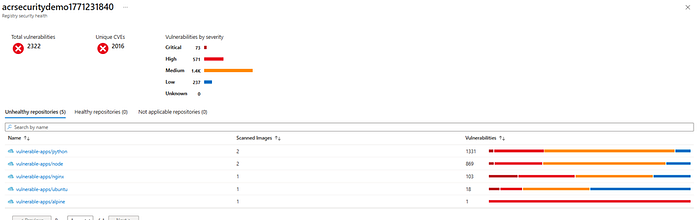
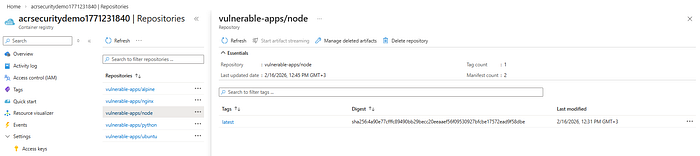
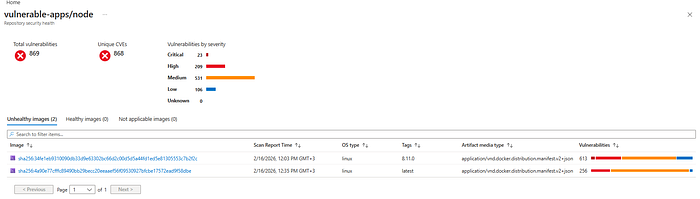
As you can see above its showing 2 images vulnerable for repo
vulnerable-apps/node but only 1 image showing in Azure portal
Choose Your Solution
Option A: Automated (Recommended for Production)
# Enable retention policy
az acr config retention update \
  --registry your-acr-name \
  --status enabled \
  --days 7 \
  --type UntaggedManifests
# Manually purge existing untagged manifests (one-time)
./purge-untagged-images.sh your-acr-name false
Option B: Manual Control (Recommended for Sensitive Environments)
# Run purge script with dry-run
./purge-untagged-images.sh your-acr-name true
# Review output, then execute
./purge-untagged-images.sh your-acr-name false
# Set up scheduled task for ongoing maintenance
az acr task create \
  --name weekly-untagged-purge \
  --registry your-acr-name \
  --cmd "acr purge --filter '.*:.*' --ago 7d --untagged" \
  --schedule "0 0 * * 0" \
  --context /dev/null
Verification
# Wait 24 hours for Defender scan cycle
# Confirm untagged manifests are gone
./find-all-untagged-images.sh your-acr-name
# Check Defender for Cloud portal
# Verify recommendation no longer shows your registry
Best Practices
1. Proper Tagging Strategy
Prevent untagged manifests by following good tagging practices:
# ❌ BAD: Overwriting tags
docker tag myapp:latest myregistry.azurecr.io/myapp:latest
docker push myregistry.azurecr.io/myapp:latest
# This creates untagged manifests when you push new versions
# ✅ GOOD: Use immutable tags
docker tag myapp:latest myregistry.azurecr.io/myapp:v1.2.3
docker tag myapp:latest myregistry.azurecr.io/myapp:commit-abc123
docker push myregistry.azurecr.io/myapp:v1.2.3
docker push myregistry.azurecr.io/myapp:commit-abc123
2. Retention Policy Configuration
Choose retention days based on your workflow:
Environment Recommended Days Rationale Development 0–1 days Fast iteration, low risk Staging 7 days Balance between cleanup and safety Production 30 days Safety buffer for rollback scenarios
3. Regular Auditing
Schedule regular audits:
# Add to cron or Azure Automation
0 9 * * 1 /path/to/find-all-untagged-images.sh your-acr-name > /var/log/acr-audit.log
4. Monitoring and Alerts
Set up Azure Monitor alerts for:
- Registry storage reaching threshold
- Defender for Cloud vulnerability count
- ACR task failures
5. Documentation
Document your cleanup strategy:
- Retention policy settings
- Scheduled task schedules
- Manual purge procedures
- Rollback procedures
Troubleshooting
Issue: Purge Command Fails
Error: "Operation returned an error status of 'Unauthorized'"
Solution:
# Ensure you have the right permissions
az role assignment create \
  --assignee <your-user-or-service-principal> \
  --role "AcrDelete" \
  --scope /subscriptions/<subscription-id>/resourceGroups/<rg>/providers/Microsoft.ContainerRegistry/registries/<acr-name>
Issue: Defender Still Shows Vulnerabilities After 24 Hours
Possible causes:
- Manifests weren't actually deleted
- New untagged manifests were created
- Defender cache issue
Solution:
# Verify manifests are really gone
az acr manifest list-metadata \
  --registry your-acr-name \
  --name repository-name \
  --query "[?tags==null]"
# If manifests still exist, run purge again
./purge-untagged-images.sh your-acr-name false
# If manifests are gone, wait another 24 hours or contact Azure support
Issue: Accidentally Deleted Important Manifest
Prevention:
# Always use dry-run first
az acr run --cmd "acr purge ... --dry-run" ...
# Set retention policy with grace period
az acr config retention update --days 7  # Not 0
Recovery: If you have the original image locally:
# Re-push the image
docker push myregistry.azurecr.io/myapp:v1.2.3
If you don't have it locally, you'll need to:
- Rebuild from source
- Restore from backup (if you have ACR geo-replication)
Issue: Retention Policy Not Working
Verification:
# Check policy status
az acr config retention show --registry your-acr-name
# Ensure it's enabled
az acr config retention update \
  --registry your-acr-name \
  --status enabled \
  --days 0 \
  --type UntaggedManifests
Summary
Untagged images in Azure Container Registry continue to appear in Microsoft Defender for Cloud vulnerability reports because:
- Untagging removes only the tag reference, not the manifest
- Defender scans all manifests, regardless of tag status
- Manifests must be explicitly purged to clear vulnerabilities
Two Solutions:
Solution 1: Retention Policy (Automated)
- Enable retention policy with
--days 0for immediate cleanup - Fully automated, no manual intervention needed
- Best for most production environments
Solution 2: Manual Purge (Controlled)
- Use
acr purgecommand with dry-run preview - Schedule with ACR Tasks for recurring cleanup
- Best for sensitive environments requiring manual approval
Key Takeaways:
- ✅ Always scan for untagged manifests before untagging
- ✅ Use dry-run mode before purging
- ✅ Wait 24 hours for Defender reports to update
- ✅ Implement proper tagging strategies to prevent accumulation
- ✅ Monitor and audit regularly
Additional Resources
- Azure Container Registry Retention Policy Documentation
- Troubleshooting Image Vulnerability Assessment
- ACR Purge Command Reference
- Microsoft Defender for Cloud — Container Security
Have you encountered this issue? Share your experience in the comments below!