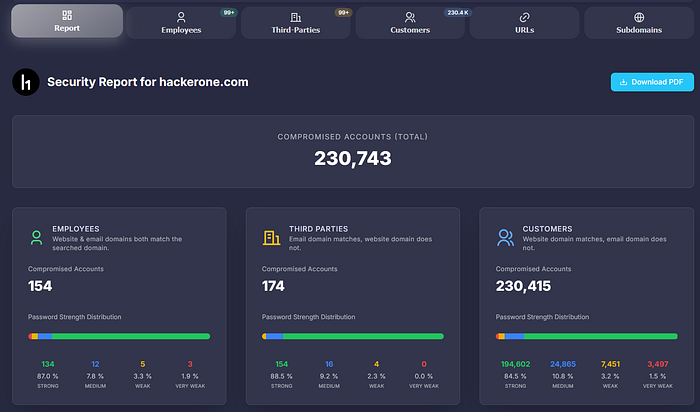
30-Second Rundown
- Stealer logs contain real credentials tied to real login pages.
- A quick domain search shows if employees, admins, or vendors are exposed.
- Turn "this domain has leaked credentials" into "here's how an attacker takes over accounts."
Why This Beats Traditional Recon
Subdomain enumeration finds attack surface. Credential leaks find access.
While other hunters are scanning ports and fuzzing endpoints, you're looking at plain-text passwords for admin@target.com, vpn-user@target.com, or support@target.com.
Same target. Different starting point. Faster impact.
What to Look For
High-value patterns in leak results:
- IT or admin emails (admin@, sysadmin@, it-support@)
- VPN or remote access URLs in the source field
- Cloud console logins (AWS, Azure, GCP)
- Internal tools (Jira, Confluence, GitLab, Jenkins)
- Support or billing portals with customer data access
One valid credential to an internal tool is worth more than 10 open ports.
How to Use LeakRadar for Bug Bounty
- Search the target's domain on LeakRadar.io
- Filter by "Employees" to focus on staff accounts
- Check the URL field to identify which services are exposed
- Map the credential to a realistic attack path
- Document the exposure and potential impact in your report
Writing the Report
Don't just say "credentials are leaked." Show the path:
- This email appears in stealer logs with a plain-text password
- The URL points to [internal tool / VPN / admin panel]
- Password reuse or weak password policy increases likelihood of valid access
- Impact: unauthorized access to [specific system], potential lateral movement
Triage teams can't ignore a clear path from leak to access.
The Edge
Most hunters skip this step. They assume leaked credentials are out of scope or too obvious.
They're wrong. Programs care about real risk. Plain-text credentials tied to their domain is real risk.