Every house in a city has a unique address so that letters and parcels can reach the correct destination. The internet works the same way.
Every website lives on a computer (server), and every server has a unique numeric address, called an IP address — for example:104.26.10.229
But let's be honest — humans are terrible at remembering numbers.
That's why we use DNS (Domain Name System).
What is DNS?
DNS is the internet's phonebook.
It translates human-readable domain names into machine-readable IP addresses, so browsers know where to go.
Simple example:
xyz.com → DNS → 104.26.10.229 → Website loads
You type a name. DNS finds the number. Your browser connects to the server.
Simple — but powerful.
What Happens When You Type a Website?
Let's say you open your browser and type:www.xyz.com
Behind the scenes, this is what actually happens
DNS Resolution — Step by Step
Local Cache Check
Your computer first checks:
"Do I already know the IP address for this domain?"
If yes → instant response (very fast). If not → it asks for help.
Recursive DNS Server (Your Helper)
Your system sends the request to a Recursive DNS Resolver (usually provided by your ISP, Google DNS, or Cloudflare DNS).
The resolver:
- Checks its own cache
- If found → returns the IP
- If not → starts searching for it
Root DNS Servers
The resolver asks a Root DNS Server:
"Where can I find information about
.comdomains?"
The root server replies:
"I don't know the IP, but I know who manages
.com. Go there."
TLD DNS Servers
Now the resolver contacts the TLD (Top-Level Domain) server for .com.
The TLD server responds:
"The authoritative nameservers for
tryhackme.comare hosted on Cloudflare."
Authoritative DNS Server
This is the final authority.
The authoritative server:
- Stores the actual DNS records
- Returns the real IP address:104.26.10.229
Response + Caching (TTL)
The resolver:
- Sends the IP back to your computer
- Saves it in cache for a specific time (TTL — Time To Live)
Your browser now connects to the server, and the website loads
Real-Life Analogy
Think of it like finding a friend's house:
- You check your own diary (local cache)
- Ask a friend (recursive resolver)
- Friend checks city index (root server)
- Finds the area office (TLD server)
- Goes to the house owner (authoritative server)
- Gets the exact address and remembers it for next time (cache)
Understanding Domains: TLD, SLD & Subdomains
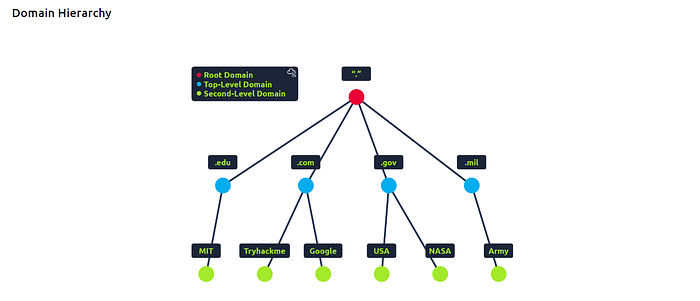
🔹 TLD (Top-Level Domain)
The right-most part of a domain.
Examples:
.com.org.in.uk
Types:
- gTLD (Generic):
.com,.org,.net - ccTLD (Country Code):
.in,.ca,.uk
🔹 Second-Level Domain (SLD)
The part just left of the TLD.
Example:xyz.com
- TLD →
.com - SLD →
tryhackme
Rules:
- Max 63 characters
- Allowed:
a–z,0–9,- - Hyphens cannot start or end the name
🔹 Subdomain
Anything left of the SLD.
Example:admin.xyz.com
- Subdomain →
admin
You can create multiple levels:jupiter.servers.xyz.com
Each label:
- Max 63 characters
- Max 253 characters
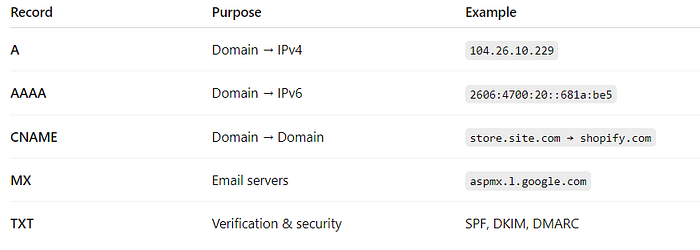
Common DNS Record Types (Must-Know)
DNS is not just about IPs. It stores different record types for different purposes.

Why MX & TXT Records Matter
- MX records decide where emails are delivered
- TXT records help prevent email spoofing and spam
- Used for domain ownership verification (Google, AWS, etc.)