


How I Owned the Server Through PDF Export- LFI
During testing, I encountered a PDF export feature that allowed users to preview and download generated reports. The application provided multiple predefined templates each producing a dynamically generated PDF.
All screenshots shown are locally reproduced in a controlled environment to maintain real target confidentiality.
At first, everything appeared normal. The preview functionality worked as expected and each download returned a randomly named PDF file.
However, while inspecting the network requests behind the download action, I noticed something unusual.
The application was passing a filesystem path directly as a GET parameter.
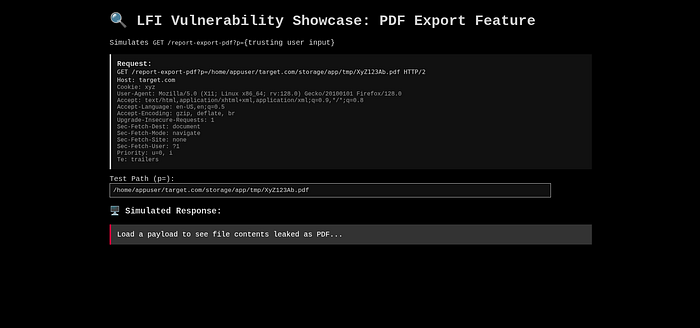
Instead of referencing a logical identifier (such as a report ID), the p parameter contained an absolute path on the server.
That was the first red flag.
Why the Path Disclosure Mattered
The disclosed path revealed several critical details:
- The application was reading files directly from server's filesystem.
- The home directory of the system user was exposed
- The webroot was hosted inside a privileged system user directory
- There was no visible attempt to sanitize or restrict the input
This suggested that the application was blindly trusting user input to locate and serve files.
At this point, I suspected a Local File Inclusion (LFI) vulnerability.
Confirming the LFI
To validate the issue, I replaced the PDF path with a known system file.

The server responded with the contents of /etc/passwd, confirming that arbitrary files could be read from the filesystem.
The response included the application user account proving that the process had sufficient permissions to read sensitive system files.
This confirmed unrestricted local file inclusion.
Escalating the Impact
Once arbitrary file reads were confirmed, I tested whether application-level secrets were also accessible.
I attempted to retrieve the environment configuration file:
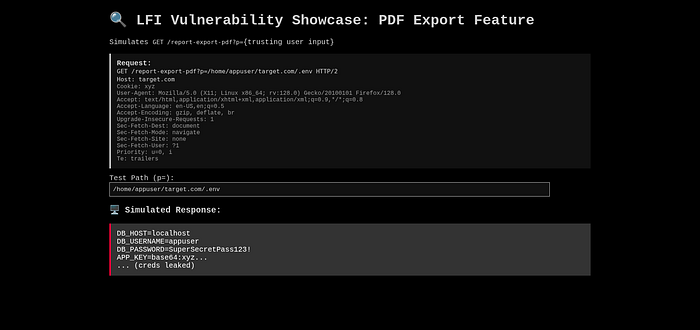
The request successfully returned the .env file.
This file contained sensitive information such as:
- Database credentials
- Application secrets
- Internal configuration values
At this stage, the vulnerability escalated from file disclosure to full application compromise.
Access to environment variables alone is often enough to pivot into database access, authentication bypass, or further internal exploitation.
Critical Misconfiguration: Privileged Webroot
One of the most serious issues here was how the application was hosted.
The web application was running from a privileged system user's home directory, rather than a restricted webroot.
This is a dangerous configuration.
What went wrong:
- The webroot was hosted under a system user with broad permissions
- The application process had access to sensitive directories
- File inclusion instantly became high-impact
What should have been done:
- Web applications should run under a low-privileged user
- The webroot should be isolated (e.g.
/var/www/html) - Ownership should be restricted to
www-dataor an equivalent service account - The application should not have read access outside its intended directory
Running a web application under a privileged system user turns simple bugs into critical vulnerabilities.
In this case, the LFI would have been far less damaging if proper privilege separation had been enforced.
Why This Vulnerability Existed
This issue occurred due to a combination of mistakes:
- User-controlled input was directly used to read files
- No path allowlisting or normalization was applied
- Absolute paths were trusted without validation
- The application ran with excessive filesystem privileges
Individually, each mistake is bad. Together, they resulted in a high-impact LFI.
Have you ever found a critical bug in a feature as simple as a PDF export?
If you're interested in real-world vulnerability discoveries, follow me here on Medium.
I write about:
- Practical exploitation techniques
- Real security mistakes found during testing
- Lessons that help developers and testers avoid repeating them
Every write-up is based on hands-on analysis, not theory.