
This lab demonstrates a reflected cross-site scripting vulnerability where user input is placed inside an HTML attribute. At first glance, the application appears secure because angle brackets are HTML-encoded. However, the real issue is not in the HTML body but inside an attribute context. The goal of the lab is to execute JavaScript in the victim's browser. Although < and > are encoded, the application does not properly handle quotation marks inside attributes. This allows an attacker to break out of the attribute and inject malicious code.
Step 1 — Initial Testing
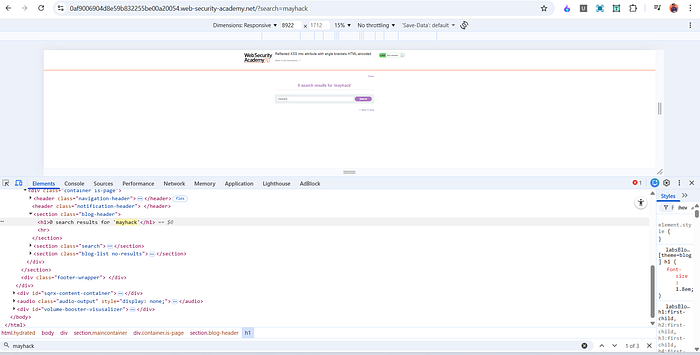
I started by opening the lab and using the search function normally. I entered a simple string such as: mayhack
The search behaved as expected.
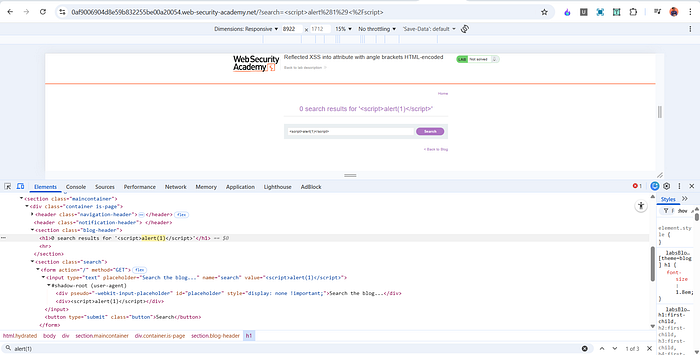
To test for XSS, I entered:
<script>alert(1)</script>
The page responded with:
0 search results for '<script>alert(1)</script>'
However, no alert box appeared.
Step 2 — Inspecting the Response
I opened Developer Tools and inspected how the input was rendered in the page.
Inside the <h1> element, the payload appeared as:
<h1>0 search results for '<script>alert(1)</script>'</h1>
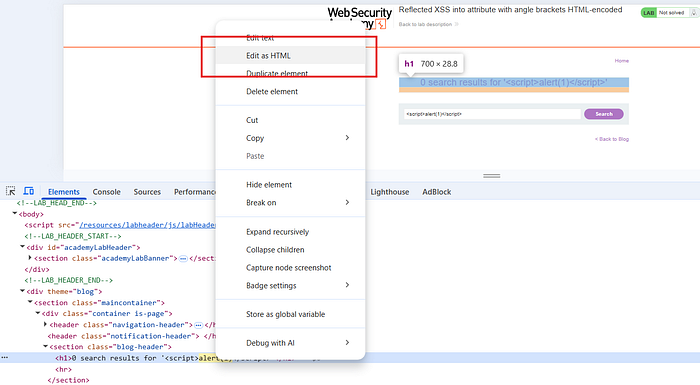

This means the application properly encoded HTML tags, which prevented the script from executing in the normal HTML body.
So direct script injection was not possible in that location.
Step 3 — Identifying the Real Injection Point
While inspecting further, I noticed that the same input was also reflected inside an input field:
<input type="text" name="search" value="<script>alert(1)</script>">
Here, the user input is placed inside the value attribute of an input element.
This is important because attributes behave differently from regular HTML content. Even if angle brackets are encoded, the application may still be vulnerable if quotation marks are not handled correctly.
Step 4 — Breaking Out of the Attribute
Since the input was inside:
value="USER_INPUT"
I attempted to break out of the attribute by injecting a quotation mark.
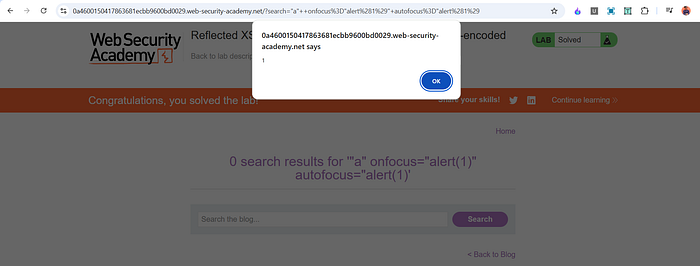
The payload I used was:
"a" onfocus="alert(1)" autofocus="alert(1)
This successfully injected JavaScript into the page.
Why This Payload Works
The key to this attack is understanding how HTML attributes work.
- The original input field had a value attribute.
- By inserting a quotation mark, I escaped from that attribute.
- I then added a new event handler attribute: onfocus.
- I also added autofocus so that the field automatically receives focus when the page loads.
The onfocus event runs JavaScript when the input field gains focus.
The autofocus attribute automatically focuses the input field when the page loads.
So the sequence is:
- Page loads
- The input field automatically gains focus
- The onfocus event triggers
- alert(1) executes
If autofocus is not used, the user would have to manually click inside the field for the payload to execute. That is why combining both attributes allows automatic execution.
Why This Is Reflected XSS
This vulnerability is classified as reflected XSS because:
- The malicious input is sent in the request.
- The server reflects it immediately in the response.
- The payload is not stored in a database.
- The attack works only when the victim clicks a specially crafted link.
It is not stored XSS and it is not purely DOM-based. The server reflects the payload directly into the page.
Impact
If this vulnerability existed in a real application, an attacker could:
- Steal session cookies
- Perform actions on behalf of the victim
- Redirect users to malicious sites
- Capture sensitive input
- Inject phishing content
Even though the application encoded angle brackets, improper handling of attribute context made it vulnerable. This shows that encoding < and > alone is not enough to prevent XSS.
Mitigation
To prevent this type of vulnerability, the application should:
- Perform proper contextual output encoding. When reflecting data inside an attribute, quotation marks and special characters must also be encoded.
- Use secure templating engines that automatically escape user input based on context.
- Avoid inline JavaScript event handlers like onfocus and onclick.
- Implement a strong Content Security Policy to reduce the impact of injected scripts.
Conclusion
This lab highlights the importance of understanding context when handling user input. Even if HTML tags are encoded, applications can still be vulnerable if they fail to properly escape data inside attributes.
The main lesson is that XSS protection must be context-aware. Different parts of HTML require different types of encoding. Simply encoding angle brackets is not enough.
📬 Stay Connected
If you found this helpful and want to learn more about web security, hands-on labs, feel free to follow me for upcoming posts.
✍️ Follow me for more cybersecurity write-ups 🔗 LinkedIn — codermayank 📸 Instagram — @mayhack_