

Github: https://github.com/xeloxa/wp-hunter
If you've ever done security research on WordPress, you know the paradox: the ecosystem is enormous, but your time isn't. With tens of thousands of plugins and themes to review, "scan everything" quickly turns into "miss the good stuff."
That's exactly the gap WP-Hunter aims to close: it's an open-source WordPress plugin/theme reconnaissance + static analysis (SAST) tool that helps security researchers prioritize what to look at next — rather than drowning in endless lists.
The problem: WordPress recon is noisy
Traditional recon workflows often fall into one of two camps:
- Metadata-only hunting (installs, last update, ratings): fast, but shallow.
- Deep source review: accurate, but slow and hard to scale.
In reality, you need both: a way to filter the ecosystem down to a shortlist, and then a way to go deep on the most promising candidates.
Enter WP-Hunter
WP-Hunter combines three ideas into a single workflow:
- Recon across plugins & themes
- Heuristic "Vulnerability Probability Score (VPS)" to rank likely high-risk targets
- Semgrep-powered SAST to zoom into code-level issues when it matters
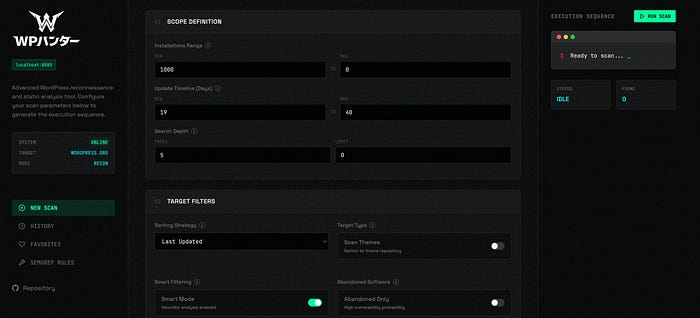
It also ships with a modern web dashboard so you can run and track scans visually instead of living purely in terminal output.
What makes it different?
1) Vulnerability Probability Score (VPS): prioritize before you deep-dive
WP-Hunter's VPS is designed to flag "low-hanging fruit" in a huge ecosystem — think widely-used but neglected projects, riskier categories, and other signals that can correlate with security debt.
2) Offline recon with a local database
Instead of repeatedly hitting remote APIs, you can sync the plugin catalog into a local SQLite database and query instantly — great for speed, repeatability, and travel/offline work.
3) A web dashboard built for real workflows
The dashboard supports:
- Real-time scan streaming (WebSockets)
- One-click Semgrep analysis
- Scan history and comparisons
- A favorites system to track interesting targets
- Managing custom Semgrep rules from the UI
Getting started (quick overview)
WP-Hunter runs on Python 3.8+ and optionally uses Semgrep for deep analysis.
The recommended mode is launching the web dashboard locally (it exposes a local interface at http://localhost:8080).
Who is WP-Hunter for?
WP-Hunter is positioned for:
- Bug bounty hunters doing WordPress-focused recon
- Pentesters assessing plugin/theme risk in a scoped engagement
- Security researchers exploring patterns across the WP ecosystem
Responsible use
Tools like this are most valuable when used ethically and with authorization — for example, in bug bounty programs, client engagements, or your own infrastructure. WP-Hunter is explicitly presented as a security research tool built for professional workflows.
What's next?
WP-Hunter's Product Hunt page notes a roadmap direction: AI-powered source code analysis is planned to make detection smarter over time.
Closing
WordPress security research doesn't have to be "random walks through plugin directories." With a scoring model to rank targets, an offline database to move fast, and Semgrep to go deep when needed, WP-Hunter feels like a practical upgrade to the recon phase.