


If I asked you to secure your entire frontend application against data theft and script injections using just one line of code, would you believe it's possible?
Most developers rely entirely on their frameworks (like React or Vue) to handle security. We assume that because we aren't writing raw HTML, we are safe.
We aren't.
There is a powerful, often overlooked HTTP header that acts as the ultimate bouncer for your website. It has the authority to stop attacks that bypass your code entirely. When configured correctly, it makes your application virtually immune to Cross-Site Scripting (XSS).
I still remember the first time I discovered this header. I felt like I had found a cheat code for security. I configured it, deployed it to production, and sat back to watch the magic.
Ten minutes later, I was rolling it back in a panic.
Analytics stopped tracking. The support chat widget vanished. My perfectly crafted inline JavaScript handlers refused to fire. The browser console looked like a crime scene of red error text.
This is the reality for most developers. We know we need Content Security Policy (CSP), but it feels like playing Whac-A-Mole. So, we end up ignoring it or copy-pasting a weak configuration just to make the errors go away.
Today, we are going to fix that. Here is how to architect this powerful header to actually secure your app , without making you hate your life.
What is CSP (Really)?
Forget the textbook definition for a second.
Think of your application as a nightclub. You are the owner. XSS is a bad actor trying to sneak in. CSP is the bouncer at the door.
Without instructions, the bouncer lets everyone in (default browser behavior). If you give the bouncer a bad list, they might let the bad guys in or kick your VIPs out.
A Content Security Policy is simply an HTTP header that tells the browser: "Only load resources from these specific places. Block everything else."
The Syntax Trap
Most developers get overwhelmed by the syntax. It looks like a wall of text.
It's just a semicolon-separated list of directives.
Rule of Thumb: If you don't explicitly allow it, CSP blocks it.
Here is what a basic header looks like:
Content-Security-Policy: default-src 'self'; img-src *; script-src userscripts.example.comdefault-src 'self': Only load things from my own domain.img-src *: Load images from anywhere (usually fine).script-src ...: Only load scripts from this specific URL.
Simple, right? Until you add third-party tools.
The "Unsafe" Mistake Everyone Makes
This is where 90% of policies fail.
You add Google Analytics, Intercom, or a marketing pixel. The console throws an error because those scripts try to inject inline code.
Frustrated, you change your policy to this:
❌ The Lazy Approach (Vulnerable):
Content-Security-Policy: script-src 'self' 'unsafe-inline' https://www.google-analytics.com;See that 'unsafe-inline'?
From my experience, the moment you add that flag, you might as well delete the header entirely. 'unsafe-inline' tells the browser to execute any script tag found in the HTML.
If an attacker manages to inject <script>alert('Stealing Cookies')</script> into a comment section or a URL parameter, the browser will execute it happily because you told it inline scripts are okay.
✅ The Better Approach:
You have two robust options to handle inline scripts without opening the gates of hell:
- Hashes: You calculate a SHA hash of your specific script and list it in the header.
- Nonces: You generate a random cryptographic token on the server for every request.
Using Nonces (The Senior Way)
If you are building a modern app (React, Vue, Next.js, etc.), you should use a Nonce (Number used ONCE).
How it works:
- Your server generates a random string (e.g.,
r4nd0m). - You add it to the CSP header:
script-src 'nonce-r4nd0m'. - You add it to your script tags:
<script nonce="r4nd0m">.
Now, if an attacker injects a script, they won't know the random nonce. The browser sees a script without the matching token and blocks it immediately.
How to Deploy Without Breaking Production
This is the part that saves your job.
Never deploy a blocking Content-Security-Policy header straight to production if you are unsure. Use the Report-Only header instead.
❌ Common Approach: Guessing the allowed domains, deploying, and waiting for user complaints.
✅ Senior Developer Approach:
- Set the header
Content-Security-Policy-Report-Only. - Define a
report-uri(orreport-to) endpoint. - Let it run for a week.
The browser will not block anything. Instead, it will send a JSON payload to your reporting endpoint every time a policy would have been violated.
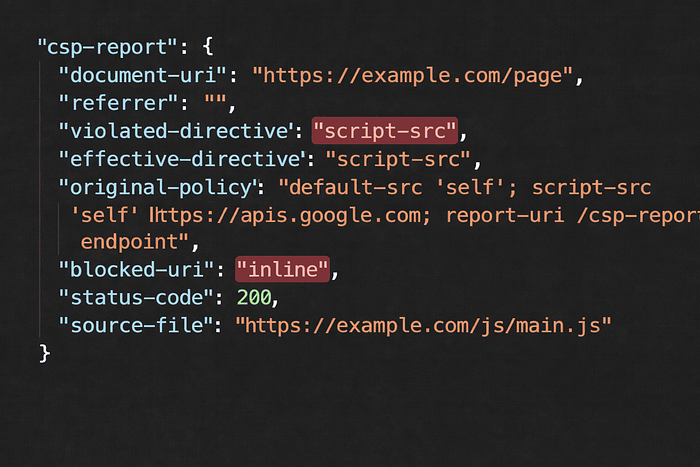
You review the logs. "Oh, I forgot we use Hotjar." -> Add Hotjar to the allowlist. "Wait, why is a script loading from a Russian gambling site?" -> That is actual malware you just caught.
Once your logs are clean, you switch the header from Report-Only to the standard enforcing header.
What Most Developers Get Wrong
It's not just about scripts.
I often see policies that lock down scripts but leave object-src or base-uri wide open.
object-src 'none': Always set this. There is almost no reason to allow<embed>or<object>tags (Flash, Java applets) in 2026.base-uri 'self': This prevents attackers from injecting a<base>tag that changes the base URL for all relative links on your site (hijacking your form submissions).
A Reasonable Starting Policy
If you are starting from scratch, don't over-engineer it. Start here and loosen it only when necessary.
Content-Security-Policy:
  default-src 'self';
  script-src 'self' 'nonce-randomString';
  style-src 'self' 'unsafe-inline';  /* Styles are less risky, but strict is better */
  img-src 'self' data: https://cdn.example.com;
  connect-src 'self' https://api.example.com;
  object-src 'none';
  base-uri 'self';
Conclusion
Content Security Policy isn't a nice-to-have feature anymore; it's baseline hygiene for modern web development.
Yes, it is annoying to set up. Yes, third-party marketing scripts make it difficult. But it is the single most effective shield you have against code injection attacks.
If you do one thing today: Go to your production site, open the network tab, and check your headers. If you don't see Content-Security-Policy, or if you see 'unsafe-inline' inside script-src, put a ticket in your backlog immediately.
Has CSP ever broken your production build? Drop a comment below , I'd love to hear your "war stories."
For more deep dives into frontend architecture and security, check out my other stories at Azad Ansari.
References & Tools:
- MDN Web Docs: CSP
- Google CSP Evaluator (Highly recommended for checking your policy)