So guys this is V3n0mkai with the another writeup of the Pico CTF Web Exploitation Challenge 1 Easy Category [Crack The Gate 1]. This is might be the easy challenge but we have to understand some of the concepts from this challenge as well which i will tell in the end of the writeup that what we have learned .
- Challenge Statement :- We're in the middle of an investigation. One of our persons of interest, ctf player, is believed to be hiding sensitive data inside a restricted web portal. We've uncovered the email address he uses to log in: ctf-player@picoctf.org. Unfortunately, we don't know the password, and the usual guessing techniques haven't worked. But something feels off… it's almost like the developer left a secret way in. Can you figure it out? Additional details will be available after launching your challenge instance.
- Now in this challenge actually we have given a web login portal after launching the instance, and there we have to login to the portal using some techniques.
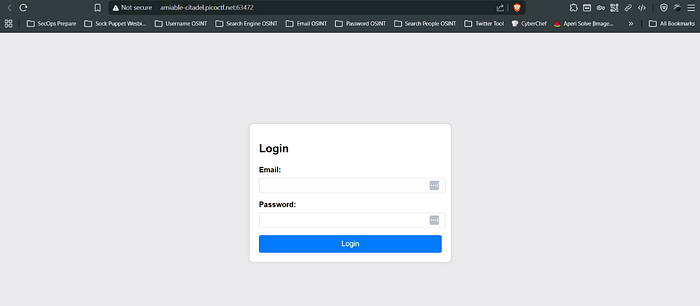
- Now this is what the interface of the web looks like in the challenge. We have been already provided the email address of the person we just have to figure the password or we have to figure out the way to login without password by bypassing it.
- So now what we are gonna do is first tried for the path traversal by some common techniques like the /robots.txt, /sitemap.xml, /admin, /secret, /flag.txt, /administrator-panel and other common directories but didn't found any good.
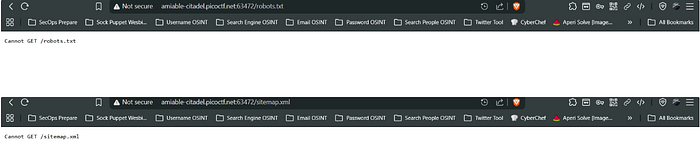
- Though we didn't got robots.txt and sitemap.xml but at least we should know the meaning of them and why didn't we got them, because the intention of writing this CTF writeup is not for solving purpose it is about clearing the fundamentals helping the person strengthening their roots and pillars and also helping to crack the interview.
- Robots.txt :- It is a plain text policy file which just implements the Robots Exclusion Protocol [REP] and is placed at the root of the website and whose only role is to just specify the crawlers which of the places it is allowed to crawl and which it is not .
- Now also there is to understand some important difference between the crawling and the indexing of page . Crawling means to read the contents of the page and Indexing means the user agent saves the URL in its database and make it appear in the search results but if robots.txt is allowed then only the content will be visible .
- There also exists the X-Robot-Tags:noindex header by which we can disallow the indexing via browser, but if we disallow the robots.txt and noindex together, so this will result in the no crawling but the indexing can be still there despite being noindex header because due robots.txt being disabled the browser does not see the noindex at all . So for this robots.txt must be enabled.
- Sitemap.xml :- This is XML [Extra Markup Language] file that contains the important URLs for the website which are available for the crawling and usually the crawlers discover the pages from here.
- In this CTF Portal we cannot the get the robots.txt and sitemap.xml so this is not the browser issue. There might be the file may placed at different route in the website .
- So continuing to the challenge we then navigated to the page source of the website and we found this thing .


- We copied that green comment and the navigated to the dCode.fr and it recognized the cipher as the ROT 13 .
- ROT 13 :- It a cryptographic substitution cipher where each letter is shifted by the letter 13 positions after it. It only works on the A-Z alphabets .
- So on the decryption we got this.

- So it says to send the request by adding the header of X-Dev-Access:yes.
- X-Dev-Access:yes :- X use for the non standard and custom HTTP Headers and then Dev-Access means the Developer Access. So by this we are enabling the developer mode. Due to this what happens is it enables the developer-only features, bypass certain restrictions, may return some hidden or secret pages .
- So now we opened the burp suite and intercepted the request of the login and then sent that to the repeater and added the dev access header and checked the response .
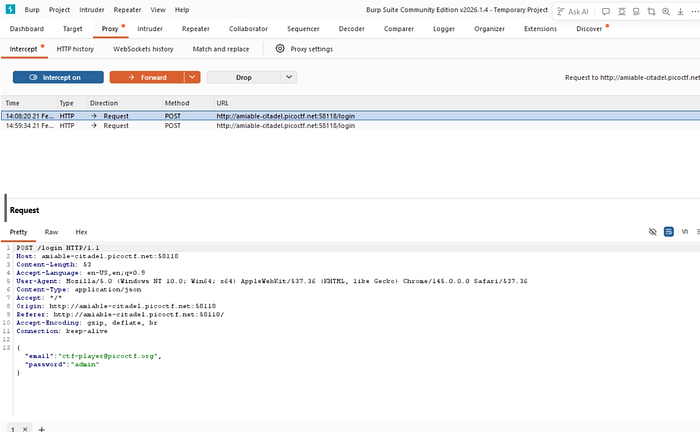
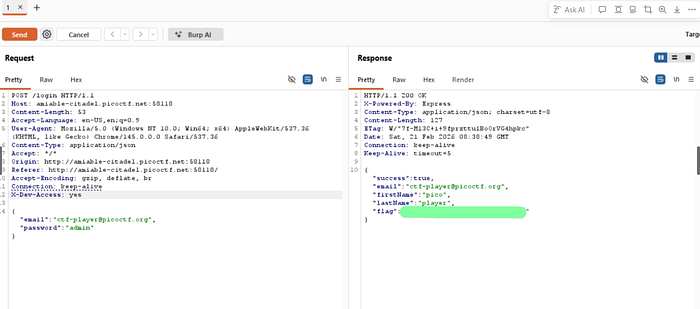
- And Hell Yeah, We got the flag.
So from this CTF Challenge What We Learnt Is :-
- Burp Suite Interception Request .
- X-Dev-Access Custom Header .
- ROT 13 Cipher .
- Robots.txt and Sitemap.xml .
- Crawling v/s Indexing .
- Burp Suite Repeater .
- dCode.fr .
- Burp Suite Interception of the Request .
- Source Code Analysis .
- X-Robot-Tags .
Why This Challenge Matters
At first glance, this looked like a basic login bypass challenge.
An email was provided. The password was unknown. Brute force didn't work.
But something felt off.
And that feeling — that instinct — is what separates button-clickers from real problem solvers.
When traditional login attempts fail, you don't guess randomly.
You investigate.
You inspect.
You observe.
This challenge forces you to think beyond typing credentials into a form.
It pulls you into:
- Source code analysis
- Understanding hidden comments
- Identifying encoded hints
- Recognizing ROT13 patterns
- Manipulating HTTP headers
- Using Burp Suite effectively
- Understanding custom developer headers
- Intercepting and modifying requests
- Thinking like a developer — not just an attacker
This wasn't password cracking.
This was logic discovery.
The Real Lesson
Web applications don't just fail because of SQL injection or XSS.
Sometimes they fail because:
- Developers leave debug backdoors.
- Custom headers expose hidden features.
- Comments reveal encoded hints.
- Access controls rely only on front-end logic.
The header:
X-Dev-Access: yes
Was never meant for users.
It was meant for developers.
And that is exactly why it worked.
The Mindset Shift
Most beginners stop when they don't see robots.txt.
Or when brute force doesn't succeed.
Or when the login form doesn't respond differently.
But security testing is not about visible endpoints.
It's about asking:
What does the server see that I don't?
What changes if I modify the request?
What happens if I act like the developer?
When static interaction fails…
Manipulate the protocol.
Technical Strength Behind This Writeup
This challenge required:
- Inspecting page source for hidden hints
- Identifying and decoding ROT13 cipher
- Understanding custom HTTP headers
- Intercepting login requests using Burp Suite
- Modifying and replaying requests via Repeater
- Understanding how backend logic may rely on headers
- Differentiating crawling vs indexing
- Understanding robots.txt, sitemap.xml, and X-Robot-Tags
One missed comment — no hint. One missed header — no access. One missed interception — no flag.
Everything had to align.
Final Takeaway
CTFs are not about getting the flag.
They are about training your brain to:
- Look where others don't.
- Question default behavior.
- Inspect traffic, not just interfaces.
- Understand how HTTP really works.
- Security is rarely about breaking encryption.
It is often about exploiting assumptions.
If this writeup helped you understand web logic flaws better, consider sharing it with your peers.
More challenges. More protocol manipulation. More controlled exploitation.
Happy Hacking.