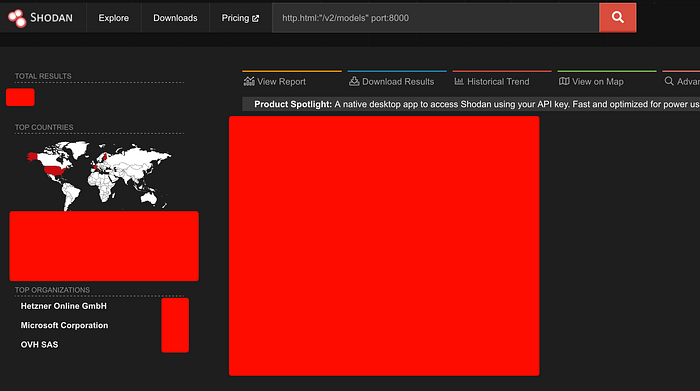

A practical Shodan recon guide for every component in the modern ML serving pipeline from model servers to vector databases to notebook environments.
The modern AI stack is sprawling. A production ML deployment no longer means one model behind one API it's a constellation of model servers, vector databases, experiment trackers, notebook environments, object stores, and GPU orchestration layers, each running its own HTTP or gRPC service, each with its own default port, and each trivially discoverable by anyone with a Shodan account.
This is not a theoretical concern. Run http.title:"Jupyter" port:8888 -http.html:"token" right now. The results are as bad as you expect.
Every component that ships with a built-in health endpoint, a REST API, or a metrics scraper is also a potential reconnaissance target. The question isn't whether your ML infrastructure is fingerprint-able — it is. The question is whether you know about it before an attacker does.
This guide is organized by service. For each component we cover the default ports, what the unauthenticated attack surface looks like, and the Shodan queries that find exposed instances in the wild. Use this offensively for authorized recon and defensively to audit your own exposure.
Responsible use: These queries are for authorized security assessments, bug bounty recon on in-scope targets, and defensive hardening of infrastructure you own or are contracted to protect. Unauthorized access to computer systems is illegal. If you run these against your own org and find exposure, treat it as a P0.
The Attack Surface at a Glance
Here's every service in the modern ML stack, its default ports, and the exposed endpoints that matter for recon:
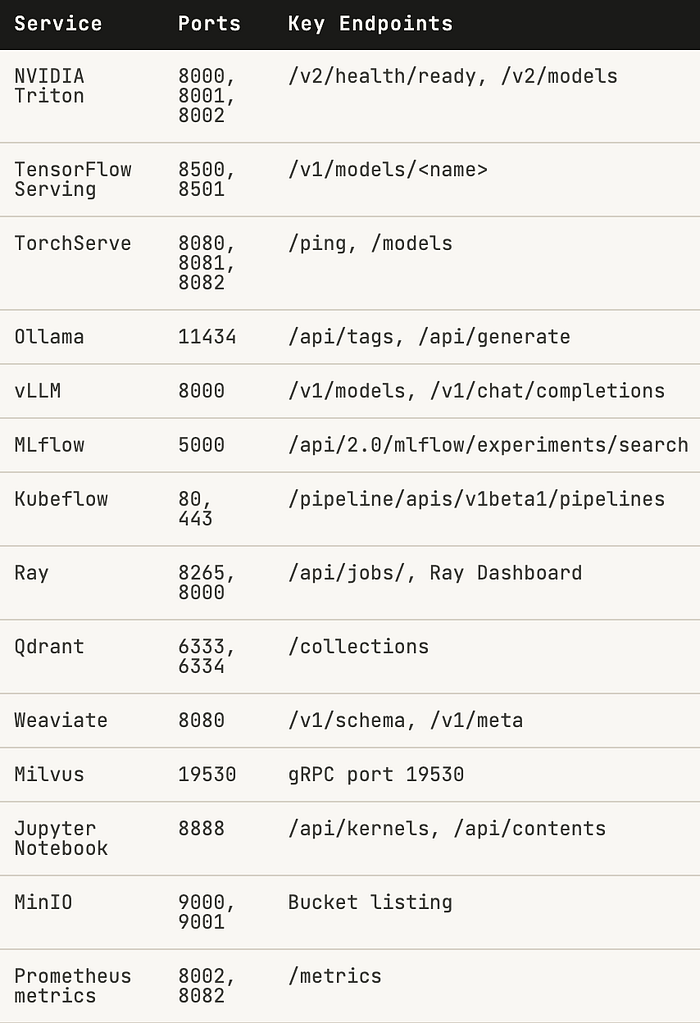
Note the critical-to-medium gradient. Model servers and vector databases matter most they're where your IP lives. But don't underestimate Prometheus endpoints: /metrics leaks model names, inference counts, latency percentiles, and sometimes hostnames that enumerate your entire backend.
Model Serving Servers
These are the highest-value targets. An unauthenticated model server doesn't just leak information it lets an attacker invoke your models for free, extract architecture details, and in some cases download weights directly.
NVIDIA Triton — ports 8000, 8001, 8002
Triton ships with no authentication by default. The /v2/health/ready endpoint is a trivial canary if it returns 200, the server is li,ve and everything below it is accessible. The /v2/models endpoint lis all loaded models, including their names, versions on, and input/output tensor shapes.
NVIDIA Triton
http.title:"Triton Inference Server" port:8000
http.html:"/v2/health/ready" port:8000
http.html:"/v2/models" port:8000
port:8001 product:"grpc" http.html:"triton"
port:8002 http.html:"nv_inference_request_success"
The Prometheus endpoint on 8002 is worth noting separately. It leaks nv_inference_request_success, nv_inference_request_duration_us, and per-model GPU memory usage. From a metrics scrape alone you can enumerate every model name and gauge production request volume.
TensorFlow Serving — ports 8500, 8501
TensorFlow Serving exposes a REST API on 8501 and gRPC on 8500. The REST /v1/models/<name> endpoint returns model metadata and version status. If you don't know the model name, /v1/models (without a name) often enumerates them anyway.
TensorFlow Serving
http.html:"/v1/models/" port:8501
http.html:"model_version_status" port:8501
port:8500 product:"grpc"
product:"TensorFlow Serving"
TorchServe — ports 8080, 8081, 8082
TorchServe's architecture is unusually dangerous: the inference port (8080) and the management API (8081) are separate services. The management API allows registering, scaling, and unregistering models with no auth required by default. Port 8082 serves Prometheus metrics.
TorchServe
port:8081 http.html:"/models"
http.html:"defaultWorkers" port:8081
http.html:"Healthy" port:8080 http.html:"torchserve"
port:8082 http.html:"ts_inference_requests_total"
An exposed TorchServe management port isn't just an information disclosure it's remote model deployment. An attacker can push a malicious model archive (.mar file) to a listening management API. Plan accordingly.
LLM Runtimes
Ollama and vLLM are the two dominant local/self-hosted LLM serving runtimes. Both expose OpenAI-compatible APIs with no authentication by default — by design, for ease of local use. This design decision doesn't survive the internet.
Ollama port 11434
Ollama is installed by millions of developers to run models locally. When OLLAMA_HOST is set to 0.0.0.0 — which the docs explicitly show for remote access — the API is exposed on all interfaces. /api/tags lists every downloaded model. /api/generate lets you run them.
Ollama
port:11434 http.html:"ollama"
http.html:"/api/tags" port:11434
http.html:'"models"' port:11434
http.html:"/api/generate" port:11434
product:"Ollama" port:11434
vLLM port 8000
vLLM's OpenAI-compatible API on port 8000 is designed for high-throughput LLM serving. Exposed instances hand over /v1/chat/completions and /v1/completions to anyone who asks. On a powerful GPU box, the financial impact of this is immediate — someone else is running inference on your dime.
vLLM
http.html:"/v1/models" port:8000 http.html:"vllm"
http.html:"/v1/chat/completions" port:8000
http.html:'"object":"list"' port:8000 http.html:"model"
http.html:"/health" port:8000 http.html:"vllm"
Vector Databases
Vector databases are the backbone of every RAG pipeline. Exposed instances leak your embedding collections which often contain reconstructable representations of your proprietary documents, customer data, or training corpus.
Qdrant ports 6333, 6334
Qdrant
http.html:"/collections" port:6333
http.title:"Qdrant" port:6333
http.html:"qdrant" port:6333 http.html:"result"
http.html:'"version":' http.html:"qdrant" port:6333
Weaviate port 8080
Weaviate's /v1/schema endpoint exposes the full schema of every collection, including class names, properties, and vectorizer configuration. This is enough to understand the entire knowledge graph being served.
Weaviate
http.html:"/v1/schema" port:8080 http.html:"weaviate"
http.html:"weaviate" http.html:"graphql" port:8080
http.html:"/v1/meta" port:8080 http.html:"weaviate"
Milvus port 19530
Milvus communicates over gRPC on 19530. While Shodan can't read gRPC payloads, the open port combined with the Attu web UI (often co-deployed) is the reliable fingerprint.
Milvus
port:19530 product:"grpc"
http.title:"Attu" http.html:"milvus"
product:"Milvus" port:19530
ML Infrastructure
MLflow port 5000
MLflow tracks experiments, stores model artifacts, and maintains the model registry. An exposed MLflow instance is a complete audit trail of your ML development process: every training run, every hyperparameter, every metric, and links to every artifact. The model registry endpoint can also be used to download registered model versions directly.
MLflow
http.title:"MLflow" port:5000
http.html:"/api/2.0/mlflow/experiments/search" port:5000
http.html:"/api/2.0/mlflow/registered-models" port:5000
http.html:"mlflow" http.html:"artifact" port:5000
Ray port 8265
The Ray dashboard exposes cluster state, job queues, actor graphs, and resource allocation for the entire distributed compute cluster. The /api/jobs/ endpoint lists running and completed jobs including their entrypoints (which often contain paths, environment variables, and configuration).
Ray
http.title:"Ray Dashboard" port:8265
http.html:"/api/jobs/" port:8265
http.html:"/api/serve/applications/" port:8265
Data Environments
Jupyter Notebook port 8888
Jupyter is the most dangerous entry on this list by impact-to-prevalence ratio. An unauthenticated Jupyter instance is full remote code execution on the host. The /api/kernels endpoint lets you create and attach to Python kernels. The /api/contents endpoint exposes the entire filesystem tree from the working directory. There is no meaningful security boundary here.
Jupyter Notebook
http.title:"Jupyter" port:8888 -http.html:"password"
http.title:"Home Page — Select or create a notebook"
http.html:"/api/kernels" port:8888
http.title:"JupyterLab" port:8888
http.html:"jupyter" port:8888 -http.html:"token"
MinIO ports 9000, 9001
MinIO is the S3-compatible object store most teams use for model artifacts, training data, and checkpoint storage. Anonymous bucket listing is its own data breach — you can enumerate every object path without credentials. The console on 9001 uses default credentials (minioadmin:minioadmin) surprisingly often in dev environments that drifted to production.
MinIO
http.title:"MinIO" port:9001
port:9000 http.html:"<ListBucketResult>"
http.html:"minio" port:9000 http.html:"ListBuckets"
product:"MinIO" port:9000
Compound Dorks for Broad Sweeps
For wide-net recon or internal auditing across cloud ASNs, these compound queries cover the full stack efficiently:
Unauthenticated LLM endpoints on major cloud providers
http.html:"/v1/models" http.html:"object" org:"Amazon" OR org:"Google" OR org:"Microsoft"Jupyter — no token, no password (RCE exposure)
http.title:"Jupyter" port:8888 -http.html:"token" -http.html:"password"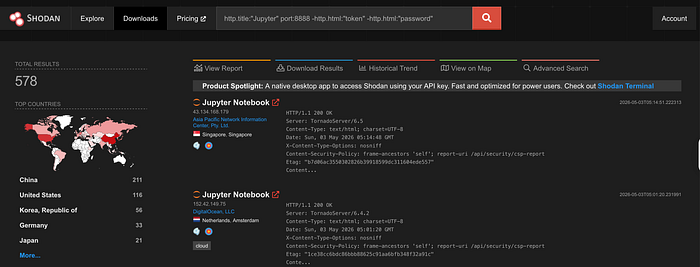
Prometheus scrape endpoints leaking ML metrics
http.html:"# TYPE" http.html:"inference" http.html:"latency" -org:"monitoring"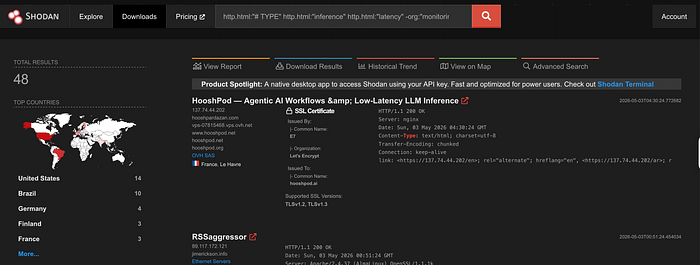
Ollama instances with models loaded
port:11434 http.html:'"models"' http.html:'"name"'
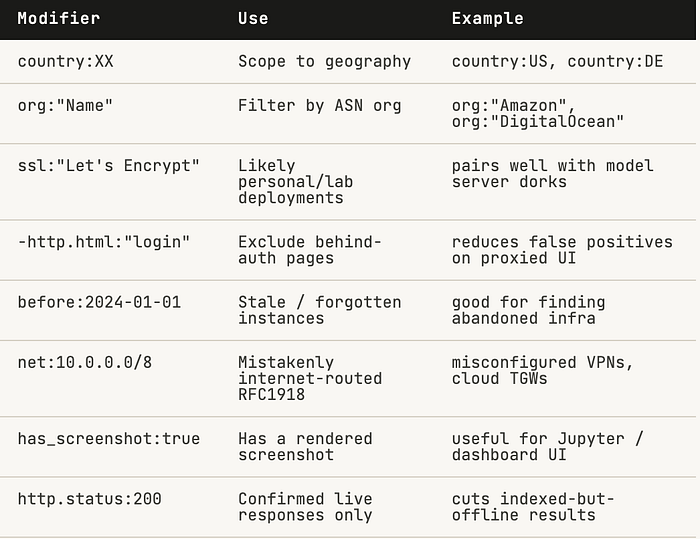
Shodan Operator Reference
Combine these modifiers with any dork above to narrow or broaden scope:
Run the dorks. Then fix what you find.
Thanks