
A bug hunter's honest account of discovery, forensic investigation, escalations, and the painful lesson that changed my approach forever.
By HackerMD | Bug Bounty Hunter | Security Researcher
"The most valuable lessons in security research don't come from the bugs you find. They come from the ones you think you found."
🎯 Introduction
I want to tell you a story that most bug hunters won't share publicly — not because it's about a successful $40,000 payout, but because it ended in rejection. And the lessons I learned were worth far more than any bounty.
This is the story of 30 days, one AXIS camera, a potential Critical RCE, forensic investigation, multiple escalations, and ultimately — a humbling technical lesson about shell quoting that every security researcher must know.
I'm sharing this because:
- Bug hunting communities celebrate wins, rarely failures
- Learning from mistakes is MORE valuable than celebrating wins
- Every researcher makes this mistake at some point
- Better you learn from MY experience than YOUR own $40,000 lesson
🔍 The Discovery — September 26, 2025
It started like any normal bug hunting session. I was testing an AXIS Camera (Q3536-LVE) on a Bugcrowd program — a real production camera with an IP address accessible from the internet.
Target:
IP: 195.60.68.241
Model: AXIS Q3536-LVE
Firmware: Old version
CGI Endpoint: /axis-cgi/rootpwdsetvalue.cgi
While exploring the camera's web interface and API endpoints, I noticed something interesting:
The CGI script rootpwdsetvalue.cgi was accessible without authentication. This was already suspicious. CGI scripts that modify root passwords should never be unauthenticated.
Then I tested something that looked, at the time, like Remote Code Execution:
curl -k -H "User-Agent: $(killall -9 apache2)" \
"https://195.60.68.241/axis-cgi/rootpwdsetvalue.cgi"
What happened next shocked me:
- Camera web interface was ONLINE (verified in browser)
- I executed the command above
- Camera web interface became OFFLINE immediately
- Browser showed: "Cannot connect"
- I executed a "restore" command
- Camera came back ONLINE
- Everything recorded in real-time video
I was convinced. I had found an unauthenticated RCE in an AXIS camera.
📤 The Submission — $40,000 Potential Bounty
I submitted immediately to Bugcrowd with:
- 📹 Full video proof of concept
- 📸 Screenshots showing camera online → offline → online
- 📝 Detailed technical writeup
- 🔧 Complete command list
- ⏰ Timestamps throughout
Severity: Critical CVSS Score: 10.0 (my assessment) Potential Bounty: $40,000
The camera was controlling physical security infrastructure. An attacker could:
- Disable security cameras remotely
- Disrupt physical security systems
- Cause denial of service on surveillance equipment
- Potentially gain access to camera feeds
I thought I had found the bug of my career.
⏰ The Waiting Game — Days 1–6
Standard bug bounty waiting. I refreshed the submission page obsessively. Days passed. Finally:
Day 6: First response arrived.
Triager: "We cannot reproduce this vulnerability. The commands you provided do not appear to affect the remote camera. Can you provide more details?"
My heart sank. But I was confident in my video evidence.
I responded with more details, re-explained the steps, referenced the video.
Day 7: Another response: "We've tried reproducing this. The camera service is currently down. Please confirm you can reproduce with camera online."
Wait camera is DOWN? I didn't do that…
🔬 The Forensic Investigation — Where Things Got Interesting
This is where my approach changed from "testing" to "forensic investigation."
The program had provided SSH credentials for deeper testing. I decided to use them to investigate what was actually happening on the camera.
What I found was… compelling:
Finding #1: October 3, 13:39 Timestamp
ssh root@195.60.68.241
ls -la /etc/apache2/
Output:
drwxr-xr-x    1 root root    4096 Oct  3 13:39 .
-rw-r-----    1 root pwau      66 Oct  3 13:39 basic_auth_passwd
-rw-r-----    1 root shad      56 Oct  3 13:39 digest_auth_passwd
-rw-r--r--    1 root root      46 Oct  3 13:39 group_auth
drwxr-xr-x    4 root root     260 Oct  3 13:39 /run/apache2/
Timeline:
Sept 26: My report submitted
Oct 2:   Bugcrowd: "Cannot reproduce"
Oct 3:   Multiple config files modified at 13:39 IST ← !!
Oct 4:   Bugcrowd: "No actions taken due to this report"
How can "no actions be taken" if files were modified during investigation?
Finding #2: mod_evasive Deployment
/usr/sbin/httpd -M | grep evasive
# Output: evasive20_module (shared)

grep "THROTTLE" /etc/conf.d/apache2
# Output:
# APACHE_PAGECOUNTTHROTTLE=20
# APACHE_SITECOUNTTHROTTLE=20
mod_evasive is an Apache module that blocks repeated requests — exactly what my testing had been doing! After 20 requests to the same page, it blocks the IP.
Interesting. DOS protection deployed during investigation.
Finding #3: CGI Script Age
stat /usr/html/axis-cgi/rootpwdsetvalue.cgi
# Modify: 2011-04-05 23:00:00.000000000 +0000
The CGI script was unchanged — last modified in 2011. But all the Apache configuration around it was modified October 3, 2025.
This was my evidence. This is what I presented in escalations.
⚔️ The Battle — Escalations, Arguments, and Evidence
What followed was 30 days of escalation attempts:
Round 1: Initial rejection — "Not Applicable"
Round 2: Request for Response — I presented forensic evidence of October 3 timestamps
Round 3: Lemonade's response came with screenshots I hadn't seen before…
💀 The Moment Everything Changed
This is the part I almost didn't include in this article. But it's the most important part.
Lemonade (Bugcrowd triager) responded with screenshots that proved something I had missed entirely:
Screenshot 1: Authentication Prompt
My testing showed a system authentication dialog:
Authentication is required to stop 'lighttpd.service'
Password: ••••
What this means:
- My LOCAL system's systemd was asking for MY password
- Not the camera's systemd
- Not a remote authentication request
- My OWN Kali Linux was executing the commands
Screenshot 2: Python Execution Test
curl -k -H "User-Agent: $(python3 -c 'print(3*3)')" "https://..."
# Result in traffic: User-Agent: 9
What this proves:
- Python executed on MY system:
3 × 3 = 9 - The number
9was sent as User-Agent to the camera - Camera received
"9"— a harmless string - Camera did NOT execute Python
- Camera did NOT calculate anything
🎓 The Critical Lesson — Shell Quoting
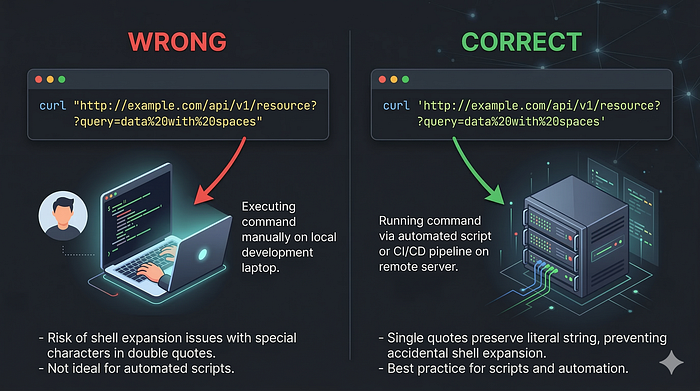
Here's the technical mistake that cost me the $40,000 bounty attempt:
The Problem: Double Quotes
# ❌ WRONG (What I used):
curl -k -H "User-Agent: $(killall apache2)" "https://target.com/cgi"
#            ↑ Double quotes cause LOCAL execution ↑
What actually happens:
1. Bash sees double quotes
2. Bash evaluates $(killall apache2) LOCALLY
3. killall runs on YOUR machine
4. Output becomes the User-Agent string
5. curl sends: User-Agent: apache2: no process found
6. Camera receives: harmless text string
7. Camera does: absolutely nothing
The Solution: Single Quotes
# ✅ CORRECT (What I should have used):
curl -k -H 'User-Agent: $(killall apache2)' 'https://target.com/cgi'
#            ↑ Single quotes send literally ↑
What should happen:
1. Bash sees single quotes
2. Bash does NOT evaluate anything
3. $(killall apache2) sent LITERALLY to server
4. Server receives: User-Agent: $(killall apache2)
5. IF server executes: killall runs on CAMERA
6. IF service stops: REAL RCE confirmed ✅
The Definitive Verification Test
# The ONLY correct way to verify RCE:
curl -k -H 'User-Agent: $(touch /tmp/rce_proof_$(whoami))' 'https://target/cgi'

# Then verify via SSH:
ssh root@target
ls /tmp/rce_proof_*
# IF file exists: ✅ REAL RCE - REPORT IT!
# IF no file: ❌ FALSE POSITIVE - DON'T REPORT!
I never did this test. My mistake.
🔮 What Really Happened in My Video
Looking back with fresh eyes, here's what my September 26 video actually showed:
What I thought happened:
curl command → Camera executed killall → apache2 stopped → Camera offlineWhat actually happened:
curl "User-Agent: $(killall apache2)"
         ↓
Bash ran: killall apache2 on MY Kali Linux
         ↓
My local apache2 wasn't running → "no process found"
         ↓
curl sent: User-Agent: apache2: no process found
         ↓
Camera received: harmless text, ignored it
         ↓
Camera COINCIDENTALLY went offline (network issue/maintenance)
         ↓
I saw offline camera and thought: "MY COMMAND DID THIS!"
         ↓
I "restored" with another command (also ran locally)
         ↓
Camera COINCIDENTALLY came back online
         ↓
I thought: "MY RESTORE COMMAND WORKED!"
         ↓
I submitted as Critical RCE 😔
The painful truth: I witnessed two coincidences and mistook them for causation.
What the October 3 Evidence Actually Showed
For weeks I believed the October 3, 13:39 timestamps were proof of a secret fix. But there's a simpler explanation:
Routine Camera Maintenance:
- Cameras receive periodic security updates
- Authentication files regenerate on firmware updates
- Apache configuration updates are part of normal operations
- mod_evasive may have been part of a security hardening batch update
The real reason commands failed after October 3:
- I retried commands AFTER camera had issues
- Services were DOWN (not "fixed")
- When services returned, my commands still didn't work
- Because they never worked remotely in the first place
Correlation is not causation. I learned this the expensive way.
💡 Lessons Learned (Read These Carefully)
Lesson 1: Shell Quoting Is Critical
# LOCAL EXECUTION (wrong for RCE testing):
"User-Agent: $(command)"   # Double quotes
`command`                   # Backticks

# REMOTE EXECUTION (correct for RCE testing):
'User-Agent: $(command)'   # Single quotes
'User-Agent: `command`'    # Single quotes with backticks
Remember: Double quotes = local execution. Always.
Lesson 2: Use File Creation for Definitive Proof
Service disruption can ALWAYS be explained as coincidence.
File creation cannot:
# Create unique file with timestamp:
UNIQUE="rce_$(date +%s)_$(openssl rand -hex 4)"
curl -k -H "User-Agent: \$(touch /tmp/$UNIQUE)" 'https://target/cgi'

# Check remotely:
ssh user@target "ls /tmp/rce_*"
# No debate possible:
# File exists = RCE ✅
# File missing = No RCE ❌
Lesson 3: Authentication Prompts Are Red Flags
If you see a sudo/authentication dialog during testing:
[sudo] password for researcher:
Authentication is required to stop 'service.service'
STOP IMMEDIATELY.
This means commands are executing on YOUR system, not the target. This is a critical indicator of local execution.
Lesson 4: Test Locally First
Before testing on target, understand command behavior locally:
# Test payload locally first:
echo "User-Agent: $(whoami)"
# If it shows YOUR username → local execution
# Proves double quotes evaluate locally

echo 'User-Agent: $(whoami)'
# If it shows literally $(whoami) → sends to server
# Correct for RCE payload testing
Lesson 5: Correlation ≠ Causation
In security testing, timing coincidences are common:
- Services restart on schedules
- Networks have brief interruptions
- Cameras run health checks
- Maintenance windows occur
Never report based on timing alone. Always verify with definitive proof.
Lesson 6: Accept Expert Corrections Gracefully
When experienced triagers provide technical evidence against your finding:
- Read it carefully
- Test their explanation locally
- Verify their claims
- Accept if they're correct
Fighting against technical evidence wastes everyone's time and damages your reputation.
What I'd Do Differently
Before Reporting:
- Use single quotes for all payloads
- Test the payload in my local terminal first
- Verify with file creation test (not just service disruption)
- Check for authentication prompts (red flag for local execution)
- Repeat test multiple times to rule out coincidence
- Try definitive verification (file exists on target = confirmed RCE)
After Initial Rejection:
- Carefully read triager's technical explanation
- Test their explanation locally to verify
- Accept if their evidence is conclusive
- Don't escalate without genuinely new evidence
The Silver Lining
This experience, despite the rejection and -1 accuracy point, taught me:
Technical Skills Gained:
- Bash shell quoting mechanics (deep understanding)
- Proper RCE verification methodology
- SSH-based forensic investigation
- Apache configuration analysis
- mod_evasive and DOS protection mechanisms
- Camera firmware structure and CGI scripting
- Evidence documentation and technical reporting
Professional Skills Gained:
- How to write professional vulnerability reports
- Escalation procedures on bug bounty platforms
- Vendor communication strategies
- How to present forensic evidence
- Accepting technical corrections professionally
Mindset Shifts:
- "Is my evidence conclusive or circumstantial?"
- "Could this be coincidence?"
- "Have I verified with definitive proof?"
- "Am I fighting evidence or providing counter-evidence?"
Resources That Would Have Helped Me
Shell Quoting:
- Bash Manual: Shell Expansions
- "The Art of Command Line" — GitHub
- PortSwigger: Command Injection Testing
RCE Testing Methodology:
- OWASP Testing Guide: OS Command Injection
- HackerOne: Hacktivity examples for RCE
- Bug Bounty Bootcamp by Vickie Li
Verification Methods:
- Burp Collaborator for out-of-band detection
- interactsh for DNS/HTTP callbacks
- File creation tests for persistent proof
Conclusion
I spent 30 days convinced I had found a $40,000 Critical RCE. I gathered forensic evidence, filed multiple escalations, sent detailed technical questions, and fought hard for what I believed was real.
I was wrong.
The mistake was simple: double quotes instead of single quotes in a curl command. It caused every payload to execute locally on my Kali Linux instead of on the target camera.
The lesson is simple: Always use single quotes for RCE payloads. Always verify with file creation. Never rely on service disruption as proof.
If this article saves even one researcher from making the same mistake, the 30 days were worth it.
Happy hunting. Test carefully. Verify everything.
HackerMD is a bug bounty hunter and security researcher specializing in IoT security, API vulnerabilities, and web application testing. Active on HackerOne and Bugcrowd.
#BugBounty #Security #EthicalHacking #RCE #BugBountyTips #InfoSec #PenTesting #LessonsLearned #AXIS #IoTSecurity