In this article, we'll explore HTML Injection in a simple and practical way what it is, how to identify it during testing, and how to create a proper Proof of Concept (PoC).
When I started learning web security, HTML Injection was one of the vulnerabilities I frequently encountered in labs and practice environments. Although it is often considered a basic issue, it is still commonly found in real-world web applications, especially in input fields such as signup forms, profile pages, and search functionalities.
This blog is written from a beginner's perspective to help you understand how HTML Injection works in real-world scenarios and why proper input validation is essential.
What is HTML Injection? HTML Injection is a common web vulnerability that occurs when user-supplied input is not properly validated or sanitized before being rendered in the browser. As a result, attackers can inject arbitrary HTML code that gets rendered as part of the web page.
In this article, we will identify and exploit an HTML Injection vulnerability using a deliberately vulnerable application, vulnweb.com, and demonstrate how user input is reflected and rendered as HTML.
Target Application The target used for this demonstration is Acunetix Art, a purposely vulnerable web application provided by Acunetix for security testing and educational purposes. Target URL: http://testphp.vulnweb.com/
Vulnerable Functionality The vulnerability exists in the Signup functionality of the application. Navigation path used: Home → Signup
Identifying the Vulnerability To test for HTML Injection, we attempt to inject a basic HTML tag into the Username field during user registration.
Payload Used
<h1>Hacked</h1>This payload is harmless and commonly used to confirm whether HTML is being rendered by the browser instead of being treated as plain text.
Exploitation Steps Access the Signup Page
Open the following URL in your browser: http://testphp.vulnweb.com/signup.php
You will see a signup form with multiple input fields, as shown in the image below:

In the Username field, enter the following payload:
<h1>Hacked</h1>Fill in the remaining fields with any test data and submit the form. As you see in the image below:
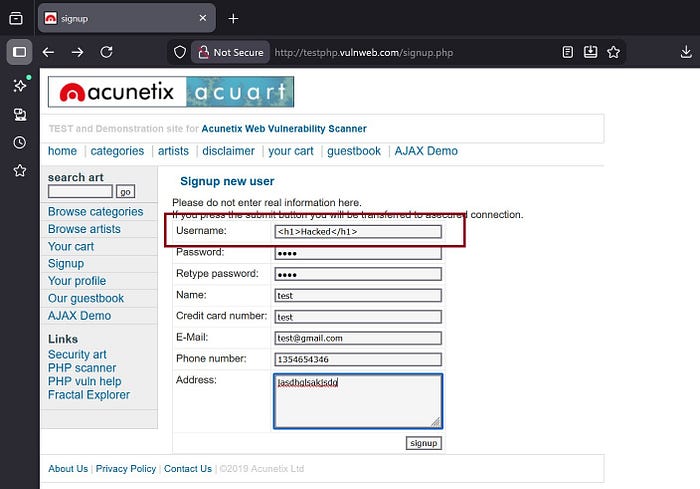
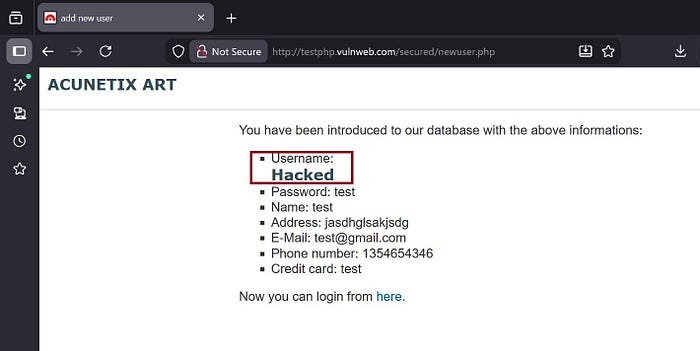
After successful registration, the application redirects to a confirmation page where the submitted details are displayed.
At this stage, the injected payload is rendered as HTML instead of being escaped. As shown in the image below:
Real World Impact of HTML Injection If HTML Injection is not fixed, it can cause serious security problems. An attacker can change how a web page looks, add fake or misleading content, or insert malicious links to trick users. Sometimes, this issue can also be used to move toward XSS attacks, which makes the impact even worse. Because of this, users may get redirected to harmful sites or lose sensitive information.
Recommendation To prevent HTML Injection, always validate user input on both the client and server side. Encode user-controlled data before displaying it so it appears as plain text, not HTML. Using secure templates and proper input sanitization helps block malicious tags before they reach the page.
Conclusion HTML Injection is a simple but risky vulnerability that occurs due to poor input handling. In this demonstration on vulnweb.com, we saw how a basic HTML payload injected into the signup form was rendered directly in the response. This clearly shows why proper input validation and secure coding practices are essential for web applications.
For more beginner-friendly blogs like this, follow me more blogs are coming soon. 😊
Thank you Vrushali Pagar