
Recently, I was tasked with testing a large logistics and cold-chain storage company. Their main web application was a modern, sleek, Single Page Application (SPA). On the surface, it seemed impenetrable: heavily shielded by Cloudflare's Web Application Firewall (WAF), utilizing reCAPTCHA v3 on all forms, and hiding its backend behind AWS infrastructure.
This is the story of how a methodical, step-by-step approach to JavaScript analysis — and one specific configuration mistake — allowed me to peel back the layers of their application and extract their entire internal architecture, hidden API endpoints, and backend secrets schema.
Here is the playbook of how it was done.
Phase 1: The Reconnaissance & The "Brick Wall"
Every engagement starts with mapping the attack surface. I fired up my standard passive reconnaissance pipeline: subfinder for subdomain enumeration, followed by httpx to probe for live HTTP services.
The results returned a mix of marketing sites, a VPN portal, and an exposed 1Password SCIM bridge. However, when attempting to interact with these endpoints, I hit a brick wall.
- Internal portals returned
403 Forbidden(Cloudflare Access policies blocking unauthorized IPs). - The VPN portal was firewalled.
- The main website's contact forms required a valid reCAPTCHA v3 token.
My Thought Process: "If the WAF is aggressively blocking my standard XSS/SQLi payloads via curl, and the backend APIs strictly validate captchas before processing any data, traditional backend exploitation via the command line is dead. I need to shift my focus entirely to the client-side. What is the frontend telling the browser that it isn't telling me?"
Phase 2: JavaScript Deconstruction
Modern SPAs rely heavily on JavaScript to function. To understand how the application communicates with its backend, I needed to extract all the JavaScript files the application was loading.
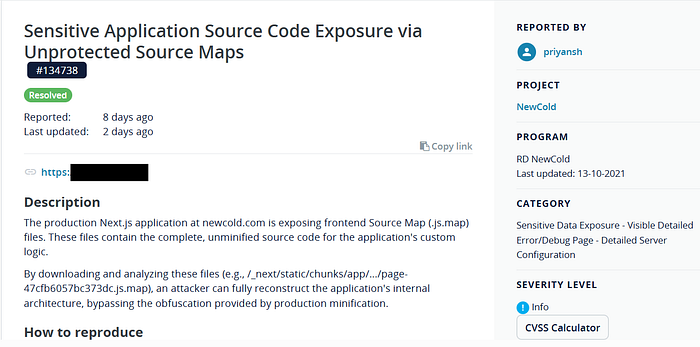
I parsed the HTML source and extracted the URLs for the application's JavaScript chunks. Because the app was built with Next.js (identifiable by the /_next/static/chunks/ paths), the logic was split across multiple chunked files (e.g., page-47cfb6057bc373dc.js).
I downloaded these files and began running targeted regex queries to hunt for interesting strings: API routes, hardcoded tokens, and third-party service integrations.
The Findings:
- Hidden API Routes: Buried in the minified code, I found
fetch("/api/submitContactForm"and, more interestingly,fetch("api/submitForm". Why are there two different contact form endpoints? - Third-Party Integrations: References to
SENDGRID_API_KEYandNEXT_AWS_SECRET_ACCESS_KEY(though, frustratingly, only as variable references, not hardcoded values). - Mapbox Token: I found a hardcoded Mapbox public token. However, testing it revealed the developers had correctly restricted it to their domain, rendering it useless for financial abuse.
My Thought Process: "I found the API routes, but I can't exploit them because of the captcha. I know they use SendGrid and AWS, but I don't have the keys. I'm looking at a heavily minified, obfuscated 200KB text file. I need a way to read this code in its original, unminified format."
Phase 3: The Next.js Source Map "Cheat Code"
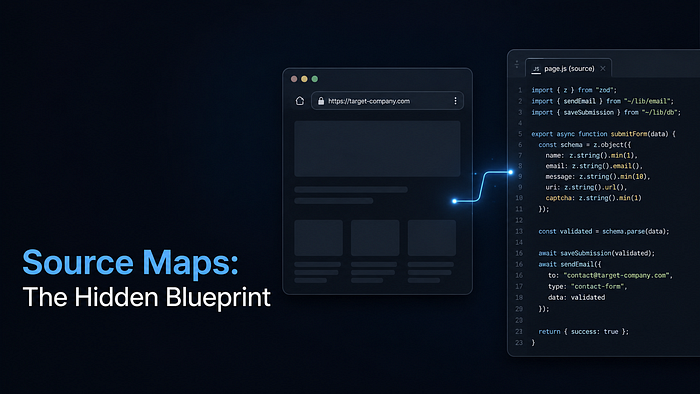
Any experienced frontend developer knows that debugging minified code in production is a nightmare. To solve this, build tools like Webpack (used by Next.js) generate "Source Maps" (.js.map files). These files act as a dictionary, translating the minified code back to the original, readable source code.
Developers are supposed to disable these in production. Frequently, they forget.
Taking a leap of faith based on the framework fingerprint, I took one of the JavaScript chunk URLs: /_next/static/chunks/app/%5B%5B...slug%5D%5D/page-47cfb6057bc373dc.js
And I simply appended .map to the end.
The Request:
GET /_next/static/chunks/app/%5B%5B…slug%5D%5D/page-47cfb6057bc373dc.js.map HTTP/2
The Response:
HTTP/2 200 OK content-type: application/octet-stream content-length: 81235
200 OK. An 81KB file containing the complete, unminified source code for that specific application route.
Phase 4: Mining the Goldmine
A .js.map file is formatted in JSON. The actual source code lives inside the "sourcesContent" array. I used jq (a command-line JSON processor) to extract just the readable code, stripping away the useless mathematical mapping data.
From there, it was like reading the developer's blueprint.
1. Uncovering the Headless CMS Architecture In the unminified code, I found multiple imports from a file called ~/__generated__/graphql:
import { type PostContactSubmissionMutationVariables } from "~/__generated__/graphql"; import { type AcfMediaItemConnectionEdge } from "~/__generated__/graphql";
The Deduction: AcfMediaItemConnectionEdge is a dead giveaway. "ACF" stands for Advanced Custom Fields, a plugin exclusively used in WordPress. Combined with graphql, this instantly revealed that the sleek Next.js frontend was just a headless wrapper pulling data from a WordPress + WPGraphQL backend.
2. Extracting the Exact API Validation Logic I found the exact code handling the /api/submitForm endpoint:
const response = await fetch("api/submitForm", { method: "POST", body: JSON.stringify({ data: { uri: pageData.uri, fields }, captcha, }), });
The Deduction: I now knew the exact JSON structure the backend expected. I knew it required a uri (likely a HubSpot or CMS form ID) and a fields object.
3. Enumerating Server-Side Environment Variables I extracted the exact Zod validation schema the backend used on startup:
REVALIDATE_SECRET_KEY: z.string().min(1), SENDGRID_API_KEY: z.string(), NEXT_AWS_SECRET_ACCESS_KEY: z.string(), RECAPTCHA_SECRET_KEY: z.string(),
Phase 5: The "Hacker's Perspective" (Impact)
If I were an advanced persistent threat (APT) targeting this company, how would I use this Information Disclosure?
- Bypassing the WAF via Direct Backend Targeting: The Cloudflare WAF successfully blocked my XSS payloads on the frontend. However, the source map revealed the exact location of the WordPress backend. If I could find the IP address of the internal AWS server hosting the WPGraphQL endpoint (via ASN lookup, Shodan, or a minor SSRF flaw elsewhere), I could bypass the Cloudflare WAF entirely and attack the WordPress backend directly.
- Targeted Exploitation: Instead of blindly fuzzing the main website, I now know exactly which proprietary GraphQL mutations (like
PostContactSubmissionMutation) to target. I can craft highly specific payloads to exploit potential business logic flaws in their email routing logic. - Credential Stuffing / LFI Preparation: Knowing they rely on AWS (
NEXT_AWS_SECRET_ACCESS_KEY) and SendGrid allows an attacker to pivot to AWS-specific misconfiguration attacks (e.g., S3 bucket fuzzing based on the AWS Account ID, or attempting to exploit known Server-Side Request Forgery vulnerabilities in older AWS SDK versions).
Conclusion: Why "Informational" Findings Matter
In the bug bounty world, findings like this are often marked as "Informational" or Low severity because they don't directly leak user passwords or result in Remote Code Execution. It's easy to get frustrated by this.
But information gathering is the most critical phase of an attack.
By finding these source maps, I transformed a black-box application into a white-box application. I stripped away the Cloudflare obfuscation, identified their exact backend technology stack (Next.js → WordPress → WPGraphQL → SendGrid), and mapped their hidden API endpoints.
For a defensive team, this write-up isn't just about a missing configuration flag. It's a warning: Your frontend is leaking your backend's blueprint to anyone with a browser and 5 minutes of free time.
The Fix: If you are a developer using Next.js, please ensure you explicitly disable source maps in your next.config.js:
module.exports = { productionBrowserSourceMaps: false, }