

When approaching a Windows system during an engagement, the first objective is simple: understand the environment before interacting with it.
This walkthrough focuses on structured system and network enumeration, highlighting how much information can be gathered without exploiting a single vulnerability.
Starting with Network Identification
The first step was to identify the system's position within the network.
ipconfigThis revealed the internal addressing scheme:
IPv4 Address: 192.168.132.x
Subnet Mask: 255.255.255.0
Default Gateway: 192.168.132.x
Even at this stage, we establish:
- The system is part of a private network
- The
/24subnet suggests a typical small-to-medium environment

Verifying System Context
Before moving further, I checked system time and environment context.
date /t
time /t
This helps correlate logs later and understand whether the system is actively used or part of a lab environment.

SMB Activity and Workstation Statistics
Next, I inspected workstation-level network statistics.
net statistics workstationThe output showed:
- Minimal SMB activity
- No read/write operations
- No network errors
This suggests either a controlled environment or low user interaction at the time.

Identifying Logged-in Users
Understanding who is actively using the system is critical.
PsLoggedon.exeThis revealed:
Active User: MSEDGEWIN10\IEUserThis immediately gives a foothold for:
- User-level targeting
- Credential-based attacks
- Session hijacking (in real environments)

Logon Sessions and Authentication Context
To go deeper, I enumerated logon sessions.
LogonSessions.exeKey observations:
- Authentication: NTLM
- SID: SYSTEM-level context (
S-1-5-18) - No domain controller references
This confirmed that the system is operating in a WORKGROUP, not a domain environment.

Enumerating Shares and Sessions
Next, I checked for shared resources.
net shareAvailable shares included:
- ADMIN$
- C$
- D$
- IPC$
- backup
- HR
- public
The presence of backup and HR shares is particularly interesting, as these often contain sensitive data.
net sessionNo active sessions were found, indicating no current remote connections.

Process Enumeration
To ensure there were no suspicious processes running:
pslist.exeThe system showed only standard Windows processes:
- System
- smss
- csrss
- winlogon
No anomalies were observed, indicating a clean baseline.

Network Activity Analysis
To understand real-time communication:
netstat -eThis confirmed:
- Active packet transmission
- No errors or dropped packets

Open Ports and Active Connections
A deeper look into network connections:
netstat -anoRevealed:
- Port 135 (RPC)
- Port 445 (SMB)
- Dynamic RPC ports
- Active outbound HTTPS connections
The exposure of SMB (445) is always significant, as it is one of the most targeted services in Windows environments.

Routing and Network Structure
To map network paths:
netstat -rThis confirmed:
- Default route via
192.168.132.x - Local subnet communication

External Communication Insight
Further inspection of connections showed:
- Multiple outbound HTTPS connections
- States such as ESTABLISHED, TIME_WAIT, CLOSE_WAIT
This indicates the system is actively communicating with external infrastructure.
NetBIOS Enumeration
To gather host-level identity:
nbtstat -nFindings:
- Hostname: MSEDGEWIN10
- Workgroup: WORKGROUP
- NetBIOS services active

Deep Network Configuration
For a complete overview:
ipconfig /allThis revealed:
- Network adapter details
- MAC address
- DHCP configuration

DNS Cache — A Hidden Goldmine
One of the most valuable steps in enumeration:
ipconfig /displaydnsThis exposed:
icpanel.hackcrack.io → 192.168.132.xThis is critical because:
- It reveals previously accessed domains
- It can expose internal or external infrastructure
- It provides pivot points for further investigation

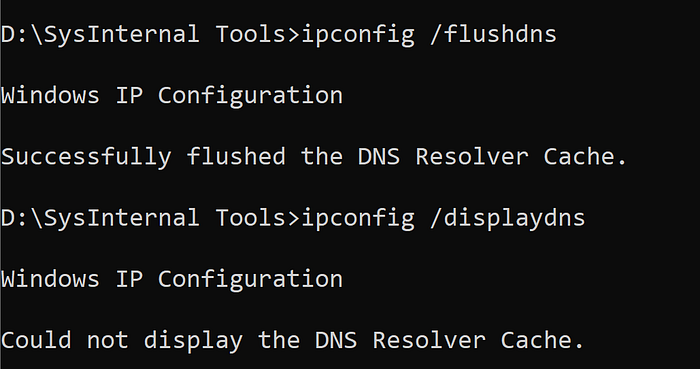
Clearing DNS Cache
To verify control over the system:
ipconfig /flushdns
ipconfig /displaydns
The cache was successfully cleared, confirming command execution and system interaction.
Key Takeaways
This exercise demonstrates that even without exploitation, a large amount of valuable information can be gathered:
- Internal network structure
- Active users
- Shared resources
- Open services
- External communication
- Cached domain intelligence
Final Thoughts
Enumeration is often underestimated, but in real-world scenarios, it is one of the most critical phases of any engagement.
The difference between a failed attack and a successful compromise often lies not in exploitation skills — but in how well the attacker understands the environment.
This walkthrough reinforces a simple principle:
The more you know about the system, the less you need to guess.