

Overview
The ShadowRoast lab from CyberDefenders provides a comprehensive look into a multi-stage attack targeting Active Directory environments. This investigation tracks a threat actor's journey from a deceptive initial foothold via a masqueraded "AdobeUpdater" binary to the sophisticated abuse of Kerberos and Active Directory replication. By leveraging Splunk and Sysmon telemetry, we dissect the adversary's methodology as they navigate the network, escalate privileges, and attempt to remain under the radar.
The writeup follows a logical flow of incident response, starting with process creation analysis to identify malicious files and moving into registry-based persistence. The core of the challenge highlights the transition from a low-privilege user to a high-value target through AS-REP Roasting and the rare, stealthy DCShadow attack. This lab serves as a masterclass in identifying the subtle log signatures left behind by popular offensive tools like Rubeus and Mimikatz.
Scenario
As a cybersecurity analyst at TechSecure Corp, you have been alerted to unusual activities within the company's Active Directory environment. Initial reports suggest unauthorized access and possible privilege escalation attempts.
Your task is to analyze the provided logs to uncover the attack's extent and identify the malicious actions taken by the attacker. Your investigation will be crucial in mitigating the threat and securing the network.
Lab Reference: Blue team CTF Challenges | ShadowRoast — CyberDefenders
Analysis
- What's the malicious file name utilized by the attacker for initial access?
Start by filtering for the usual culprits, cmd.exe and powershell.exe without narrowing the scope to a specific endpoint. Selecting useful fields helps us visualize processes, parent processes, and their command line arguments.
Run the following SPL query — note the line containing eval can be optionally removed, I included it for readability.
index="shadowroast" AND event.code=1 AND (winlog.event_data.Image=*cmd* OR winlog.event_data.Image=*powershell*)
| eval command_length=len('winlog.event_data.CommandLine')
| where command_length < 50
| table _time, winlog.computer_name, winlog.event_data.User, winlog.event_data.Image, winlog.event_data.CommandLine, winlog.event_data.ParentImage, winlog.event_data.ParentCommandLine
| sort -_time

The malicious file name utilized for initial access was executed on Office-PC.CORPNET.local from CORPNET\sanderson's Downloads directory.
The SPL above limits search results to images (processes) that include powershell.exe or cmd.exe, and have an event.code of 1. Event ID 1 is a Sysmon log that tracks process creation.
Full Path: C:\Users\sanderson\Downloads\AdobeUpdater.exe
Q2. What's the registry run key name created by the attacker for maintaining persistence?
Knowing the name of the malware, let's update our SPL to include it. In addition, since we're looking for registry values set, filter for event.code="13".
index="shadowroast" event.code="13" "*AdobeUpdater.exe*"Expand the event and check the winlog.event_data_TargetObject field. This field value tells us what value was set, along with the full path.

Q3. What's the full path of the directory used by the attacker for storing his dropped tools?
Looking at the timestamp from the last event, where autoruns registry persistence was created, make note of the timestamp 2024-08-06T01:05:58. We can assume that tools would have been dropped somewhere around that time — while this isn't always the case, it's a starting point.

Edit your SPL to display event.code="11" which shows Sysmon file creation events. We're interested in the winlog.event_data.TargetFilename field. Create a table which includes the timestamp, event code, and file name. We can confirm that three files were created in C:\Users\Default\AppData\Local\Temp\ on 2024–08–06 between 01:07:09 and 01:07:19, minutes after persistence was established.
index="shadowroast" event.code="11" "*AdobeUpdater.exe*" "winlog.computer_name"="Office-PC.CORPNET.local"
| table _time, event.code, winlog.event_data.TargetFilename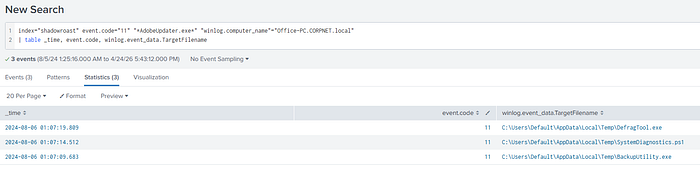
Q4. What tool was used by the attacker for privilege escalation and credential harvesting?
Surely one of these tools transferred to Office-PC.CORPNET.local has to be involved.
Modify the SPL query to include all possible IOCs identified. Expand the event.code filter so we're not limited to a specific event ID.
index="shadowroast" event.code="*" ("*AdobeUpdater.exe*" OR "*DefragTool.exe*" OR "*SystemDiagnostics.ps1*" OR "*BackupUtility.exe*") winlog.computer_name="Office-PC.CORPNET.local"Expand the winlog.event_data.OriginalFileName field to inspect it's contents. There's a few files that immediately caught my eye:
ab.exe— I've seen it before, it's never a good sign.mimikatz.exe— A popular utility used for harvesting credentials from memory.Rubeus.exe— Like Mimikatz, this is a multi-purpose utility commonly used for various, malicious purposes, specifically designed for interacting with, and abusing Kerberos.

Next, refine the SPL query to include our newly discovered "OriginalFileNames":
index="shadowroast" event.code="*" ("*AdobeUpdater.exe*" OR "*DefragTool.exe*" OR "*SystemDiagnostics.ps1*" OR "*BackupUtility.exe*") winlog.computer_name="Office-PC.CORPNET.local" AND (winlog.event_data.OriginalFileName="*ab.exe*" OR winlog.event_data.OriginalFileName="*mimikatz*" OR winlog.event_data.OriginalFileName="*rubeus*")We're down to 10 results. Looking through each event I quickly found a process creation event where "BackupUtility.exe" aka "Rubeus.exe" executed from C:\Users\Default\AppData\Local\Temp\BackupUtility.exe.


Interestingly, we can see the winlog.event_data.CommandLine field captured the command line arguments passed to Rubeus. We can conclude that Rubeus was instructed to perform an asreproast, and format the output in a manner in which it can be ingested into Hashcat.
By performing an asreproast, the threat actor is attempting to retrieve the ticket granting ticket (TGT) for any account that has the "Do not require Kerberos pre-authentication" setting enabled. This attack preys on the fact that the authentication service reply (AS_REP) is encrypted with the account's password, and any domain user can request it.
The resulting hash can be cracked offline using tools such as John the Ripper (JTR), or Hashcat.
Here's a quick snippet from an article I found to give you an idea of what the threat actor saw when running this command, assuming it was successful:

Q5. Was the attacker's credential harvesting successful? If so, can you provide the compromised domain account username?
Zooming out and looking at surrounding context is important. We know that Rubeus was executed, and if successful would have provided the threat actor with a hash for which they could have attempted cracking offline. Assuming they were successful in doing so, we would likely see activity for a different account, one which would provide them with the means to move vertically.
Once again, refine the SPL filter selecting fields that help us visualize key activities.
index="shadowroast" event.code="*" ("*AdobeUpdater.exe*" OR "*DefragTool.exe*" OR "*SystemDiagnostics.ps1*" OR "*BackupUtility.exe*") winlog.computer_name="Office-PC.CORPNET.local" AND (winlog.event_data.OriginalFileName="*ab.exe*" OR winlog.event_data.OriginalFileName="*mimikatz*" OR winlog.event_data.OriginalFileName="*rubeus*")
| table _time, winlog.event_data.OriginalFileName, winlog.event_data.Image, winlog.event_data.User
On 2024–08–06 between 01:05:11 and 01:05:15 Activity is observed involving ab.exe (AdobeUpdater.exe), the malware which was downloaded and executed under the context of CORPNET\sanderson. This represents the initial execution and the point where the attack chain began.
On 2024–08–06 at 01:10:45 Evidence shows BackupUtility.exe (Rubeus.exe) being executed by CORPNET\sanderson to perform an AS-REP roasting attack to harvest hashes.
- Note: It is important to note that
asreproastdoes not require elevated privileges and can be performed from a low-level domain user account.
On 2024–08–06 between 01:14:46 and 01:14:47 We see DefragTool.exe (Mimikatz.exe) executed with NT AUTHORITY\SYSTEM privileges. Since Mimikatz requires administrative rights to interact with LSASS, this confirms that privilege escalation has occurred. This suggests the prior asreproast attack was successful, providing the threat actor with credentials for an account with local administrative rights.
On 2024–08–06 at 01:15:18 Mimikatz is executed again, and we now see the user CORPNET\tcooper in the winlog.event_data.User field. This indicates the threat actor has successfully moved from the initial sanderson context to the tcooper account, likely by using the elevated SYSTEM privileges to steal credentials or impersonate the target user's session.
Q6. What's the tool used by the attacker for registering a rogue Domain Controller to manipulate Active Directory data?
So what's a DCShadow attack?
A DCShadow attack allows an adversary with high-level privileges to register a rogue workstation as a temporary Domain Controller to bypass standard security logging and monitoring. By using this "ghost" DC to push malicious changes — like SID history or password resets directly to the Active Directory replication stream. The attacker ensures the changes appear as legitimate replication traffic rather than suspicious administrative actions.
index="shadowroast" AND (event.code="4928" OR event.code="4929" OR event.code="4662")Alright, next stop — MITRE ATT&CK, we need to know how to identify this attack in the logs available to us.
MITRE ATT&CK includes a section which tells us under which log sources, and event IDs to check:

Build an SPL query which includes those events. A single event returns indicating "An Active Directory replica source naming context was removed."

A Google search "tools for DCShadow attacks hacktricks" led me to a wiki page providing instructions on how to perform the attack using Mimikatz.

Note: For an attacker to successfully execute a DCShadow attack, they don't just need "admin rights", they specifically require two extended rights on the domain object: DS-Install-Replica and DS-Replication-Get-Changes-All. These permissions allow a workstation to act like a legitimate domain controller during the replication process.
By abusing these rights, the adversary bypasses the standard Direct Service (DS) logging that occurs when an administrator manually changes a user's attribute (like a password or group membership). Instead, the change is "pushed" as a replication update, which the rest of the domain trusts implicitly. This is why monitoring for the creation of new nTDSDSA objects is a critical, yet often an overlooked detection strategy.
Q7. What's the first command used by the attacker for enabling RDP on remote machines for lateral movement?
Enabling RDP can be done in several ways, as shown in this article.
Among the many methods shown in the article, most include a common path, and keywords such as "Terminal Server" and "fDenyTSConnections". Filtering for either of these should get us where we need to be.

index="shadowroast" AND "*Terminal Server*"The SPL specified above returns 5 results. Among those results are two Event ID 13's (registry value set) and two Event ID 1's (process creation).

Looking at the winlog.event_data.CommandLine value we can see the full command line passed to reg.exe used to enable RDP.

Format: add "hklm\system\currentcontrolset\control\terminal server" /f /v fDenyTSConnections /t REG_DWORD /d 0
Q8. What's the file name created by the attacker after compressing confidential files?
We know that the files staged for exfiltration were likely zipped towards the end of the attack chain. Use the timestamp captured from the previous question as a starting point.

The question indicates files were compressed — knowing this we can build an SPL query to filter for file creation events, and common formats associated with compressed files.
index="shadowroast" AND event.code="11" AND (*.7z OR *.zip OR *.gzip)A single event returns, which also happened to be within minutes following the threat actor enabling RDP for lateral movement.

This event confirms that a file named CrackDump.zip was created in C:\Users\Default\AppData\Local\Temp on FileServer.CORPNET.local by CORPNET\tcooper (the compromised user) in preparation for exfiltration.

Summary
In summary, the attack on the CORPNET domain demonstrates the critical importance of monitoring "Living off the Land" techniques and administrative tool abuse. The adversary successfully established a foothold, dropped a suite of offensive tools in temporary directories, and leveraged Rubeus to harvest credentials. By cracking an account hash, they achieved SYSTEM privileges and moved laterally, eventually compromising a secondary administrative account to stage data for exfiltration.
The investigation concludes with the detection of a DCShadow attack, where the attacker bypassed traditional logging by injecting changes directly into the AD replication stream. This writeup underscores the necessity of monitoring specific Windows Event IDs, such as 4928 and 4929 to catch rogue Domain Controller registration. Ultimately, this case study emphasizes that even when an attacker enables RDP or zips confidential data for exfiltration, a diligent analyst can reconstruct the entire kill chain through precise SPL queries and a deep understanding of Windows artifacts.