The goal was to find out if any user credentials were being sent in clear text. In this lab, I worked as a network security specialist investigating a possible data leak by analyzing packet capture data using Wireshark.
Tools Used
- Wireshark
- Linux terminal
- PCAP file analysis
What I Did
I started by opening the packet capture file and reviewing the traffic.
Since going through every packet manually would take too long, I used the terminal to speed things up and search for possible credentials:
strings /home/labex/project/network_analysis/company_traffic.pcap | grep -iE "user|pass|login"
- strings → pulls readable text from the packet capture
- grep -iE → searches for keywords like user, password, login (case-insensitive)
This helped me quickly find anything that looked like login data.
Findings
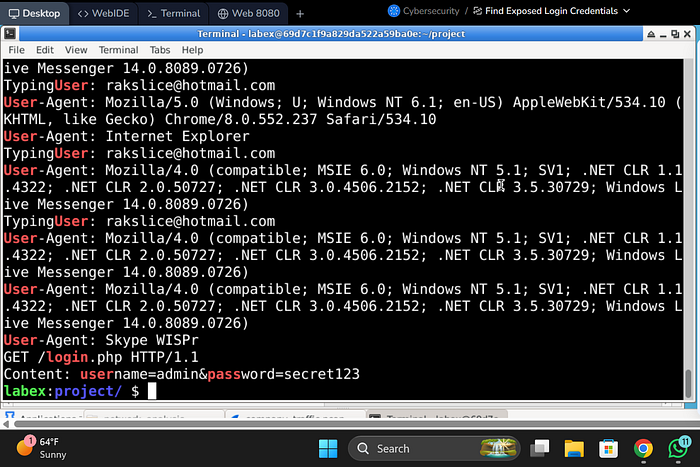
- I found HTTP traffic that contained login information
- Specifically, I saw a POST request with:
- Username
- Password
The key issue was that this data was in plain text, meaning it was not encrypted.
What I Noticed
- HTTP traffic is not secure, so credentials can be exposed easily
- Using simple keyword searches can quickly reveal sensitive data
- This kind of issue would be very easy for an attacker to exploit if they are monitoring traffic
Documentation Step
After finding the credentials, I saved them using:
echo -e "username: [found username]\npassword: [found password]" > /home/labex/project/network_analysis/found_credentials.txt
This step is important for documenting findings during an investigation.
Impact
If this happened in a real company:
- Attackers could capture login credentials directly from network traffic
- This could lead to:
- Unauthorized access
- Account takeover
- Data breaches
It clearly shows why unencrypted protocols like HTTP are risky.
Conclusion
This lab showed how easy it is to find exposed credentials when traffic is not encrypted.
It also reinforced why secure protocols like HTTPS should always be used for login systems.