
Introduction
In today's digital world, almost everything we use runs on a web application. From checking emails, shopping online, booking tickets, using banking services, watching movies, or even ordering food, all these services are powered by web applications.
Because web applications are widely used and exposed to the internet, they are also one of the most common targets for cyber attacks. Security teams often receive alerts related to suspicious activities happening in web applications. But before someone can investigate those alerts, they must clearly understand how a web application actually works behind the scenes.
This blog is the first part of my series "How to Investigate Web Application Alerts". Before we jump into analyzing attacks, logs, vulnerabilities, and investigation techniques, it is very important to understand the fundamentals of web applications.
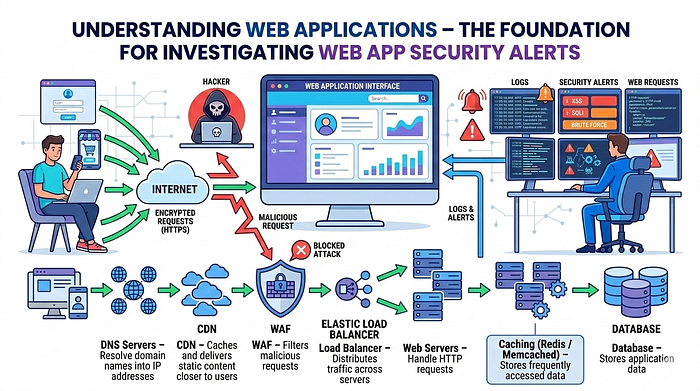
In this article, we will cover:
- What a web application is
- How web applications work
- The full workflow of a web request
- Components of a web application
- Web application architecture
- Infrastructure involved
- Data flow inside web applications
- Security layers involved in web apps
- Where logs are generated
- Why understanding these components is critical for security investigation
This article will serve as the foundation for the entire investigation series.
What is a Web Application?
A web application is a software program that runs on a web server and is accessed through a web browser over the internet.
Instead of installing software on your computer, you simply open a browser and access the application through a URL.
Examples of web applications include:
- Email services
- Social media platforms
- Online banking portals
- E-commerce websites
- Ticket booking systems
- Cloud storage services

Whenever you interact with a website that allows login, form submission, searching, or purchasing items, you are interacting with a web application.
Unlike static websites, web applications are dynamic, meaning they generate responses based on user input and data stored in databases.
Basic Example of a Web Application
Let's take a simple example.
Imagine you visit an online shopping website.
You:
- Open the website
- Search for a product
- Add the product to your cart
- Login to your account
- Make a payment
Behind the scenes, many systems work together to make this happen.
The web application will:
Receive your request -> Process it on the server -> Fetch data from databases -> Apply business logic -> Return the result to your browser
All this happens in milliseconds.
Core Components of a Web Application
A typical web application consists of multiple components working together. The main components include:

1. Client (User Side)
The client is the user's device where the web application is accessed.
Examples include:
- Web browsers
- Mobile browsers
- Mobile applications
- APIs used by third-party services
Popular browsers include:
- Google Chrome
- Mozilla Firefox
- Microsoft Edge
- Safari
The client sends HTTP or HTTPS requests to the server and displays the response received from the server.
2. Web Server
The web server is responsible for handling incoming HTTP requests from clients.
Common web servers include:
- Apache
- Nginx
- IIS
The web server performs tasks such as:
- Receiving HTTP requests
- Serving static content (HTML, CSS, JS, images)
- Forwarding dynamic requests to application servers
- Managing connections
For example, when you open a website URL, the request first reaches the web server.
3. Application Server
The application server contains the business logic of the web application.
It processes user requests and performs operations such as:
- Authentication
- Authorization
- Data processing
- Interacting with databases
- Generating dynamic content
Common application frameworks include:
- Node.js
- Java Spring Boot
- .NET
- Django
- Flask
- Ruby on Rails
The application server decides how the application behaves.
4. Database
The database stores all the data used by the application.
Examples include:
- User accounts
- Passwords
- Orders
- Product details
- Transaction records
- Logs
- Session information
Common databases include:
- MySQL
- PostgreSQL
- MongoDB
- Oracle
- Microsoft SQL Server
The application server queries the database whenever data needs to be retrieved or updated.
5. APIs
APIs allow different services or applications to communicate with each other.
Many modern web applications use APIs to:
- Connect mobile apps
- Integrate payment gateways
- Connect third-party services
- Fetch external data
Examples include:
- Payment APIs
- Authentication APIs
- Map services APIs
APIs play a major role in modern microservice architectures.
The Complete Workflow of a Web Request
Understanding the lifecycle of a web request is extremely important for security investigation.
Let's walk through the entire workflow.
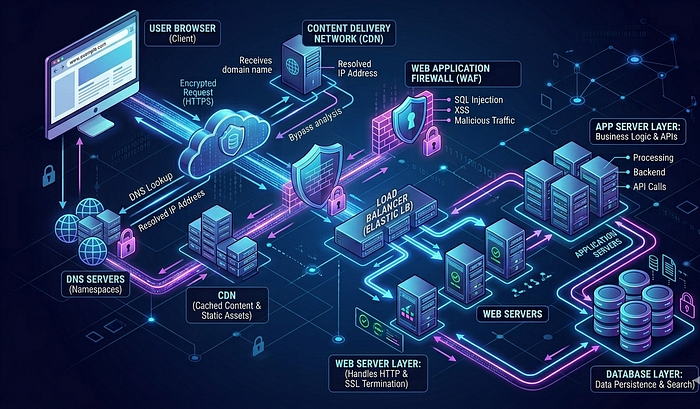
Step 1: User Enters URL
The user enters a URL in the browser.
Example:
https://example.com/loginStep 2: DNS Resolution
The browser needs to convert the domain name into an IP address.
It sends a request to a DNS server.
The DNS server returns the IP address of the web server.
Example:
example.com -> 192.168.1.10Step 3: Browser Sends HTTP Request
The browser sends an HTTP or HTTPS request to the server.
Example request:
GET /login HTTP/1.1
Host: example.com
User-Agent: Chrome
Step 4: Request Reaches Security Layer
Before reaching the application, the request may pass through multiple security layers:
- CDN
- WAF
- Load Balancer
- Reverse Proxy
These layers help filter malicious traffic.
Step 5: Load Balancer Distribution
If the application has multiple servers, the request goes through a load balancer.
The load balancer distributes traffic across multiple servers to improve performance and availability.
Step 6: Web Server Processing
The web server receives the request.
It checks:
- URL path
- Request headers
- Static vs dynamic content
If the request is dynamic, it forwards it to the application server.
Step 7: Application Server Execution
The application server processes the request.
It may perform operations like:
- Validate user input
- Authenticate users
- Execute business logic
- Query database
Step 8: Database Interaction
If data is needed, the application queries the database.
Example queries:
- Fetch user profile
- Check login credentials
- Retrieve product data
The database returns the requested data.
Step 9: Application Generates Response
The application generates a response.
Example response formats:
- HTML
- JSON
- XML
Step 10: Response Sent to Client
The server sends the response back to the browser.
The browser then renders the content and displays the page to the user.
Web Application Architecture
Web applications are designed using different architectures. The most common architecture is the Three-Tier Architecture.
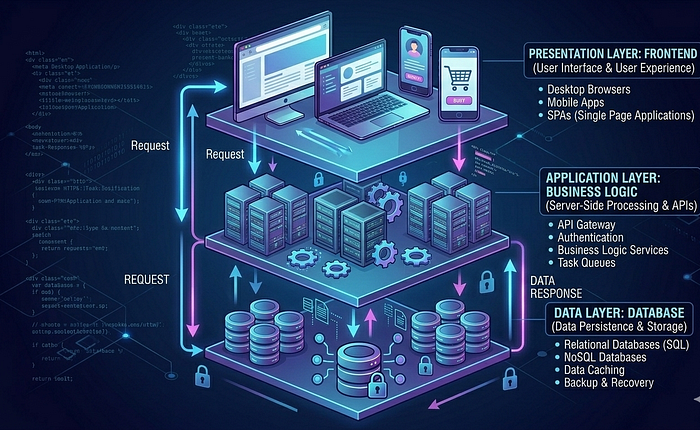
1. Presentation Layer
This is the frontend of the application.
- It includes: HTML, CSS, JavaScript, UI frameworks
This layer interacts with users.
2. Application Layer
- This layer handles: Business logic, Request processing, Authentication, Authorization
It connects the frontend to the database.
3. Data Layer
This layer stores all application data.
- It includes: Databases, Data storage, Data management systems
Modern Web Application Architecture
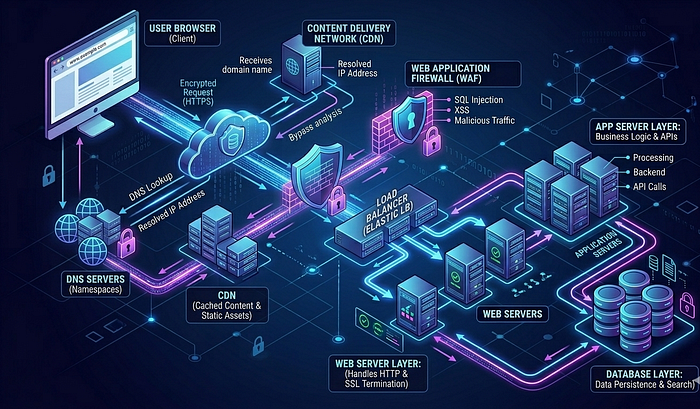
Many modern applications follow microservices architecture.
Instead of one large application, the system is divided into multiple smaller services.
Each service handles a specific function such as:
- Authentication
- Payments
- User management
- Notifications
Benefits include:
- Scalability
- Flexibility
- Faster deployment
- Easier maintenance
Infrastructure Behind Web Applications
A real-world web application runs on multiple infrastructure components. These include:
- DNS Servers — Resolve domain names into IP addresses.
- CDN (Content Delivery Network) — Delivers static content faster by caching it near users.
- WAF (Web Application Firewall) — Filters malicious requests.
- Load Balancers — Distribute traffic across servers.
- Web Servers — Handle HTTP requests.
- Application Servers — Execute application logic.
- Databases — Store application data.
- Caching Systems — Improve performance by storing frequently accessed data. Examples include Redis and Memcached.
Types of Web Application Data
Web applications process different types of data:
- User Data — Usernames, passwords, profiles.
- Transaction Data — Orders, payments, purchases.
- Session Data — User login sessions.
- Application Logs — System activities.
- Security Logs — Security-related events.
Where Logs Are Generated in Web Applications
For security investigations, logs are extremely important.
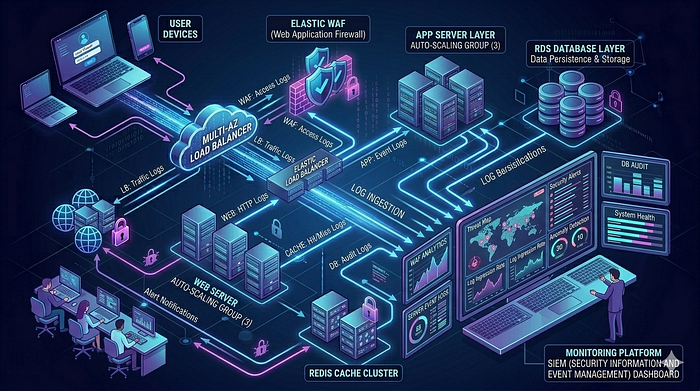
Logs can be generated at multiple layers. Examples include:
- Web Server Logs — Contain request details like: IP address, Request path, Status code, User agent
- Application Logs — Contain application events like: Login attempts, Errors, API calls
- Database Logs — Track database queries and transactions.
- WAF Logs — Contain blocked attacks and suspicious requests.
- Load Balancer Logs — Track incoming traffic.
- Authentication Logs — Track login activities.
Understanding which logs to analyze is critical during investigations.
We will explore these logs in detail in upcoming blogs.
Why Understanding Web Applications is Important for Security Investigation
When a security alert is triggered, investigators must answer questions such as:
- What exactly happened?
- Which component received the request?
- Did the request reach the application server?
- Did it interact with the database?
- Was the request blocked by WAF?
- Which logs should be analyzed?
Without understanding the web application architecture, it becomes extremely difficult to investigate alerts properly.
That is why understanding the entire request flow and system components is essential for security analysts.
Common Attack Surfaces in Web Applications
Web applications expose multiple attack surfaces. Some common ones include:
- Login pages
- Search functionality
- File uploads
- APIs
- Form inputs
- Authentication systems
- Session management
Attackers often target these components to exploit vulnerabilities.
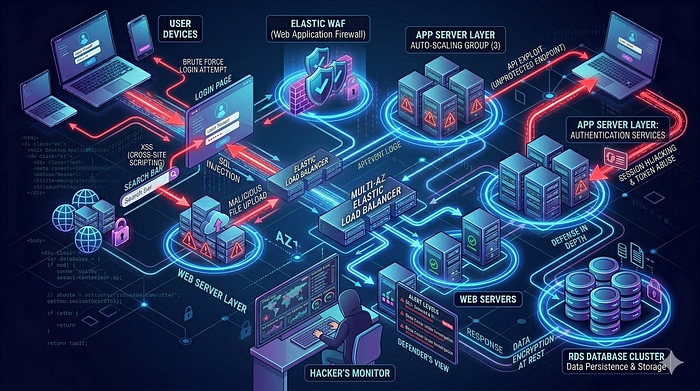
In upcoming articles, we will explore attacks such as:
- SQL Injection
- Cross Site Scripting
- Command Injection
- File Upload Attacks
- Authentication Bypass
- Directory Traversal
More importantly, we will focus on how to investigate alerts generated from these attacks.
Conclusion
Web applications are complex systems made up of multiple components working together. From the moment a user enters a URL to the moment a page loads in the browser, many systems process the request behind the scenes.
Understanding these systems is the first and most important step for anyone investigating web application security alerts.
In this blog, we explored:
- What web applications are
- How they work
- Key components involved
- Web request workflow
- Application architecture
- Infrastructure components
- Logging layers
- Attack surfaces
This knowledge forms the foundation for web application security investigations.
In the upcoming articles in this series, we will go deeper into topics such as:
- Web server logs analysis
- Application logs investigation
- Identifying web attacks in logs
- Investigating SQL injection alerts
- Analyzing XSS attempts
- Understanding WAF alerts
- Step-by-step investigation techniques used by SOC analysts
Stay tuned for the next article in the "How to Investigate Web Application Alerts" series.