June 3, 2026
When Your Login System Becomes the Attacker: PAM Modules as a Double-Edged Sword
In the last article, we examined how nginx modules, a tool designed to serve web traffic, can be exploited by an attacker who has gained a…

Adolph Gasper
4 min read
In the last article, we examined how nginx modules, a tool designed to serve web traffic, can be exploited by an attacker who has gained a foothold on your server. Today, we go deeper into the Linux stack, the authentication layer itself.
This is about PAM (Pluggable Authentication Modules) and how the same flexibility that makes it powerful for sysadmins makes it a perfect persistence mechanism for attackers.
What is PAM?
PAM is the authentication backbone of Linux. When you SSH into a server, runsudo, or unlock a screen, PAM is what decides whether you get in. It sits between the application (sshd, sudo, login) and the actual credential check.
The genius of PAM is that it's modular. Instead of every application implementing its own auth logic, they all delegate to PAM, and PAM loads a stack of modules defined in /etc/pam.d/. You can chain modules, add MFA, integrate LDAP, or write your own.
That last part is where things get interesting.
The Legitimate Use Case
Consider a common sysadmin problem: you manage a DigitalOcean droplet. The root password was set by the provisioner, and you never wrote it down. You don't want to change it in case it's used somewhere. You work from multiple devices, so a single SSH key is inconvenient.
The clean solution: write a PAM module that accepts your own personal password for root login, sitting in front of the normal auth stack. If your password matches you're in. If not, PAM falls through to normal Unix auth.
This is exactly the kind of problem PAM was designed to solve.
Building One in Nim
Most PAM modules are written in C. But any language that can compile to a .so shared library works. Here we use Nim, a systems language that compiles to C , to show how accessible this has become.
A PAM module is just a .so file that exports specific function names. PAM's loader does a dlsym() lookup at runtime:
pam_sm_authenticate:Called for theauthstackpam_sm_setcred:Called to set credentials after authpam_sm_acct_mgmt:called for theaccountstack- and so on
The names must match exactly. If they don't, the module is silently skipped.
The core of the module is straightforward, get the username, get the conversation function, prompt for a password, and compare it.
PAM_EXTERN int pam_sm_authenticate(pam_handle_t *pamh, int flags,
                                    int argc, const char **argv) {
  const char *user = NULL;
  pam_get_user(pamh, &user, NULL);
  // only apply to root
  if (strcmp(user, "root") != 0)
    return PAM_AUTH_ERR;
  // get the conversation function to prompt for password
  struct pam_conv *conv;
  pam_get_item(pamh, PAM_CONV, (const void **)&conv);
  // prompt
  struct pam_message msg = { .msg_style = PAM_PROMPT_ECHO_OFF,
                              .msg = "Password: " };
  const struct pam_message *msgp = &msg;
  struct pam_response *resp = NULL;
  conv->conv(1, &msgp, &resp, conv->appdata_ptr);
  // compare
  if (strcmp(resp->resp, SECRET_PASS) == 0)
    return PAM_SUCCESS;
  return PAM_AUTH_ERR;
}
PAM_EXTERN int pam_sm_authenticate(pam_handle_t *pamh, int flags,
int argc, const char **argv) {
const char *user = NULL;
pam_get_user(pamh, &user, NULL);
// only apply to root
if (strcmp(user, "root") != 0)
return PAM_AUTH_ERR;
// get the conversation function to prompt for password
struct pam_conv *conv;
pam_get_item(pamh, PAM_CONV, (const void **)&conv);
// prompt
struct pam_message msg = { .msg_style = PAM_PROMPT_ECHO_OFF,
.msg = "Password: " };
const struct pam_message *msgp = &msg;
struct pam_response *resp = NULL;
conv->conv(1, &msgp, &resp, conv->appdata_ptr);
// compare
if (strcmp(resp->resp, SECRET_PASS) == 0)
return PAM_SUCCESS;
return PAM_AUTH_ERR;
}Install it to /lib/x86_64-linux-gnu/security/ and add one line to /etc/pam.d/sshd:
auth sufficient pam_auth.soauth sufficient pam_auth.sosufficient means: if this passes, stop checking and let them in. If it fails, continue down the stack to normal auth.
The sshd_config Gotcha
One thing worth highlighting from real-world testing: PermitRootLogin must be set to yes, not prohibit-password.
When set to prohibit-password, sshd doesn't just block key-less root logins , it actively interferes with the PAM conversation, injecting its own rejection response into the password buffer. The result is garbled input reaching your module with control characters prepended to whatever the user typed. Authentication fails in a confusing and hard-to-debug way.
This is a subtle but important behavior: sshd can corrupt the PAM conversation before your module even gets clean input.
Now Flip It: The Attacker's Perspective
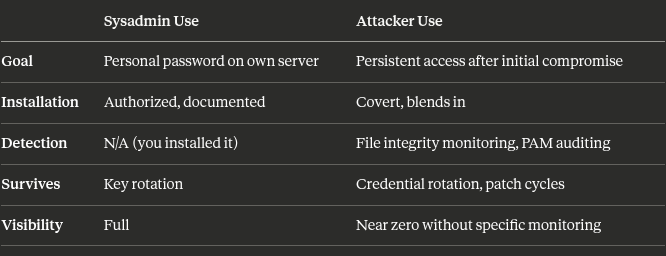
Everything above is legitimate. A sysadmin owns their server and is solving a real problem.
Now consider an attacker who has gained initial access to a Linux server, maybe through a CVE, a misconfigured service, or stolen credentials. They want persistence. They want to be able to come back even if:
- The compromised credentials are rotated
- SSH keys are regenerated
- The original vulnerability is patched
A malicious PAM module is nearly perfect for this:
It survives credential rotation. Passwords and keys change. A PAM module sitting in front of the auth stack doesn't care, it has its own hardcoded secret.
It's invisible to most monitoring. Defenders check for new users, changed passwords, new SSH keys, and new cron jobs. Almost nobody audits /lib/x86_64-linux-gnu/security/ or /etc/pam.d/.
It works across services. One module can be loaded for SSH, sudo, su, and login simultaneously, depending on which PAM configs it's added to.
It requires no running process. Unlike a reverse shell or a backdoored daemon, a PAM module is passive, it only activates during legitimate login flows, making it nearly invisible to process-based monitoring.
It can be named anything. pam_motd.so, pam_env2.so, pam_audit_helper.so. A malicious module can be named to blend in with the dozens of legitimate modules already present.
Real World: What This Looks Like in an Incident
An attacker gains access, drops a .so into /lib/x86_64-linux-gnu/security/ and adds a single line to /etc/pam.d/sshd. They then lose their initial access vector, the CVE gets patched, the stolen key gets rotated. It doesn't matter. They still have a way back in.
From a defender's perspective, nothing looks wrong:
- No new users
- No changed passwords
- SSH key auth still works normally for legitimate users
- No suspicious processes running
- Firewall rules unchanged
The only trace is a file in a directory nobody looks at and one line in a config file that blends in with dozens of others.
How to Detect This
Audit PAM configs regularly:
# check for unexpected auth lines
cat /etc/pam.d/sshd
ls -la /etc/pam.d/
# check all loaded PAM modules against a known good list
ls /lib/x86_64-linux-gnu/security/
# check for unexpected auth lines
cat /etc/pam.d/sshd
ls -la /etc/pam.d/
# check all loaded PAM modules against a known good list
ls /lib/x86_64-linux-gnu/security/File integrity monitoring: Tools like AIDE, Tripwire, or auditd can alert on changes to /etc/pam.d/ and /lib/*/security/. This should be a baseline for any hardened server.
auditd rules for PAM directories:
-w /etc/pam.d/ -p wa -k pam_config
-w /lib/x86_64-linux-gnu/security/ -p wa -k pam_modules
-w /etc/pam.d/ -p wa -k pam_config
-w /lib/x86_64-linux-gnu/security/ -p wa -k pam_modulesCheck module signatures: Legitimate distro-provided PAM modules are signed. An attacker's .so won't match any known package:
dpkg -S /lib/x86_64-linux-gnu/security/pam_auth.so
# if it returns "not found" — investigate
dpkg -S /lib/x86_64-linux-gnu/security/pam_auth.so
# if it returns "not found" — investigateMonitor auth logs for unexpected module names:
grep "pam_" /var/log/auth.log | awk '{print $5}' | sort | uniqgrep "pam_" /var/log/auth.log | awk '{print $5}' | sort | uniqThe Bigger Picture
PAM is not a vulnerability. It is doing exactly what it was designed to do, be flexible and extensible. The same is true of nginx modules, cron jobs, systemd units, and LD_PRELOAD. The Linux ecosystem is built on composability, and composability is a double-edged sword.
The lesson isn't that PAM is dangerous. It's that every extensibility point on your system is a potential persistence mechanism, and defenders need to monitor them with the same care that attackers use to exploit them.
If you only monitor for the obvious signs, new users, changed passwords, suspicious processes, you're leaving an entire layer of the stack unwatched.
Summary
The code walkthrough and full build instructions for the legitimate sysadmin use case are available here. The goal here is to understand how these mechanisms work, which is the first step to defending against them.