

TL;DR
Python AI and agent projects should keep secrets out of code, load them through environment variables, validate them with Pydantic Settings, and inject them at runtime through CI/CD or a secret manager CLI.
Use .env only for local development, never commit it, and verify ignore rules. Add startup validation, secret scanning, log redaction, and per-agent secret scoping to reduce leaks.
As teams grow, move from local .env files to Doppler / Infisical / 1Password CLI workflows and adopt rotation plus incident response procedures.
This guide gives a staged path from solo prototype to team-grade secret handling for beginner and mid-level AI developers.
Why Your AI Agent is a Financial Liability
An AI agent with tool access can leak secrets in one line. env. If that output lands in a public log, your API key becomes a billing incident. Maybe a data incident. At minimum, it becomes cleanup work.
This is the core rule. Code is logic. Secrets are runtime configuration. Keep them separate. The Twelve-Factor App config principle still applies, and AI systems need it even more because agents can execute tools, inspect process state, and write logs automatically.
The practical standard now is not just os.getenv(). It is validated, typed configuration, startup failure on missing keys, scoped secret injection, and log scrubbing across local development, containers, CI/CD, and agent runtimes. Pydantic Settings supports typed configuration from environment variables and secret sources, which makes it a strong default in Python projects.
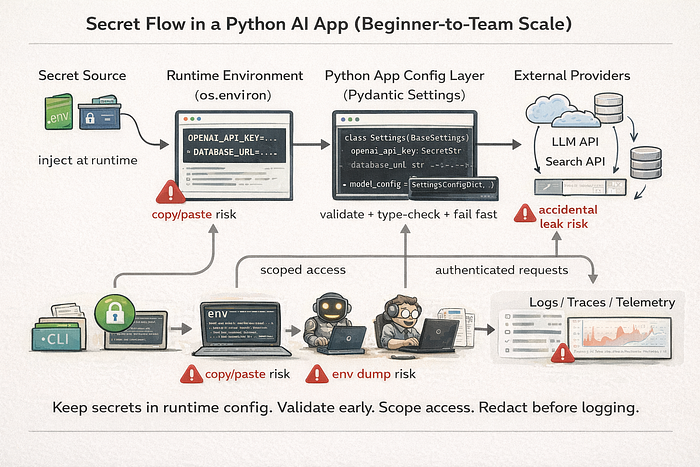
The "Agentic Leak" scenario
A coder agent runs a shell command for debugging. It prints environment variables. Your OPENAI_API_KEY, DATABASE_URL, and a webhook secret are now in a shared trace. Nobody broke your cryptography. Your architecture exposed the values.
That is why secret management belongs in the system design. Not as an afterthought.
Technique 0: Threat Modeling for AI Projects (Before You Pick a Tool)
Most beginner secret guidance starts with .env. That is too late. Start with what you are trying to protect and where it can leak.
What counts as a secret in an AI app
Beginners usually think only about one thing. The model API key. Real projects have more:
- model provider API keys
- vector database tokens
DATABASE_URLvalues with embedded credentials- cloud storage keys
- webhook signing secrets
- OAuth client secrets and refresh tokens
- service account JSON credentials
- private internal endpoints
- private system prompts or policy prompts in some organizations
If a value grants access, authorizes requests, or reveals private infrastructure, treat it as a secret.
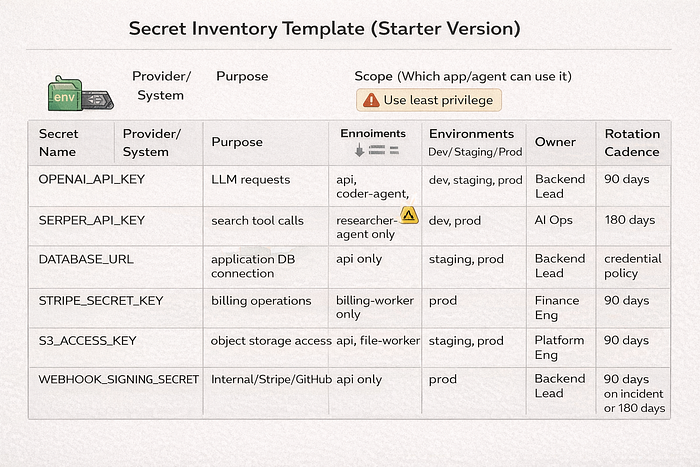
Secret exposure paths unique to agent systems
AI and agent systems leak secrets through places normal web apps do not use as much:
- tool outputs
- agent traces and observability platforms
- prompt logs
- memory stores
- eval artifacts
- exception dumps
- notebook outputs
- screenshots in documentation
- telemetry payloads
- subprocess inheritance (
os.environpassed to child processes)
This matters because many leaks are accidental and happen during debugging. The secret never touches source code. It still gets exposed.
Technique 1: The Local Sandbox — Using .env Files Safely
.env is a local convenience. It is not a production secret manager.
The anatomy of a .env file
Use two files.
.env: real local values. Never commit..env.example: placeholders only. Commit this file.
.env
OPENAI_API_KEY=sk-live-actual-value
OPENAI_MODEL=gpt-4.1-mini
LOG_LEVEL=INFO
.env.example
OPENAI_API_KEY=replace_me
OPENAI_MODEL=gpt-4.1-mini
LOG_LEVEL=INFO
Why the split works:
.env.exampledocuments required settings.- New developers can start fast.
- You stop sharing real keys in chat messages and onboarding docs.
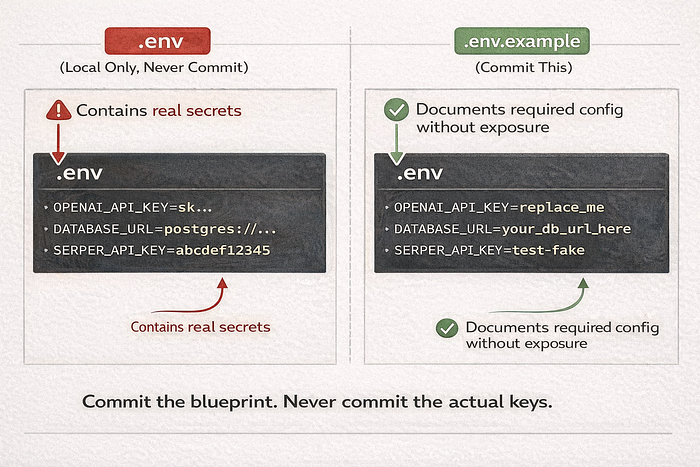
Loading secrets with python-dotenv
Use python-dotenv for local development only. The app should still read from environment variables. That way the same code works in local, CI, Docker, and production (python-dotenv).
Use explicit pathing. Relative paths break in tests and subprocesses.
# config_bootstrap.py
from pathlib import Path
from dotenv import load_dotenv
PROJECT_ROOT = Path(__file__).resolve().parent
ENV_PATH = PROJECT_ROOT / ".env"
def load_local_env() -> None:
    if ENV_PATH.exists():
        load_dotenv(dotenv_path=ENV_PATH, override=False)
    else:
        print(f"[config] .env not found at {ENV_PATH}. Continuing with system environment.")
Implementation detail:
override=Falsepreventspython-dotenvfrom replacing values that are already injected by your shell, IDE, or CI runner.
The Git guardrail
Do not assume .gitignore works. Verify it.
git check-ignore -v .envIf Git shows no matching ignore rule, your .env is not protected.
Also check if it was already tracked:
git ls-files --error-unmatch .envIf it was committed, remove it from tracking and rotate the keys. Deleting the file from the latest commit does not remove it from history.
git rm --cached .envFile permissions and local machine hygiene
This is not enterprise-only. It matters on shared laptops, remote dev boxes, and classroom machines.
Practical rules:
- do not store
.envin synced public folders - avoid screenshots of terminals that show exported values
- close shell history habits like
export OPENAI_API_KEY=...on shared systems - keep local secrets in one predictable location, not copied across project folders

Technique 2: Reading Secrets via the Environment
This is the baseline pattern. Read from os.environ or os.getenv(). Never hardcode secrets in source files, notebooks, tests, or Dockerfiles.
Why os.getenv is better than hardcoding
Hardcoding couples code and credentials. Environment variables separate deployment config from code, which is the point of the Twelve-Factor config guidance.
import os
OPENAI_API_KEY = os.getenv("OPENAI_API_KEY")
The same code works whether the value came from:
.envloader- shell export
- CI secret injection
- Docker runtime env
- secret manager CLI wrapper
Handling defaults and "must-have" keys
Do not wait for an SDK call to fail with "Unauthorized." Fail at startup.
import os
def require_env(name: str) -> str:
    value = os.getenv(name)
    if not value:
        raise RuntimeError(f"Missing required environment variable: {name}")
    return value
OPENAI_API_KEY = require_env("OPENAI_API_KEY")
LOG_LEVEL = os.getenv("LOG_LEVEL", "INFO")
Simple rule:
- Secrets: required. No defaults.
- Non-secret runtime options: defaults are fine.
- Environment-specific values: document the default behavior clearly.
The sanity check for dirty environments
Beginners hit this all the time. The app reads a different key than expected because the shell, IDE, and .env all define it.
Do not print the secret. Print the source strategy and a masked fingerprint.
import hashlib
import os

def masked_fingerprint(value: str) -> str:
    digest = hashlib.sha256(value.encode()).hexdigest()[:8]
    return f"sha256:{digest}"
key = os.getenv("OPENAI_API_KEY")
if key:
    print(f"[config] OPENAI_API_KEY loaded ({masked_fingerprint(key)})")
else:
    raise RuntimeError("Missing OPENAI_API_KEY")
Technique 2.5: Testing Configuration Without Real Secrets
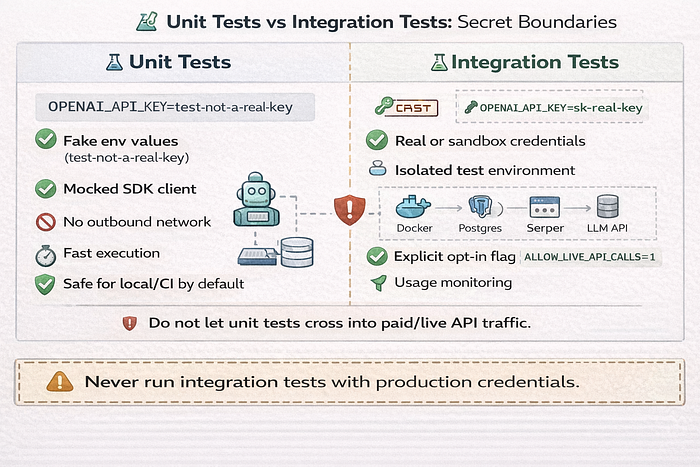
Many beginner projects accidentally spend money during tests. Or worse. They use production secrets in local test runs.
Safe test fixtures and fake keys
Use fake values in unit tests unless you are running explicit integration tests.
Examples:
OPENAI_API_KEY=test-not-a-real-keySERPER_API_KEY=test-fake- monkeypatch env variables in tests
- use
.env.testwith placeholders only
# test_settings.py
import os

def test_env(monkeypatch):
    monkeypatch.setenv("OPENAI_API_KEY", "test-not-a-real-key")
    assert os.getenv("OPENAI_API_KEY") == "test-not-a-real-key"
Preventing tests from hitting real paid APIs
Use two controls.
- Environment guard
- Client mocking or dependency injection
# app_startup.py
import os

APP_ENV = os.getenv("APP_ENV", "dev")
if APP_ENV == "test" and os.getenv("ALLOW_LIVE_API_CALLS") == "1":
    raise RuntimeError("Live API calls are blocked in test environment")
Then inject fake clients in tests instead of real SDK clients.
Technique 3: Industrial-Strength Validation with Pydantic
This is where simple scripts become maintainable systems.
The fail-fast principle
Crash on startup if configuration is missing or malformed. Do not let the app start in a half-valid state.
Pydantic Settings provides structured settings models that load from environment variables and validate types (Pydantic Settings).
Benefits:
- missing keys fail immediately
- types are enforced early
- config logic is centralized
- tests can override settings in controlled ways
Creating a centralized settings module
This fixes two common problems:
- config values scattered across files
- accidental secret exposure in debug logs
Use SecretStr for sensitive fields and BaseSettings from pydantic-settings.
# settings.py
from functools import lru_cache
from pydantic import Field, SecretStr
from pydantic_settings import BaseSettings, SettingsConfigDict

class Settings(BaseSettings):
    model_config = SettingsConfigDict(
        env_file=".env",          # local convenience only
        env_file_encoding="utf-8",
        extra="ignore",
        case_sensitive=False,
    )
    app_env: str = Field(default="dev", alias="APP_ENV")
    log_level: str = Field(default="INFO", alias="LOG_LEVEL")
    openai_api_key: SecretStr = Field(alias="OPENAI_API_KEY")
    openai_model: str = Field(default="gpt-4.1-mini", alias="OPENAI_MODEL")
    serper_api_key: SecretStr | None = Field(default=None, alias="SERPER_API_KEY")
@lru_cache
def get_settings() -> Settings:
    return Settings()
Usage:
from settings import get_settings
settings = get_settings()
openai_key = settings.openai_api_key.get_secret_value()
SecretStr helps avoid accidental exposure in repr output. It does not remove the need for logging discipline. Once you unwrap the value, it is plain text.
Environment variable naming conventions
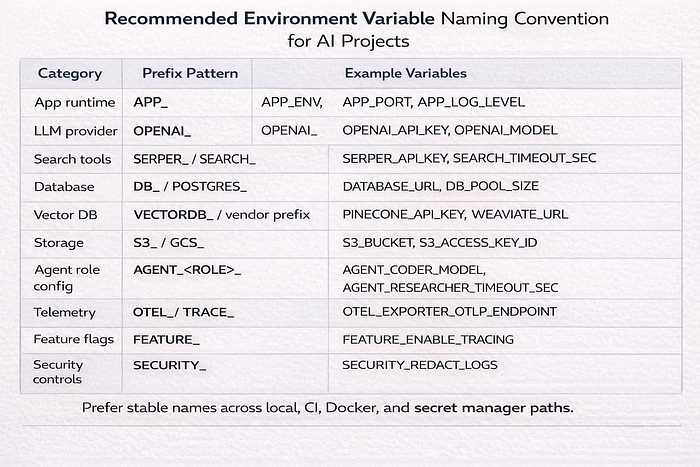
Naming gets messy fast in multi-agent systems. Use stable prefixes.
Good examples:
APP_ENVOPENAI_API_KEYVECTORDB_API_KEYAGENT_CODER_MODELAGENT_RESEARCHER_TIMEOUT_SEC
Keep names consistent across .env.example, CI, Docker Compose, and secret manager paths.
Technique 3.5: Secret Rotation and Key Lifecycle Management
Setup is day one. Rotation is day thirty.
When to rotate a key
Rotate immediately when:
- a secret was committed
- a secret appeared in logs
- a secret was shared in chat/email/screenshots
- a teammate leaves and used shared credentials
- provider dashboard shows suspicious usage
- access scope changes
You do not need proof of abuse to rotate. Exposure is enough.
How to rotate without breaking production
Use a controlled sequence. Not panic edits.
- Create a new key.
- Update secret store / CI / platform config.
- Deploy or restart workloads that read the secret.
- Verify successful requests.
- Revoke old key.
- Document what changed and when.
If the provider supports multiple active keys, use overlap for a short period. That reduces downtime risk.

Technique 4: Containerization and the Docker Inheritance Trap
Containers are great for consistency. They also preserve mistakes very well.
Environment variables in Docker vs Compose
Two different ideas get mixed together:
- Compose variable interpolation
- Container runtime environment
Docker documents environment variable precedence for Compose. Read it once and stop guessing (Docker Compose env precedence).
Practical rule:
environment:incompose.yamldefines what the container receives..envis often used for interpolation convenience, not secret storage.- shell env values can override interpolation inputs depending on how Compose is invoked.
Example:
services:
  api:
    build: .
    environment:
      OPENAI_API_KEY: ${OPENAI_API_KEY}
      APP_ENV: dev
If you see "wrong key in container," debug source precedence first. Not the SDK.
Secret injection in production
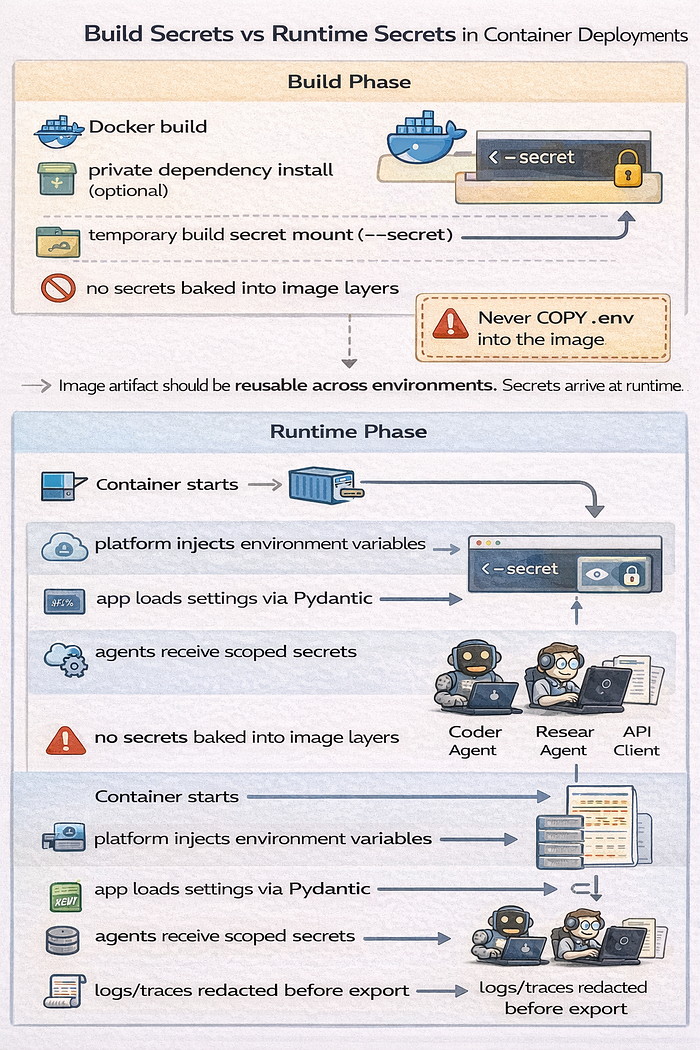
Do not COPY .env into a Docker image. Secrets can end up in image layers and caches.
If you need a secret during build, use Docker build secrets (--secret and RUN --mount=type=secret) (Docker Build secrets).
# syntax=docker/dockerfile:1
FROM python:3.12-slim
WORKDIR /app
COPY . /app
CMD ["python", "main.py"]
Then inject runtime secrets at deploy time through the platform, orchestrator, or secret manager.
Runtime secrets vs build secrets on hosting platforms
This is where many beginner deploys break.
- Build secret: needed only during image build or dependency install
- Runtime secret: needed by the running app process
Do not assume a platform setting marked "environment variable" applies to both build and runtime. Check the platform docs and deployment phase behavior.
Technique 4.5: Local Development Pitfalls in IDEs, Notebooks, and REPLs
AI developers use notebooks and IDEs constantly. These tools are convenient. They also make leaks easy.
Jupyter and Colab secret handling gotchas
Common mistakes:
- printing variables in notebook cells
- leaving outputs saved in
.ipynb - sharing notebook links with outputs included
- running shell commands that expose env vars
- tutorial screenshots that include tokens
Practical rules:
- clear outputs before sharing
- never store real keys in notebook cells
- use environment injection or notebook-specific secret storage features where available
- treat notebooks as publishable artifacts
IDE run configurations and hidden environment drift
VS Code and PyCharm can inject env variables through run configs. Your terminal session may use a different set.
Result:
- app works in IDE
- app fails in terminal
- app fails in Docker
- developer wastes an hour debugging the wrong thing
Fix:
- document one canonical local startup path
- print masked config fingerprints on startup
- keep
.env.exampleauthoritative

Technique 5: CI/CD and Deployment Guardrails
Your CI pipeline is part of production hygiene. Treat it that way.
GitHub Actions and encrypted secrets
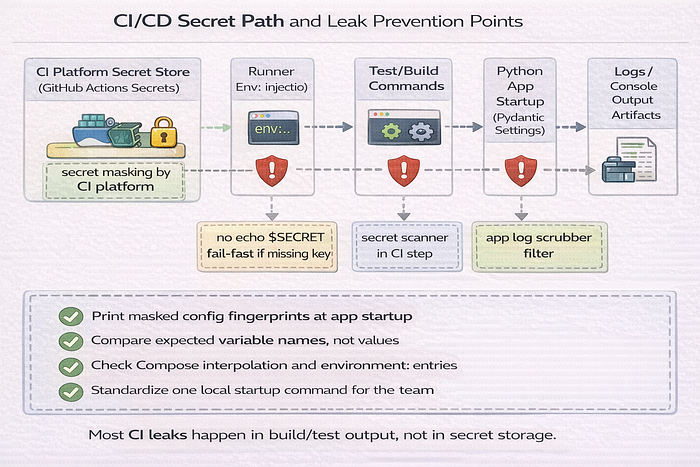
GitHub Actions supports encrypted secrets that can be mapped into the runner environment (GitHub Actions secrets).
name: test-and-build
on:
  push:
    branches: [main]
jobs:
  test:
    runs-on: ubuntu-latest
    env:
      OPENAI_API_KEY: ${{ secrets.OPENAI_API_KEY }}
      APP_ENV: ci
    steps:
      - uses: actions/checkout@v4
      - uses: actions/setup-python@v5
        with:
          python-version: "3.12"
      - run: pip install -r requirements.txt
      - run: pytest -q
The app code should not care that the value came from GitHub. It still reads the same environment variable name.
Automated leak prevention
Manual caution fails under deadlines. Use layered controls.
Option A: pre-commit + detect-secrets
pre-commit standardizes local hooks. detect-secrets scans for likely secrets and supports baselines (pre-commit, Yelp detect-secrets).
# .pre-commit-config.yaml
repos:
  - repo: https://github.com/Yelp/detect-secrets
    rev: v1.5.0
    hooks:
      - id: detect-secrets
        args: ["--baseline", ".secrets.baseline"]
Bootstrap:
pip install pre-commit detect-secrets
detect-secrets scan > .secrets.baseline
pre-commit install
Option B: TruffleHog
TruffleHog can run in CI or pre-commit workflows and detect exposed secrets (TruffleHog).
Option C: GitHub Push Protection
GitHub Push Protection can block pushes that contain supported secret patterns before they land in the remote repo (GitHub Push Protection).
Preventing secret echo in CI logs
This still happens. A lot.
Bad examples:
echo $OPENAI_API_KEY- verbose debug scripts that print full env
- failing tests that dump config objects with unwrapped secrets
Rules:
- never print env values directly
- use masked fingerprints for diagnostics
- disable verbose logging for CI unless required
- scrub logs at the application layer too, not just the CI platform
Technique 5.5: Deployment Platform Patterns (Railway, Render, Vercel, Fly.io, and similar)
Many beginner AI developers deploy to managed platforms before they use Kubernetes. Good. The secret patterns still matter.
Runtime secrets vs build secrets on managed platforms
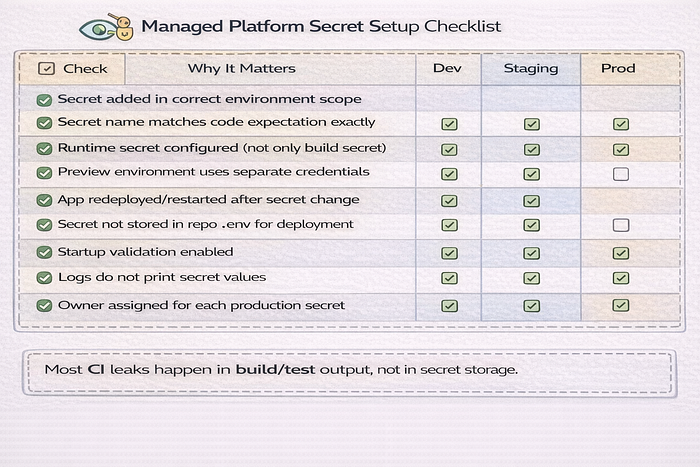
Managed platforms often have separate controls for:
- build environment variables
- runtime environment variables
- preview environment variables
- production environment variables
If the app works in preview but fails in production, check environment scope first.
Common misconfigurations on managed platforms
Common mistakes:
- setting the secret only in preview
- copying
.envinto the repo because "the platform needs it" - using one key across dev, staging, and prod
- exposing server secrets in client-side builds
- rotating a key in the dashboard but forgetting to redeploy/restart
Use environment-specific secrets and keep naming consistent.
Technique 6: Multi-Agent Scoping and Log Scrubbing
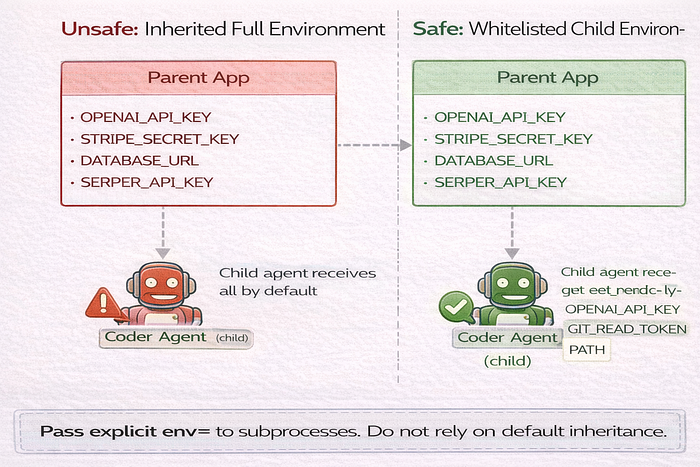
AI systems introduce a common failure mode. Every agent gets access to every secret because the parent process has them all.
Scoped secrets for agentic swarms
Apply least privilege. A coding agent should not get billing credentials. A retrieval agent should not get deployment tokens.
Use per-agent capability maps and whitelist env propagation.
AGENT_SECRET_SCOPE = {
    "coder": ["OPENAI_API_KEY", "GIT_READ_TOKEN"],
    "researcher": ["OPENAI_API_KEY", "SERPER_API_KEY"],
    "billing": ["OPENAI_API_KEY", "STRIPE_SECRET_KEY"],
}
Then pass only allowed keys to child processes.
import os
import subprocess

def spawn_agent(role: str, cmd: list[str]) -> subprocess.Popen:
    allowed_keys = AGENT_SECRET_SCOPE[role]
    child_env = {"PATH": os.environ.get("PATH", "")}
    for key in allowed_keys:
        if key in os.environ:
            child_env[key] = os.environ[key]
    return subprocess.Popen(cmd, env=child_env)
This avoids accidental cross-agent access caused by default environment inheritance.
The log masking utility
Python logging supports filters. Use one to scrub secrets before records are emitted (Python logging docs).
# log_masking.py
import logging
from collections.abc import Iterable

class SecretScrubberFilter(logging.Filter):
    def __init__(self, secrets: Iterable[str]):
        super().__init__()
        self._secrets = [s for s in secrets if s and len(s) >= 8]
    def _scrub(self, text: str) -> str:
        out = text
        for secret in self._secrets:
            out = out.replace(secret, "***REDACTED***")
        return out
    def filter(self, record: logging.LogRecord) -> bool:
        if isinstance(record.msg, str):
            record.msg = self._scrub(record.msg)
        if record.args:
            if isinstance(record.args, tuple):
                record.args = tuple(
                    self._scrub(a) if isinstance(a, str) else a for a in record.args
                )
            elif isinstance(record.args, dict):
                record.args = {
                    k: self._scrub(v) if isinstance(v, str) else v
                    for k, v in record.args.items()
                }
        return True
Attach at startup before handlers emit application logs.
import logging
from settings import get_settings
from log_masking import SecretScrubberFilter

settings = get_settings()
root = logging.getLogger()
root.setLevel(logging.INFO)
secrets_to_mask = [settings.openai_api_key.get_secret_value()]
if settings.serper_api_key:
    secrets_to_mask.append(settings.serper_api_key.get_secret_value())
for handler in root.handlers:
    handler.addFilter(SecretScrubberFilter(secrets_to_mask))
Limits matter. This catches many direct leaks. It will not catch every transformed version, truncated value, or encoded payload.
Subprocess and worker inheritance controls
Default behavior matters here. Child processes inherit environment state unless you override it.
That means one careless subprocess.Popen(...) can expose all parent secrets to an agent worker, script, or tool runner. Treat env= as a required parameter in agent process spawning code.
Technique 6.5: Framework-Specific AI Secret Pitfalls
Frameworks speed up development. They also hide behavior.
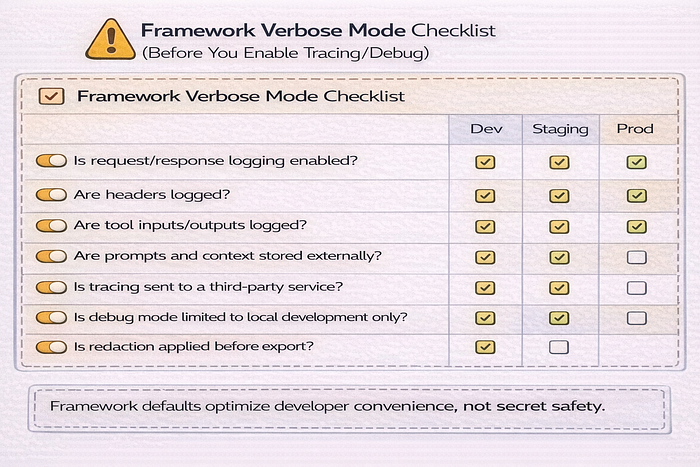
LangChain, CrewAI, AutoGen, and tooling layers
Many frameworks and wrappers can:
- auto-read environment variables
- enable verbose tracing
- log prompts and tool calls
- send traces to third-party observability backends
Check framework settings for:
- debug or verbose mode
- callback handlers
- tracing exporters
- request/response logging
- tool execution logs
Do not assume framework defaults are safe for shared environments.
SDK debug modes that leak request metadata
Some SDKs and HTTP clients log request metadata in debug mode. That can include headers, URLs, payload fragments, or auth tokens depending on configuration.
Rules:
- enable debug only locally
- do not use shared logs for debug sessions with real secrets
- scrub logs at source when possible
- review transport/client logging settings, not just app logger settings
Technique 6.8: Observability, Tracing, and Prompt Logging Hygiene
AI systems often add tracing early. Good for debugging. Bad if you send secrets into traces.
What to never send to telemetry by default
Do not log or trace these without explicit redaction:
- raw authorization headers
- full environment dumps
- signed URLs
- request bodies containing API tokens
- tool payloads with credentials
- prompt context that includes secret values
- customer PII mixed into debugging traces
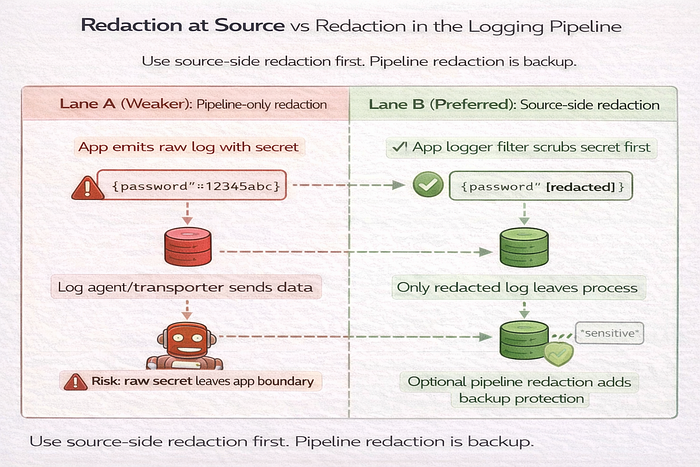
Redaction at source vs redaction in pipeline
Two places to redact:
- at source: before your app emits logs/traces
- in pipeline: inside your log/telemetry platform
Use source-side redaction first. Pipeline redaction is still useful, but it is a second line of defense. If the data leaves your process unredacted, you already expanded the blast radius.
Technique 7: Scaling to Enterprise Secret Managers
At some point, local .env files become operational debt.
Moving to CLI-based injection
CLI-based injection is a practical transition step. Your app still reads env vars. The CLI injects them at process start.
Common options:
- Doppler CLI (
doppler run) (Doppler CLI docs) - Infisical CLI (
infisical run -- ...) (Infisical CLI run) - 1Password CLI (
op run) (1Password CLI run)
Your code does not change. That is the benefit.
The secret-less local dev workflow
Instead of storing real credentials in .env, run the app through a secret manager CLI.
doppler run -- python main.pyEquivalent patterns:
infisical run -- python main.py
op run -- python main.py
This keeps long-lived secrets out of project files. Some tools still keep auth/session state locally. Read vendor docs and choose a setup that fits your team and machine trust model.
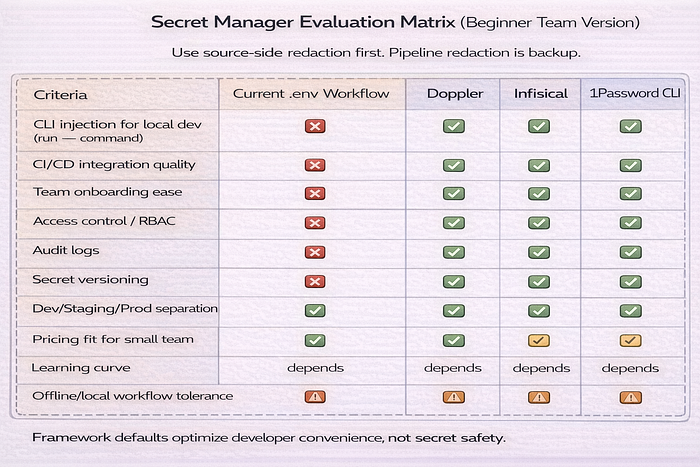
Choosing a secret manager without overengineering
Beginner and mid-level teams do not need a giant evaluation matrix. Use a small one.
Evaluate:
- CLI support for local dev
- CI integration
- audit logs
- RBAC / access scoping
- team onboarding flow
- pricing for your team size
- environment support (dev/staging/prod)
- secret versioning and rollback behavior
Technique 7.5: Team Workflow and Secret Ownership
Once a second developer joins, secret handling changes.
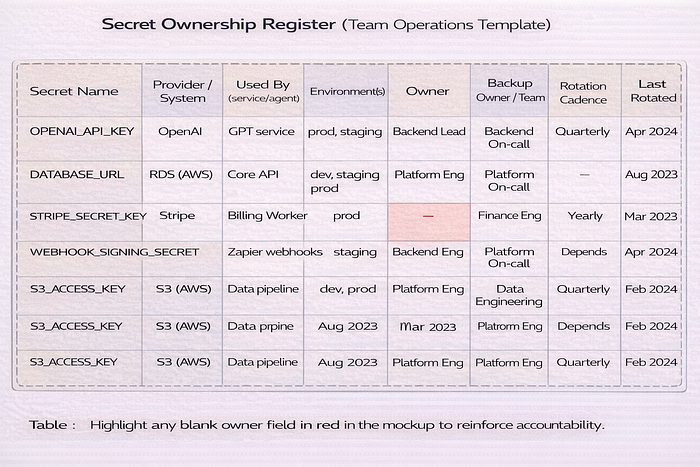
Who owns each secret
Every important secret should have metadata. Keep it simple.
- owner
- system/provider
- environments used
- scope
- rotation cadence
- where stored
- incident contact
This prevents "nobody knows where this key came from" during incidents.
Shared accounts vs service accounts
Avoid personal developer credentials in production systems.
Why:
- offboarding risk
- unclear ownership
- weak audit trails
- accidental revocation when personal accounts change
Use service accounts and team-managed credentials when providers support them.
Incident Response: What to Do If a Secret Leaks
This section is for real life. Not theory.
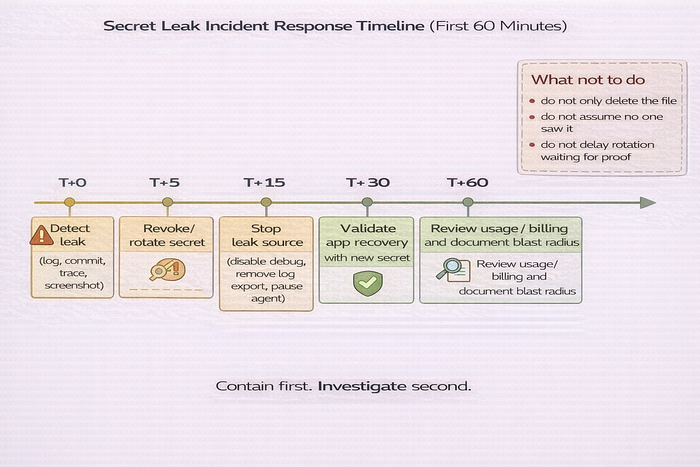
Immediate containment checklist
If a secret leaks, do this first:
- Rotate or revoke the secret
- Stop the leak source (logs, debug mode, trace export, notebook sharing)
- Assess blast radius (which systems used the secret)
- Check usage dashboards and billing
- Redeploy/restart affected services
- Document timeline and actions taken
Do not wait for certainty. If exposure is plausible, rotate.
Cleanup is not recovery
Deleting a commit, trace, or message is not enough.
The secret may already be:
- cloned
- cached
- indexed
- forwarded
- copied into backups
- scraped by automated systems
Recovery means rotation, validation, and review. Not just deletion.
Migration Playbook: From Solo .env to Team-Grade Secret Management
Most teams do not need enterprise tooling on day one. They do need a path.
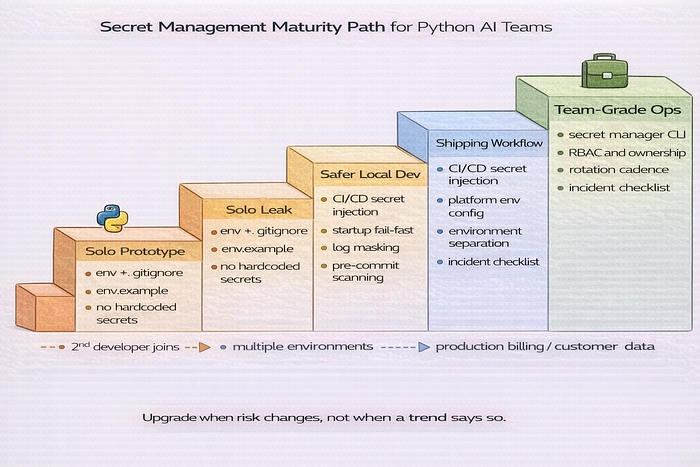
Stage 1 to Stage 4 maturity model
Stage 1 — Solo prototype
.env+.gitignore.env.example- no hardcoded secrets
Stage 2 — Safer local development
- startup validation
- centralized settings module (Pydantic)
- log masking
- secret scanner in pre-commit
Stage 3 — Shipping workflow
- CI/CD secret injection
- managed platform env config
- per-environment secrets
- incident response checklist
Stage 4 — Team-grade operations
- secret manager CLI
- scoped access/RBAC
- rotation cadence
- secret ownership register
- per-agent least privilege
When to upgrade your stack
Do not upgrade based on company size labels. Upgrade when your risk changes.
Upgrade triggers:
- more than one developer
- more than one environment
- production billing exposure
- customer data involved
- multiple agents or subprocess workers
- shared logs/traces across the team
- compliance or audit requirements
The Python Secret-Keeping Checklist (Senior Review)
Use this as a release gate for Python AI and agent projects.
- Immunity: Is
.envin your.gitignore, and did you verify withgit check-ignore -v .env? - The Blueprint: Is
.env.examplecommitted and up to date? - Type Safety: Are you using Pydantic Settings for config validation? (Pydantic Settings docs)
- Masking: Are secrets stored as
SecretStrand kept out of normal logs/repr output? - Pathing: Does local
.envloading use explicitpathlibpathing? - Validation: Does the app fail at startup if required keys are missing?
- Testing: Do unit tests avoid real paid API keys by default?
- Rotation: Do you have a documented key rotation procedure?
- Containers: Are you avoiding
COPY .envinto Docker images? (Docker Build secrets) - Compose Hygiene: Have you documented env precedence and interpolation behavior? (Docker Compose env precedence)
- CI/CD: Are secrets injected from CI/platform stores instead of hardcoded values? (GitHub Actions secrets)
- Scanning: Is secret scanning active in pre-commit and/or CI? (detect-secrets, TruffleHog)
- Push Protection: Is GitHub Push Protection enabled where available? (GitHub Push Protection)
- Agent Scope: Does each agent get only the secrets it needs?
- Subprocess Control: Do worker processes use explicit
env=whitelists? - Telemetry Hygiene: Are logs/traces redacted at source before export?
- Ownership: Does each production secret have an owner and rotation cadence?
- Incident Response: Do you have a leak response checklist that the team can execute under pressure?
Final notes for beginner and mid-level AI developers
Do not try to implement everything at once. Start with the biggest failure modes.
- Stop hardcoding secrets.
- Add
.envand.env.example. - Fail fast on missing keys.
- Move config into a Pydantic settings module.
- Add secret scanning to commits and CI.
- Scope secrets per agent or worker.
- Add log and trace redaction.
- Move to CLI-based secret injection when the team grows.
That sequence gives you real risk reduction fast. It also sets you up to scale without rewriting your config system later.
