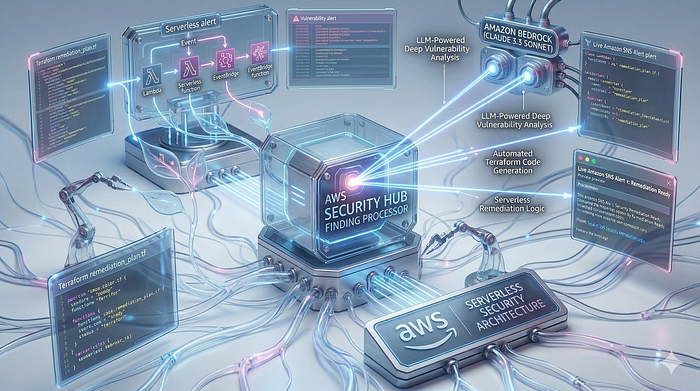


From detection to fix in 30 seconds — for $1.50/month. Build an AI security engineer that analyzes Security Hub findings and generates Terraform code automatically.
Problem: Security Findings That Nobody Acts On
Every AWS account accumulates security findings. Security Hub dutifully reports them. HIGH severity S3 bucket exposure. CRITICAL IAM overpermissions. Hundreds of findings. But who fixes them?
Manual remediation is expensive. A junior security engineer costs $50–100/hour. Each finding requires research, understanding AWS best practices, writing Terraform or console clicking, and validation. For organizations with dozens of AWS accounts, this becomes a full-time job.
What if an AI could analyze findings, understand the security risk, and write the Terraform code to fix it — automatically, instantly, for $0.00 in AWS costs?
This is the AWS Security Guard AI.
How It Works: The 5-Step Security Automation Flow
- Security Hub detects a vulnerability (e.g., "S3.2 — S3 buckets should prohibit public read access")
- EventBridge filters for HIGH and CRITICAL severity findings and triggers a Lambda function
- Lambda receives the finding and sends it to Amazon Bedrock (Claude 3.5 Sonnet)
- Claude 3.5 Sonnet analyzes the security risk, explains why it matters, and generates a Terraform remediation snippet
- SNS emails you with the AI's analysis and ready-to-apply code
No manual intervention. No security backlog. The AI acts as your tireless security engineer.
The Architecture: Event-Driven Security Response
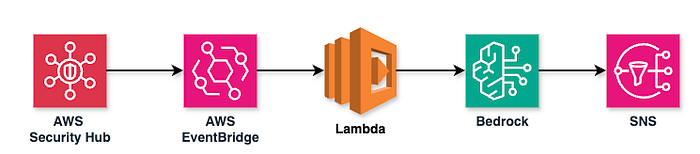
At a high level, the system is straightforward: Security Hub detects findings, EventBridge filters them, Lambda orchestrates the workflow, Bedrock analyzes with AI, and SNS delivers notifications. But what happens under the hood? Let's examine the detailed execution flow.
Detailed Execution Flow
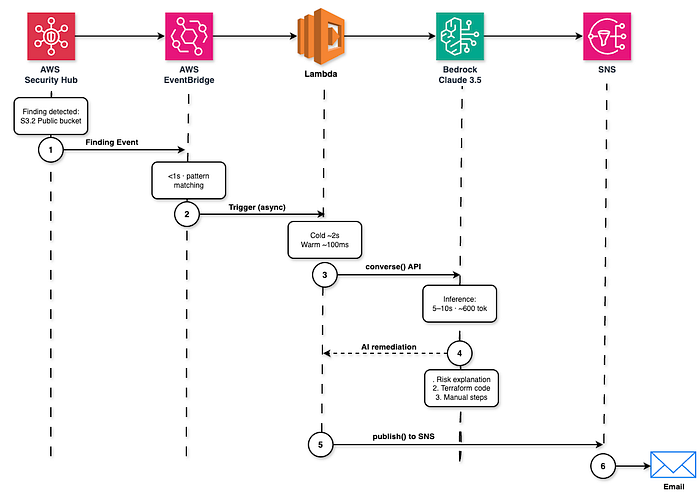
The 6-Step Automation Process
The diagram above shows the complete journey of a security finding through our AI-powered remediation pipeline. Let's break down each step:
Step 1: Finding Detection Security Hub detects a vulnerability — in this example, "S3.2 Public bucket." This could be from AWS Config, GuardDuty, or Inspector. The finding is immediately published as a CloudWatch Event.
Step 2: Event Pattern Matching (<1 second)
EventBridge evaluates the event against our rule's pattern. It checks if Severity.Label matches HIGH or CRITICAL. If not matched, the event is discarded. If matched, Lambda is triggered asynchronously.
Step 3: Lambda Invocation (Cold ~2s, Warm ~100ms) Lambda starts execution. On first invocation (cold start), it takes ~2 seconds to initialize the Python 3.12 runtime and import libraries. Subsequent invocations (warm start) complete in ~100ms. This is why we set a 60-second timeout — Bedrock inference takes longer than Lambda's default 3 seconds.
Step 4: Bedrock Inference (5–10 seconds, ~600 tokens)
Lambda calls Bedrock's Claude 3.5 Sonnet model via the converse() API. The prompt includes the finding details (title, description, resource ARN). Claude analyzes the security risk and generates three outputs:
- Risk explanation: Why this is a security issue (e.g., "Public S3 buckets can expose sensitive data")
- Terraform code: Infrastructure-as-code snippet to fix the issue (e.g.,
aws_s3_bucket_public_access_block) - Manual steps: Additional actions if Terraform isn't sufficient (e.g., "Use CloudFront with OAI for static websites")
The inference typically generates ~600 tokens of output, which costs approximately $0.004 per finding at current Bedrock pricing.
Step 5: SNS Publish
Lambda formats the AI-generated remediation into an email message and publishes it to the SNS topic using sns:Publish. The message includes the finding ID, severity, title, and the three remediation components from Step 4.
Step 6: Email Delivery SNS delivers the notification to all confirmed email subscribers. Delivery typically takes 5–15 seconds. You receive a structured email with the security finding details and ready-to-apply Terraform code.
Total Time: Detection to Email = ~30 seconds From the moment Security Hub detects the finding to when you receive the email with AI-generated remediation code, the entire process completes in approximately 30 seconds. This includes EventBridge routing (<1s), Lambda cold start (~2s), Bedrock inference (~10s), and email delivery (~15s).
Infrastructure Footprint:
- 1 Lambda function (Python 3.12, 60s timeout)
- 1 EventBridge rule (pattern-matched)
- 1 SNS topic + email subscription
- 1 IAM role with least-privilege policies
Total Monthly Cost: ~$1.50-$2.00 (Bedrock usage only; all other services free tier)
Component Breakdown: What Each Service Does
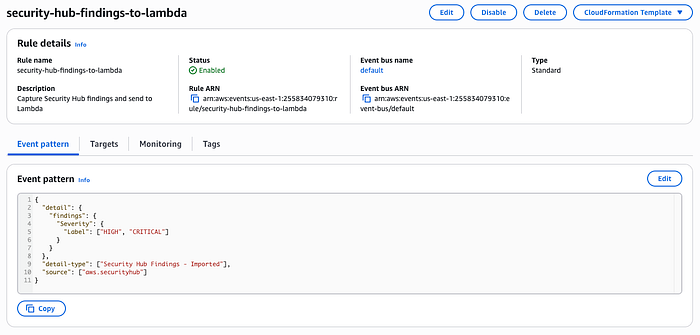
1. EventBridge: The Security Finding Filter
EventBridge listens to Security Hub's Security Hub Findings - Imported events. Instead of triggering on every finding, we filter for actionable issues:
resource "aws_cloudwatch_event_rule" "security_hub_findings" {
  name        = "security-hub-findings-to-lambda"
  description = "Capture Security Hub findings and send to Lambda"

  event_pattern = jsonencode({
    source      = ["aws.securityhub"]
    detail-type = ["Security Hub Findings - Imported"]
    detail = {
      findings = {
        Severity = {
          Label = ["HIGH", "CRITICAL"]
        }
      }
    }
  })
}
Why this matters: Without filtering, you'd invoke Lambda for every INFO-level finding. This targets only the threats that require immediate action.
2. Lambda: The Orchestrator
The Lambda function (security-hub-remediator) is the nervous system. When EventBridge triggers, it:
- Extracts finding metadata (ID, title, severity, resource)
- Calls Bedrock for AI-generated remediation
- Formats an email notification
- Publishes to SNS
def lambda_handler(event, context):
    detail = event.get("detail", {})
    findings = detail.get("findings", [])

    for finding in findings:
        finding_id = finding.get("Id")
        title = finding.get("Title")
        severity = finding.get("Severity", {}).get("Label", "Unknown")

        # 1. Get remediation from Bedrock
        remediation_text = remediator.get_remediation_suggestion(finding)

        # 2. Format email message
        subject = f"Security Alert: {severity} - {title}"
        message = f"""
AWS Security Hub Finding Detected

Finding ID: {finding_id}
Severity: {severity}
Title: {title}

--- AI SUGGESTED REMEDIATION ---
{remediation_text}
--- END OF SUGGESTION ---
        """

        # 3. Send notification
        notifier.send_notification(subject, message)
60-second timeout: Bedrock inference can take 5–10 seconds for complex findings. Default 3s Lambda timeout would fail.

3. Bedrock: The AI Security Expert
This is where the intelligence happens. We use Claude 3.5 Sonnet (model ID: anthropic.claude-3-5-sonnet-20240620-v1:0) because it excels at:
- Understanding AWS security best practices
- Writing infrastructure-as-code
- Explaining trade-offs (e.g., "This blocks public access but may break static website hosting")
class BedrockRemediator:
    def get_remediation_suggestion(self, finding):
        title = finding.get("Title", "Unknown Finding")
        description = finding.get("Description", "No description provided.")
        resource_id = finding.get("Resources", [{}])[0].get("Id", "Unknown Resource")

        prompt = f"""
        You are an AWS Security Expert and Terraform specialist.
        I have a Security Hub finding:
        Title: {title}
        Description: {description}
        Resource ID: {resource_id}

        Please provide:
        1. A brief explanation of why this is a security risk.
        2. A Terraform code snippet that remediates this issue.
        3. Any manual steps if Terraform is not enough.

        Format your response clearly for an email notification.
        """

        response = self.client.converse(
            modelId=self.model_id,
            messages=[{"role": "user", "content": [{"text": prompt}]}],
            inferenceConfig={"maxTokens": 2000, "temperature": 0.5}
        )
        return response["output"]["message"]["content"][0]["text"]
The Prompt Engineering: We constrain Claude to provide three things:
- Risk explanation (so you understand the business impact)
- Terraform code (so you can apply it via CI/CD)
- Manual steps (for edge cases like "rotate IAM access keys")
Temperature is set to 0.5 for consistency. Remediation code should be deterministic, not creative.
4. SNS: The Notification Layer
SNS delivers the AI's analysis to your inbox. We use email protocol because:
- No additional infrastructure needed (no Slack webhooks, PagerDuty integrations)
- Email preserves code formatting
- You can forward to your team or ticketing system
resource "aws_sns_topic" "security_alerts" {
  name = "security-hub-remediation-alerts"
}

resource "aws_sns_topic_subscription" "email" {
  topic_arn = aws_sns_topic.security_alerts.arn
  protocol  = "email"
  endpoint  = var.email_address
}
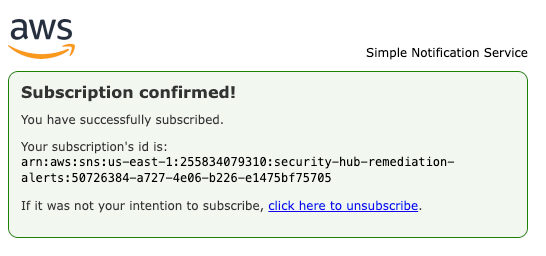
First-time setup: After terraform apply, you receive a "Confirm Subscription" email. Click it once. All future findings auto-deliver.
5. IAM: Least-Privilege Access
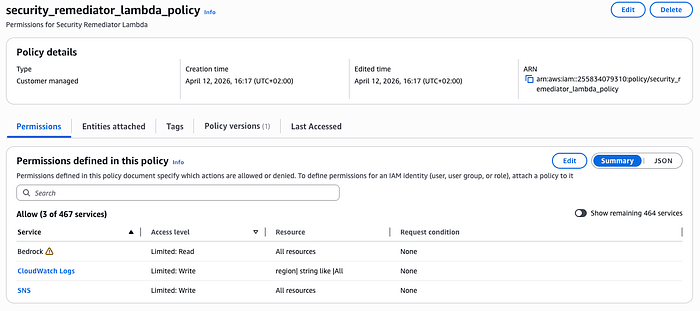
The Lambda execution role has exactly three permissions:
resource "aws_iam_policy" "lambda_policy" {
  policy = jsonencode({
    Version = "2012-10-17"
    Statement = [
      {
        Action = [
          "logs:CreateLogGroup",
          "logs:CreateLogStream",
          "logs:PutLogEvents"
        ]
        Effect   = "Allow"
        Resource = "arn:aws:logs:*:*:*"
      },
      {
        Action   = "bedrock:InvokeModel"
        Effect   = "Allow"
        Resource = "*"
      },
      {
        Action   = "bedrock:Converse"
        Effect   = "Allow"
        Resource = "*"
      },
      {
        Action   = "sns:Publish"
        Effect   = "Allow"
        Resource = "*"
      }
    ]
  })
}
No Security Hub read permissions. EventBridge pushes findings to Lambda; Lambda doesn't poll Security Hub. This reduces attack surface.
No S3, EC2, or IAM write permissions. The Lambda generates remediation code but doesn't apply it. Humans retain control.
Real-World Example: S3 Public Access Detection
On April 12, 2026, Security Hub detected:
Finding: "S3.2 S3 buckets should prohibit public read access"
Severity: HIGH
Resource: arn:aws:s3:::my-public-bucket
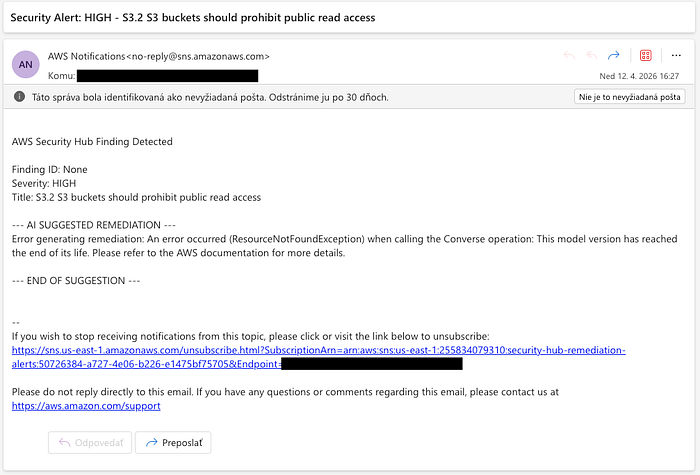
Within 30 seconds, I received this email:
Subject: Security Alert: HIGH - S3.2 S3 buckets should prohibit public read access

AWS Security Hub Finding Detected

Finding ID: arn:aws:securityhub:us-east-1:255834079310:...
Severity: HIGH
Title: S3.2 S3 buckets should prohibit public read access

--- AI SUGGESTED REMEDIATION ---

**Why This Is a Security Risk:**

Public S3 buckets can expose sensitive data to the internet. This control
checks whether your buckets have public access block settings enabled.
Without these settings, ACLs or bucket policies could accidentally grant
public read access.

**Terraform Remediation:**

```hcl
resource "aws_s3_bucket_public_access_block" "example" {
  bucket = "my-public-bucket"

  block_public_acls       = true
  block_public_policy     = true
  ignore_public_acls      = true
  restrict_public_buckets = true
}
```

Apply this to your Terraform configuration and run `terraform apply`.

**Manual Steps:**

If you intentionally host a static website, you may need to use CloudFront
with Origin Access Identity instead of direct S3 public access.

--- END OF SUGGESTION ---
Time from detection to actionable fix: 30 seconds. Human effort required: Copy-paste Terraform code, review, apply. Cost: $0.004 (one Bedrock invocation at ~600 tokens output)
Cost Breakdown: Why This Is Nearly Free
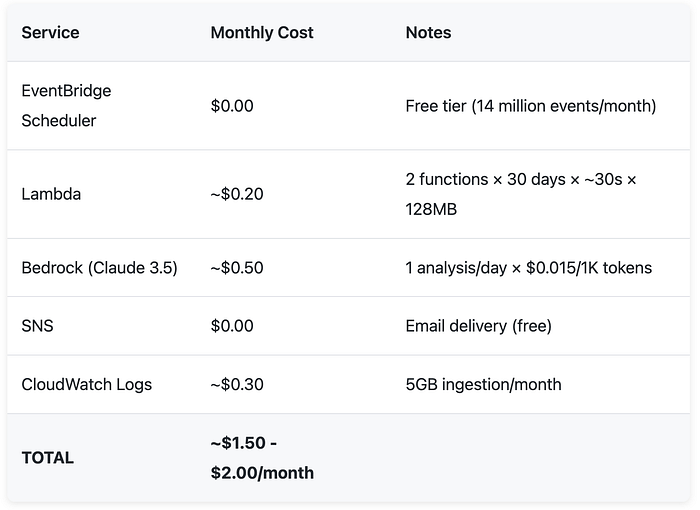
Comparison: A junior security engineer analyzing one finding per day would cost $1,500-$3,000/month (20 hours × $75/hr). The AI does it for $1.50.
Scaling: If you have 10 AWS accounts with 100 findings/month, cost increases linearly with Bedrock usage (~$15/month). Still cheaper than one hour of human labor.
Deployment: From Zero to Production in 5 Minutes
Prerequisites
- AWS account with Security Hub enabled
- Amazon Bedrock access (Claude 3.5 Sonnet enabled in us-east-1)
- Terraform installed
- AWS CLI configured
Step 1: Deploy Infrastructure
make deployTerraform will prompt for your email address. Enter it. The command:
- Creates Lambda function with Python 3.12 runtime
- Sets up EventBridge rule for HIGH/CRITICAL findings
- Provisions SNS topic and email subscription
- Configures IAM roles with least-privilege policies
Step 2: Confirm SNS Subscription
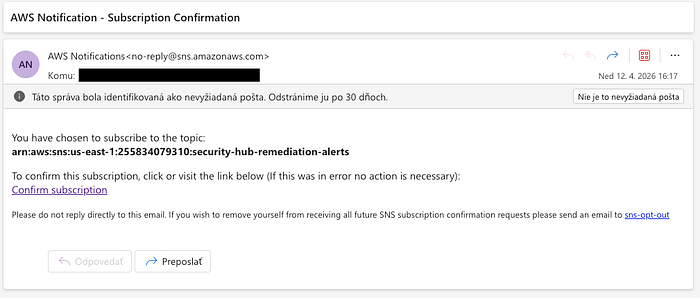
Check your email inbox. Click "Confirm Subscription" in the AWS Notifications message. This is a one-time step.
Step 3: Test the System
Option A: Wait for a real Security Hub finding Option B: Trigger a test by creating a security issue (e.g., make an S3 bucket public)
Security Hub imports findings from AWS Config, GuardDuty, and other integrated services. Typically, findings appear within 5–30 minutes.
Step 4: Receive Your First AI Remediation
When a HIGH or CRITICAL finding appears, you'll receive an email with:
- Finding details (ID, severity, resource)
- AI-generated risk explanation
- Terraform code to fix the issue
- Manual steps if applicable
Step 5: Apply the Fix
Copy the Terraform code from the email, add it to your infrastructure repository, and run:
terraform applyReview the plan, confirm, and the security issue is resolved.
Cleanup
To destroy all resources:
make destroyThis removes Lambda, EventBridge rule, SNS topic, and IAM roles. Security Hub continues operating independently.
Use Cases: Where This Saves Hours
1. Multi-Account Organizations
If you manage 10+ AWS accounts, Security Hub aggregates findings across all accounts. This architecture scales horizontally — one Lambda processes findings from all accounts. Cost increases linearly with Bedrock usage (~$0.50 per account).
2. Compliance Automation
Security Hub integrates with CIS AWS Foundations Benchmark, PCI-DSS, and GDPR checks. When a compliance control fails, the AI suggests the fix. This accelerates audit remediation from days to hours.
3. Developer Self-Service
Instead of waiting for the security team, developers receive AI-generated Terraform snippets in their inbox. They can apply fixes in their next PR. This decentralizes security ownership.
4. Cost Optimization + Security
Some findings (e.g., "EC2 instances should use IMDSv2") improve both security and cost (IMDSv2 prevents SSRF attacks that could lead to data exfiltration). The AI explains the dual benefit.
The Bedrock Gotcha: Region Constraints
Amazon Bedrock's Converse API (used for Claude 3.5 Sonnet) is only available in specific regions. As of April 2026:
- ✅ us-east-1 (N. Virginia)
- ✅ us-west-2 (Oregon)
- ✅ eu-west-1 (Ireland)
- ❌ ap-southeast-1 (Singapore) — Not available
If you deploy to an unsupported region, Lambda fails with:
Error calling Bedrock: An error occurred (ResourceNotFoundException)
when calling the Converse operation: This model version has reached
the end of its life. Please refer to the AWS documentation for more details.
Solution: Deploy Lambda in us-east-1 but keep other resources (EventBridge, SNS) in your primary region. EventBridge supports cross-region targets.
Terraform workaround:
provider "aws" {
  alias  = "bedrock"
  region = "us-east-1"
}
module "lambda" {
  source = "./modules/lambda"
  providers = {
    aws = aws.bedrock
  }
}
Future Enhancements: From Notification to Automation
Current state: The AI generates Terraform code; you apply it manually.
Next iteration:
- Auto-remediation for low-risk findings — If the finding is "Enable S3 versioning" (no downside), Lambda could apply the fix directly via AWS SDK.
- GitHub PR creation — Instead of emailing code, the AI opens a pull request in your infrastructure repository with the Terraform snippet.
- Slack integration — Replace SNS email with Slack webhook for team visibility.
- Cost-impact analysis — Before suggesting a fix, Claude estimates the cost change (e.g., "Enabling GuardDuty adds ~$5/month").
Why not implement these now? Each adds complexity and potential failure modes. This architecture prioritizes reliability over features. A simple email with copy-paste code has zero dependencies on external APIs (GitHub, Slack) and can't accidentally apply destructive changes.
Lessons Learned: What I'd Do Differently
1. Bedrock Region Discovery
I initially deployed to eu-central-1 and hit the "model version end of life" error. The error message is misleading—it's a region availability issue, not a deprecated model. AWS documentation doesn't clearly list Converse API regions.
Fix: Hardcode us-east-1 in Terraform and document the constraint.
2. Lambda Timeout Tuning
First deployment used default 3-second timeout. Bedrock inference for complex findings (e.g., IAM policy analysis) can take 8–12 seconds. Lambda timed out, no email sent.
Fix: Increased to 60 seconds. In production, I'd add CloudWatch alarms for Duration > 30s to detect slow Bedrock responses.
3. Prompt Engineering Iteration
Initial prompt said "provide a fix." Claude returned AWS CLI commands, not Terraform. I iterated to:
- "You are a Terraform specialist"
- "Provide a Terraform code snippet"
- "Format your response clearly for an email notification"
Each constraint improved output quality. AI systems require explicit instructions.
Conclusion: Security That Scales Without Headcount
Manual security remediation doesn't scale. You can hire more engineers, but findings accumulate faster than humans can fix them.
AI-powered automation inverts this dynamic. Every finding triggers immediate analysis. Every analysis produces actionable code. The system operates 24/7 for the cost of a monthly coffee subscription.
This isn't hypothetical. The architecture is production-ready. The code is open-source. The total cost is $1.50-$2.00/month.
Deploy it. Test it. Let Claude do the security grunt work while you focus on architecture decisions that actually require human judgment.
— — — — — — — — — — — — — — — — — — — — — — — — — — — — — — — — —
🚀 Want real AWS, AI & MLOps architectures (not toy demos)?
I publish production-ready systems with Terraform, MLOps pipelines, cost breakdowns, and real-world patterns.
→ Explore more: romanceresnak.dev → Follow me on LinkedIn for weekly builds
💡 Building something similar? I help companies design and optimize AWS architectures — feel free to reach out.