React2Shell is a vulnerability affecting certain React-based applications where unsafe rendering or improper handling of dynamic input can allow malicious code execution paths.
In simple words:
If an application improperly handles user-controlled input inside certain React components, it may lead to:
- Injection issues
- DOM manipulation vulnerabilities
- In severe cases, shell access depending on backend misconfigurations
How I Found It (The Simple Way)
During testing, I followed my usual methodology:
- Identify tech stack
- Check exposed JS files
- Review client-side components
- Test for known React-related misconfigurations
Extension Used: RSC Security Tools
A Chrome extension for detecting React Server Components (RSC) and Next.js App Router fingerprints on web pages.
This extension helps detect:
- Automatically scans web pages for RSC indicators
- Sends controlled RSC probe request
- Content-Type Analysis: Detects
text/x-componentresponses
How To Install RSC Security Tools:
Follow the installation instructions on the RSC Security Tools GitHub page.
How I Used It During VAPT
After installing the extension:
- I opened the target web application.
- Clicked the RSC Security Tools icon.
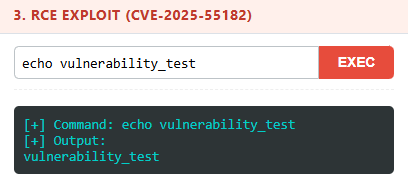
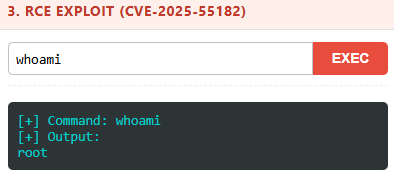
Why This Matters for Non-Security Teams
You don't need to be a penetration tester to run basic checks
Even internal IT teams can:
- Install RSC Security Tools
- Visit their organization's web apps
- Check detected frameworks
- Flag suspicious findings to security teams
Lessons From This Engagement
What I learned (again):
- Sometimes simple tools are powerful.
- Browser extensions can surface real security gaps.
- Many organizations don't monitor frontend security posture.
- React misconfigurations are common in real environments.