
Websites Are Leaking Their Own Secrets. And Nobody Is Talking About It. | Information Disclosure Story
Most people think hacking is complicated.
Big brain. Advanced tools. Years of experience.
But today I learned something that flipped that belief completely.
Some websites don't need to be hacked.
They are already giving everything away.
And nobody — not the developer, not the company, not the CEO — even knows it is happening.
That is Information Disclosure.
And today, I studied it. I understood it. And then I exploited it in a real lab.
Let me tell you exactly what happened.
Before I Touched the Lab, I Did This First
I have one rule before every lab.
Understand first. Attack second.
Because running tools without understanding is like driving at 200kmph without knowing where the road ends.
So I sat down. Opened my notes. And studied.
What Is Information Disclosure?
Simple.
Information Disclosure = a website accidentally leaking sensitive information it was never supposed to show.
Also called Information Leakage.
Think about it like this.
Imagine you own a business. You have a safe with all your important documents — customer data, bank details, contracts, passwords.
Now imagine you accidentally left the safe open.
You did not give anyone the key.
You did not invite anyone in.
But the door is open.
And anyone who walks by can just look inside.
That is exactly what information disclosure is.
And the things leaking out of these "open safes" on real websites?
- Usernames and passwords
- Credit card details
- API keys
- Database credentials
- IP addresses
- Hidden directories
- Entire source code through backup files
- Framework names and versions
One mistake. One misconfiguration. And all of that is out in the open.
How Does Information Actually Get Leaked?
This is where it gets interesting.
🔸 robots.txt
This file was designed to tell Google — "hey, don't index these pages."
But it also does something else.
It tells every attacker exactly which directories are sensitive.
A treasure map.
Made by the website itself.
For the attacker.
🔸 Directory Listing
Some servers are so poorly configured that visiting a folder URL shows a full list of every file inside it.
No login required. No hacking needed.
Just visit the URL.
Like walking into a company's office and finding all their files sitting on a table. Labeled. Organized. Ready to read.
🔸 Backup Files
Developers create backup files during development — index.php.bak, config.old, database.backup.
Then they push everything to production.
And forget to delete the backups.
An attacker just guesses the filename.
And reads the entire source code of the application.
🔸 Hard-Coded Credentials
Some developers write API keys, database passwords, and secret tokens directly into the code.
Then push that code to a public server.
Sometimes even to GitHub.
And now the entire internet has the keys.
🔸 Verbose Error Messages
And this is the one I exploited today.
When a server crashes, sometimes it throws back a full detailed error — framework name, version number, internal file paths, class names, method names.
The server is literally handing the attacker a roadmap.
"Here is what I am running. Here is the version. Here is how I am structured."
And the attacker did not even have to ask nicely.
Why Does This Keep Happening?
Because most people build fast. And secure slow.
Three main reasons:
1. Failure to clean up before going live
Debug mode on. Verbose errors on. Backup files everywhere.
Developers build in a test environment where all of this makes sense.
Then they push to production.
And forget that the whole world can now see it.
2. Insecure default configuration
Servers come with default settings.
Most of those settings were never designed with security in mind.
Nobody changes them.
Nobody asks — "should this really be visible to everyone?"
So it is.
3. Flawed design from the start
Sometimes it is not a mistake.
The application was just never designed with security as a priority.
Sensitive data treated casually. From day one.
And casual is expensive when it comes to security.
What Is the Impact? (This Part Is Serious)
Raj Shamani always says — consequences happen when you don't take things seriously.
And information disclosure is proof of that.
The impact can be direct.
An online shop leaks customer card details.
One breach. One news article.
Lawsuit. Regulatory fine. Destroyed trust. Overnight.
The impact can be indirect.
A website leaks its framework version.
Sounds harmless, right?
But if I know you are running Apache Struts 2.3.31 — a version with known critical vulnerabilities — I already know which exploit to run next.
That one version number just became the entry point for a full system compromise.
The impact always depends on three things:
- What was disclosed
- Who got it
- What they do with it next
And sometimes?
The disclosure itself is the attack.
The data leaking out is the damage. Right there. No next step needed.
The Lab — Information Disclosure in Error Messages
Okay. Theory is done.
Now the real part.
Step 1 — Understanding the Goal
The task was simple.
Find and submit the version of the framework running on the server.
That is it.
But you have to find it first.
Step 2 — Open Burp Suite
Fired up Burp Suite Professional.
Set it to intercept all HTTP traffic between my browser and the web application.
Burp sits in the middle of every request.
Reads everything. Modifies everything. Misses nothing.
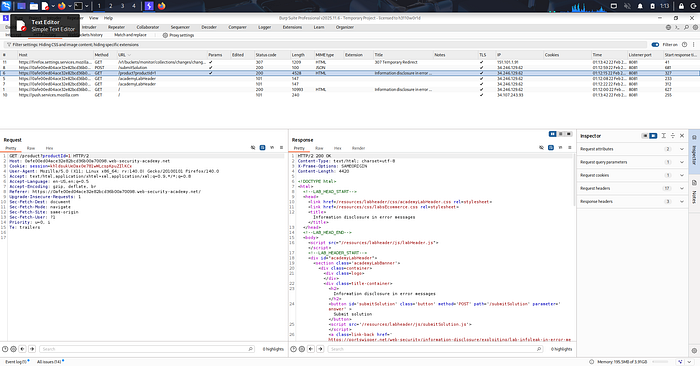
Step 3 — Find the Product Page Request
The lab had a simple e-commerce website.
I navigated to a product page.
The URL looked like this:
/product?productId=1Sent this request to Burp's Repeater tool — which lets you manually change and fire requests again and again without touching the browser.
Step 4 — Think Like an Attacker
Here is where the mindset shift happens.
What if I send something the server does not expect?
Instead of productId=1 — a valid number — I changed it to something invalid.
Just a single quote. That is it.
/product?productId='One character.
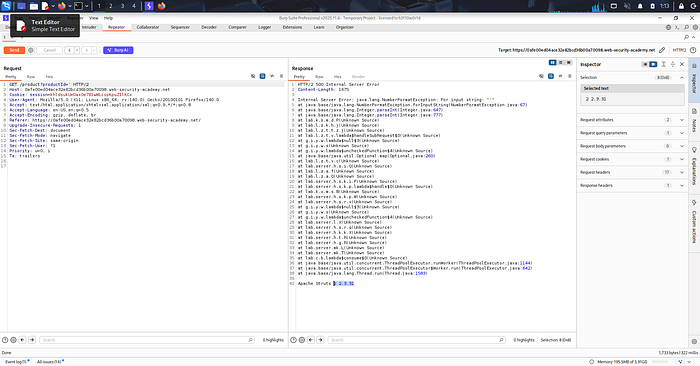
Step 5 — The Server Panicked
Sent the request.
The server broke.
HTTP 500 — Internal Server Error.
And with it came a full Java stack trace.
Lines and lines of internal error output that was never supposed to be shown to anyone outside.
java.lang.NumberFormatException: For input string: "'"
  at java.base/java.lang.NumberFormatException...
  at java.base/java.lang.Integer.parseInt...
  at lab.server...
The server told me exactly what went wrong.
Internal class names. File paths. Method names.
And then — right at the very bottom of the response — something I was not expecting to find this easily:
Apache Struts 2 2.3.31There it was.
The framework. The exact version. Handed over by the application itself.
No brute force. No complex payload. No hours of digging.
One wrong input. One crash. One version number.
Step 6 — Submit and Solve
Copied that version number.
Submitted it as the answer.
Lab solved……………….
What This Means in the Real World
Apache Struts 2.3.31 is not just a version number.
It is a version associated with critical known vulnerabilities.
The kind that have been used in real-world attacks affecting millions of people.
If an attacker finds this version number on a live website?
They do not need to think.
They already know exactly what to do next.
This is why verbose error messages in production are one of the most dangerous misconfigurations that developers ignore.
Your app crashed — that is already a problem.
Do not hand the attacker a manual on top of it.
The fix is simple:
- Turn off detailed error messages in production
- Show users a generic error page
- Log the real error internally — where only your team can see it
Three lines of configuration.
That is all it takes.
But most people never do it.
What This Lab Taught Me
There is a saying I keep coming back to —
The biggest risk is thinking you have no risk.
And today's lab was proof of that in security.
Information Disclosure is not a loud attack.
No alarms go off. No warnings flash. No red flags appear.
The website just quietly talks. And the attacker quietly listens.
No complex payload.
No advanced tool.
No hours of fuzzing.
Just one invalid input. One error message. One version number.
And the door is open.
That is what makes this dangerous.
The vulnerability is not hiding in some deep corner of the application.
It is sitting right on the surface.
Waiting for someone to read it.
What I Learned About Learning
Security is not just about tools.
It is about curiosity.
What happens if I send this?
What happens if I break this?
What does the server say when it is confused?
Ask the right questions. And the system will answer.
That is the real lesson from today.
Not just in security.
In everything.
Stay curious. Keep breaking things. Keep learning.
Tools Used
- Burp Suite Professional
- PortSwigger Web Security Academy
About This Blog
I write all my blogs based on my actual lab-solving experience. I document my thought process, my mistakes, and my learning journey in my own words first. Then I use AI tools to help organize and structure my writing better — but the content, experience, and learning are 100% mine.
Lab Proof

Tejas Saubhage | Breaking things to build them better