

Lab: Reflected XSS into HTML context with all tags blocked except custom ones
Challenge Overview
This lab demonstrates a reflected Cross-Site Scripting (XSS) vulnerability in the search functionality of a web application that attempts to block all standard HTML tags. The filtering mechanism rejects commonly known tags such as <script>, <img>, and others in an effort to prevent XSS attacks.
However, the application still allows custom HTML tags. Custom tags are not predefined HTML elements but browsers still parse them as part of the DOM structure. If a custom tag is allowed and event attributes are not filtered, it becomes possible to execute JavaScript.
The goal of this lab is to inject a custom HTML tag that executes JavaScript automatically and displays document.cookie.
Step-by-Step Solution
Step 1 — Exploring the Search Functionality
After opening the lab, I first explored the search feature to understand how user input was handled.
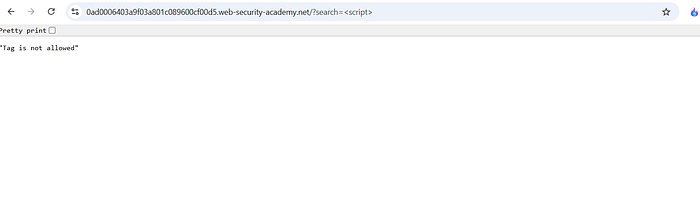
I started by testing a basic XSS payload:
The application returned an error message stating that the tag was not allowed. This confirmed that the server was actively filtering standard HTML tags.
Step 2 — Testing Custom HTML Tags
Since standard tags were blocked, I tested whether the application allowed custom HTML tags.
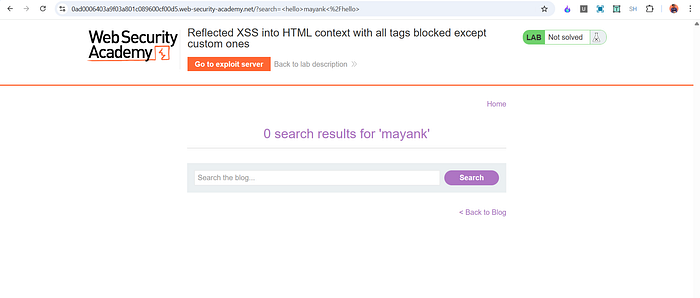
I entered the following input:
<hello>mayank</hello>
The input was reflected successfully in the response and rendered in the page. This confirmed that custom tags were allowed by the filtering mechanism.
However, the payload did not trigger any JavaScript execution because it did not include any event handler.
Step 3 — Injecting JavaScript Using an Event Attribute
Because custom tags were allowed, the next step was to add a JavaScript event handler to the custom element.
The following payload was used:
Explanation of the payload:
• <may> is a custom HTML tag that bypasses the tag filtering.
• onfocus is an event attribute that executes JavaScript when the element receives focus.
• alert(document.cookie) displays the current cookies.
• id='x' assigns an identifier to the element.
• tabindex='1' allows the element to receive keyboard focus even though it is not normally interactive.
At this stage the payload worked, but it required the element to receive focus. Since the lab required the exploit to run automatically, an additional step was needed.

Step 4 — Delivering the Payload Using the Exploit Server
The lab provides an Exploit Server that can be used to deliver the attack to the victim.
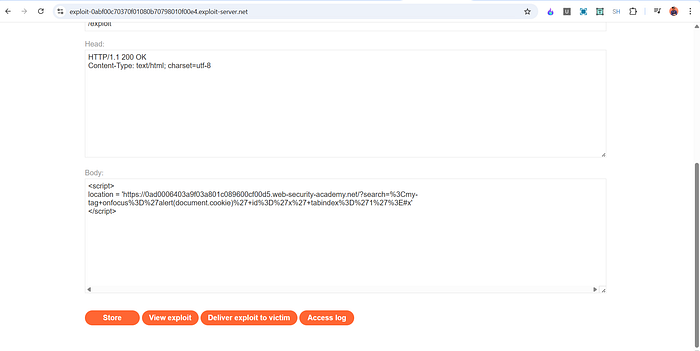
To trigger the payload automatically, I created an exploit page that redirects the victim to the vulnerable URL containing the injected payload.
Example exploit:
Explanation:
• The script redirects the victim to the vulnerable search page.
• The payload injects the custom tag with the onfocus event.
• The fragment #x causes the browser to automatically focus the element with id x.
• When the element receives focus, the onfocus event triggers and executes alert(document.cookie).
After testing the exploit using View Exploit, the alert box appeared. Finally, clicking Deliver to Victim solved the lab.

How and Why This Attack Works
The vulnerability exists because the application attempts to block XSS by filtering known HTML tags, but it fails to consider custom tags.
Browsers treat unknown tags as valid DOM elements. As long as the browser can parse the element, event attributes such as onfocus can still execute JavaScript.
The attack works due to three key factors:
- The application allows custom HTML tags.
- Event attributes like
onfocusare not filtered. - The page reflects user input directly into the HTML context.
By combining a custom tag with an event handler and forcing the browser to focus the element using the URL fragment, the payload executes automatically.
This demonstrates that blocking specific tags is not sufficient protection against XSS.
Impact
If this vulnerability existed in a real application, an attacker could:
• Steal session cookies • Execute arbitrary JavaScript in the victim's browser • Perform actions on behalf of authenticated users • Inject malicious content or phishing scripts • Compromise user sessions and sensitive data
Because the exploit can be delivered through a crafted link, attackers could easily target victims via phishing emails or malicious websites.
Mitigation
To prevent this vulnerability, developers should implement the following protections:
- Apply proper output encoding when inserting user input into HTML.
- Avoid relying solely on tag filtering for XSS protection.
- Remove or sanitize dangerous event attributes such as
onfocus,onclick, and others. - Use a secure HTML sanitization library to clean user-generated content.
- Implement a strict Content Security Policy (CSP) to limit script execution.
The most reliable defense against XSS is context-aware output encoding combined with secure input handling, rather than attempting to blacklist specific HTML tags.
📬 Stay Connected
If you found this helpful and want to learn more about web security and hands-on labs, feel free to follow me for upcoming write-ups and practical cybersecurity content.
✍️ Follow me for more cybersecurity write-ups 🔗 LinkedIn — codermayank 📸 Instagram — @mayhack_
I've already published several XSS lab write-ups, and more labs will be uploaded soon. Stay tuned for upcoming posts covering additional PortSwigger labs and web security concepts.