That is the biggest misconception in cybersecurity.
A VPN is not simply "hiding your location." It is performing complex routing manipulation, packet encapsulation, cryptographic authentication, kernel-level traffic interception, and military-grade encryption in real time.
Every second your VPN is active, an invisible war is happening underneath your operating system.
Your ISP tries to observe your traffic. Attackers try to intercept packets. Public Wi-Fi networks try to expose metadata. And the VPN silently rebuilds your entire network path before a single packet leaves your machine.
This article is not about marketing terms.
This is about understanding what actually happens inside a VPN tunnel.
Why VPNs Exist in the First Place
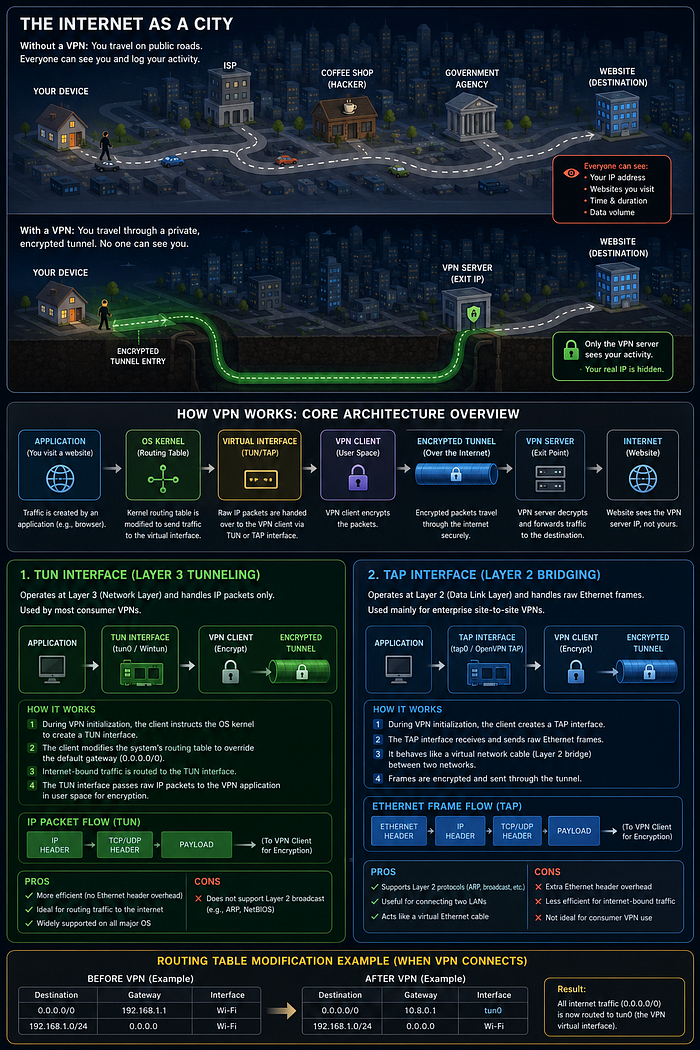
Think of the internet as a giant city full of roads.
Normally when you visit a website:
Your device → ISP → Routers → Website
Every system in the middle can observe parts of your communication.
Your ISP can see:
- Which servers you connect to
- Your metadata
- Timing information
- DNS requests
- Traffic patterns
Anyone sitting on insecure public Wi-Fi may attempt packet interception.
A VPN changes this completely.
Instead of directly connecting to the internet, your traffic first enters an encrypted tunnel and exits through a VPN server, making it appear as though the traffic originated from that VPN server rather than your actual device.
This creates privacy, anonymity, and encrypted transport.
But the real magic happens underneath.
The Hidden Virtual Network Adapter Inside Your Operating System
When you activate a VPN, your operating system silently creates a virtual network interface.
This fake adapter becomes the new path for your internet traffic.
Most people never notice this happening.
Two major interface types are used:
1. TUN Interface (Layer 3)
This is used by most modern consumer VPNs.
The TUN interface operates at Layer 3 of the OSI model and handles IP packets only.
When the VPN starts:
- The OS routing table gets modified
- Default traffic routes change
- Internet-bound packets are redirected into the virtual interface
- The VPN application intercepts packets before they reach the internet
This is why on Linux you often see interfaces like:
- tun0
- tun1
The VPN client then encrypts those packets in user space.
2. TAP Interface (Layer 2)
TAP interfaces operate differently.
Instead of handling IP packets, they handle full Ethernet frames.
These are more common in enterprise site-to-site VPN deployments where two entire networks must behave like one shared LAN.
But TAP introduces additional Ethernet overhead and is slower for normal consumer VPN usage.
The Encapsulation Lifecycle — What Happens to Your Packet
This is where VPNs become truly fascinating.
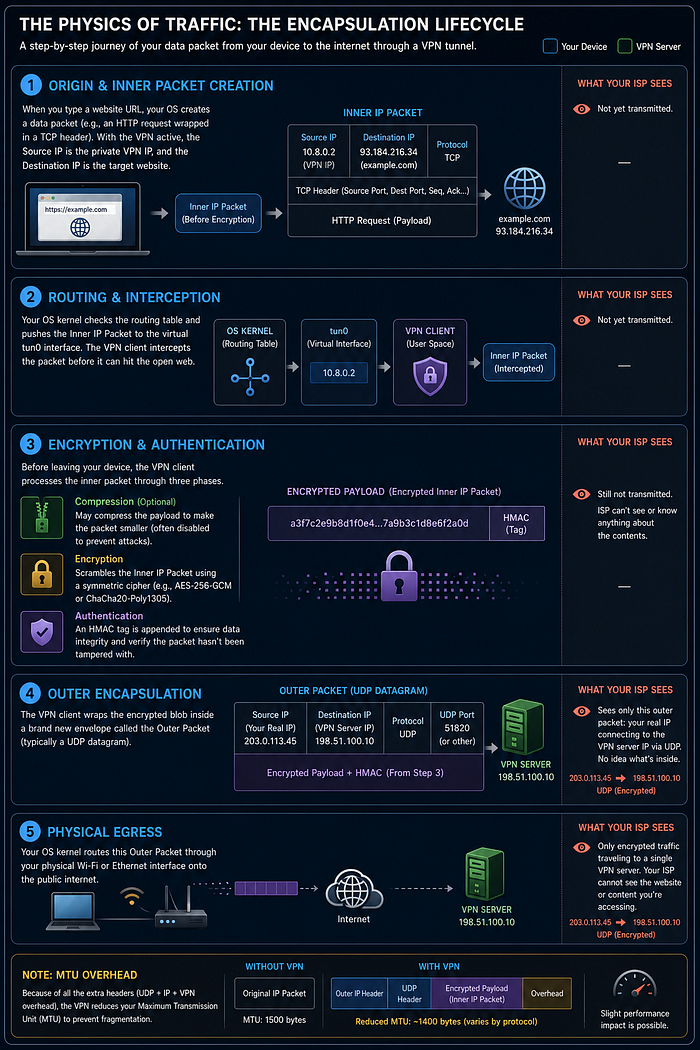
When you type a website into your browser, your operating system creates an internal IP packet.
Inside that packet:
- Source IP = your VPN-assigned private IP
- Destination IP = target website
Now the VPN intercepts it before it reaches the open internet.
Then several things happen.
Step 1 — Encryption
The VPN scrambles your packet using strong cryptographic algorithms.
This transforms readable data into unreadable ciphertext.
Anyone intercepting the traffic only sees encrypted noise.
Step 2 — Authentication (HMAC)
The VPN appends a cryptographic hash signature called HMAC.
This ensures:
- The packet was not modified
- The packet is authentic
- Tampering gets detected immediately
If even one bit changes, the hash changes completely and the packet gets rejected.
Step 3 — Outer Encapsulation
Now the VPN wraps your encrypted packet inside another outer packet.
This outer packet contains:
- Your real ISP IP address
- VPN server destination IP
- UDP/TCP transport information
Your ISP only sees encrypted traffic traveling to a VPN server.
They cannot see:
- Which websites you visit
- Packet contents
- Inner requests
This process is called encapsulation.
AES-256 — The Encryption Standard Governments Trust
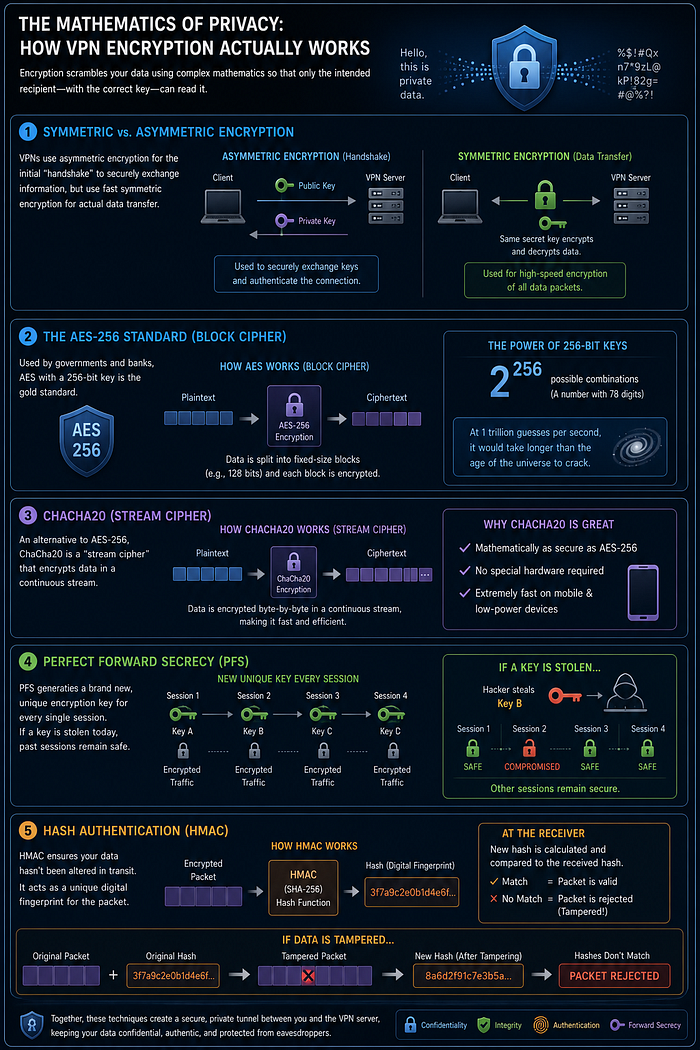
Most modern VPNs rely on AES-256 encryption.
AES stands for: Advanced Encryption Standard.
The "256" refers to the key size.
That means there are: 2²⁵⁶ possible key combinations.
That number is astronomically large.
If a computer tested one trillion keys every second, it would still take longer than the age of the universe to brute force the encryption.
AES works as a block cipher:
- Data gets split into blocks
- Each block gets encrypted independently
This is why AES-256 is trusted by:
- Governments
- Banks
- Military systems
- Enterprise infrastructures
ChaCha20 — The Faster Modern Alternative
ChaCha20 is another encryption algorithm heavily used in modern VPNs.
Unlike AES:
- It is a stream cipher
- It encrypts data continuously instead of block-by-block
Advantages:
- Extremely fast on mobile devices
- No specialized hardware required
- Efficient on low-power CPUs
ChaCha20 is heavily used inside WireGuard VPNs.
Perfect Forward Secrecy (PFS)
One of the most important concepts in modern VPN security.
Without PFS: If a hacker steals one encryption key, they may decrypt previous sessions.
With PFS: Every VPN session gets a brand new encryption key.
Meaning:
- Yesterday's traffic remains safe
- Last week's traffic remains safe
- Old sessions cannot be retroactively decrypted
This massively limits damage during key compromise.
VPN Protocols — The Rulebooks of Encryption
Encryption algorithms alone are not enough.
VPN protocols define:
- How keys are exchanged
- How packets move
- How authentication works
- How tunnels stay alive
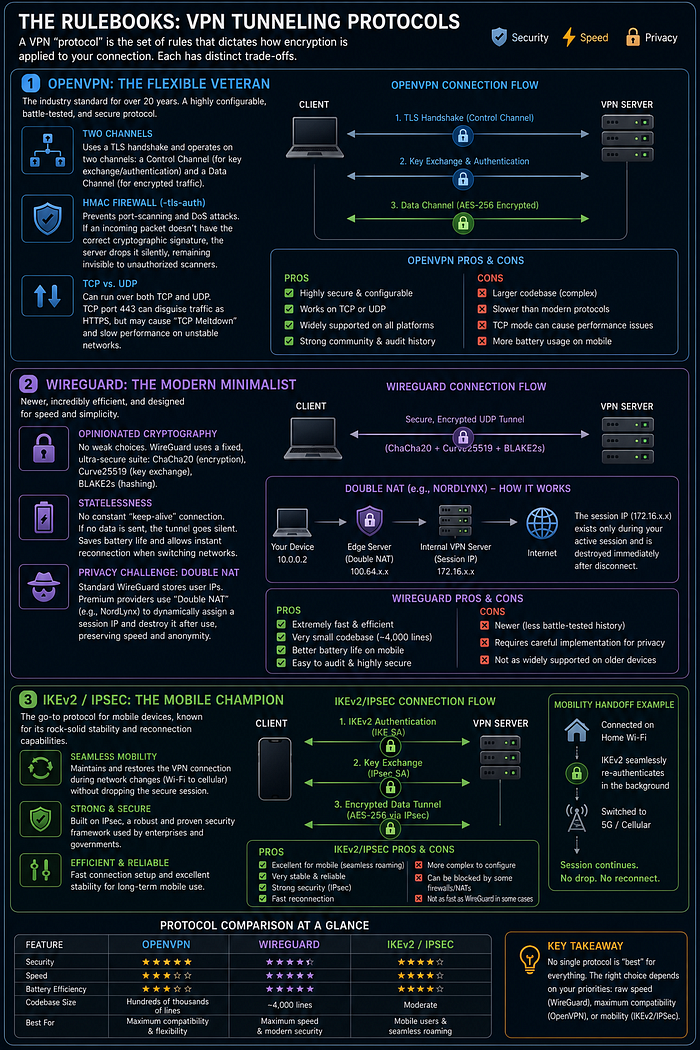
OpenVPN — The Battle-Tested Veteran
OpenVPN has existed for over 20 years.
It uses:
- TLS handshake
- Separate control and data channels
- AES-256 encrypted transport
One important feature: tls-auth
If packets do not contain the proper cryptographic signature, the server silently drops them.
This helps defend against:
- Port scanning
- DoS attacks
- Unauthorized discovery
OpenVPN supports:
- TCP
- UDP
But TCP mode may introduce performance degradation known as: TCP Meltdown.
WireGuard — The Modern Speed Monster
WireGuard is radically different.
OpenVPN historically contains hundreds of thousands of lines of code.
WireGuard operates on roughly: 4,000 lines.
This means:
- Smaller attack surface
- Faster performance
- Easier auditing
- Better efficiency
WireGuard forces strong cryptography only:
- ChaCha20
- Curve25519
- BLAKE2s
No weak ciphers allowed.
It is fast enough that many users barely notice performance overhead.
IKEv2/IPSec — The Mobile Stability King
IKEv2/IPSec excels on unstable mobile networks.
Its biggest strength: Seamless reconnection during network switching.
Example:
- Switching from Wi-Fi to cellular
- Moving between networks
- Temporary packet loss
The VPN session survives without interruption.
This makes IKEv2 extremely popular on smartphones.
The Reality Most People Never Realize
When your VPN is active:
Your operating system routing tables change. Virtual interfaces appear. Packets get intercepted. Traffic gets encrypted. Hashes get appended. Outer packets get generated. Tunnels get maintained. Keys rotate continuously.
All before your browser loads a single webpage.
This entire process happens in milliseconds.
Silently.
Final Takeaway
VPNs are not "magic privacy buttons."
They are complex systems built from:
- Kernel-level routing
- Packet encapsulation
- Cryptographic mathematics
- Authentication systems
- Secure tunneling protocols
Most people only see: "Connected."
But underneath that tiny green VPN icon is an entire architecture fighting to keep your traffic invisible.
The real power of cybersecurity begins when you stop using tools blindly…
…and start understanding the mathematics, protocols, and system internals that make them work.
Because privacy is not just software.
Privacy is engineering.
Happy Hacking.