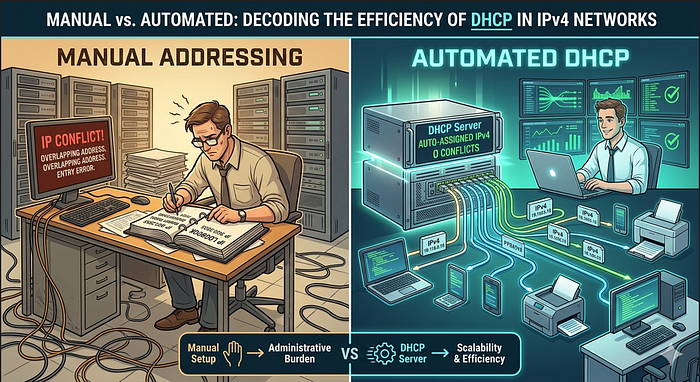
When assigning IPv4 addresses to devices on a network, there are two fundamental approaches: static or dynamic configuration. Static IPv4 addressing is the process of assigning a permanent and unchanging IP address to a device on a network. In the static assignment method, the network administrator must manually enter the required network information for each device (host). In a professional network configuration, this information includes at least the following three components:
IP Address: The unique identifier of the device on the network.
Subnet Mask: The structure that defines the network to which the device belongs.
Default Gateway: The router address that the device uses to access external networks (the internet or remote networks).
Why Use Static IP?
The greatest advantage of static addressing is consistency. Having a fixed address is crucial for printers, servers, and other critical network devices. If users access a server via a specific IP address, any change to that address can disrupt connectivity. Therefore, static configuration is standard for devices where availability is critical.
Risks and Challenges
However, this method also has significant disadvantages. Manually configuring each device is time consuming and highly prone to human error typos. Since devices can perform only basic validation during static entry, entering an incorrect or conflicting address may cause network issues. Additionally, static addresses are persistent; even if a device leaves the network, the address must be manually released and properly tracked through an accurate inventory system.
For administrators who want full control, static addressing is indispensable. However, as networks grow, transitioning to dynamic methods becomes inevitable to reduce this operational burden.
This manual burden brought by static addressing must give way to intelligent automation in scalable networks.
Automation in Network Management: Dynamic Addressing with DHCP
In local networks, the user population is in a constant state of flux. New users arriving with laptops or newly installed workstations may require a connection at any moment. Manually assigning addresses for every single device is not a sustainable method for modern and dynamic networks. This is where DHCP (Dynamic Host Configuration Protocol) comes into play to automate the process.
How Does DHCP Work?
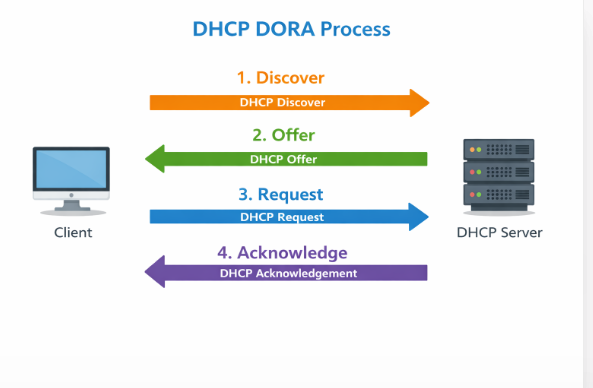
DHCP automatically distributes IPv4 addresses, subnet masks, default gateways, and other critical configuration information to devices. The primary reason this protocol is preferred, especially in large scale networks, is that it lightens the workload on technical support teams and completely eliminates errors resulting from manual data entry. The DHCP process actually takes place through a four-stage handshake known as DORA: The client searches for an address (Discover), the server sends a proposal (Offer), the client confirms (Request), and the server completes the registration (Acknowledge).
Address Leasing Logic and Efficiency
One of the greatest advantages offered by DHCP is that addresses are not assigned permanently, but are instead provided as a lease for a specific period. When a device leaves the network or is powered down, the IP address it was using automatically returns to the pool and is made available for another device. This dynamic structure prevents IP address waste particularly in networks with frequently moving mobile users and ensures that limited IPv4 resources are used with maximum efficiency.
While the convenience of automation provided by dynamic addressing is significant, it can lead to IP conflicts if not configured correctly. At this point, the concept of 'Address Exclusion' plays a critical role.
Ensuring Network Stability: The Role of IP Exclusions
While DHCP offers great convenience through automation, it can inadvertently lead to IP Address Conflicts if not configured carefully. A DHCP server is not naturally aware of the addresses you have manually assigned to servers or printers. To prevent the server from assigning an already in use static IP to a new device, network administrators use "DHCP Exclusions."
By defining an exclusion range, you instruct the DHCP server to keep certain addresses out of the dynamic pool. This ensures that your critical infrastructure remains accessible at their fixed addresses while the rest of the network enjoys the fluidity of automation. This small yet vital step is what separates a basic setup from a resilient, professional network architecture.
DHCP Servers: Everywhere You Connect to the Internet
The unsung hero that allows you to connect to the internet within seconds at a cafe or an airport is DHCP. The moment your device joins a network, the DHCP client on it communicates with the local DHCP server and requests an IPv4 address on your behalf. But what exactly is this server, and where is it located?
Devices Acting as DHCP Servers
Almost any device running DHCP service software can function as a server. However, the type of device used varies depending on the scale of the network:
Large-Scale Networks: In medium to large-scale enterprises, DHCP services are typically provided through a central, dedicated server reserved specifically for this task.
Home and Small Business Networks: This is the most common use case. The wireless routers we use are actually "dual identity" devices:
- Client Role: It acts as a client to receive a public IP address from your Internet Service Provider (ISP).
- Server Role: It acts as a server to distribute private IP addresses to devices within the home, such as phones, laptops, or televisions.
Network Appliances: In addition to PC based servers, enterprise-level routers can also be configured to provide this service, though this method is not as common as dedicated servers.
Conclusion
Whether it is a massive data center or a small modem in your home, the DHCP server acts as the traffic cop of modern network connections, preventing chaos and ensuring a smooth flow of data.