

These free tools can build a complete digital profile on anyone — and most people have no idea they exist.
I was doing routine recon for a personal project when I typed my own email into a lookup tool I'd bookmarked months ago.
What came back wasn't what I expected.
Names I hadn't used in years. Phone numbers — masked, but clearly mine. Usernames from platforms I'd forgotten I'd signed up to. Breach records going back to 2010. A GitHub handle I thought was anonymous. Profile pictures scraped from accounts I'd deleted.
All of it, assembled in under 10 seconds, from a single email address.
I'm a Computer Engineering student who works on cloud security auditing for my project. I understand data exposure better than most people I know. And I was still caught off guard.
That's the thing about OSINT. It doesn't require a hacker. It doesn't require skill. It requires curiosity — and a browser.
This article is Part 1 of a deep-dive into the OSINT toolkit that security researchers, journalists, and unfortunately, stalkers and threat actors use every day. I'm going to walk you through 7 tools, what they actually surface, and how to use them responsibly.
What Is OSINT and Why Should You Care Right Now
Open Source Intelligence is the practice of collecting publicly available information about a target using legal, accessible sources — social platforms, breach databases, public records, DNS lookups, and web archives.
It's used by penetration testers during recon phases, journalists verifying sources, HR teams doing background checks, and law enforcement building cases. It's also used by people with far less noble intentions.
The uncomfortable truth that most security content skips over: the difference between a security researcher and a stalker using these tools is intent, not access. The tools are identical. The data is identical. That's exactly why you need to understand this.
If your data is out there and it is you should know what's out there, how it's connected, and what someone could do with it before they do.
Here are the 7 tools I used. Every single one is free to try on yourself.
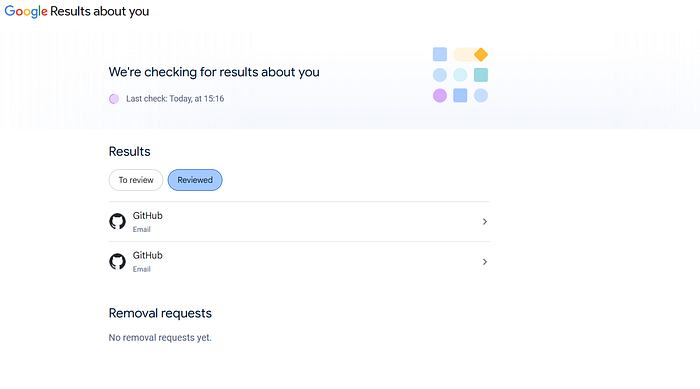
And it's not just third-party tools doing this. Google has a built-in feature called Results About You — go to https://myactivity.google.com/results-about-you
and see exactly what Google has indexed about you across the web. Mine showed two GitHub email exposures that I'd never flagged myself. You can request removals directly from there. Most people don't know this page exists.
Tool 1 — WhatsmyName.app: The Username Aggregator
Link: https://whatsmyname.app
Start here. Always.
WhatsmyName takes a single username and simultaneously checks it across hundreds of platforms — Twitter, Reddit, GitHub, Telegram, Steam, Pinterest, Flickr, OnlyFans, DeviantArt, and dozens more. In seconds, it returns which platforms have an active account with that username.
Why this is dangerous: Most people reuse usernames. The username you created on Reddit in 2014 is probably the same one on that obscure forum, that old gaming profile, that Discord server. WhatsmyName connects them all.
What it reveals: Active accounts across 300+ platforms, social graph connections, interest mapping from platform categories, potential real name correlation if the username was created carelessly.
How to use it:
- Go to whatsmyname.app
- Enter the username (without @)
- Wait 10–15 seconds for the scan to complete
- Green = account found, Red = not found, Yellow = uncertain (manual check needed)
Start with the green results. Cross-reference profiles. Look for bio overlap, profile pictures, linked accounts. This is where you start building the graph.
Try this on yourself first. Count how many platforms share your username. The number will surprise you.
Tool 2 — IntelligenceX (IntelX): The Dark Archive
Link: https://intelx.io
IntelligenceX is not a typical search engine. It indexes data that Google explicitly excludes — leaked databases, paste sites, darknet content, old web archives, and breach compilations.
When I searched on IntelX, the results screen showed 471 text files, 115 CSVs, 107 HTML files, 71 pastes, 20 database files, and more — all matching a single query. The document viewer showed email:password combo lists, credential dumps, and forum registrations going back years.
You can input any username or email here to search
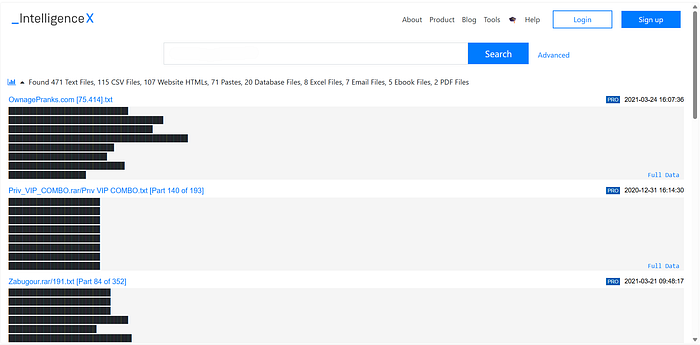
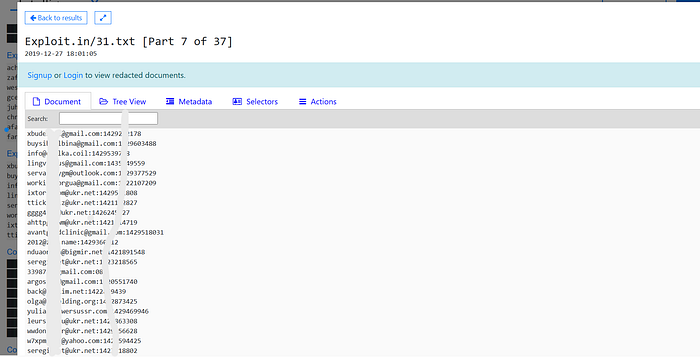
What it reveals: Breach records, credential combos, paste leaks, old forum posts, email/password associations, registration data across defunct platforms.
Free tier limitations: You can see that data exists. PRO tier unlocks full document reads. But even free results tell you what breached, when, and from where — which is often enough.
How to use it:
- Go to intelx.io
- Search by email, username, domain, IP, or phone number
- Review the file type breakdown and date range
- Open individual results to see source context
For OSINT purposes, IntelX is most useful for confirming whether a target has been in a breach and identifying which breach — because breach origin tells you what data types were exposed.
A target who appeared in the LinkedIn 2012 breach and the Adobe 2013 breach probably used the same password on both. That's not a small detail.
Tool 3 — Social Searcher: Real-Time Social Monitoring
Link: https://www.social-searcher.com
Social Searcher scans live social media posts across Twitter/X, Reddit, Instagram, YouTube, Facebook, and more — indexed in near real-time.
Where WhatsmyName finds accounts, Social Searcher finds activity. It's the difference between knowing someone has a Twitter account and knowing what they posted three hours ago.
What it reveals: Recent public posts, sentiment patterns, location context from post metadata, interest mapping from post topics, temporal activity patterns (when they're online, what triggers posting), language and writing style for persona confirmation.
How to use it:
- Go to social-searcher.com
- Search by keyword, name, or hashtag
- Filter by platform and date range
- Export results for timeline building
The temporal data is underrated. Knowing someone is consistently active between 11 PM and 1 AM tells you timezone. Timezone narrows geography. Geography narrows everything.
Tool 4 — Holehe: Email-to-Platform Checker
Link: https://holeheosint.com (https://github.com/megadose/holehe )
Holehe takes an email address and checks whether it's registered on 120+ platforms — without triggering alerts or logging into anything. It works by exploiting "forgot password" flows that return different responses for registered vs unregistered emails.
What it reveals: Which services the target has accounts on, cross-platform presence from a single email, platform categories that reveal interests and behaviors.
The clever part: Most platforms confirm during password reset whether an email is registered. Holehe automates this at scale. The target receives no notification. No login attempt is recorded. The check is entirely passive from an external perspective.
Try your own email. See which platforms you've forgotten you signed up for.
Tool 5 — Behind the Email: The Richest Lookup Tool in This List
Link: https://behindtheemail.com
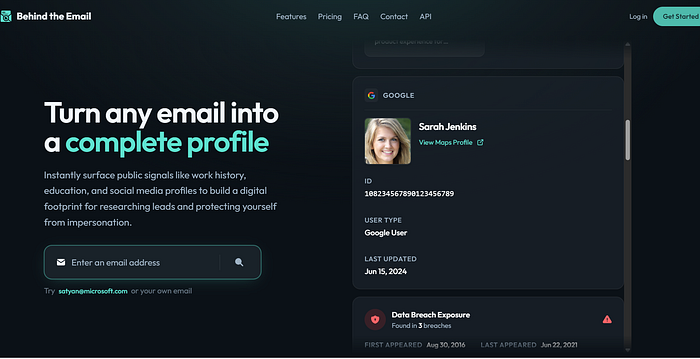
This one genuinely surprised me. It's the most comprehensive single-email lookup I've used.
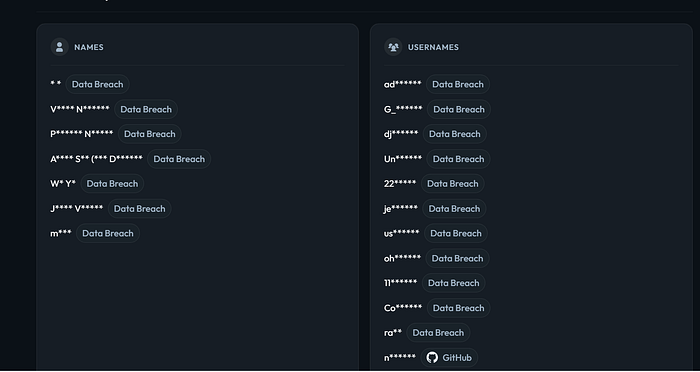
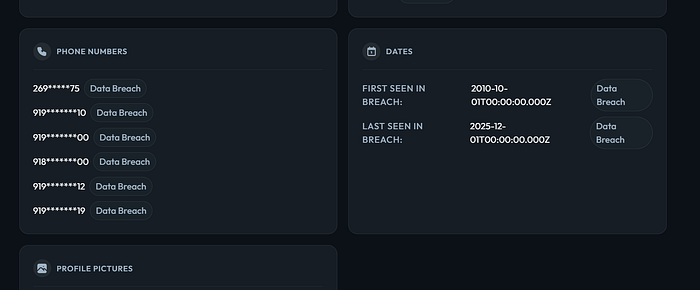
Enter an email, and it aggregates data from multiple public and breach sources to return: linked Google account details (name, profile picture, Maps profile), data breach exposure with specific breach names and dates, names associated with the email, masked phone numbers from breach records, usernames across platforms, social media profile links, and first/last seen in breach data.
What it reveals in practice:
- Names panel: Multiple aliases and real names tied to the email across different services
- Usernames panel: Cross-platform handles — including one tagged as GitHub, which immediately links to code repositories, commit history, and real identity confirmation
- Phone numbers panel: 6 masked numbers, all tagged "Data Breach" with source metadata
- Dates panel: First seen in breach: 2010. Last seen: 2025. A 15-year exposure window.
That date range is what gets me. A 2010 breach record means this email has been in leaked databases for 15 years. It's been scraped, sold, re-scraped, and sold again more times than anyone can track.
How to use it:
- Go to behindtheemail.com
- Enter any email address
- Review each panel — Names, Usernames, Phones, Dates, Profile Pictures
- Use the breach source tags to trace which databases the data came from
This is the tool you send to someone who thinks their data isn't publicly exposed.
Tool 6 — Digital Footprint Check: The Self-Audit Tool
Link: https://www.digitalfootprintcheck.com
This one is explicitly built for self-auditing rather than third-party recon — though the data it surfaces is identical either way.
It scans your digital footprint across data broker sites, people-finder databases, and public records, then shows you where your information is listed and gives guidance on removal requests.
What it reveals: People-finder listings, public record aggregations, data broker presence, estimated exposure score.
This is the tool to use after running the others on yourself. After you've seen what Behind the Email or IntelX returns, come here to understand the ecosystem that feeds those results.
Tool 7 — WebMii: The Reputation & Presence Aggregator
Link: https://webmii.com
WebMii searches the open web for a name and returns a digital presence score — aggregating social profiles, news mentions, public records, blog posts, and forum activity into a unified view.
It's the closest thing to a Google search specifically optimized for person-finding. Where Google returns everything, WebMii filters for identity signals.
What it reveals: Social profile inventory, web mentions and press, public comment history, professional profile links, presence score out of 10 for estimating how findable a person is.
Best use case in an OSINT workflow: Use WebMii to confirm identity after WhatsmyName and Behind the Email have given you a name. If all three sources converge on the same person, you've got solid confirmation.
The Full Workflow — How These Tools Work Together
Most people think OSINT is about individual tools. It's not. It's about the graph.
Here's the flow a researcher would actually run:
- Start with an email → Behind the Email returns names, usernames, phones, breach history
- Take the username → WhatsmyName finds it across 300+ platforms
- Take the name → WebMii aggregates web presence and confirms identity
- Check breach depth → IntelX shows which leaks the email appeared in and what data types were exposed
- Monitor live activity → Social Searcher shows recent posts and behavioral patterns
- Verify platform registrations → Holehe confirms which services the email is registered on
- Understand the ecosystem → Digital Footprint Check shows data broker presence
Each tool fills a gap the others leave open. The output isn't seven separate reports — it's one connected picture of a person's digital identity.
The Part Nobody Talks About
Here's the counterintuitive reality: the problem isn't that these tools exist. The problem is that most people assume their data isn't there.
Privacy theater — changing passwords, using a VPN, keeping your Instagram private — doesn't help if your email is in 47 breach databases from services you signed up for in 2011 and forgot about. The data is already out. The VPN doesn't reach back in time.
The researchers who find nothing on themselves are the ones who audited their own exposure first and then systematically removed it. Not the ones who avoided the internet.
OSINT as a defensive skill matters more than OSINT as an offensive one. Every one of these tools works on you right now. The question is whether you know what they return.
What's Coming in Part 2
Part 2 will cover the deeper tools — DNS-layer OSINT, reverse image search workflows, subdomain enumeration, Shodan for infrastructure exposure, and a full case-study walkthrough of building a complete target profile from a single starting point.
But Part 2 only drops if this article clears 100 claps and someone drops a comment below confirming they want it.
That's not a gimmick. It's a filter. The people who engage are the people who actually read. I write for readers, not view counts.
Drop a comment with "Part 2" if you want the deep-dive.
If this shifted how you think about your own exposure — or you found something on yourself that surprised you — I want to hear about it.
Do you think most people genuinely can't access their own exposure data — or do they just not want to know what's there?
If this landed, follow. I publish on cloud security, application security, and OSINT — usually when something surprises me enough to write about it.
All tools covered in this article are legal to use for research purposes. OSINT is a legitimate discipline used by security professionals, journalists, and researchers worldwide. Use responsibly. Never use these tools to stalk, harass, or harm individuals. The author does not endorse any illegal use of OSINT techniques.