
Cisco's new model release extends their previous 8B model with structured reasoning capabilities. This allows it to generate explicit reasoning traces and think through complex, multi-step security problems before presenting an answer.
If you have an Ollama deployment, you might have noticed this model isn't in the library yet, and there are no GGUFs available on Hugging Face (as of time of writing this!).
In this article I'll show you how to take the raw weights, pack them into a compressed GGUF, and run the model locally, ensuring you don't have to trust a random internet stranger to pack the files for you.
And we're going to do this using docker, so that you don't have to install and persist software that you don't plan on using, and we have it run sandboxed, the attacker-mindset way.
If you haven't packed a model before, it's a great excuse to get hands-on with tensors, GGUF and a tiny step forward in your supply chain security practices. It only takes a few minutes (give or take based on your connection speed).
Download the Weights and settings/configs
Go to the official repo and list all files: https://huggingface.co/fdtn-ai/Foundation-Sec-8B-Reasoning/tree/main
Doing this manually won't require any Huggingface Tokens or API keys.

Now place all of the downloaded files in a local directory named "raw_model" (should you use a different name then update it in the commands below as well)
Files you actually need:
- All ".safetensors" files, "config.json", "generation_config.json", "tokenizer.json", and "special_tokens_map.json".
Packing into GGUF
This section assumes you have Docker installed. The command below will convert the downloaded files into a well packed GGUF. For more information on the GGUF format please refer to: https://huggingface.co/docs/hub/en/gguf
The command assumes you've downloaded all required files to a raw_model subdirectory and you're executing this from the parent directory.
docker run --rm -v $(pwd):/data python:3.11-slim bash -c " \
  apt-get update && apt-get install -y git && \
  pip install --upgrade pip && \
  git clone https://github.com/ggml-org/llama.cpp.git /app/llama.cpp && \
  pip install -r /app/llama.cpp/requirements.txt && \
  python /app/llama.cpp/convert_hf_to_gguf.py /data/raw_model --outfile /data/foundation-sec-F16.gguf"
As a result, you'll now have "foundation-sec-F16.gguf" file in the parent directory. You're almost there! Read the next section in order to learn how to compress its size in a way we don't lose quality or sanity (err, precision).
Quantasizing, A.K.A. Compressing our GGUF
The GGUF that we have is already usable, but it will likely require more VRAM that you and I have, or more than you'd be willing to allocate for the model.
That's why we want to first Quantasize the model, whilst remaining careful not to reduce its size to a point where we make it "dumb".
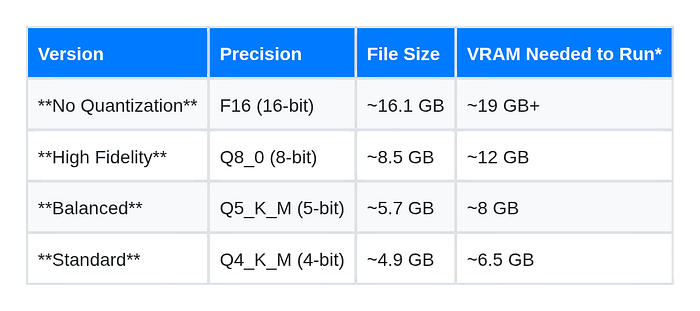
So how much should we be able to reduce its size in this case? In this example, I'm quantizing to Q8_0, which is well above the standard Q4_K_M normally used for 8b parameter models; just "in case" considering this new reasoning behavior may require higher precision to work properly. Higher precision should ensure the "chain of thought" logic remains intact.
Note that I have not found official recommendations from Cisco on which compression would be acceptable for us mortals with limited VRAM.
Here's a quick table Gemini Pro put together for us:
Let's use docker then to quantize to Q8_0:
docker run --rm -v $(pwd):/data ghcr.io/ggml-org/llama.cpp:full \
  --quantize /data/foundation-sec-F16.gguf /data/foundation-sec-Q8_0.gguf Q8_0
Once the process finishes successfully, we'll see a new GGUF in the same directory as the original one, named "foundation-sec-Q8_0.gguf".
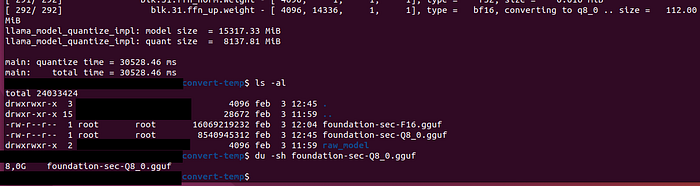
You may also notice the GGUF is half the size as the original, yay!
Importing to Ollama
We're now going to be putting together a "Modelfile" which is going to be used by Ollama to load our GGUF file and in it we're also going to be referencing data obtained from the huggingface files downloaded earlier.
DIRECTIVE IN MODELFILE            SOURCE OF DATA
--------------------------------------------------------------------------------
FROM ./path_to_model.gguf         The path to the GGUF file.

TEMPLATE …[llama3.1template]      Meta Llama 3.1 Standard (This is because this
                                  model provided by Cisco is derived from
                                  Llama-3.1-8B-Base).

PARAMETER temperature 0.6         Llama-3.1-FoundationAI-SecurityLLM-Reasoning-8B
                                  Technical Report (Specific to the "Reasoning"
                                  variant). Refer to https://arxiv.org/html/2601.21051v1#S4
                                  section Evaluation Results > Evaluation Protocol.
                                  (Also, note that the README file provided by
                                  Cisco mentions 0.3 was used for Benchmarking
                                  purposes).

PARAMETER top_p 0.95              Llama-3.1-FoundationAI-SecurityLLM-Reasoning-8B
                                  Technical Report. Refer to
                                  https://arxiv.org/html/2601.21051v1#S4 section
                                  Evaluation Results > Evaluation Protocol.

SYSTEM …[system prompt]           Obtained from tokenizer_config.json provided by
                                  Cisco, under the "chat_template" property.

PARAMETER stop "<|user|>"         Obtained from tokenizer_config.json provided
PARAMETER stop "<|assistant|>"    by Cisco and then eot_id is just standard for
PARAMETER stop "<|system|>"       Llama.
PARAMETER stop "<|end_of_text|>"
PARAMETER stop "<|eot_id|>"
Create a file named "Modelfile" in the same directory as the GGUF:
FROM ./foundation-sec-Q8_0.gguf

# 1. The Cisco/Jinja Chat Template
# (Derived directly from the tokenizer_config.json)
TEMPLATE """{{ if .System }}<|system|>
{{ .System }}
{{ end }}{{ if .Prompt }}<|user|>
{{ .Prompt }}
{{ end }}<|assistant|>
"""

# 2. The OFFICIAL System Prompt also obtained from tokenizer_config.json
SYSTEM """You are Metis, a cybersecurity reasoning model from the Minerva family developed by Foundation AI at Cisco. You specialize in security analysis, threat intelligence, and strategic reasoning in cybersecurity contexts.

The user is a cybersecurity professional trying to accomplish some cybersecurity task. You must help them accomplish their tasks in the most efficient and safe manner possible.

You have professional knowledge and experience of a senior-level cybersecurity specialist. For tasks relating to cyber threat intelligence (CTI), make sure that the identifiers (CVEs, TTPs) are absolutely correct.

Think step-by-step before producing a response. Explicitly generate a reasoning trace to explain your logic before your final answer."""

# 3. Parameters (From Technical Report & Tokenizer)
PARAMETER temperature 0.6
PARAMETER top_p 0.95
PARAMETER stop "<|user|>"
PARAMETER stop "<|assistant|>"
PARAMETER stop "<|system|>"
PARAMETER stop "<|end_of_text|>"
PARAMETER stop "<|eot_id|>"
Note: Ollama does not run the GGUF file directly from your source directory. Instead, adhering to the OCI (Open Container Initiative) standard, it ingests the file and converts it into hashed 'blobs' stored in its internal registry. Therefore once the import is complete, your original GGUF file is redundant and can be deleted to save space
Place both the GGUF file and the "Modelfile" in a temporary location of your choosing, and run:
ollama create foundation-sec -f Modelfile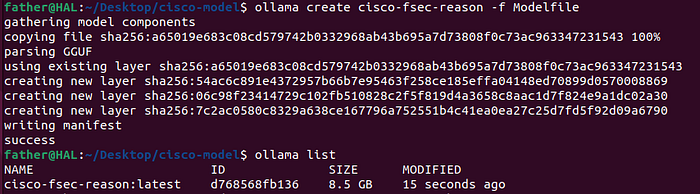
We're ready to try it out.
Run:
ollama run cisco-fsec-reason "I can't find the question to the answer 42"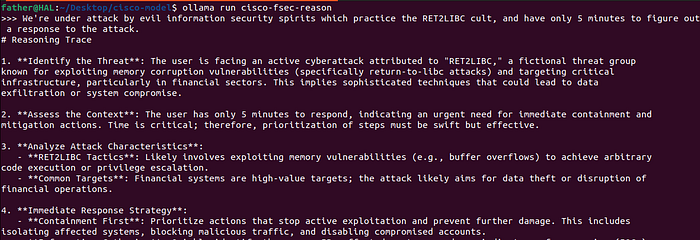
Closing thoughts
We are in an era where open-weight models are gold. Being able to pack and run them yourself means you aren't reliant on third parties or stuck paying for expensive closed-source APIs.
Privacy Reminder: If you use this locally to analyze sensitive logs or internal configs, cut the cord. Ensure your inference server has outgoing internet access blocked. One main advantage of local AI is privacy, don't leak your reasoning traces by accident.
Thanks for reading!
About Kulkan
Kulkan Security (www.kulkan.com) is a boutique offensive security firm specialized in Penetration Testing. If you're looking for a Pentest partner, we're here. Reach out to us via our website, at www.kulkan.com
More on Kulkan at:
Subscribe to our newsletter at: