
قَالُوا سُبْحَانَكَ لَا عِلْمَ لَنَا إِلَّا مَا عَلَّمْتَنَا ۖ إِنَّكَ أَنتَ الْعَلِيمُ الْحَكِيمُ
While exploring the search functionality of a web application, I discovered a Reflected Cross-Site Scripting (XSS) vulnerability. In this post, I will walk through the discovery, the payload used, and how developers can prevent such flaws.
Disclaimer: This write-up is for educational purposes only. The vulnerability was reported ethically and has been patched.
The Discovery
The target application featured a logbook search function. I noticed that the value passed to the search parameter in the URL was being reflected directly into an HTML input field without proper sanitization.
Vulnerable Endpoint: https://target-app.com/ham/log.php?search=[User_Input]
The Attack Vector
The goal was to "break out" of the HTML attribute and execute an event handler.
Initial HTML Structure: The application took my input and placed it directly inside an input tag's value attribute:
<input type="text" value="USER_INPUT_HERE" ...>By injecting a double quote ("), I could close the value attribute and introduce new attributes like onfocus.
The Payload: " autofocus onfocus=alert(1) x="
Deep Dive: The Logic Behind the Payload
When I first saw my input reflected in the search bar, I didn't just jump to <script>alert(1)</script>. Modern browsers and basic WAFs (Web Application Firewalls) often block the <script> tag immediately. I needed something stealthier and more effective.
Here was my thought process:
1. Breaking the Cage
The application was placing my input inside the value attribute of an <input> tag. To execute JavaScript, I first had to "break out" of that value attribute. By starting my payload with a double quote ("), I effectively closed the attribute, leaving the rest of my payload free to roam as new HTML attributes.
2. Bypassing "User Interaction"
Usually, an XSS like onclick=alert(1) requires the victim to actually click something. I wanted the exploit to trigger automatically.
autofocus: This is a powerful HTML5 attribute. By adding it, I tell the browser: "As soon as this page loads, pull the user's cursor focus directly to this search box."onfocus: This is the trigger. Sinceautofocusjust forced the box to be focused, theonfocusevent fires immediately without the user doing anything.
3. Cleaning Up the Mess
The original code likely had a trailing double quote that I didn't want breaking my syntax. By adding x=" at the end of my payload, I turned that leftover quote into a dummy attribute.
- Result:
value="" autofocus onfocus=alert(1) x=""(Clean execution
Proof of Concept (PoC)
I crafted the following malicious URL: https://target-app.com/ham/log.php?search=%22+autofocus+onfocus%3Dalert%281%29+x%3D%22&logbook=private&button=Search
Result: The browser rendered the input as:
<input type="text" value="" autofocus onfocus=alert(1) x="" ...>An alert box with the value 1 appeared immediately, confirming the execution of arbitrary JavaScript.
Impact
If an attacker convinces a logged-in user to click this link, they could:
- Session Hijacking: Steal session cookies using
document.cookie. - Phishing: Inject a fake login form to steal credentials.
- Unauthorized Actions: Perform API calls on behalf of the victim.
Remediation
To prevent this, developers should never trust user-supplied input.
- Input Validation: Filter or block special characters.
- Output Encoding: Before rendering input into the DOM, use context-aware encoding. For HTML attributes, characters like
< > " 'should be converted to their HTML entities (e.g.,"becomes"). - Content Security Policy (CSP): Implement a strong CSP to disallow inline scripts and minimize the risk of XSS execution.
Conclusion
This bug serves as a reminder that even simple search bars can lead to complete account takeover if not handled securely. Stay curious and keep hacking ethically!
Screenshot of the exploit in action:
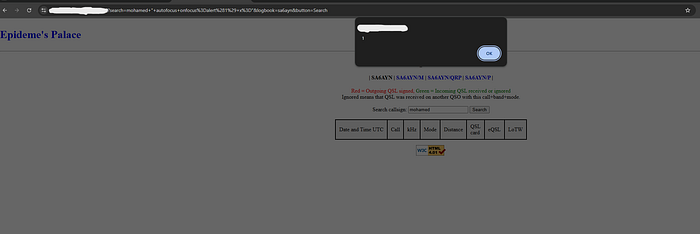
The alert box confirms the execution of the injected JavaScript payload.
#CyberSecurity #BugBounty #XSS #WebSecurity #InfoSec