- Ok so guys this is my first writeup i have been writing on the medium platform of the recent CTF i was practicing on the platform RingZero.
- In that i selected the coding challenges and decided to do the first challenge.
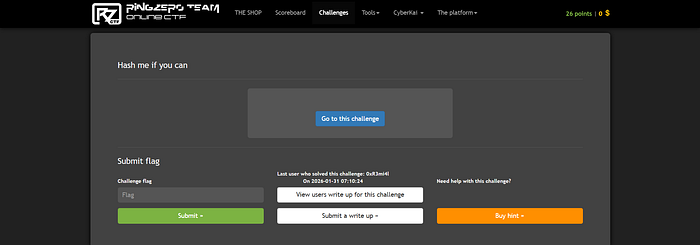
- Now the challenge interface looked somehow like this the image attached below.
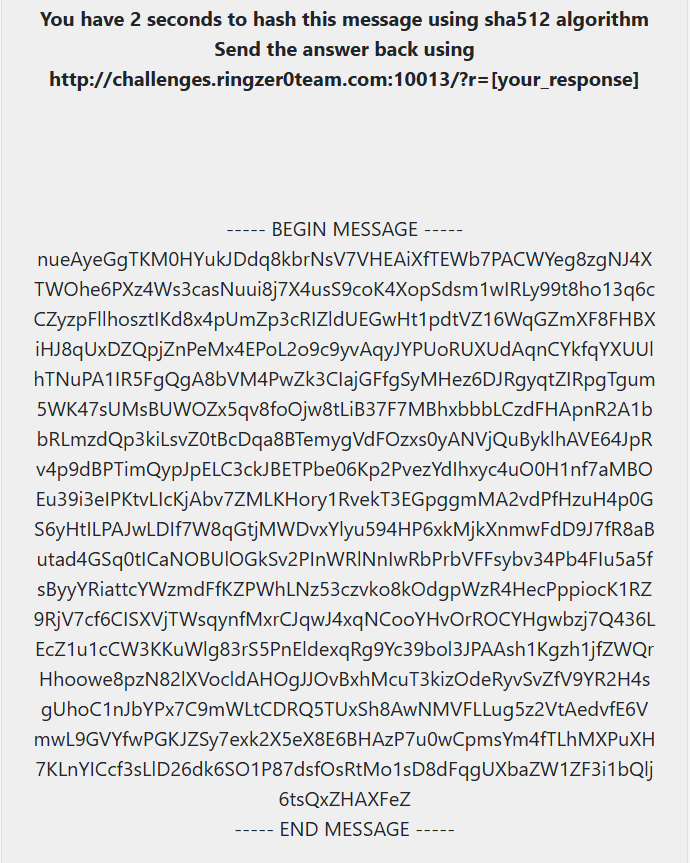
4. Now after this i read the challenge text carefully and it told that i have to hash this given message text using the SHA 512 Algorithm and then submit the text to the given URL and in the end i will get the flag after i submit the correct response.
5. All this process i have to in just 2 seconds, which is obviously not humanly possible at all.
6. So here clearly we had to apply the kind of the some script or any commands of linux and send the requests.
7. SHA 512 :- It is a cryptographic hashing algorithm which is used to convert any text of the any length in just 512 bit [64 bytes]. It is not any encryption algorithm at all. It is a part of the SHA 2 family in cryptography.
8. Now the first command i thought of running was :-
curl "http://challenges.ringzer0team.com:10013/?r=$(echo -n [The hashing text] | shah512sum | cut -d ' ' -f1)"9. Now in this command i have used the :
a. curl command to send the HTTP Requests from the CLI Terminal of the Kali.
b. echo -n command to paste the text including the newline character as well.
c. sha512sum for hashing
d. cut delimiters of the whitespaces and then extracting only first field of that .
10. But here is the thing that this command will not give the flag at all because the Challenge URL is dynamic and the texts updates itself. So if we send the requests of curl in just 2 seconds the text will get updated and then new text will be there which will have the different hash then previous one.
11. In the images you can clearly see that it has shown in the response that too slow process error.
12. So i used some help of the AI then got to know about the session stateful requests which store the cookies and session id automatically and then from that we can send the the requests to the URL and it will store the cookies and in response we will get the answer.
13. By storage of the session cookies we will retrieve the original message response of the server which will include the flag.
14. So now choosing the Python as the language because it has the supported libraries which will make the scripting easier i constructed the below script.
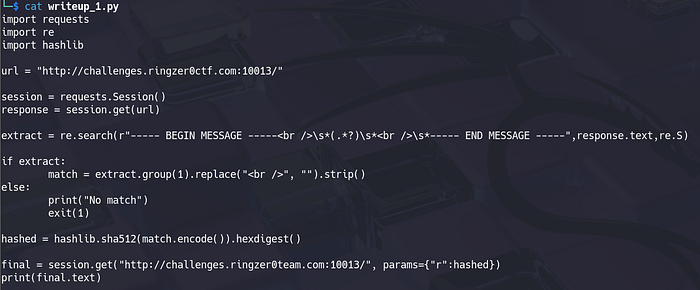
15. Explanation of the script in understandable way :-
a. requests, re, hashlib library :- Requests is the A Python library used to send HTTP requests (GET, POST, etc.) to websites and receive responses like a browser. It handles sessions, cookies, headers, and makes web automation simple and reliable. Re is the Python's regular expression library used to search, match, and extract patterns from text. It is used when you need to find specific data inside large or messy strings like logs or HTML. Hashlib is the Python's cryptographic hashing library used to generate hashes like SHA-256 and SHA-512. It converts data into a fixed-length fingerprint used for integrity checks and security tasks.
b. I used the requests library of the python to create the session of the website and the extract the response of the text and then i just applied the re.search function to extract the original message which we are given to hash.
c. .*? -> '.' means to match any character. '*' means to repeat the process zero or more times. '?' makes it lazy to match little as possible.
d. \s* -> To neglect the whitespaces in the reponse.
e. strip() function :- This is the function of the python to remove the leading and trailing whitespaces from the text we have selected.
f. hashlib.sha512(text.encode()).hexdigest :- Now the extracted text is the alphanumeric characters which the machine do not understand, it understands the language of the bit/bytes so we encoded to the UTF-8 encoding [By Default] using the encode() function and then applied the sha512 function and then after that we again converted to hexadecimal characters for the human readable text.
g. At last we added the line of sending requests with the params [parameter] added as well.
16. With this we executed the script.
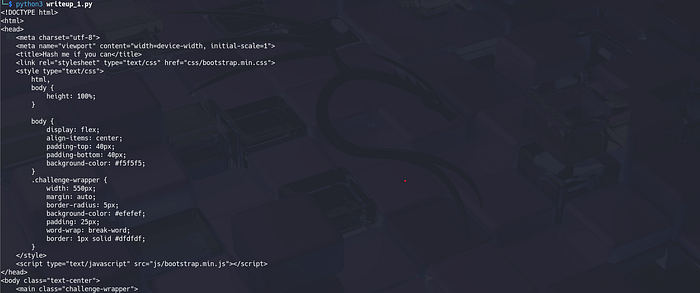

17. Hell Yeah we got the Flag.
18. One another method is also there of the Burp Suite Using as well. So i suggest all of people to try that method themselves as well.
This was my first write-up, and it marks the beginning of a series where I will consistently break down real CTF challenges with real techniques and real learning outcomes. My goal is not just to solve challenges, but to explain the mindset, tooling, and reasoning behind every step so that readers can actually apply these skills in practice.
Every upcoming write-up will focus on practical cybersecurity concepts, clean automation, and problem-solving approaches that are genuinely useful for CTFs, penetration testing, and real-world security work. If you are someone who wants to move beyond copy-paste solutions and truly understand why things work, these write-ups are for you.
If you found this helpful, consider following and sharing it with your peers — it helps me stay consistent and motivates me to keep producing high-quality, beginner-friendly yet technically solid content for the community.
More challenges. More automation. More learning.
Happy Hacking.