
Introduction
In internal networks, few services are as common — and as dangerous when misconfigured — as SMB (Server Message Block). What looks like a simple file-sharing protocol often becomes the fastest path to sensitive data, credential leaks, and even full system compromise.
This write-up walks through SMB from a penetration tester's perspective: understanding, enumerating, and exploiting it step by step.
What is SMB?
SMB (Server Message Block) is a client-server protocol used for:
- File sharing
- Printer sharing
- Network resource access
- Inter-process communication
It is primarily used in Windows environments but also works cross-platform through Samba on Linux/Unix systems.
SMB Versions Overview
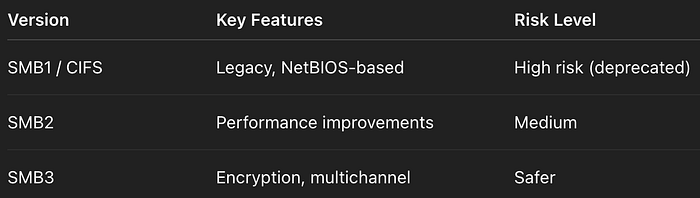
Important note:
- SMB1 is deprecated and insecure
- Modern systems should use SMB3
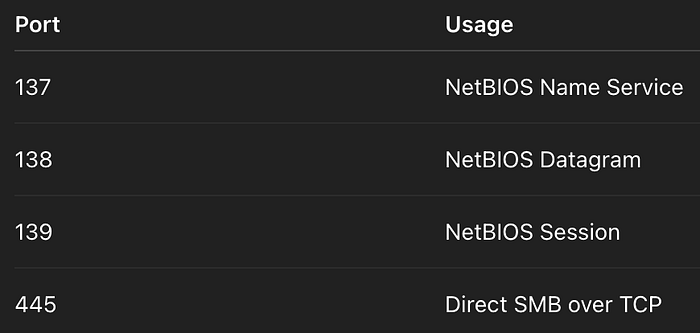
Ports & Protocol Behavior
Initial Enumeration
Nmap Scan
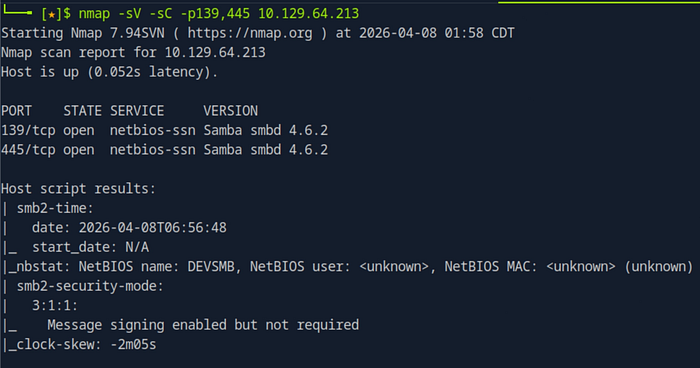
nmap -sV -sC -p139,445 <IP>Purpose:
- Detect SMB service
- Identify version
- Run default scripts
Null Session (Anonymous Access)
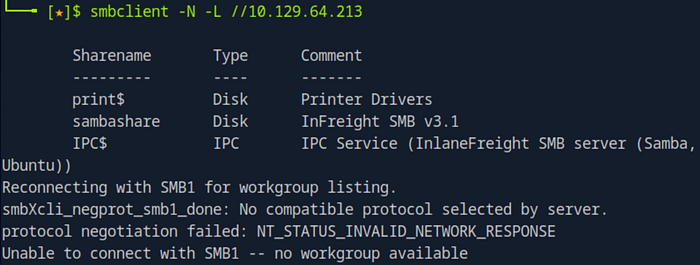
smbclient -N -L //<IP>What it does:
- Lists shares without authentication
If this works:
- The system is already misconfigured
SMB Share Interaction
smbclient //<IP>/sambashare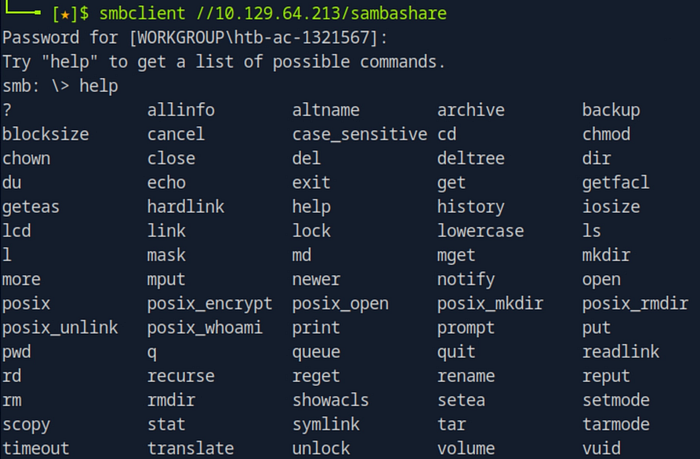
Common commands inside:
ls→ List files
get file.txt→ Download file
put file.txt→ Upload file
!ls→ Run local command
RPC Enumeration (Most Powerful Phase)
rpcclient -U "" <IP>This opens a shell for deep enumeration.
Core Enumeration Commands
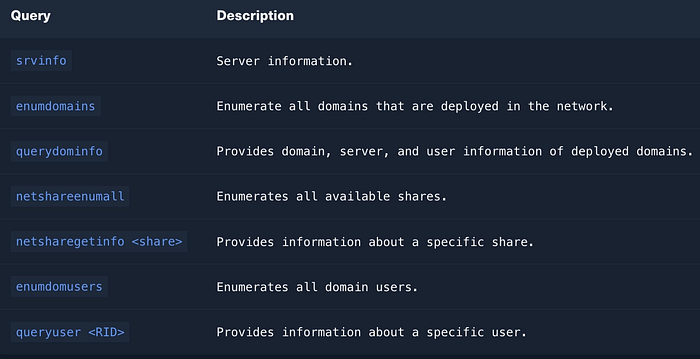
https://www.samba.org/samba/docs/current/man-html/rpcclient.1.html
System Info
srvinfo→ OS version, server type
Domain Enumeration
enumdomains→ Lists domains/workgroups
querydominfo→ Domain details:
- User count
- Server role (PDC is critical)
- Domain name
User Enumeration
enumdomusers→ List users
queryuser <RID>→ Detailed user info:
- Password last set
- Login times
- Profile paths
Share Enumeration
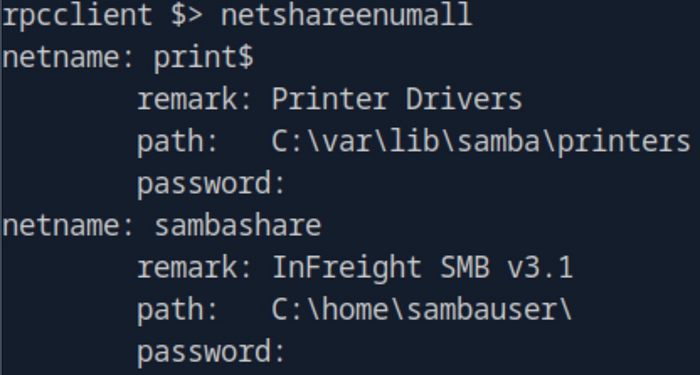
netshareenumall→ Lists all shares (including hidden)
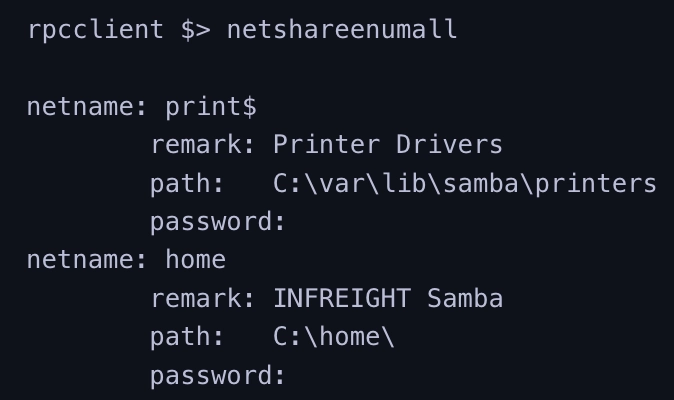
netsharegetinfo <share>→ Deep analysis:
- Path
- Permissions
- Active connections
Permission Analysis (Critical)
Example:
SID: S-1-1-0→ Means: Everyone
Permissions: FULL ACCESSIncludes:
- Read
- Write
- Delete
- Change permissions
- Take ownership
Why This is Dangerous
If a share has:
guest ok = yeswritable = yescreate mask = 0777
Then:
- Anyone can upload files
- Anyone can modify data
- Anyone can delete content
This often leads to:
- Data exfiltration
- Malware upload
- Webshell placement
- Privilege escalation
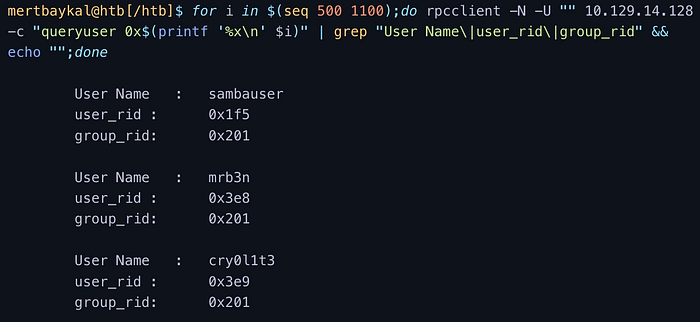
RID Brute Force
When users are not visible:
for i in $(seq 500 1100); do
rpcclient -N -U "" <IP> -c "queryuser 0x$(printf '%x\n' $i)"
done
Purpose:
- Discover hidden users via RID
Alternative Tools
SMBMap
smbmap -H <IP>→ Shows:
- Shares
- Permissions
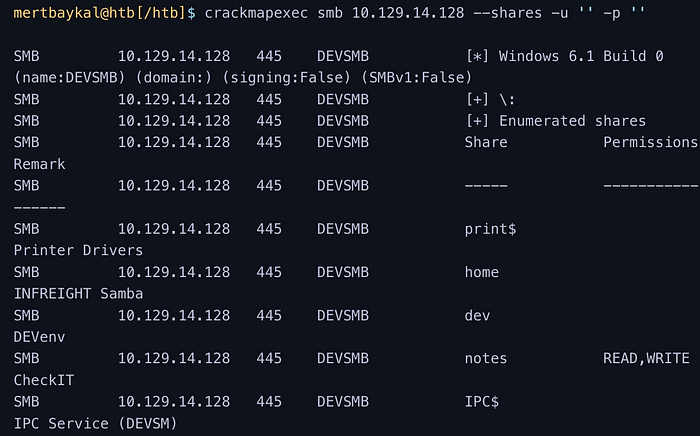
CrackMapExec
crackmapexec smb <IP> --shares -u '' -p ''→ Fast enumeration + permission check
enum4linux-ng
./enum4linux-ng.py <IP> -A→ Automated enumeration:
- Users
- Shares
- Policies
- OS info
Attack Path Example
- Anonymous login allowed
- Shares visible
- Writable share found
- Upload file
- Execute or retrieve sensitive data
Most Dangerous Misconfigurations
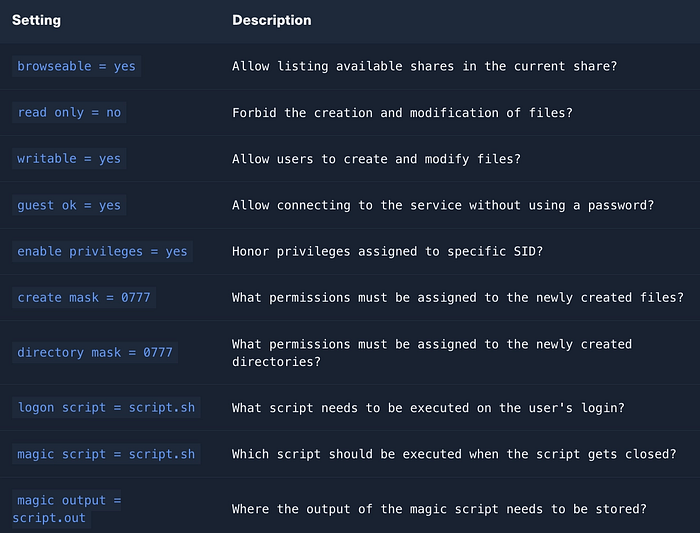
These are the settings you should always look for:
guest ok = yes→ No authentication required
read only = no→ Write access enabled
writable = yes→ Files can be modified
browseable = yes→ Share visible to everyone
create mask = 0777→ Full permissions on new files
directory mask = 0777→ Full permissions on new directories
map to guest = bad user→ Invalid users become guest
Secure Configuration (What Should Be Used)
cat /etc/samba/smb.conf | grep -v "#\|\;"
guest ok = no
read only = yes
writable = no
create mask = 0640
directory mask = 0750
Additional protections:
- Disable SMB1
- Enforce SMB signing
- Restrict access via ACL
- Use strong authentication
- Monitor SMB logs